Implementing Audit Triggers and Audit Jobs in PeopleSoft

In today’s enterprise environments, maintaining data integrity, security, and regulatory compliance is non-negotiable. PeopleSoft, a widely used ERP system, provides powerful auditing tools for Audit Triggers and Audit Jobs to help organizations track and monitor changes across both transactional data and application configurations.
Audit Triggers operate at the database level, capturing every insert, update, or delete action on critical tables, while Audit Jobs focuses on monitoring system configuration and security-related changes at the application level. Together, they offer a robust and comprehensive auditing framework to ensure visibility, accountability, and compliance across your PeopleSoft system.
In this guide, you’ll learn how to implement and manage Audit Triggers and Audit Jobs in PeopleSoft, with step-by-step instructions and real-world examples to help you safeguard your enterprise data effectively.

Understanding the Purpose of Audit Triggers
Audit Triggers in PeopleSoft are database-level mechanisms that record every change (insert, update, or delete) made to selected tables. These triggers ensure that all data modifications—whether performed by users through PeopleSoft pages or by scripts directly on the database—are captured and stored in corresponding audit tables.
Using audit triggers helps organizations:
- Track who changed data and when it was changed.
- Detect unauthorized modifications.
- Support compliance with audit and security regulations.
- Provide a clear change of history for troubleshooting or analysis.
Audit triggers are particularly useful for high-impact tables such as employee information, department structures, and financial records.
Creating Audit Triggers in PeopleSoft
To configure audit triggers, PeopleSoft provides an interface under:
- Navigation: People Tools > Utilities > Audit > Update Database Level Auditing > Audit Triggers
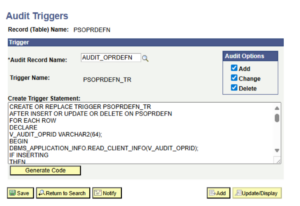
- This page (TRIGAUDPNL component) lets you define which tables require auditing, and what type of database activity should be captured.
Steps to Create Audit Triggers:
- Open the Audit Triggers page. Here, specify the Record Name (the base table) and the Audit Record Name (the corresponding audit table).
- Choose Audit Options. Select the actions you wish to track – Add (Insert), Change (Update), or delete.
- Generate the SQL Code. Click the Generate Code button to create the SQL statements that will form the trigger definition.
- Review and save. You can review or customize the generated SQL code before saving the configuration.
Once saved, the trigger definition becomes available for script generation through the Run Audit Triggers process.
Running Trigger Scripts
After defining the audit triggers, the next step is to create and execute the corresponding SQL scripts that will install them in the database.
- Navigation: People Tools > Utilities > Audit > Perform Database Level Audit > Run Audtrgs.
Steps to Create Run Audit Triggers:
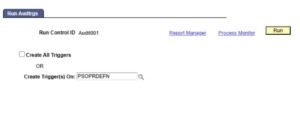
1. Open the Run Audtrgs Page. Select whether you want to generate triggers for all defined tables or for specific ones.
2. Run the Process. When executed, the process generates SQL scripts (e.g., TRGCODEX.SQL) containing CREATE TRIGGER statements.
3. Locate the Output. The generated files are saved in:
- The PS_SRVRDIR directory (if run from the application server), or
- The system TEMP directory (if running from a Windows client).
4. Execute the Scripts. Run these scripts using tools like SQL Developer or SQL*Plus to create triggers in the database.
Once executed, these triggers become active, automatically logging all relevant database transactions into their associated audit tables.
Example: Trigger on a OPRDEFN Table
Let’s say you need to audit changes to the PSOPRDEFN (Operator Definition Table).
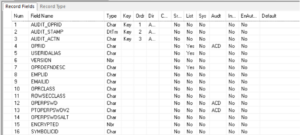
- Define an audit table, AUDIT_OPRDEFN, mirroring the structure of the base table plus additional columns (e.g., operator ID, timestamp).
- Use the Audit Triggers page to define a trigger linking these two tables.
- Generate the trigger script using Run Audtrgs and execute it.
A sample generated SQL might look like:
- CREATE OR REPLACE TRIGGER PSOPRDEFN_TR
- AFTER INSERT OR UPDATE OR DELETE ON PSOPRDEFN
- FOR EACH ROW
- BEGIN
- INSERT INTO AUDIT_PSOPRDEFN (…columns…)
- VALUES (…old/new values…).
- END.
Now, every change in PSOPRDEFN will automatically be recorded in AUDIT_PSOPRDEFN.
Understanding Audit Jobs in PeopleSoft
In addition to audit triggers, PeopleSoft supports Audit Jobs, which are designed to monitor application-level and configuration changes.
(Reference: Oracle Documentation — Understanding Audit Jobs)
While audit triggers operate at the database level, audit jobs focus on system setup and security configurations. These jobs track when setup tables or security objects are modified, who made the change, and what exactly changed.
Audit jobs are typically scheduled through Process Scheduler and can be customized to run periodically, providing a snapshot of key configuration and security changes over time.
Types of Audit Jobs
- Security Audit Jobs: Monitor role, permission list, and user profile changes.
- Configuration Audit Jobs: Track updates to key setup tables or delivered configuration components.
- Data Warehouse Audit Jobs: Capture metadata or structural changes in reporting environments.
- Audit jobs help administrators detect unexpected configuration changes and maintain compliance with internal policies or external standards.
Comparing Audit Triggers and Audit Jobs
| Feature | Audit Triggers | Audit Jobs |
| Scope | Database-level changes (Insert, Update, Delete) | Application-level configuration and security updates |
| Execution | Scheduled through Process Scheduler | Runs automatically whenever data changes |
| Storage | Audit tables (in database) | Application tables or reporting repositories |
| Use Case | Data tracking and compliance | Configuration tracking and system monitoring |
Strengthen Your PeopleSoft Audit Strategy with Kovaion
Implementing Audit Triggers and Audit Jobs is only the first step toward building a compliant and secure PeopleSoft environment. At Kovaion, we help organizations go beyond the basics—designing and deploying robust auditing frameworks that align with enterprise governance, risk, and compliance requirements.
Whether you’re enabling real-time database-level tracking through Audit Triggers or scheduling system-wide monitoring with Audit Jobs, our team ensures seamless configuration, optimization, and long-term support. With our deep PeopleSoft expertise, you gain greater visibility, stronger control, and full confidence in your system’s integrity.
Partner with Kovaion to unlock the full potential of auditing in PeopleSoft and build a more secure, compliant enterprise.
Connect with us today to get started.
Conclusion
Implementing Audit Triggers and Audit Jobs in PeopleSoft is essential for organizations aiming to ensure data integrity, system accountability, and regulatory compliance. While audit triggers provide real-time tracking of database-level changes, audit jobs offer critical insights into configuration and security modifications within the application.
By leveraging both tools, PeopleSoft administrators can create a comprehensive audit framework that not only protects sensitive data but also enhances transparency across the entire system. Whether you’re preparing for an audit, tightening your internal controls, or just improving visibility, these auditing mechanisms give you the confidence to maintain compliance and detect issues before they escalate.
Start implementing audit triggers and audit jobs today to strengthen your PeopleSoft environment and stay ahead of compliance requirements.
Author: Nandakumar R, Consultant | PeopleSoft Developer