HCM Experience Design Studio vs VBCS: Field Changes

Overview
In Oracle Fusion Cloud HCM, business requirements often demand changes to field behaviour — such as making a field visible or hidden, or changing it from optional to required (and vice versa).
Oracle provides two powerful tools to manage these UI-level changes:
- HCM Express Design Studio (EDS)
- Edit Pages in VBCS (Visual Builder Cloud Service)
Both tools allow UI customization without impacting the core application code. However, they differ in flexibility, control level, and technical complexity.
This blog explains when and how to use Express Design Studio versus VBCS to manage field visibility and requirement changes effectively.
Summary
Experience Design Studio (EDS) is best suited for simple, business-driven UI changes such as:
- Making a field visible or hidden
- Changing a field from optional to required
- Configuring role-based visibility
- Enabling/disabling fields
Edit Pages in VBCS is ideal for:
- Advanced UI customizations
- Conditional logic based on complex rules
- Layout restructuring
- Groovy-based expressions
- Page-level personalization beyond standard configuration
STEPS TO ENABLE
- Using Visual Builder Studio (VBS) for Redwood Pages
For pages developed or extended in Visual Builder Studio (especially Redwood pages), you can use the built-in business rules functionality.
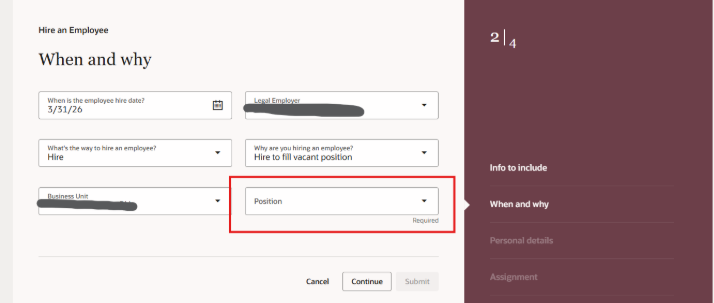
- Navigate to the specific Redwood page in Oracle Cloud HCM.
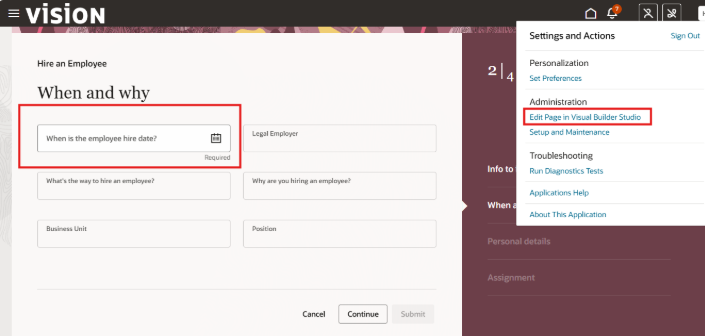
2. Open the Settings and Actions menu and select the Edit Page in Visual Builder Studio task. This will create a sandbox and open the studio in Express mode.
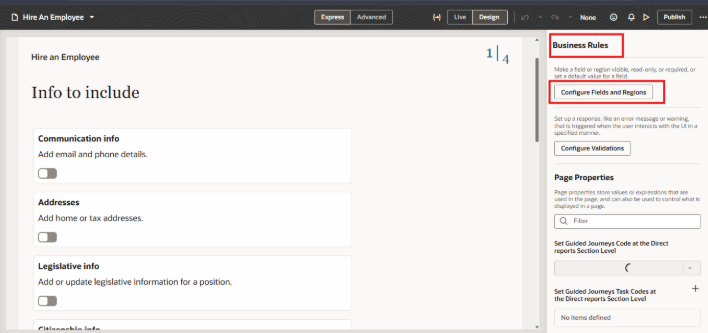
3. Click the Configure Fields and Regions button under Business Rules.
4. Find the region containing the field on the left panel.
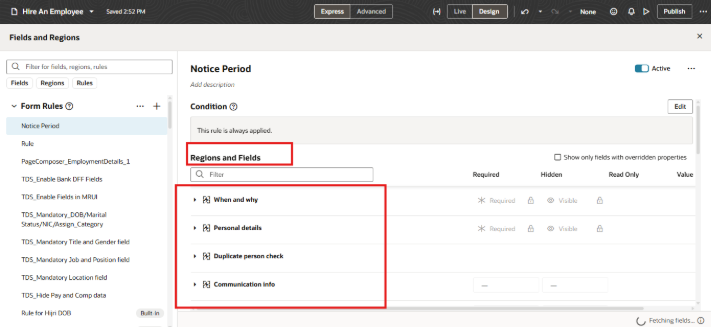
5. Click the + icon under Extension Rules to create a new business rule.
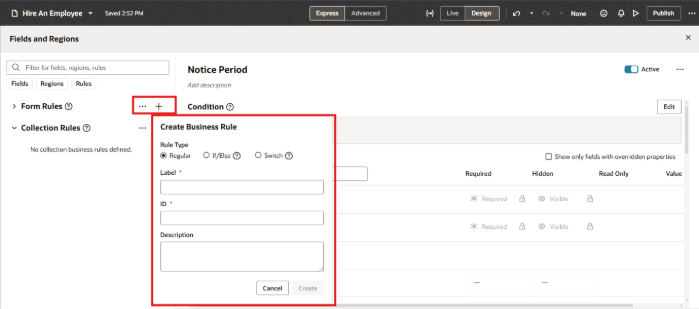
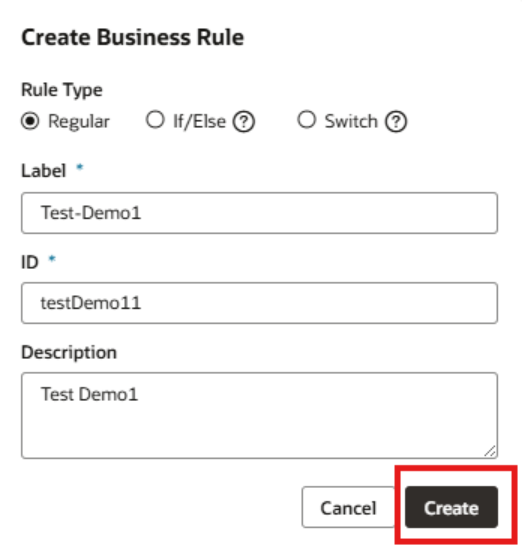
6. Enter the rule details (label, ID, description) and click Create.
7.In the rule window, select the target field and modify its Required property (uncheck or set to optional).
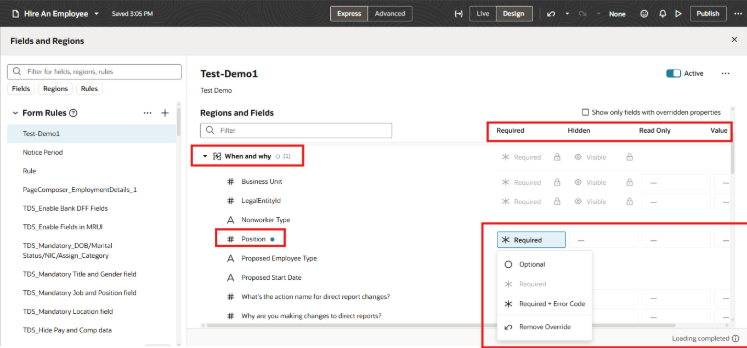
8. Preview and publish your changes to make them effective
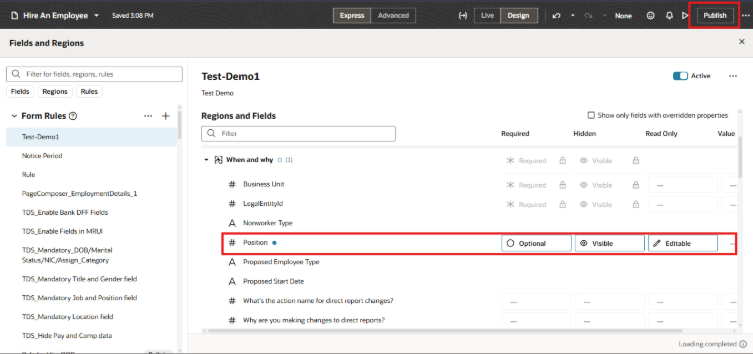
9. Once published, the changes made to the edited fields on the selected page will be visible.
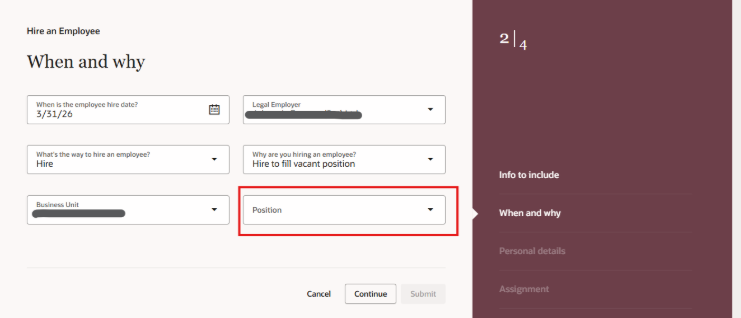
2. Using HCM Experience Design Studio (Classic UI Pages)
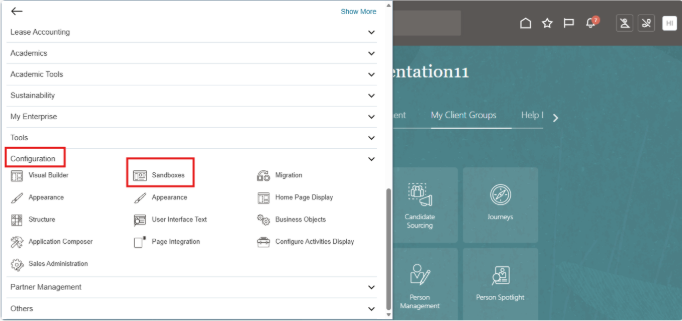
HCM Experience Design Studio cannot be used effectively without first creating and enabling a sandbox. Sandboxes are required in Oracle Fusion Cloud HCM to store configuration changes—such as hiding/showing fields, making fields mandatory, or changing layout—without immediately affecting the live production environment.
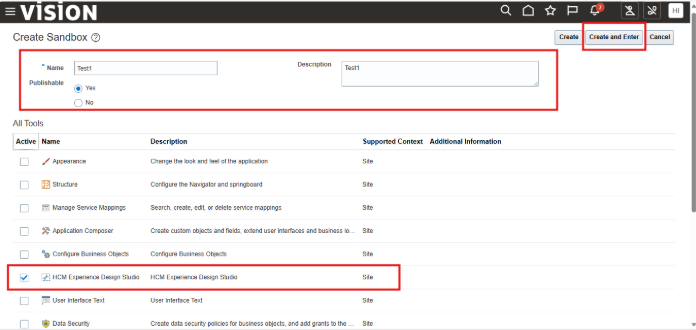
1. Go to Navigator > Configuration > Sandboxes.
2. Click Create Sandbox.
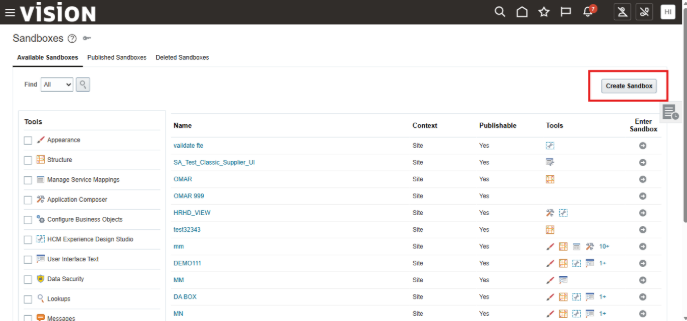
3. Ensure the HCM Experience Design Studio tool is selected -> Click Create and Enter
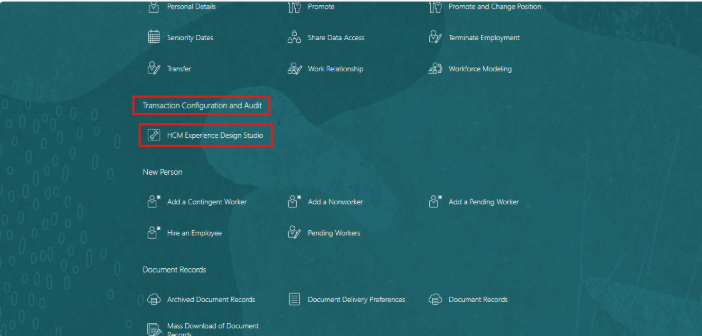
4. Click My Client Groups à In the Quick Actions area, click HCM Experience Design Studio. The action creates a sandbox and activates it before opening the studio.
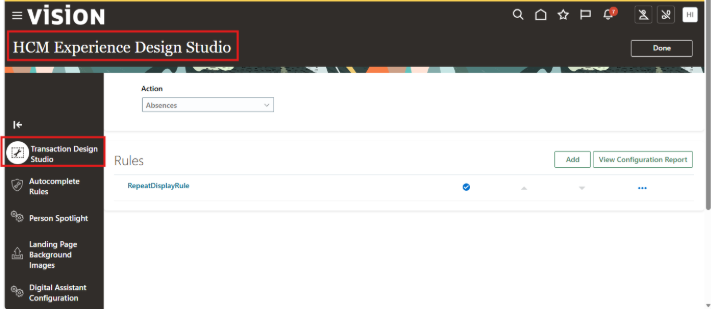
5. On the HCM Experience Design Studio page, click the Transaction Design Studio tab.
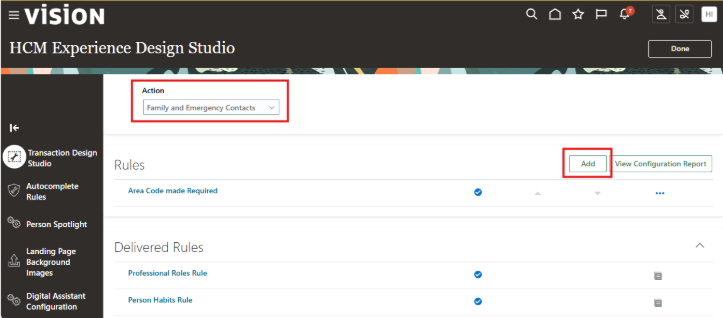
6. In the Actions field, select the page with the field you want to hide. For example, you want to make optional fields on the New Contact page required, so you select Family and Emergency Contacts –> To add a rule for the page, click Add
7. In the Available Attributes section, Data Source field, select the section with the fields you want to make required or optional, such as Additional Info on Create page.
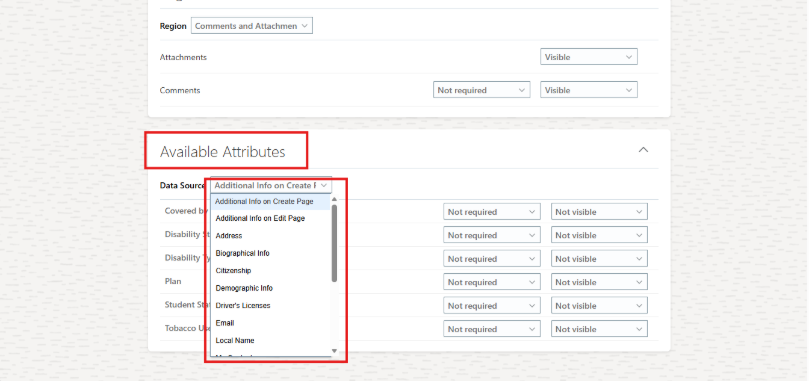
8. In the row with the optional field, you want to make required, such as Student Status and Disability Type, change Not required to Required.
9. In the row with the required field, you want to make optional, change Required to Not required.
10. In the row with the Visible field, you want to make Not Visible, Change Visible to Not Visible.
11. In the row with the Not Visible field, you want to make Visible, Change Not Visible to Visible.
12. Click Save and Close.

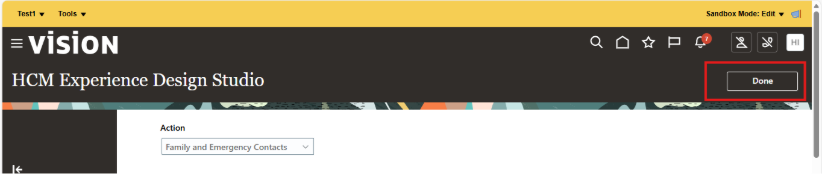
13. On the HCM Experience Design Studio page, click Done.
14. Open the changed page, such as New Contact, and verify that the fields correctly indicate whether they’re required.
15. To publish your changes, on the Sand Box click on the name and select Publish.

Best Practices:
- Always work in a sandbox for UI changes and thoroughly test them before publishing.
- Do not delete partial contents in a sandbox; publish or delete the entire sandbox.
- Publish the sandbox to make the changes available to all users
Difference Between HCM Experience Design Studio and Edit Pages VBCS
The key difference between HCM Experience Design Studio and VBCS (Visual Builder Studio) Edit Pages lies in the user interface generation they support: Experience Design Studio is for responsive (classic) pages, while VBCS is for Redwood (next-generation) pages
With Oracle’s shift towards the Redwood design system, VBCS has become the primary tool for modernizing and customizing new pages, replacing the functionality previously handled by Transaction Design Studio for these new layouts
| Feature | HCM Experience Design Studio | VBCS (Visual Builder Studio) |
| Primary Target | Responsive (Classic) HCM Pages | Redwood Application Pages |
| Main Use Case | Rule-based field hiding/localization | Drag-and-drop customization, Adding fields |
| User Persona | Functional HR Analyst | Functional Developer/Technical User |
| Capabilities | Simple UI changes, field properties | Advanced layout changes, logic, JS coding |
| Lifecycle | Sandbox-based | Git-based Source Control |
| Upgrade Safety | High | High (supports extension layers) |
- HCM Experience Design Studio
- Focus:Used for configuring and extending responsive pages across different HR modules.
- Capabilities:Allows you to hide/show fields, make fields required, and change labels based on specific criteria (e.g., country, role).
- Limitations:It cannot be used to modify the new Redwood pages.
- Best for:Simple, rule-based field manipulation in the classic UI.
2.VBCS (Visual Builder Studio) Edit Pages
- Focus:Used for customizing the Redwood user experience
- Modes:Offers an Express Mode (for simple changes like hiding/rearranging fields) and an Advanced Mode (for in-depth coding and customization).
- Integration:Deeply integrated with Oracle Cloud Applications, allowing you to click “Edit Page in Visual Builder Studio” directly from the application’s action menu.
Access requirement
- HCM Experience Design Studio:
Roles: Human Capital Management Application Administrator (ORA_HRC_HUMAN_CAPITAL_MANAGEMENT_APPLICATION_ADMINISTRATOR_JOB).
Steps: Activate a sandbox, then access from the Tools menu (As defined above).
- VBCS Edit Pages (Redwood):
Roles: Application Administrator (ORA_FND_APPLICATION_ADMINISTRATOR_JOB)
Access Method: Click “Settings” in the upper right corner of the application and select “Edit Page in Visual Builder Studio”.
Conclusion
- Experience Design Studio (TDS): Use only for Responsive (Non-Redwood) pages. It manages field visibility, labels, and requirements through a no-code interface in a Sandbox.
- VB Studio (Express Mode): Use for Redwood pages. It is the modern replacement for TDS, allowing you to configure “Business Rules” to control field visibility and requirements directly on the new Redwood UI.
AUTHOR- DEEPTHI H JAGANNATH, ORACLE FUSION HCM CONSULTANT