PeopleSoft FSCM Update Image 55: Sectionalized Landing Page

Modern enterprise systems must provide users with quick access to information, intuitive navigation, and a personalized experience. With the release of PeopleSoft FSCM Update Image 55, Oracle introduces a powerful enhancement — the Sectionalized Landing Page.
This modern interface acts as a unified entry point designed to improve productivity, simplify navigation, and present relevant information to users based on their roles and responsibilities.
The new landing page leverages the capabilities of PeopleTools 8.62, enabling organizations to deliver a visually rich and highly customizable experience. By combining dynamic notifications, personalized suggestions, quick access tiles, and role based content, the landing page ensures that users can focus on completing important tasks without spending time searching through multiple menus or pages.
This blog explores the features and benefits of the PeopleSoft FSCM Update Image 55 landing page, how it improves user productivity, and how organizations can configure and customize it to meet their operational needs.
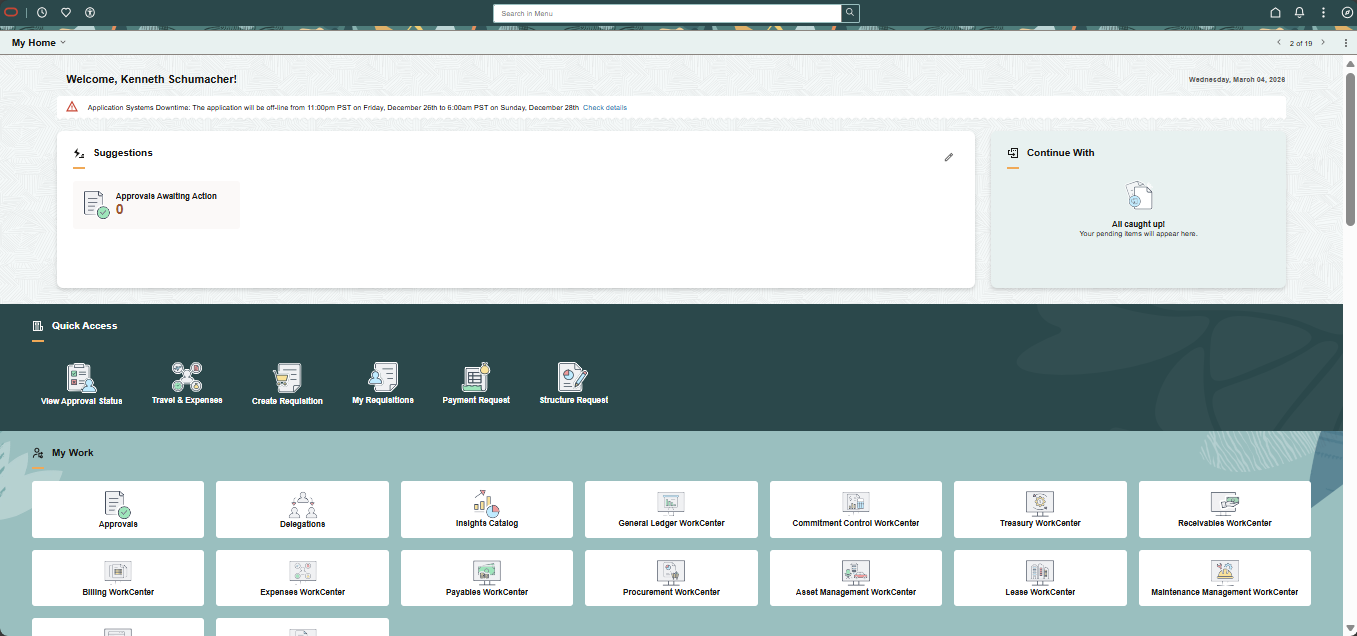
Fig 1 : Landing Page Overview
1. Unified and Personalized Entry Point
The sectionalized landing page introduces a modern and intuitive user interface designed to serve as the primary gateway for users across different roles such as employees, managers, analysts, and administrators. Instead of navigating through multiple pages or dashboards, users now have a single location where important information and tasks are presented clearly.
The landing page provides:
• Personalized greetings for users
• Real-time task notifications
• Quick navigation to frequently used features
• Role-based tiles and content
By presenting only the most relevant information to each user, the system significantly reduces the time required to locate key functionality within the application.
Another important advantage of the unified landing page is consistency. Organizations can create a standardized layout that improves usability across departments while still allowing flexibility for role – specific content.

Fig 2 : Welcome Message and Notifications
2. Leveraging PeopleTools 8.62 Styling Capabilities
One of the major improvements delivered with FSCM Update Image 55 is the enhanced styling capability enabled by PeopleTools 8.62. Administrators now have greater control over the visual appearance of the application using Cascading Style Sheets (CSS). This allows organizations to align the application’s interface with corporate branding guidelines and improve overall
visual clarity.
Key styling features include:
• Custom background textures for the landing page
• Configurable section borders and shapes
• Flexible section background colors
• Tiles styled as buttons or links
• Improved spacing and layout alignment
These design improvements create a cleaner, more modern interface that enhances usability and readability. A visually appealing interface also improves user engagement and adoption across the organization.
The flexibility offered by CSS styling allows administrators to tailor dashboards, tiles, and homepage sections to better support business workflows.
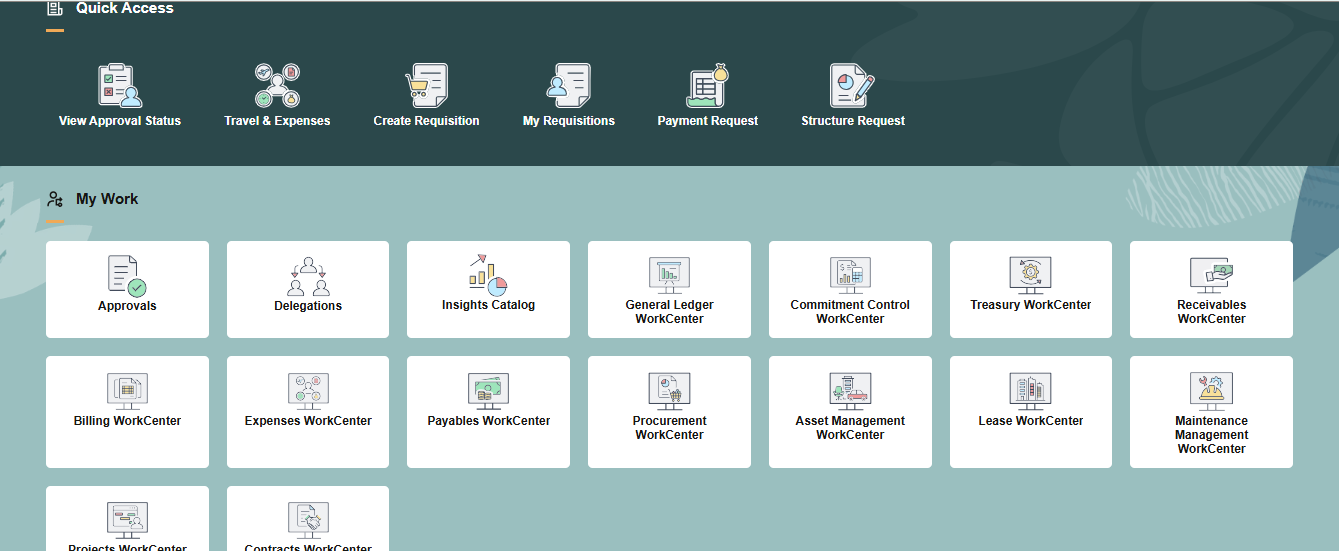
Fig 3 : Customized Landing Page
3. Dynamic Notifications with Notification Composer
A key feature of the new landing page is the integration with Notification Composer, which enables dynamic, in – application notifications to be displayed directly within landing page sections.
These notifications are generated based on predefined criteria and recipient lists. Once triggered, they appear as tiles on the landing page, guiding users toward specific tasks or important updates.
The notifications can include:
• Configurable icons
• Informative text messages
• Links to relevant transaction pages
• Actionable tiles that lead directly to required tasks
Users can dismiss notifications manually, or the system can automatically remove them when certain conditions are met such as task completion or expiration dates.
This dynamic notification framework ensures that users remain informed and can quickly respond to important business events.
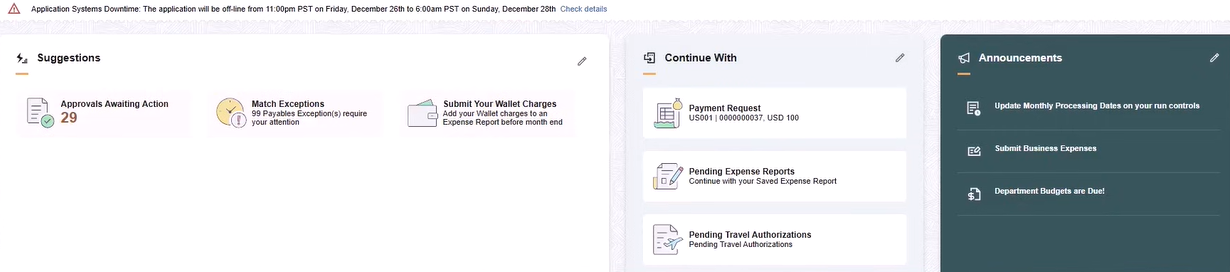
Fig 4 : Notification Composer Generated Tile
4. Key Landing Page Sections
The FSCM landing page includes several predefined sections designed to help users stay informed and productive.
Banner Announcements,
This section highlights critical system-wide messages. It ensures that important information such as system outages,
policy updates, or urgent notices is prominently displayed to all users.
Suggestions
The Suggestions section displays tasks that require immediate attention. These notifications are generated by the system
and guide users toward activities such as approvals awaiting action or resolving transaction exceptions.
Continue With
This section helps users resume unfinished work. If a transaction supports the ‘Save for Later’ feature, it will appear here so users can quickly continue their progress.
Announcements
This section delivers targeted communications to specific user groups. These announcements may contain additional details, links, or rich content such as images.Each of these sections contributes to a smarter workflow by ensuring that users are always aware of their priorities.
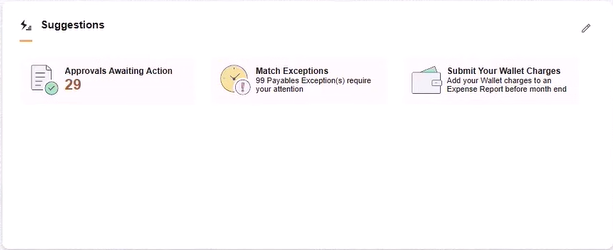
Fig 5 : Suggestions Section with Pending Approvals Tile
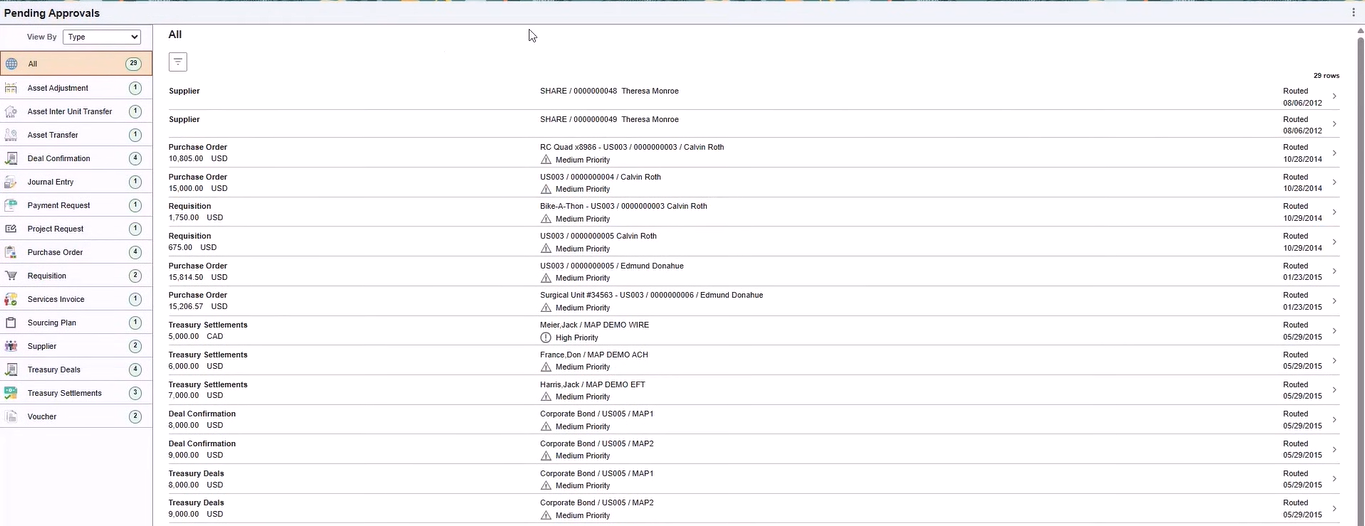
Fig 6 : Suggestions Section with Pending Approvals Tile
5. Improving Navigation with Quick Access and My Work
The landing page also introduces several navigation enhancements that allow users to access frequently used functions quickly and efficiently.
Quick Access Section
This section contains tiles that link to commonly used self-service transactions. The tiles displayed here are controlled by user security permissions, ensuring that each user only sees relevant functionality.
My Work Section
The My Work section consolidates key functional tiles and job-related activities into a single space. For example, users can quickly access approval pages, work centers, and operational dashboards without navigating through multiple menus. These sections significantly reduce navigation complexity and allow users to focus on completing tasks rather than searching for system features.
Fig 7 : Quick Access Tile
Conclusion
The introduction of the sectionalized landing page in PeopleSoft FSCM Update Image 55 marks a significant step forward in improving the user experience within the PeopleSoft ecosystem. By combining personalized content, dynamic notifications, customizable styling, and streamlined navigation, the new landing page transforms how users interact with the application.
Organizations benefit from improved productivity, reduced navigation complexity, and greater flexibility in designing role-based experiences. Administrators can easily adapt the delivered templates and sections using standard PeopleTools functionality while ensuring that security roles determine the content visible to each user.
Ultimately, this modern landing page empowers users to focus on meaningful work by presenting the right information at the right time. As organizations continue to modernize their PeopleSoft environments, the capabilities introduced in FSCM Update Image 55 provide a strong foundation for building intuitive, efficient, and engaging enterprise applications.