Enhancing Security with Location-Based Access Control

Executive Summary
In today’s increasingly distributed and hybrid work environment, organizations face significant challenges in ensuring that sensitive HR data remains accessible only to authorized personnel—and only from secure, trusted network locations. Oracle HCM Cloud addresses this challenge through its Location Based Access Control (LBAC) feature, a robust security mechanism that governs user access to tasks and data by cross referencing user roles with registered computer IP addresses.
This blog post provides an in depth exploration of LBAC in Oracle HCM Cloud: what it is, why it matters, how it works, how to enable and manage it, and how it maps to real world business use cases. Whether you are an IT Security Manager, an HCM Functional Consultant, or an organizational decision maker, this guide will equip you with the knowledge needed to implement LBAC effectively and confidently.
What is Location Based Access Control?
Location Based Access Control (LBAC) is a security feature within Oracle HCM Cloud that restricts or grants user access to application tasks and data based on two core factors:
The user’s assigned role within the Oracle HCM Cloud system.
The IP address of the computer from which the user is signing in.
When LBAC is activated, Oracle HCM Cloud cross validates the user’s login origin (their computer’s IP address) against a pre-configured allowlist of registered IP addresses. Users accessing the system from a registered, trusted IP address receive full role-based access to all permitted tasks and data. Users accessing from an unregistered or untrusted IP address are limited to generic, non-role specific tasks effectively preventing them from performing sensitive operations.
This creates a layered security model that goes beyond standard username and password authentication. Even if a user’s credentials are compromised, an unauthorized party attempting to log in from an unregistered network location will be denied access to any privileged functionality.
Purpose and Strategic Intent
The primary purpose of LBAC in Oracle HCM Cloud is to establish network perimeter aware access governance for enterprise HR systems. Organizations increasingly store sensitive employee data including payroll, performance records, benefits information, and personal identification data within HCM systems. Protecting this data from unauthorized access is not merely a best practice, it is a regulatory and ethical imperative.
LBAC serves the following strategic intents:
- Zero Trust Security: Enforce network level access boundaries in alignment with Zero Trust Architecture principles.
- Regulatory Compliance: Satisfy data localization and access restriction mandates under regulations such as GDPR, HIPAA, and SOX.
- Workforce Flexibility: Provide administrators with a practical, scalable tool to manage remote, hybrid, and external user access without compromising enterprise security.
- Risk Mitigation: Reduce the attack surface by ensuring that role based privileged operations can only be performed from known, trusted network locations.
- Structured External Access: Enable organizations to extend selective access to non-employee stakeholders such as contractors, pending workers, and external learners during preboarding or training phases.
Business Benefits of Location Based Access Control
The following table summarizes the key business benefits that organizations realize when implementing LBAC within Oracle HCM Cloud:
| Business Benefit | Description |
| Enhanced Security Posture | By tying access rights to physical network locations, organizations dramatically reduce the risk of unauthorized access from external or unsecured networks, aligning with zero trust security principles. |
| Granular Role Based Control | Administrators can configure access at the intersection of user role and network location, enabling fine-tuned policies without the need for complex custom permission sets. |
| Support for Remote & Hybrid Workforces | By marking specific roles as public, HR and IT teams can extend controlled access to remote employees, contractors, and external partners without compromising corporate security. |
| Simplified Onboarding & Preboarding | Pending workers and external learners can be given limited, role specific access from any IP address, enabling smooth onboarding workflows without requiring physical office presence. |
| Reduced Attack Surface | By restricting role-based task access to registered IP addresses, unauthorized users who obtain valid credentials but access from external networks are unable to exploit privileged functionality. |
How Location Based Access Control Works
LBAC in Oracle HCM Cloud operates through a combination of registered IP addresses and public role designations. Together, these two mechanisms define the access policies that govern every user login attempt.
Core Components
1.Registered IP Addresses (IP Allowlist)
Administrators configure a list of trusted IP addresses representing office computers, corporate network gateways, or VPN endpoints within the Security Console. These form the IP Address Allowlist. Users signing in from any IP address on this list are operating from a trusted location and receive full role based access.
IPv4 addresses are supported, and ranges can be specified using CIDR notation (e.g., 192.168.10.0/24). The allowlist supports a range suffix up to /32.
2. Public Role Designations
Certain roles can be marked as “public,” meaning that users assigned those roles can access all associated tasks from any IP address registered or unregistered. This is particularly useful for roles assigned to pending workers, external learners, contractors, or integration users who cannot be expected to connect from a registered network.
Importantly, the IT Security Manager role should always be made public when LBAC is enabled, ensuring that security administrators retain access to the Security Console even in recovery scenarios.
Prerequisites Before Enabling LBAC
Prior to activating Location Based Access Control, administrators must ensure the following conditions are in place to prevent accidental lockouts and maintain recoverability:
Required Role: The administering user must hold the IT Security Manager role.
Valid Email Address: A valid, accessible email address must be configured for the administrator account. This is used for lockout recovery notifications.
Notification Template: The administrator must be added to the user category for which the ORA Administration Activity Request Template notification is enabled.
IP Allowlist Readiness: Compile and validate the complete list of office/corporate IP addresses to be registered before activating the feature.
Step by Step: Enabling Location Based Access Control
Step 1: Activate the Profile Option.
By default, the Location Based Access tab is hidden in the Security Console Administration page.
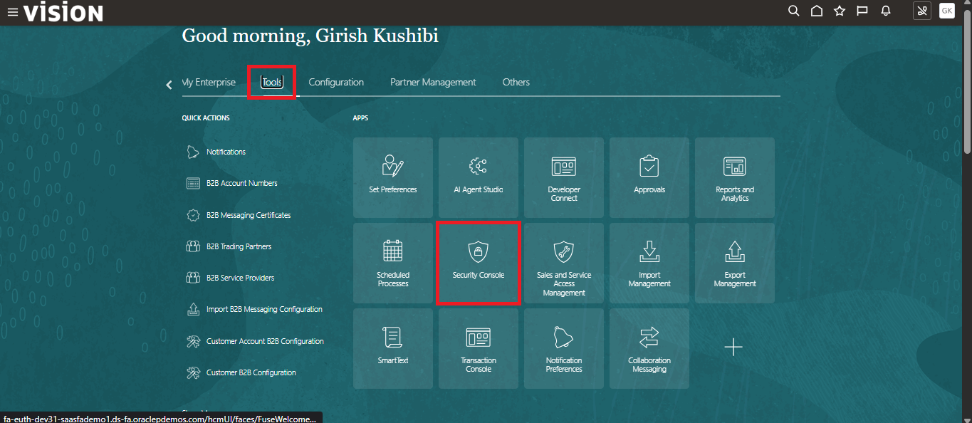
Fig1. (Security Console)
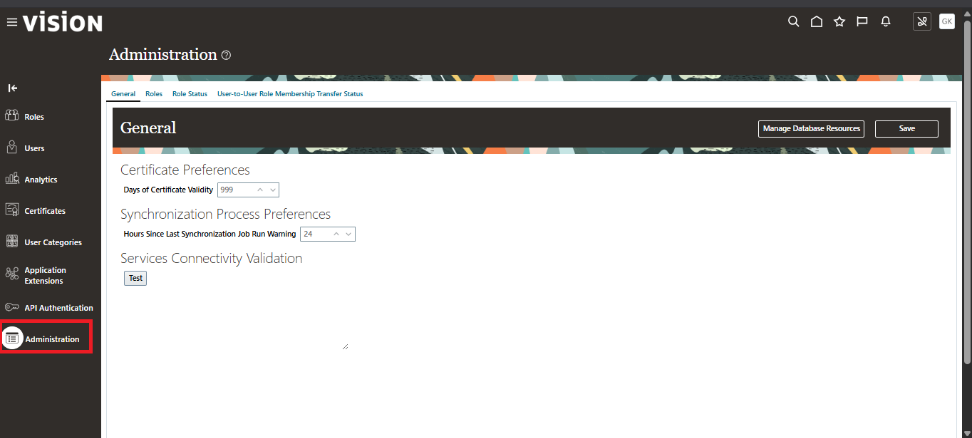
Fig.2(Administration)
Before you can configure LBAC, you must first make it visible by updating the relevant profile option.
Navigate to Setup and Maintenance > Manage Administrator Profile Values.
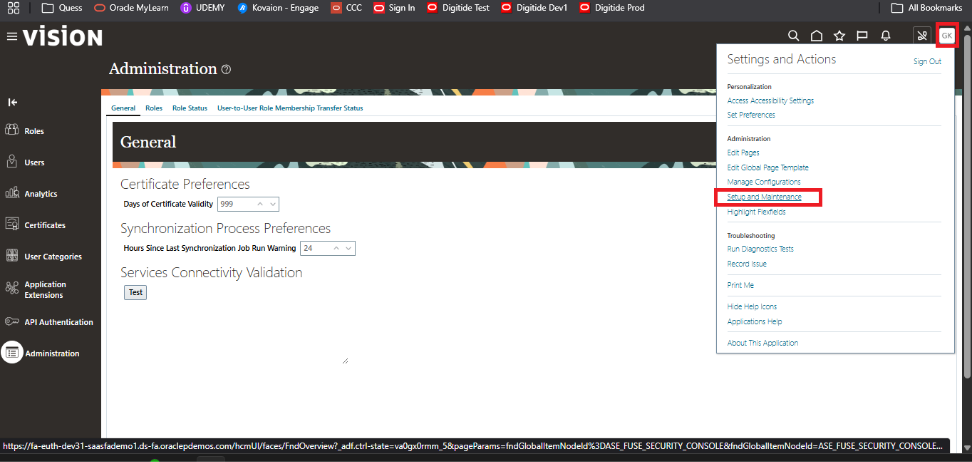
Fig.3 (Setup and maintenance)
Search for the profile option: Enable Access to Location Based Access Control.
Set the profile value to Yes at the site level
Save the changes.
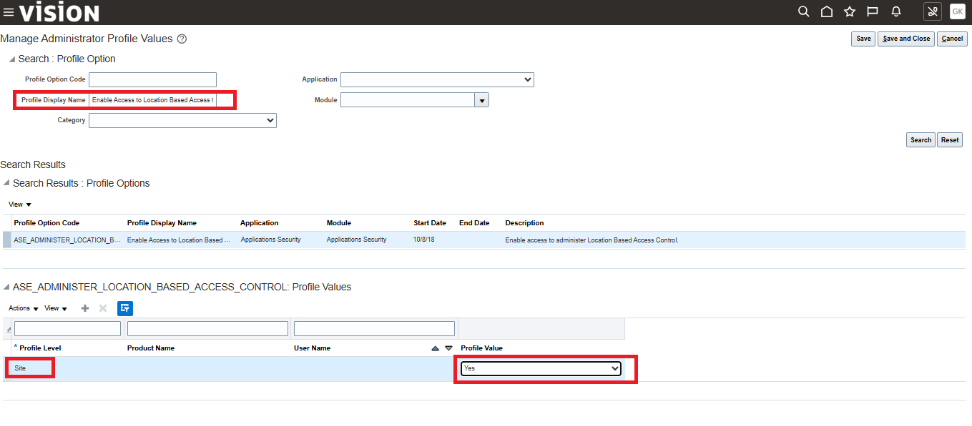
Fig.4 (Administration Profiles)
Step 2: Configure Location Based Access in Security Console
Navigate to Navigator > Tools > Security Console.
On the Administration page, click the Location Based Access tab.
Select the Enable Location Based Access checkbox to activate the feature.
In the IP Address Allowlist text box, enter one or more trusted IP addresses separated by commas.
Click Save, then review and confirm the confirmation message by clicking OK.
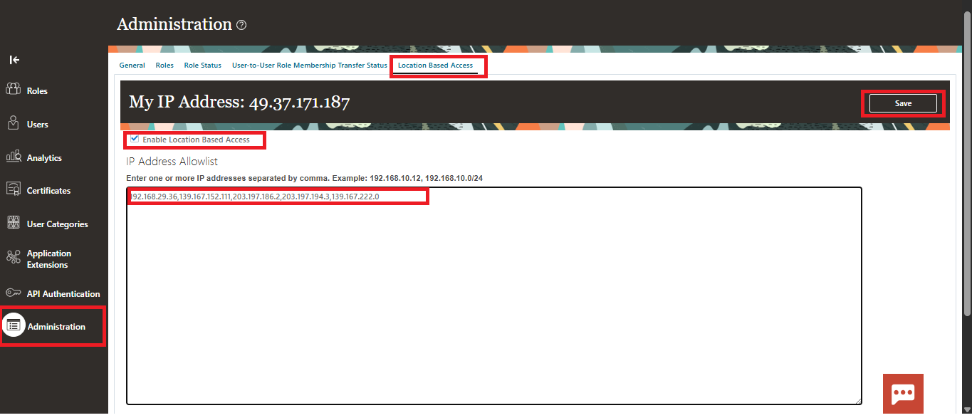
Fig.5 (Location Based Access)
Disabling Location Based Access Control
To disable LBAC, navigate to the Location Based Access tab in the Security Console and deselect the Enable Location Based Access checkbox. Upon deactivation:
All existing IP addresses in the allowlist are retained in a read only state for future reference.
Users regain access according to their standard role based permissions, irrespective of their login IP address.
Administrators can re enable LBAC at any time and add or remove IP addresses from the allowlist as needed.
Author
Girish Kushibi
Software Engineer