Automate Data Migration & Validation in Oracle HCM Cloud with KNIME

Introduction
Data migration is one of the most critical phases of any Oracle HCM Cloud implementation. Organizations moving from legacy HR systems to Oracle HCM often deal with large volumes of employee, department, job, and organizational data. Ensuring that this data is accurate, consistent, and properly formatted before loading it into Oracle HCM is essential.
However, manual validation and transformation of data can be time-consuming and prone to errors. This is where KNIME (Konstanz Information Miner) becomes extremely useful.
KNIME is an open-source data analytics platform that allows users to build automated workflows for data processing, transformation, and validation without extensive coding. By integrating KNIME into the Oracle HCM data migration process, consultants can significantly improve efficiency and reduce migration errors.
This blog explains how KNIME can help automate data validation, data transformation, and HDL file generation for Oracle HCM Cloud implementations.
Challenges in Oracle HCM Data Migration
During Oracle HCM implementation, consultants often face several challenges when migrating HR data from legacy systems:
- Data Quality Issues
Legacy HR systems may contain duplicate records, incorrect values, or missing attributes. - Data Format Differences
Data structures in legacy systems may not match Oracle HCM formats.
Example:
- Date formats
- Department structures
- Job codes
- Manual HDL File Preparation
Oracle HCM uses HCM Data Loader (HDL) to upload bulk data. Preparing HDL files manually requires strict adherence to metadata formats.
Example HDL format:
METADATA|Organization|SourceSystemOwner|SourceSystemId|EffectiveStartDate|EffectiveEndDate|Name|LocationId(SourceSystemId)
MERGE|Organization|HRC_SQLLOADER|TEST1951/01/01|1951/01/01|4712/12/31|Test|
METADATA|OrgUnitClassification|SourceSystemOwner|SourceSystemId|EffectiveStartDate|EffectiveEndDate|OrganizationId(SourceSystemId)|ClassificationCode|SetCode|Status
MERGE|OrgUnitClassification|HRC_SQLLOADER|ORG_CLASS_TEST1951/01/01|1951/01/01|4712/12/31|TEST1951/01/01|DEPARTMENT|Test|A
Manual creation increases the risk of errors.
- Data Validation Before Loading
Incorrect data may cause HDL loads to fail, delaying the implementation timeline.
To overcome these challenges, automation tools like KNIME can streamline the entire migration process.
What is KNIME?
KNIME is a visual data analytics platform that allows users to build workflows for data processing and analysis.
Key features include:
- Drag-and-drop workflow design
- Data transformation and cleansing
- Integration with databases and files
- Automation of repetitive tasks
- Advanced data validation
KNIME workflows consist of nodes that perform specific operations such as reading data, filtering records, transforming values, and exporting results.
This makes it an ideal tool for Oracle HCM data migration automation.
Example KNIME Workflow for Oracle HCM Data Migration
A typical KNIME workflow automates the process of reading HR data, validating it, transforming it into Oracle HCM format, applying business rules, and generating HDL files.
The workflow usually contains the following nodes.
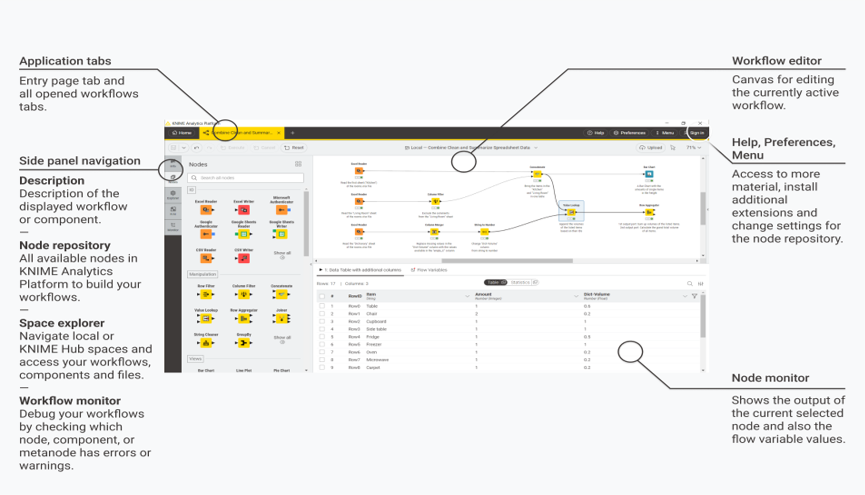
- Read Data Node (Excel Reader / CSV Reader)
Purpose
This node is used to load source HR data from files such as Excel or CSV into KNIME.
What the Node Does
- Imports HR data
- Converts file data into KNIME tables
- Makes data available for further processing
Common Nodes Used
- Excel Reader
- CSV Reader
- File Reader
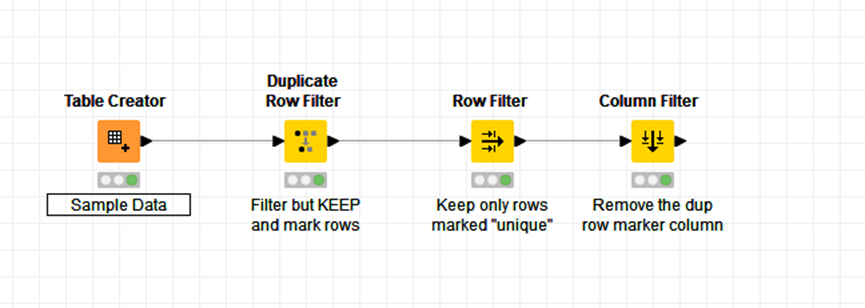
- Data Validation Node
Purpose
Validates the HR data before loading into Oracle HCM.
Common KNIME Nodes
- Duplicate Row Filter
- Missing Value
- Rule-based Row Filter
- Row Filter
Benefit
Prevents HDL load failures caused by incorrect or incomplete data.
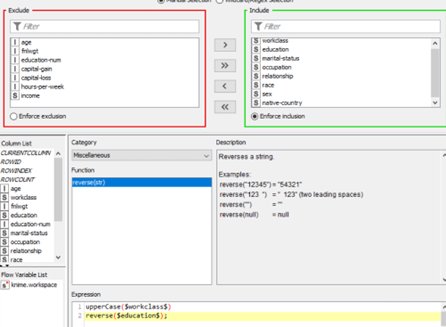
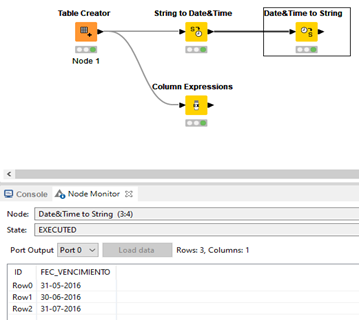
- Data Transformation Node
Purpose
Transforms legacy data into the format required by Oracle HCM HDL.
Common KNIME Nodes
- Column Rename
- String Manipulation
- Date&Time Conversion
- Column Filter
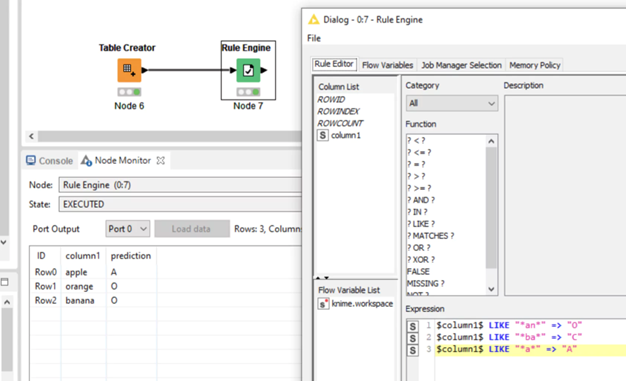
4. Rule Engine Node
Purpose
Applies business validation rules based on HR policies.
Example Rule
$Department$ = “” => “Invalid Department”
$Employee_Status$ = “Inactive” => “Exclude”
TRUE => “Valid”
Output Node (Generate HDL File)
Purpose
Exports the processed data into an HDL compatible file.
Common Nodes
- l CSV Write
- l File Writer
- l Table Writer
Conclusion
Data migration plays a critical role in the success of Oracle HCM Cloud implementations. However, manual processes often introduce errors and delays.
By integrating KNIME workflows into the migration process, organizations can automate data validation, transformation, and HDL generation. This not only improves data quality but also accelerates implementation timelines.
For Oracle HCM consultants, leveraging tools like KNIME can provide a powerful advantage by simplifying complex data migration tasks and delivering more reliable results.
As organizations continue to adopt cloud-based HR systems, automation tools like KNIME will become increasingly valuable in ensuring smooth and successful Oracle HCM implementations.
Author:– Sadiya Shaikh – Oracle HCM Counsultant