HEX 2.0: From Extracts to an Enhanced Experience in Oracle HCM Migration of Specific Extracts to Enhanced Version – A Technical Architect Perspective

Overview
Oracle Fusion Cloud HCM Release 26B introduces the ability to migrate selected extract types to the Enhanced Extract Framework (HEX 2.0). This framework is designed to address performance bottlenecks, optimize storage utilization, and enable scalable processing for high-volume HR and Payroll data extracts.
For Functional Consultants and Technical Architects, understanding the architectural shift, migration approach, and operational considerations is critical to ensuring a successful transition.
This article provides a deep-dive functional and technical overview of HEX 2.0 migration, including configuration strategy, validation handling, and best practices for enterprise environments.
Key Concept – Enhanced Extract Framework (HEX 2.0)
Enhanced Extracts represent an evolution of the traditional extract engine with improvements focused on:
- Multi-level parallel processing
- Automatic output chunking and storage optimization
- Improved runtime scalability
- Better memory and thread management
Eligible Extract Types
The following extract types that are eligible and can be migrated:
- Benefits Carrier
- HR Archive
- Other Payroll Archive
- Payroll Interface
- Full Profile
- Recruitment Archive
Architectural Impact
From a solution architecture standpoint, HEX 2.0 introduces:
- Thread-based execution models improving throughput.
- Reduced temporary storage footprint.
- Optimized handling of large data sets such as global payroll or enterprise archival extracts.
- Enhanced system stability during peak batch windows.
This makes HEX 2.0 particularly relevant for organizations operating:
- Multi-country payroll integrations.
- High-frequency data exchange with downstream systems.
- Large workforce archival processes.
Migration Strategy and Configuration Approach
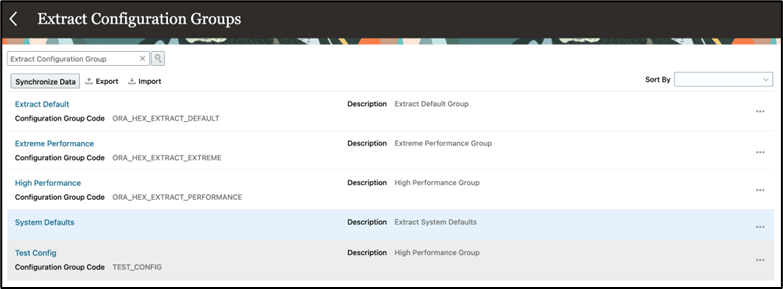
Step 1 – Enable Enhanced Extract Types via Configuration Groups.
Navigation: My Client Groups → Data Exchange → Extract Configuration Groups
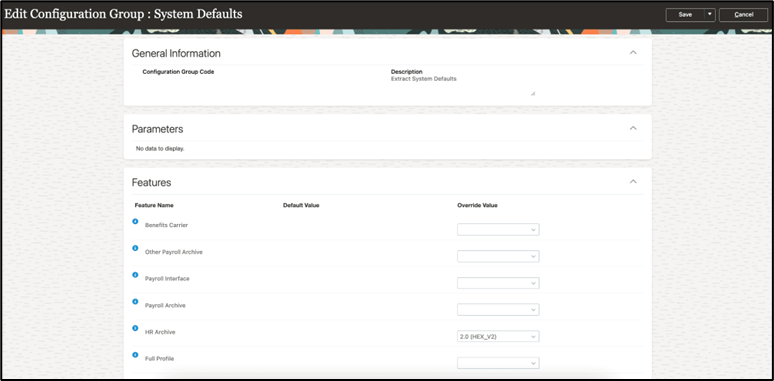
Step 2 – Select the System Defaults extract configuration group, set the override value for the desired extract types to 2.0 (HEX_V2), and then save and close the configuration group.
Architect Tip: Configuration should ideally be enabled first in lower environments to assess runtime behavior and integration compatibility.
Creating New Extract Definitions to Based on Enhanced Extract Types
- Navigate to: My Client Groups → Data Exchange → Extract Definitions → Create
- Select (+) à Create New
- On the Create Extract Definition page, select an upgraded extract type and provide the Name, Consumer, and select OK.
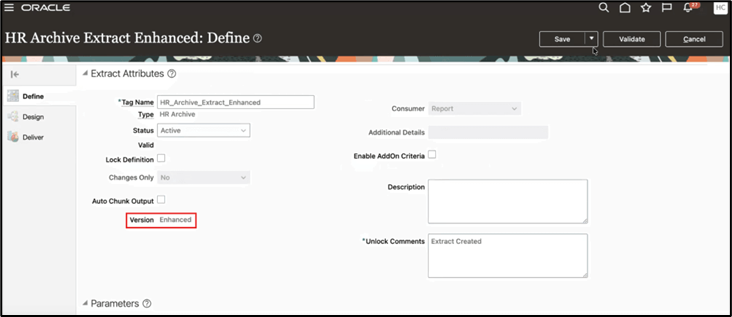
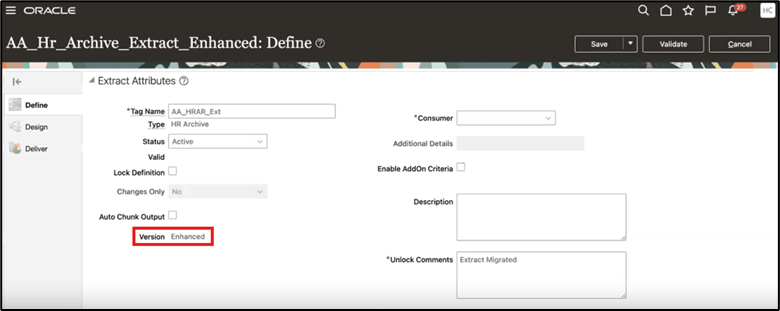
- On the Define page, verify that Version is Enhanced and proceed with creating the extract.
Upgrading Existing Extract Definitions
Step 1 – On the Extract Definitions page, select the extract definition and choose Upgrade Extract from the Actions menu.

Step 2 – Give an Extract Name in the Upgrade Extract dialog box and select OK to validate the extract.
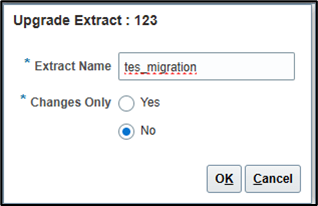
Step 3 – Validation results of the migration process:
Successful: If the enhanced version migration was successful, you’ll see a confirmation message
Select Continue to proceed with the upgrade.
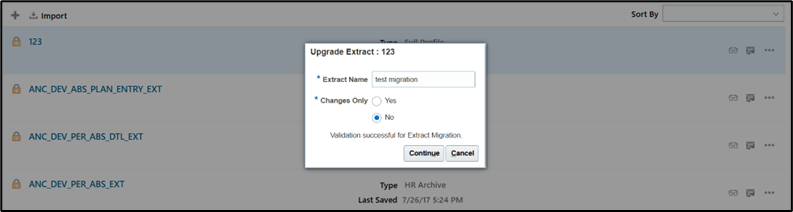
On successful upgrade, you’ll see another confirmation and click on OK.

Step 4 – Select the upgraded extract on the Extract Definitions page to verify that the version is updated to Enhanced.
Validate the extract and submit it.
In Error: If the validation failed due to issues during migration, you’ll be able to download log file to troubleshoot the problem. You can either fix the existing extract definition or create a temporary version to analyze.
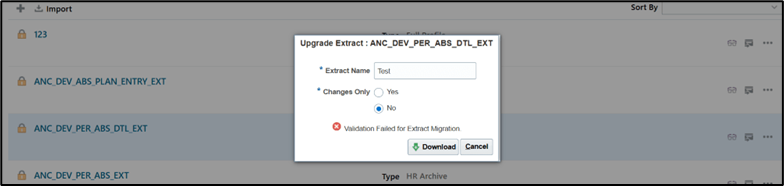
Correct any validation errors and revalidate the extract.
After successful validation, select the extract definition and verify that the Version field displays Enhanced, then proceed to submit the extract.
Technical Insight: In some cases, creating a temporary cloned extract definition helps isolate configuration issues before performing final migration.
Best Practices for Enterprise Implementation
- Perform Controlled Pilot Migration
Start with Recruitment Archive & HR Archive.
These typically have minimal real-time downstream dependencies.
- Review Scheduling and Batch Window Design
Enhanced extracts increase concurrency. Architects must:
- Review payroll batch scheduling
- Avoid overlapping high-thread jobs
- Validate ESS resource allocation
- Validate Integration Contracts
After migration confirm:
- File naming conventions
- Output segmentation handling
- Middleware transformation rules
- Third-party interface compatibility
- Implement Performance Benchmarking
Before and after migration:
- Measure extract runtime
- Compare output file sizes
- This helps justify migration ROI.
- Maintain Rollback Strategy
- Retain legacy extract version
- Document migration checkpoints
- Maintain configuration snapshots
Common Mistakes to Avoid
- Migrating payroll interface extracts without integration impact analysis
- Ignoring validation logs and proceeding with upgrade
- Not testing output chunking behavior in downstream systems
- Enabling HEX 2.0 across all extract types simultaneously
- Skipping performance monitoring post migration
Conclusion
The introduction of HEX 2.0 marks a significant architectural enhancement in Oracle Fusion Cloud HCM’s extract processing framework. When implemented with a structured migration strategy, organizations can achieve:
- Faster extract execution
- Improved system resource utilization
- Better scalability for enterprise workforce data
- Enhanced stability during batch processing
For Functional and Technical Architects, the key to success lies in environment-wise enablement, integration validation, and performance benchmarking.
Adopting Enhanced Extracts is not just a configuration change — it is a strategic modernization step in enterprise data exchange architecture.