Configure Date of Birth Validation in VBCS for Oracle HCM


Introduction to Date of Birth Validation in VBCS
Date of Birth validation in VBCS helps ensure that users enter valid and logical birth dates, following specific rules such as acceptable date ranges, minimum age requirements, or restrictions against future dates. This type of validation is commonly used in applications such as registration forms, employee records, and user profile systems.
DOB validation in VBCS helps in:
- Ensuring data integrity: By verifying that the date entered is valid and falls within an acceptable range before the form is submitted.
- Enhancing user experience: By providing immediate feedback if the user enters an invalid date, such as a future date or unrealistic age.
- Reducing errors: By detecting incorrect or illogical birth dates early before the information is stored or processed by backend systems.
In Oracle Visual Builder Cloud Service, Date of Birth validation can be implemented using date input components, validation rules, and JavaScript expressions. Developers can set rules such as restricting future dates, defining minimum age limits, or validating acceptable date ranges. These validations help ensure that only correct and meaningful birth date information is captured in the application.
Step 1 – Log in as an Administrator
Sign in to the application using your Administrator credentials.
Once logged in, navigate to My Client Groups.
Under the Quick Actions section, select Hire an Employee to initiate the employee hiring process.
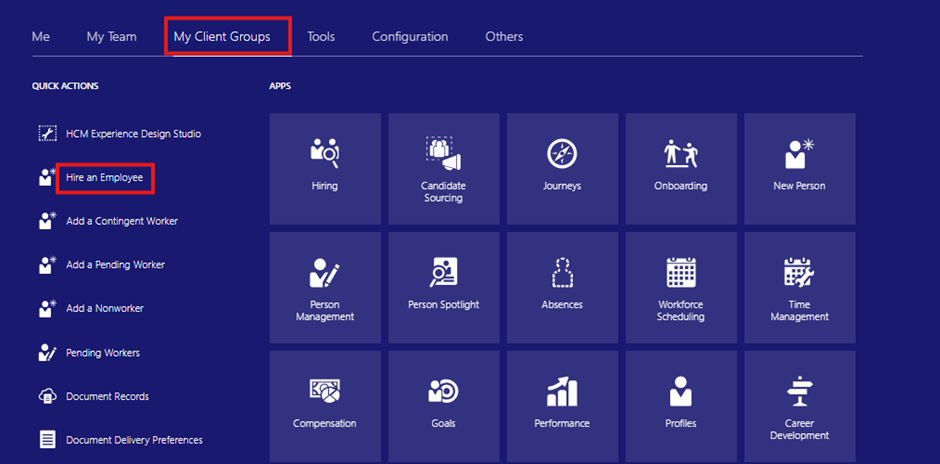
Fig 1 – Log in as an Administrator
Step 2 – Access the “Hire an Employee” Page and Navigate to VBCS
After selecting Hire an Employee from the Quick Actions menu, the Hire an Employee page will open. From this page, proceed to the Visual Builder Cloud Service (VBCS) environment to configure.
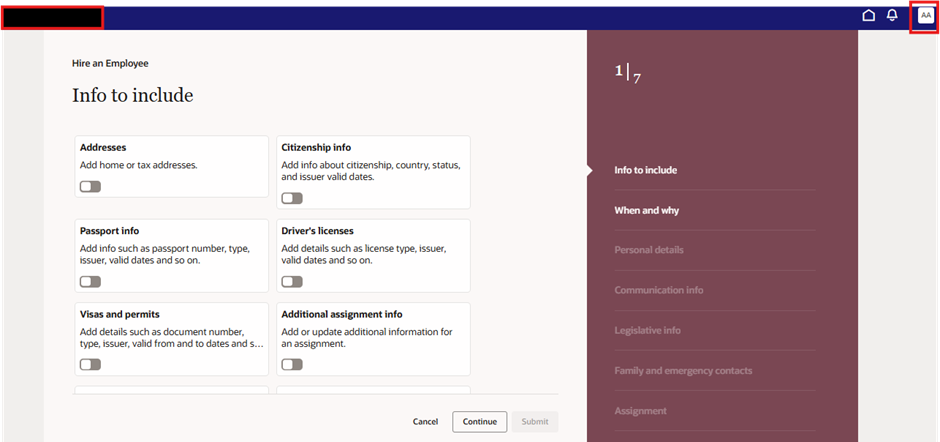
Fig 2 – Access the “Hire an Employee” Page and Navigate to VBCS
Step 3 – Configure Phone Number Validation in VBCS
Once inside Oracle Visual Builder Cloud Service (VBCS), go to the Business Rules section of the application. In this section, you can create or edit validation rules for different fields used in your form.
Next, identify the Date of Birth field and configure an appropriate validation rule for it. The rule should ensure that the entered Date of Birth follows the required date format and validation criteria, such as preventing future dates or ensuring the value falls within an acceptable range. This helps guarantee that the Date of Birth entered by users meets the defined standards before the data is submitted.
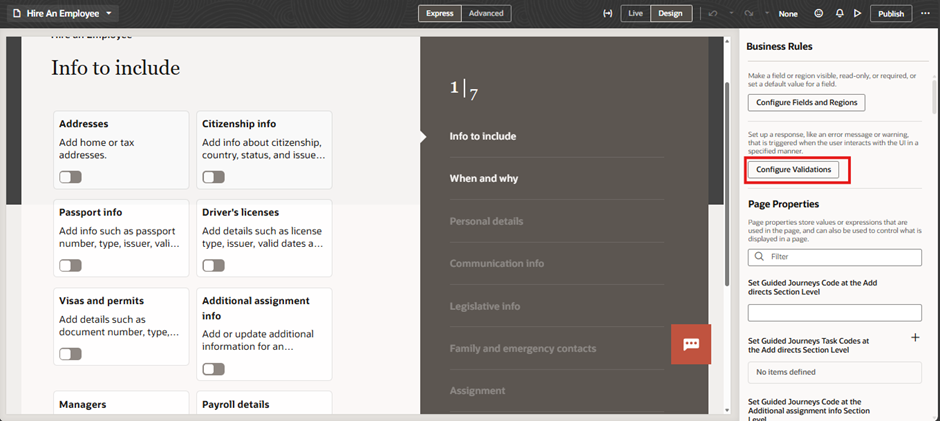
Fig 3 – Configure Phone Number Validation in VBCS
Step 4 – Create a New Business Rule and Define Its Parameters
Begin by creating a new rule within the Business Rules section of VBCS.
Inside this rule, specify the necessary components to define how the validation should behave:
- Condition: Set the criteria that will trigger the validation (e.g., when the Date of Birth entered does not match the required format).
- Summary and Severity: Provide a brief summary message describing the rule and assign a severity level (such as Error or Warning) to indicate the importance of the validation.
- Target Fields: Select the specific field(s) the rule should apply to — in this case, the Date of Birth field.
- Details: Add any additional information or messages that will be displayed to the user when the validation condition is met.
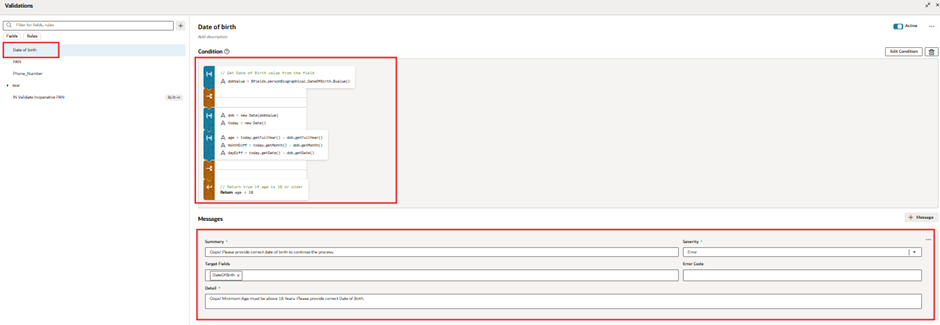
Fig 4 – Create a New Business Rule and Define Its Parameters
Step 5 – Preview and Publish the Validation Rule
After configuring the rule and defining all required parameters, preview the setup to ensure the validation works as expected. Test the rule by entering sample data to verify that the Date of Birth validation triggers correctly.
Once the rule has been successfully tested, publish the changes to make the validation active.
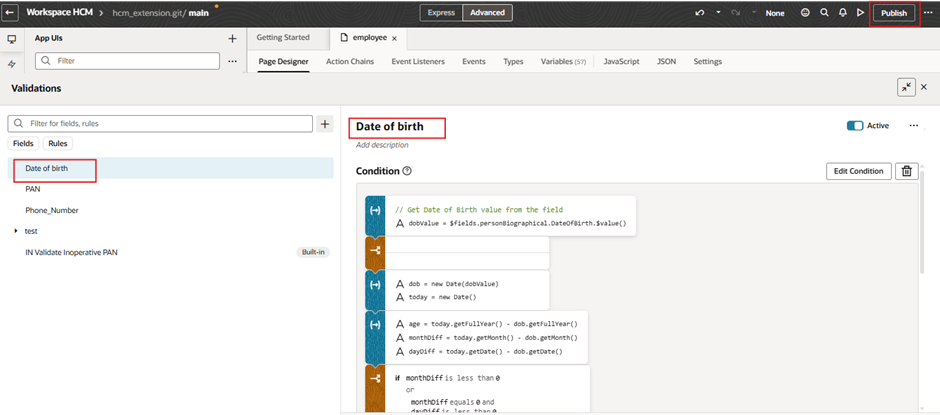
Fig 5 – Preview and Publish the Validation Rule
Step 6– Testing the Validation for an Incorrect Date of Birth Entry
After publishing the rule, perform an additional validation check to ensure accuracy.
Enter an invalid or incomplete Date of Birth in the corresponding field—for example, a future date or a date that does not meet the defined criteria. The system should display an error message, indicating that the entered Date of Birth does not satisfy the required validation rules.
This confirms that the validation is correctly preventing incorrect or unacceptable birth date entries.
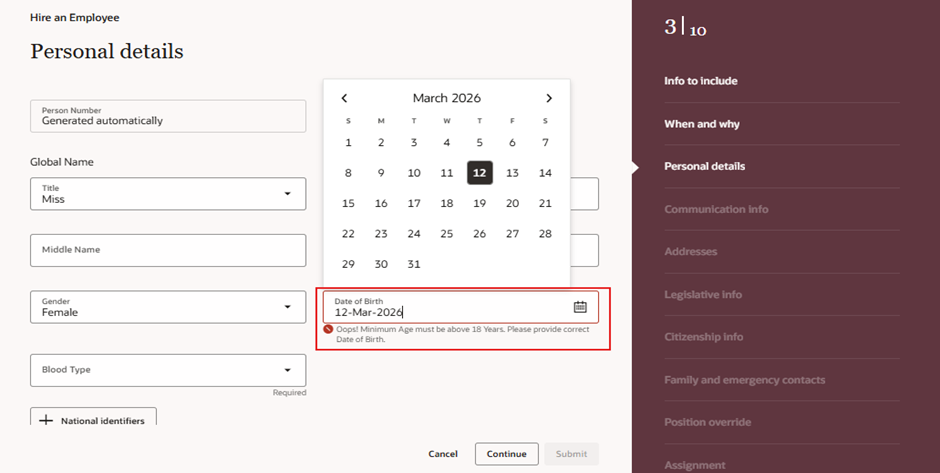
Fig 6 -Test Validation for Incomplete Phone Numbers
Business Benefits
Implementing Date of Birth validation in Oracle Visual Builder Cloud Service (VBCS) provides several important business advantages:
- Improved Data Accuracy:
Ensures that only valid and logical birth dates are entered, reducing data entry mistakes and maintaining accurate employee or user records. - Enhanced User Experience:
Provides immediate feedback when users enter an incorrect or unrealistic date, allowing them to quickly correct the information and complete the form smoothly. - Operational Efficiency:
Reduces the need for manual verification and correction of incorrect birth date entries, saving time for HR teams and system administrators. - Compliance and Standardization:
Maintains consistent and standardized date formats across all records in the organization, ensuring uniform data storage and management. - Better Eligibility Verification:
Valid Date of Birth data helps organizations verify age-related eligibility requirements, such as minimum age limits for employees, users, or services.
Conclusion
Date of Birth validation in Oracle Visual Builder Cloud Service involves creating appropriate date input fields and defining validation rules to ensure that users enter valid and acceptable birth dates. Additional logic or custom JavaScript validation can also be used to restrict future dates, enforce minimum age requirements. By implementing proper Date of Birth validation, organizations can improve data quality, system reliability, and overall efficiency while ensuring that user information is accurate and meaningful.
Author: Smruti Samruddha, Oracle HCM Cloud Consultant.