View Employee Personal Information with AI Assistance Enhancements

Introduction
Oracle Fusion HCM continues to expand the use of Artificial Intelligence to simplify HR processes and improve employee and manager experiences. One of the latest innovations is the Personal Information Assistant, an AI-powered digital assistant designed to help users easily view and verify employee personal information through natural language interactions.
Built on Oracle’s AI Agent framework and powered by advanced Large Language Models (LLMs), the Personal Information Assistant understands conversational questions and retrieves accurate, role-based information securely. Instead of navigating multiple pages in the application, users can simply ask the assistant questions and receive relevant responses instantly.
This enhancement expands the capabilities of the assistant so that not only employees, but also Line Managers and HR Specialists, can access and verify personal information for other employees—while still maintaining strict role-based security controls.
Overview of the Personal Information Assistant
The Personal Information Assistant is created using a preconfigured AI Agent template. Agents created from this template allow authorized users to retrieve personal information for themselves or for other employees within their permitted security scope.
To retrieve information about another employee, the AI agent can search using different identifiers such as:
- Person Number
- Display Name
- Email Address
The assistant interprets the user’s request, locates the appropriate employee record, and returns the relevant personal information based on role-based access permissions.
Capabilities of the Personal Information Assistant
With the Personal Information Assistant, employees, managers, and HR specialists can perform several actions through conversational AI.
Users can:
- View their own current and future‑dated personal information.
- View personal information for other employees based on Role-Based Access Control.
- Navigate to relevant pages through deep links to view or update personal information.
- Access deep links for updating personal information for themselves or other employees, if they have the required security permissions.
The AI assistant provides a secure and efficient way to access HR information without requiring users to manually search through multiple application pages.
Personal Information Available Through the Assistant
The AI agent can retrieve several categories of employee personal information including:
• Biographical Information
• Demographic Information
• Religion
• Ethnicity
• National Identifiers
• Phone
• Email
• Address
• Citizenship
• Driver’s License
• Passport
• Visas and Permits
• Family and Emergency Contacts
This allows managers and HR teams to quickly verify employee information when needed.
Example Questions the AI Agent Can Answer
The Personal Information Assistant supports natural language questions. Some example queries include:
- What’s the work email address for Employee_Name?
- I want to update my emergency contacts.
- What’s the last name, first name, and title for person_number?
- I need to update the phone number for the person with email address xyz@abcxyz.oracle.com.
The AI assistant interprets these requests and retrieves the required information or provides a direct link to update the information where applicable.
Example Scenario
In a typical scenario, an organization creates an AI Agent called Personal Information Assistant 26A from the preconfigured template.
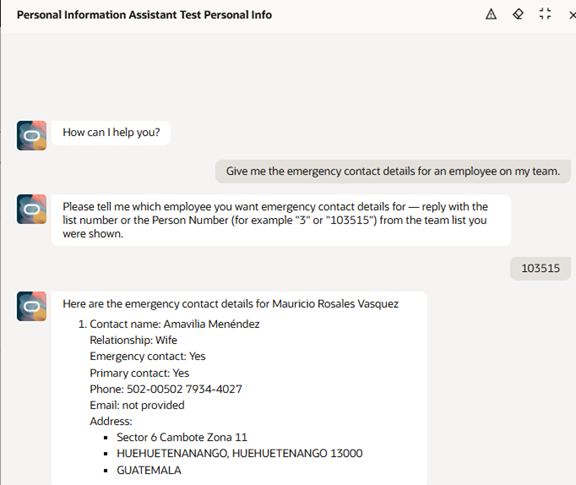
First, a Line Manager asks the assistant for emergency contact details for a team member named Sam Evans. The agent searches using the employee’s display name and retrieves the available details.
Next, the manager requests to update the address for another employee and provides the email address. The agent locates the employee using the email identifier and provides a deep link to the page where the address can be updated.
Finally, the manager asks about their own passport expiration date. The assistant retrieves the information and provides the relevant passport expiry details.
This conversational interaction significantly improves efficiency and accessibility for HR-related tasks.
Business Benefits
1)Enhanced User Experience:
Managers and employees can access personal information quickly using natural language queries.
2)Improved Efficiency:
HR teams and managers can verify employee details instantly without navigating multiple application pages.
3)Secure Data Access:
Role-Based Access Control ensures users can only view the information they are authorized to access.
4)Faster HR Processes:
Deep links provided by the AI assistant allow users to quickly navigate to the relevant pages to update personal information.
5)Reduced Administrative Effort:
By enabling self-service access to employee information, organizations reduce the dependency on HR teams for routine verification tasks.
Steps to Enable and Configure
To use the Personal Information Assistant, certain configurations must be completed in the Oracle Fusion environment.
Step-1: Enable Required Profile Option
Set the profile option:
ORA_ASE_SAS_INTEGRATION_ENABLED to Yes.
Step-2: Grant Required Permissions
Enable permission groups and ensure the required roles have access to AI Agent Studio.
Create Custom Role to access Ai Agent Studio
- Create a custom Job role
Go to Navigator > Tools > Security Console, and create a new custom job role.
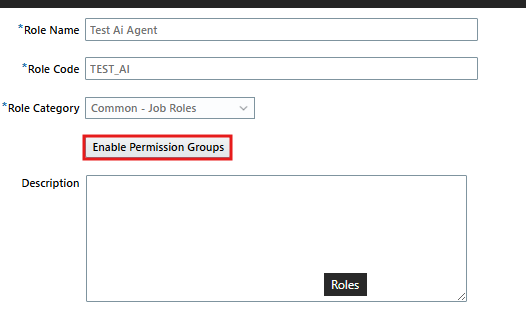
Note: Make sure to enable permission groups.
2.On the Role Hierarchy page, open the Roles and Permission Groups tab and add these duty roles:
-
- Fai Genai Agent CX Administrator Duty (ORA_DR_FAI_GENERATIVE_AI_AGENT_CX_ADMINISTRATOR_DUTY)
- Fai Genai Agent FIN Administrator Duty (ORA_DR_FAI_GENERATIVE_AI_AGENT_FIN_ADMINISTRATOR_DUTY)
- Fai Genai Agent GRC Administrator Duty (ORA_DR_FAI_GENERATIVE_AI_AGENT_GRC_ADMINISTRATOR_DUTY)
- Fai Genai Agent HCM Administrator Duty (ORA_DR_FAI_GENERATIVE_AI_AGENT_HCM_ADMINISTRATOR_DUTY)
- Fai Genai Agent PRC Administrator Duty (ORA_DR_FAI_GENERATIVE_AI_AGENT_PRC_ADMINISTRATOR_DUTY)
- Fai Genai Agent PRJ Administrator Duty (ORA_DR_FAI_GENERATIVE_AI_AGENT_PRJ_ADMINISTRATOR_DUTY)
- Fai Genai Agent PSC Administrator Duty (ORA_DR_FAI_GENERATIVE_AI_AGENT_PSC_ADMINISTRATOR_DUTY)
- Fai Genai Agent SCM Administrator Duty (ORA_DR_FAI_GENERATIVE_AI_AGENT_SCM_ADMINISTRATOR_DUTY)
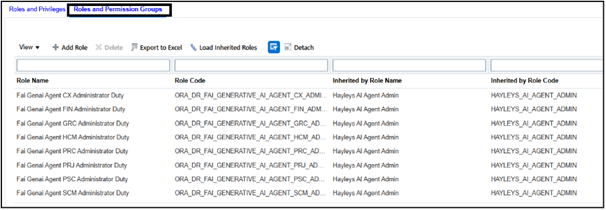
3.Open the Roles and Privileges tab and add the Manage All Intelligent Agents (ORA_FAI_MANAGE_ALL_AI_AGENTS) role.

4. Save the custom role and assign it to users who want access.
5. Assign this role to the Admin Account to configure AI Agents.
Step-3 : Create the AI Agent
The Personal Information Assistant is available as a preconfigured template. You must create your own agent by copying this template.
Navigation : My Client Group > Show More > AI Agent Studio
Search Personal Information Assistance
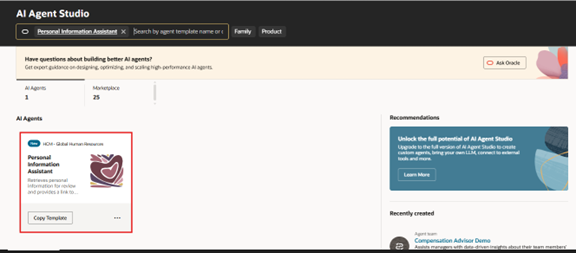
Step-4 : Copy Template
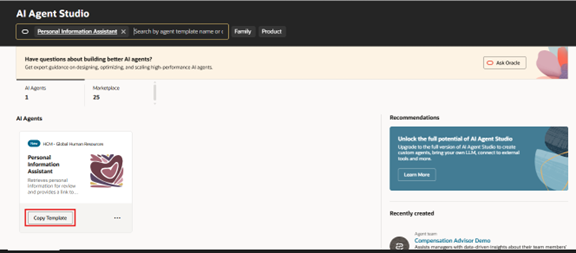
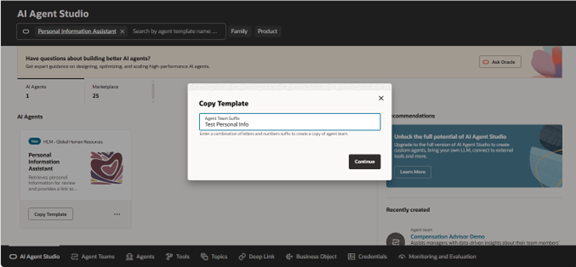
Step-5: Copy Template
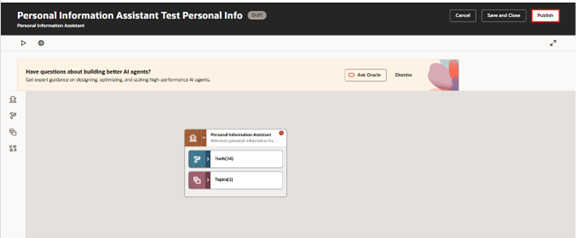
Step-6: Publish the Agent
Once the configuration is complete, publish the agent so authorized users can access it.
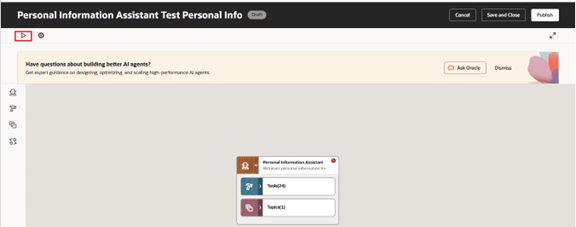
Step-7: Click Run
Step-8: In the agent search, any employee’s emergency contacts
Conclusion
The Personal Information Assistant represents a significant step forward in Oracle Fusion HCM’s AI-driven capabilities. By enabling conversational access to employee personal information, organizations can simplify HR interactions and improve productivity for employees, managers, and HR teams.
With built-in security controls, intelligent search capabilities, and direct navigation links, the assistant helps users access and verify important personal details quickly and efficiently. As Oracle continues to enhance AI integration across the HCM platform, tools like the Personal Information Assistant demonstrate how AI can transform HR processes and deliver a smarter, more user-friendly experience.