Oracle HCM Team Management with AI Assistance: Features & Benefits

The Manager Concierge agent serves as a central point where managers can get assistance with managing their team. It helps answer questions related to compensation, leave and absences, talent management, and employee information for their team members.
1.Introduction to Oracle HCM Team Management
Managing a team comes with many responsibilities, from keeping track of employee information and handling leave requests to reviewing compensation and supporting employee growth. To help make these tasks easier, Oracle HCM offers the Oracle Fusion Cloud HCM Manager Concierge, an AI-powered assistant designed to support managers in their day-to-day work.
Manager Concierge provides a convenient place where managers can ask questions, quickly access employee details, and get guidance related to their team members. With the help of AI-driven insights and automation, it enables managers to find information faster, make informed decisions, and manage their teams more effectively.
- Key Capabilities
2.1. Team Data Hub for Workforce Insights
Manager Concierge provides team-level analytics that help managers understand workforce patterns.
Managers can Analyze:
- Employment data across their team
- Compensation trends
- Talent and performance metrics
These insights help managers identify trends such as pay equity gaps or performance differences within the team. Managers can also drill down into individual employee details to take the right action.
2.2 Context-Driven Deep Links
Manager Concierge includes context-aware deep links that help managers move directly to the required system page.
For example, if a manager asks to review or update an employee’s compensation, the assistant can open the Change Salary or related Compensation page with the necessary employee details already populated. This saves time and simplifies the process for managers.
This functionality is powered by the Quick Link business object, which reduces the need to maintain many static deep links and makes system navigation faster and more efficient.
2.3 Document Support and Policy Guidance
Manager Concierge also provides access to company policies through specialized AI subagents.
These subagents help managers quickly find and understand policy-related information:
Leave and Absence Analyst
- Retrieves leave policies
- Helps managers make decisions regarding employee absences
Compensation Advisor
- Provides information about compensation policies
- Assists with salary reviews, perks, awards, and related programs
Employment Details Assistant
- Provides employment contract information
- Supports managers during employee lifecycle processes such as hiring, onboarding, development, and offboarding
- These tools help managers get accurate guidance directly from official policy documents.
3. Technical architecture
Oracle HCM Manager Concierge agent operates through a modular AI-driven architecture:
| Component | Description |
| AI Agent Studio | Platform to configure and manage AI agents |
| Document Tool | Repository of uploaded company/job-related documents |
| Integration User | Security context for agent access |
| Scheduled Processes | Index job requisitions for accurate recommendations |
The solution leverages Oracle’s generative AI infrastructure while maintaining strict security and role-based access control.
4. Prerequisites
Before enabling Oracle HCM Manager Concierge agent, ensure the following technical requirements are met:
4.1 Platform Requirements
- Oracle Applications Platform Services must be enabled.
- Generative AI capabilities must be activated in the environment.
- AI Agent Studio must be accessible.
4.2 Profile Option Configuration
Set the following profile option to Yes:
ORA_ASE_SAS_INTEGRATION_ENABLED
This enables the integration between Recruiting and AI Agent services.
4.3 Security Configuration
- Create a custom job role for AI agent access.
- Assign necessary REST service access privileges.
- Grant AI Agent runtime duties.
- Add Generative AI workflow privileges.
- Create and configure an integration user with appropriate role assignments.
4.4 Career Site Configuration Requirement
Career Coach should be enabled only on multi-page application flows. Single-page flows may cause UI inconsistencies.
5. Configuration Steps
Step 1: Create AI Agents in AI Agent Studio
- Navigate to AI Agent Studio.
- Copy the template for:
- Manager Concierge agent
- Rename according to naming standards.
- Attach relevant documents to the Document Tool.
- Publish the agents.

Step 2: Configure Security and Integration
- Create a custom job role (e.g., IRC_CE_AGENT_CHAT_JOB).
- Add required privileges such as Compensation Advisor agent chat REST access.
- Assign AI runtime and generative AI privileges.
- Create an integration user and assign the custom role.
- Map the integration role to the agents in AI Agent Studio
- Publish and validate configuration
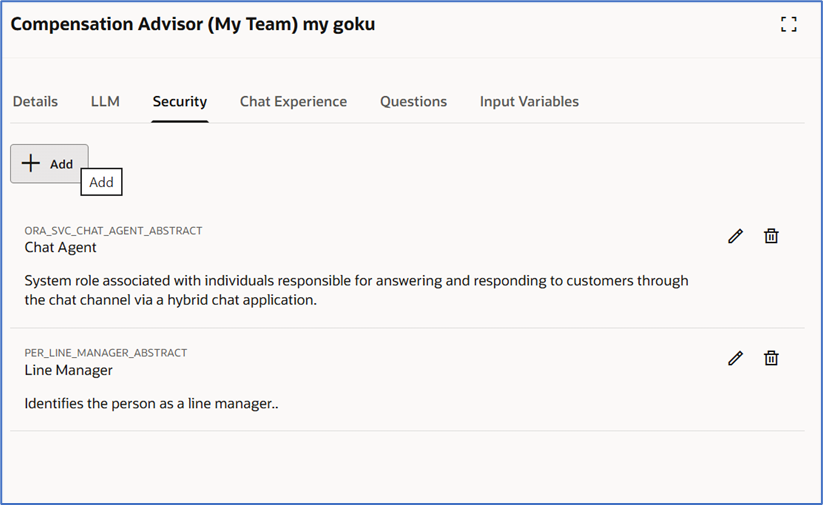
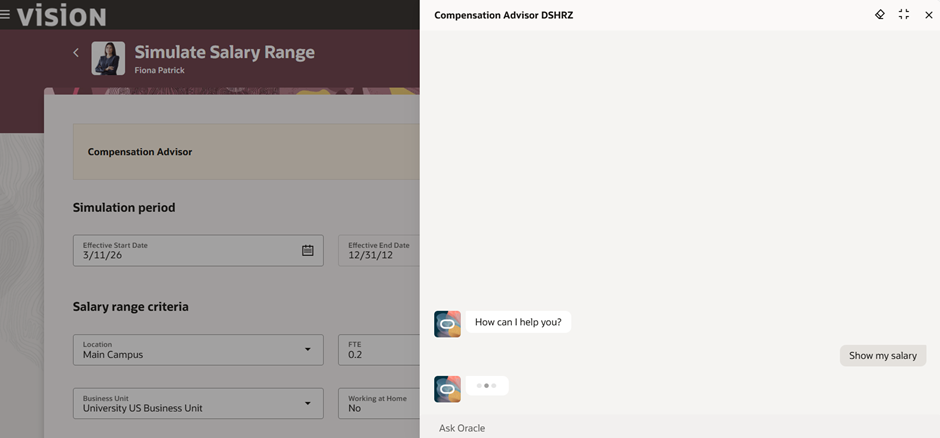
Step 3: Enable Compensation Advisor on Simulate Salary Range
- Navigate to Compensation Configuration.
- Enable AI Agent functionality.
- Enter agent team codes for:
- Compensation Agent
- Save and publish the Compensation site.
- Run scheduled indexing processes to ensure job data availability.
6. Operational Best Practices
To ensure optimal performance:
- Maintain accurate and updated workforce data in Oracle HCM.
• Regularly update HR policy documents in the Document Tool repository.
• Monitor AI agent interactions and system logs to track performance.
• Run scheduled indexing processes to keep data searchable for AI agents.
• Validate role-based access to ensure managers view only authorized team data.
• Provide training for managers on how to effectively use the AI assistant.
7. Business Benefits
- Improves manager productivity by providing quick access to employee information.
• Enables faster decision-making through AI-powered workforce insights.
• Enhances employee support by helping managers respond quickly to requests.
• Provides better visibility into team performance and compensation trends.
• Ensures consistent guidance based on company HR policies.
8. Technical Benefits
- Provides an AI-powered conversational interface for managers.
• Enables context-aware navigation through deep links to system pages.
• Maintains secure role-based access to workforce data.
• Uses scalable generative AI infrastructure within Oracle Fusion Cloud.
• Centralizes HR knowledge using the Document Tool repository.
9. Conclusion
Oracle HCM Manager Concierge enhances team management by providing managers with an AI-powered assistant that simplifies everyday HR tasks. It enables managers to quickly access employee information, HR policies, and workforce insights through a single conversational interface. By reducing manual effort and improving access to relevant data, the solution helps managers make faster and more informed decisions.