Oracle Learning introduced new capabilities for managing attendance through the Attendance Spreadsheet learning module. However, without enabling the required profile option, users won’t be able to access these enhanced attendance management features.
This new functionality allows administrators and instructors to efficiently track learner participation and mark attendance using HSDL (HCM Spreadsheet Data Loader), streamlining the process of updating learning records while ensuring greater accuracy and efficiency across the organization.

To enable this functionality, it’s essential to activate the following profile value:
- Navigation >> Login as Admin >> Select Setup and Maintains >> Click Task panel >> Search Manage Administrator Profile >> Search Profile option code (ORA_WLF).
- Profile Option: ORA_WLF_MANAGE_LEARNERS_OPTIMIZATION_V2 and Profile Value as ‘Y’
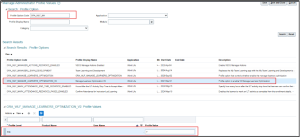
Fig 1: Manage Administrator Profile page
- Without enabling this profile value, users won’t have access to the Edit Learning Activities Workbook in the Redwood Experience.
Key Enhancement Overview
- After enabling the profile value, users can access the Edit Learning Activities in a Spreadsheet option directly from the Offering Learners tab under the More Actions menu.
- This enhancement simplifies attendance management by enabling bulk updates through an intuitive spreadsheet interface, reducing manual effort and saving valuable time.
How to Access Learning Activities in a Spreadsheet
- Navigation >> Login as Admin or Instructor >> My Client Group >> Learning and Development >> Select Course >> Click Offering >> Learner tab.
- It primarily supports Instructor-Led Training (ILT) activities, enabling instructors to record daily attendance directly in the assigned HSDL file. As shown in the image below, you can view the number of offerings along with the type of offering available for attendance tracking.
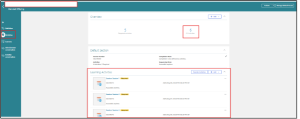
Fig 2: Offering activity’s page
- Then Navigate to the Offering Learners tab.
- Select Assignment Status as “Not Started” its show Not started person list.
- From the More Actions menu, select Edit Learning Activities in a Spreadsheet.
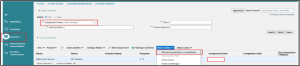
Fig 3: Leaner Tab page
- Once select the Edit Learning Activities in a Spreadsheet in the Learning Activities dialog box will appear, Click Update in Spreadsheet to download the workbook.
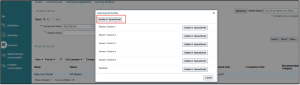
Fig 4: Edit Learning Activities page
- Then its redirect to Excel Learning activity workbook page. Select Enable in Workbook, its redirect to application Credential page. Ensure download the updated Desktop integration installer. Because of this will be supported to update the sheet in our application.
- Navigation for Desktop integration installer >> Navigator >> Tools >> Download Desktop integration installer

Fig 5: Spreadsheet Login page
- Once you enter Admin or Instructor Application id and password Click Sing-in its redirect into Learning Activities page.
- For this, select the Not Started person who has five ILT sessions and one Feedback session, as shown in the image below.
- Choose the Completion Date and Completion Status for each session. You can update any fields you want except for Activity Name, Activity Number, and Activity Type.
- Once the dates and statuses are selected, click the Upload option under the Activity tab.
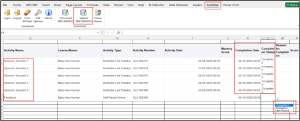
Fig 6: Edit Learning Activities in a Spreadsheet page
- This will mark the attendance at both the employee level on the My Learning
- Experience page and the admin level on the Learner tab.

Fig 7: Status Leaner tab
- Above image we can be able to view the admin level status if you want activity level status means you Select the “Mange activities” we able to view all Activity’s Status and Completion date.
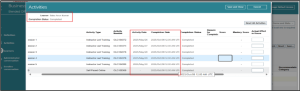
Fig 8: Admin status access page
- As per Learning Activities workbook completion date and status reflect to admin and Instructor application.
Business Benefits
Oracle Learning’s enhanced attendance management capabilities deliver a wide range of strategic and operational advantages for organizations. By enabling the required profile option and using the Learning Activities Spreadsheet, businesses can unlock stronger efficiencies, better data accuracy, and improved learning outcomes.
1. Streamlined ILT Attendance Management: Automating the attendance process through HSDL and the Excel-based Learning Activities Workbook minimizes manual work, especially for large Instructor-Led Training (ILT) batches. This results in faster attendance capture and reduces administrative burden for L&D teams.
2. Faster Bulk Updates with Reduced Processing Time: The ability to update multiple learner records simultaneously in a single spreadsheet drastically cuts down the time required for managing attendance, completion statuses, and learning activity updates. This enables administrators to keep learning records up to date in real time.
3. Improved Accuracy Through Enhanced Data Visibility: With learner-specific identifiers—such as Learner Person Number and Primary Email Address—directly accessible in the workbook, errors related to misidentification or incorrect updates are significantly minimized. This strengthens compliance, audit readiness, and reporting accuracy.
4. Increased Productivity for Administrators and Instructors: The spreadsheet interface allows for easy sorting, filtering, and validation of learner data before uploading. This reduces repetitive tasks, eliminates back-and-forth corrections, and enables L&D teams to focus on higher-value initiatives such as program design and learner engagement.
5. Seamless Redwood Experience for Better Adoption: The integration with the modern Redwood Experience ensures that the process is intuitive, visually consistent, and easy to navigate. This improves adoption across HR teams, instructors, and learning coordinators, requiring less training and ensuring a smoother transition.
6. Enhanced Governance and Compliance: Standardized attendance tracking and automated updates help maintain consistent learning records across departments and regions. This supports compliance with regulatory requirements, internal training mandates, and audit needs.
7. Scalable for Enterprise Learning Programs: Whether the organization manages hundreds or thousands of learners, the HSDL-enabled attendance process scales effortlessly. This ensures reliability, performance, and accuracy even for complex, multi-session ILT programs.
8. Better Insights for Decision-Making: Improved visibility into learner progress, attendance patterns, and training completion supports data-driven decisions for workforce planning, learning effectiveness, and skills development strategies.
Conclusion
The enhanced attendance management capability in Oracle Learning, powered by HSDL, brings a significant upgrade to how organizations track and manage learner participation. By enabling the required profile option and leveraging the Learning Activities Spreadsheet, administrators and instructors can efficiently record ILT attendance, perform bulk updates, and maintain accurate learning records—all within the modern Redwood Experience. With improved data visibility, reduced manual effort, and seamless integration, this functionality ensures a more streamlined, reliable, and user-friendly attendance tracking process. Organizations can now manage learning activities with greater precision and efficiency, ultimately enhancing the overall learning experience for both learners and administrators.
Streamline Your ILT Attendance with Kovaion
Maximize the benefits of Oracle Learning’s enhanced ILT attendance management with Kovaion’s expert guidance. From enabling profile options to leveraging the Learning Activities Spreadsheet in Redwood, we help you streamline attendance tracking, perform bulk updates, and ensure accurate learning records with minimal effort.
Partner with Kovaion today to simplify administration, improve data accuracy, and unlock the full potential of your Oracle Learning Cloud experience.
Author: Hariharan Srinivasan,Software Engineer