If you support a global organization, you know the struggle. A manager in London is promoting an employee in Dubai. The salary is in AED (Dirhams), but the manager thinks in GBP (Pounds) or USD (Dollars).
Previously, this meant opening a separate currency converter tab or doing “napkin math” during the transaction. It was friction that slowed down decision-making and increased the risk of errors.
With the latest Oracle HCM Redwood updates (specifically enhanced in 24D/25A), you can now give managers a native Currency Toggle directly on the Change Salary page. Currency Switcher option hidden by default.

Here is the step-by-step guide to enable Currency Switcher using Visual Builder Studio (VBS).
Step 1: Enter Visual Builder Studio
Navigate to the Redwood Change Salary page, then click on user icon and select Edit Page in Visual Builder Studio.
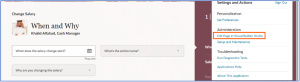
Fig1: Enter Visual Builder Studio
Step 2: Create a New Business Rule
Once VBS loads the page designer:
In Express Mode, click on the Configure Fields and Regions.
Click the + (Plus) icon next to “Form Rules” or “Regions” to create a new rule.
Condition: If you want this for everyone, leave the condition as standard (always apply). If you only want it for specific roles (e.g., Line Managers), you can add that condition by clicking on Edit option.
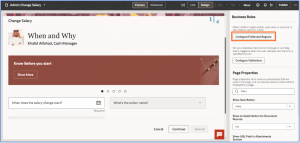
Fig 2: Configure Field and Regions
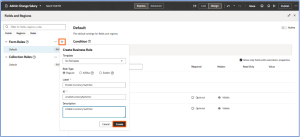
Fig 3: Create new rule
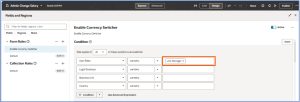
Fig 4: Add Condition
Step 3: Unhide the “Currency Switcher”
Search the field Currency Switcher and change the visibility property to Visible.
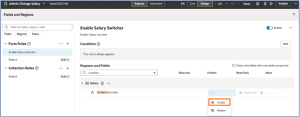
Fig 5: Unhide Currency Switcher
Step 4: Preview and Publish
Before you commit:
Click the Play (Preview) button in VBS.
Changes will be opened in new browser tab, Navigate to the Salary section. You should now see a dropdown menu above the salary figures.
If it works, hit Publish to deploy it to your test environment!
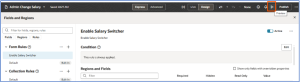
Fig 6: Preview changes
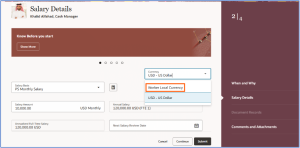
Fig 7: Select Currency as Worker Local Currency
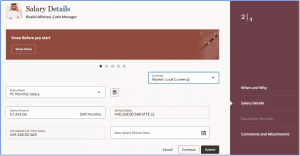
Fig 8: Worker salary as per Local Currency.
Business Benefits of Enabling the Currency Switcher in Oracle Redwood
1. Faster Decisions: Managers and HR leaders can instantly view employee salaries in their preferred currency, eliminating the need for manual conversions or external tools. This reduces delays in compensation decisions, accelerates approvals, and supports timely promotions, transfers, and salary adjustments across global teams. By having real-time visibility, managers can make confident decisions without pausing for calculations or waiting for finance support.
2. Enhanced Data Accuracy: The Currency Switcher leverages Oracle’s official General Ledger exchange rates, ensuring that all salary conversions are precise and consistent across the organization. This removes the risk of errors caused by ad-hoc calculations or outdated rates, providing a reliable single source of truth. Accurate data also improves reporting, auditing, and compliance, giving finance and HR teams confidence that compensation decisions are based on validated figures.
3. Global Equity and Transparency: For organizations operating across multiple countries, comparing salaries across regions can be complex. The Currency Switcher allows leaders to view compensation side-by-side in a common corporate currency, helping to maintain fair pay practices and identify disparities. This transparency supports equitable compensation decisions, improves employee trust, and aligns with global HR policies on fairness and inclusivity.
4. Operational Efficiency: By embedding the Currency Switcher directly into the Redwood interface, organizations reduce administrative effort and reliance on multiple tools. Managers no longer need to toggle between spreadsheets, converters, or separate applications. This streamlining frees up time for strategic HR initiatives and ensures a smoother, more user-friendly workflow.
5. Improved Strategic Insights: With instant access to multi-currency data, HR and finance leaders can better analyze compensation trends, plan budgets, and make strategic workforce decisions. Organizations can identify global salary patterns, anticipate market adjustments, and align pay structures across regions to meet business objectives efficiently.
Take Control of Global Compensation with Kovaion
Simplify multi-currency salary management in Oracle Redwood HCM with Kovaion’s expert guidance. From enabling the hidden Currency Switcher to streamlining workflows and ensuring accurate global payroll, we help organizations make faster, fairer, and data-driven compensation decisions.
Partner with Kovaion today to unlock the full potential of your Oracle HCM system and enhance efficiency across your global workforce.
Conclusion
The Redwood Salary Switcher shows how a small configuration can have substantial business impact. By using Visual Builder Studio to unhide the hidden currency toggle, managers and HR leaders can make faster, more accurate compensation decisions without relying on manual calculations or external tools. This ensures real-time, reliable data for global payroll, reduces errors, and streamlines workflows across the organization.
In addition to improving accuracy and efficiency, the feature promotes global equity by allowing leaders to view and compare salaries across regions in a single corporate currency. Organizations can now make fair, data-driven compensation decisions, enhance transparency, and free time for strategic initiatives—ultimately simplifying global compensation management and supporting overall business objectives.
Author: Ashadulla, Lead Consultant