The Oracle Journeys Redwood Experience introduces a smarter and more efficient approach to designing employee journeys by integrating Generative AI capabilities directly into the journey creation process. Instead of manually defining every task and instruction, HR Specialists and Line Managers can now leverage AI Assist to generate structured journeys quickly and intelligently.
Designed to simplify complex configuration and improve productivity, Generative AI helps users create journeys for key lifecycle events such as onboarding, offboarding, internal transfers, and career development. By automatically suggesting task names, descriptions, and instructions, the system enables faster journey creation while maintaining consistency and quality across the organization.
With AI-powered assistance, intuitive Redwood interfaces, and guided task recommendations, Oracle Journeys empowers HR teams to build effective employee journeys in minutes—helping organizations deliver smoother, more engaging employee experiences while significantly reducing manual effort.

What’s New
With Generative AI, you can now:
- Create new journeys and tasks in minutes.
- Generate intelligent task suggestions for existing journeys.
- Receive AI-suggested task names, descriptions, and instructions.
- Quickly review and select from a list of at least 10 task recommendations.
- This feature is available exclusively in the Redwood Experience.
Where You Can Use AI Assist
The AI Assist option is now available in several key areas of the Journeys module:
- Journey Templates page → Create
- Journey Details page → Tasks section > Suggest Tasks
- Task Groups page → Create
- Explore tab → Create Journey
Ensure you have the following privileges
- Manage Journey (ORA_PER_MANAGE_JOURNEY_TEMPLATE) privilege to work with journey templates.
- Application Administrator role to access Visual Builder Studio.
How to Enable the AI Assist Option
By default, the AI Assist feature is hidden (set to false). You can enable it in Visual Builder Studio (VB Studio) by setting the Show AI Assist constant to true.
1. On the application home page, go to My Client Groups. Click Show More and select Journeys Setup.
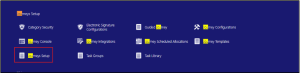
Fig 1: Journet Setup navigation page
2. Open the Journey Templates.
3. From the Settings and Actions menu, choose Edit Page in Visual Builder Studio.
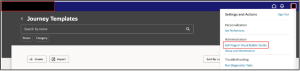
Fig 2: Journey Templet Section page
4. Select your project (or create one if this is your first time).
5. If already have means enter the Username and Password. once Login its Redirect to Visual Builder Studio page.
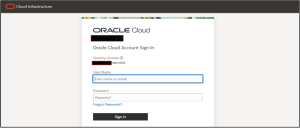
Fig 3: Visual Builder Studio Login page
6. In Express Mode, enter ‘show’ OR ‘AI ’in the filter box.
7. Set the Show AI Assist field to “true”.
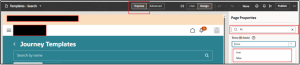
Fig 4: Visual Builder Studio page properties
8. Click Preview to check the update, then publish it.
- Once publish it AI will assist to create a journey Templet and tasks.
Navigation >> Login as HR Admin >> My Client Group >> Show more >> Journey setup or Journey templet.
Once enter into journey templet select “Create”. Select the AI Assist in creation Method. When creating a new journey, simply select the Journey category and enter the type of template you want. Then click AI Assist, and the system will automatically generate:
- A journey name and description.
- Task names, descriptions, and detailed instructions.
- A list of recommended tasks to include.
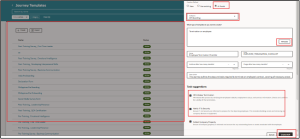
Fig 5: Journey Task Creation page
- Once click “Create Draft” Employee Termination Checklist will Draft Status. Its redirect to journey task page and what are the Descriptions and Tasks its will auto populated by AI Assist. Once you review the task and active them.

Fig 6: Journey Suggestion Task Creation page
- If you want to create Task group on that also AI Assist will help to create or we want to add some more task like Except off boarding on that also AI Assist will help to create Suggestion task for that click “Suggest” in next to task add button.
- Enter the What’s the task type you want to create? then click AI assist its will Generate the no of Suggestions task. Once select Suggestion task Click “Save”.
- Once Everything fine by default, Select Worker as the task performer and the Initiator as the task owner then Active the Journey Task.
Business Benefits
Leveraging Generative AI in Oracle Journeys within the Redwood Experience provides organizations with powerful capabilities to design, manage, and optimize employee journeys more efficiently. By enabling AI Assist for journey and task creation, businesses can improve operational efficiency, enhance employee experiences, and streamline HR processes across the enterprise.
1. Faster Journey Creation with Reduced Manual Effort: Generative AI significantly reduces the time required to design employee journeys by automatically generating task names, descriptions, and instructions. HR teams and Line Managers can create structured journeys for onboarding, offboarding, transfers, and development programs within minutes.
2. Improved Consistency Across Employee Journeys: AI-generated task recommendations help standardize journey templates across departments and business units. This ensures that employees receive consistent guidance and support during key lifecycle events, improving process reliability and organizational alignment.
3. Increased Productivity for HR and Line Managers: By automating repetitive configuration tasks, AI Assist frees HR teams from manual journey design activities. This allows them to focus more on strategic initiatives such as employee engagement, talent development, and workforce planning.
4. Enhanced Employee Experience Throughout the Lifecycle: Well-structured journeys ensure employees receive clear instructions, relevant tasks, and timely guidance during critical moments such as onboarding or role transitions. This leads to smoother transitions and a more positive overall employee experience.
5. Intelligent Task Recommendations for Better Journey Design: AI Assist analyzes the journey type and provides multiple task suggestions with detailed instructions. This helps HR professionals design more comprehensive and effective journeys without needing extensive prior configuration expertise.
6. Seamless Redwood User Experience for Better Adoption: The integration of AI capabilities within the modern Redwood interface provides an intuitive and visually consistent experience. This encourages higher adoption among HR teams and simplifies journey configuration.
7. Scalable Journey Management Across the Organization: Whether managing journeys for a small team or a global workforce, AI-powered journey creation scales efficiently. Organizations can rapidly deploy standardized journey templates across multiple departments and regions.
8. Data-Driven HR Operations and Process Optimization: By leveraging AI-driven recommendations and streamlined journey workflows, organizations can continuously refine HR processes and improve operational efficiency. This supports more agile HR operations and better alignment with evolving workforce needs.
Accelerate AI-Driven HR Innovation with Kovaion
Partner with Kovaion to unlock the full potential of Generative AI in Oracle Fusion HCM and transform how your organization designs employee journeys. With deep expertise in Oracle Journeys, Redwood Experience, and AI-enabled HR solutions, Kovaion helps organizations build intelligent journey templates that streamline onboarding, offboarding, and employee lifecycle processes.
From enabling AI Assist capabilities to optimizing journey templates and HR workflows, our experts support every stage of your Oracle HCM transformation. Whether you are implementing AI-powered automation or enhancing your existing Oracle environment, Kovaion ensures a scalable, efficient, and future-ready HR experience tailored to your business needs.
Conclusion: Intelligent, Efficient, and Experience-Focused
The introduction of Generative AI in Oracle Journeys within the Redwood Experience marks a significant advancement in how organizations design and manage employee journeys. By enabling AI Assist, HR Specialists and Line Managers can quickly generate structured journeys and tasks with intelligent recommendations, reducing the time and complexity traditionally associated with manual journey configuration.
With AI-powered suggestions for task names, descriptions, and instructions, organizations can maintain consistency and quality across important lifecycle processes such as onboarding, offboarding, transfers, and career development. This capability not only accelerates journey creation but also ensures employees receive clear guidance and support at every stage of their journey within the organization.
By combining automation, intuitive Redwood interfaces, and AI-driven insights, Oracle Journeys empowers HR teams to deliver faster, smarter, and more engaging employee experiences. These enhancements help organizations streamline HR operations, improve productivity, and build a more connected and future-ready workforce.
Author: Hariharan Srinivasan, Software Engineer