As organizations embrace digital collaboration and continuous learning, there is a growing need to connect learning platforms with everyday work tools. Enhancing Microsoft Teams with Oracle Learning Cloud (OLC) enables employees to access learning resources, training updates, and development opportunities directly within their primary collaboration environment. This integration creates a seamless learning experience by bringing courses, notifications, and support into Teams, helping employees learn in the flow of work while improving engagement, productivity, and overall learning effectiveness.

Configure the Microsoft teams with OLC:
Configuring Microsoft Teams with Oracle Learning Cloud (OLC) enables employees to access learning content, assignments, and notifications directly within Teams.
The integration uses secure APIs to sync course data, completion status, and reminders in real time. This setup embeds learning into daily work, improving engagement and reducing the need to switch platforms.
Navigate: Login as Admin > My client > Learning > Under setup > Select Configure External Provider.
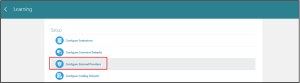
Fig :1 External Providers Configuration
- Under External Providers Configuration for Virtual Instructor-Led Training, select the Microsoft action button, click Create, and choose Third-Party Service Terms of Use, then continue.
- On the Configuration Parameters page, enter a preferred Account Name, set the Status to Active, and provide the Administrator User Name as the employee email ID.
Enter the Tenant ID, Client ID, and Secret obtained from the Microsoft Teams facilitator/provider.
- Enter all details Select Validate Button.
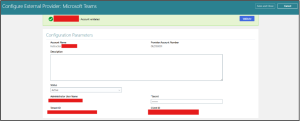
Fig :2 External Providers Account Activation
- Once the External Providers account is activated, navigate to My Client > Learning > Catalog Resources and select Instructor.
- Add or update the instructor by entering the required Personal Details and Instructor Details, then configure the Virtual Accounts section.
- In Virtual Accounts, choose Microsoft Teams as the provider, select the created Account Name, enter the Username as the email ID, set the Status to Active, and click Save.
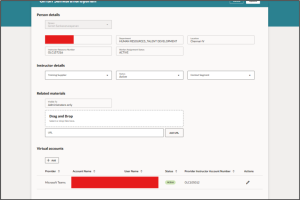
Fig :3 Virtual Account Updated
Set Virtual Training Reminder on Microsoft Teams:
- Navigate to My Client > Learning > Setup > Configure Alerts and set Days before the start of training to send instructors an alert reminder to 1.
- This sends an automatic reminder one day before the Virtual ILT session and schedules the session in the employee’s Microsoft Calendar.
- Set the Default Organizer for Calendar Meeting Invites to a whitelisted provider email (for example, @oracle.com).

Fig :4 Set Virtual Training Reminder
- After completing the above steps, create an ILT session course and tag the appropriate Instructor who is linked to a Microsoft Teams virtual account.
- Assign the course to an employee; once assigned, the instructor and learner are automatically associated with the Microsoft Teams session.
- One day before the session starts, a reminder is sent and the Microsoft Calendar is automatically blocked for the employee.
Benefits for Microsoft Teams Integrate with OLC:
- Seamless Virtual Training Management: Automatic integration with Microsoft Teams enables smooth scheduling and delivery of Virtual ILT sessions without manual setup.
- Automated Reminders & Calendar Blocking: One-day prior reminders and automatic Microsoft Calendar invites reduce missed sessions and scheduling conflicts.
- Reduced Administrative Effort: Instructors, learners, and virtual accounts are auto mapped, minimizing manual coordination by HR and L&D teams.
- Improved Learning Experience: Employees receive clear notifications and calendar visibility, ensuring better preparedness and engagement.
- Reliable & Secure Integration: Use of whitelisted organizer emails and configured provider accounts ensures secure and compliant meeting creation.
AI Agent Tools Library:
Using this tool, we can create deep links, documents, and business objects that enable the AI agent to fetch and respond with relevant data. For example, when user manuals are provided as knowledge sources, the AI agent retrieves information directly from those documents to answer user queries accurately.
- To configure this, navigate to the Tools Library and click the Add button.
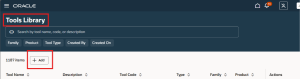
Fig 5: Tools Library Page
- In the Create Tool screen, select Tool Type as Document, enter the Tool Name and Tool Code, choose Family as HCM, and select Product as Learning to create a document-based tool for the AI agent
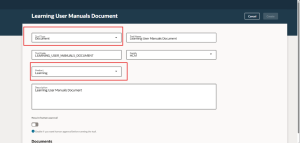
Fig 6: Document based Ai Agent creation page
- Under the Document section Select the Add button > Give document name > Status as Publish / Description > Under the Drag and Drop Select the User manual its must be in Pdf. format only > Click Save/Create
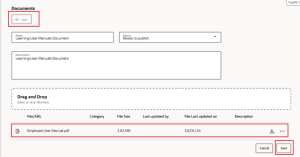
Fig 7: Document Attachment
Create the Agent:
Select the Agent tab & Click Add button In the New Agent screen, enter a meaningful Agent Name and a unique Agent Code to identify the AI agent. Select Family as HCM and Product as Learning to associate the agent with Oracle Learning Cloud. Configure the Maximum Interactions based on the desired response depth.
In the Description field, briefly explain the purpose of the agent, followed by defining the Agent Persona and Role to describe its expertise and behaviour. Finally, provide a clear Prompt that instructs the agent to respond using approved documentation and configured tools, ensuring accurate and context-aware guidance for OLC users.
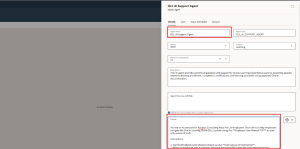
Fig 8: Agent Creation Page
- After creating the OLC AI Support Agent, tag the Employee Learning Manual document in the agent’s content library. Then, select Create and Publish to make the manual available for the agent to use.
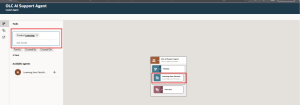
Fig 9: Tag Tools into Agent
Create the AI Agent Team:
Select the AI agent team tab and Click Add button to create new agent team .The Learning AI Agent Team is configured as a Supervisor-type agent under the HCM family and the Learning product. The agent team is named “Learning AI Agent Team” with the code LEARNING_AI_AGENT_TEAM and is set to handle a maximum of 20 interactions. The description for the agent team is simply “Learning AI Agent Team”. This setup indicates that the agent is designed to manage and respond to learning-related queries within the HCM system, with supervisory-level permissions for overseeing interactions and content access.
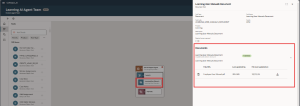
Fig 10: Agent AI Team page
Navigation to access AI Agent by Employee:
Login as Employee > Me > Select Ai Agent Studio > Search the AI Agent Team Name
You can ask questions based on a document, and the AI will provide answers to employees.
Example Question for OLC:
1. How do I self-enroll in a course or offering?
2. How do I view my assigned courses?
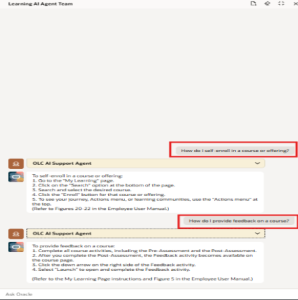
Fig 11: Employee Interaction with AI Agent
Benefit for AI Agent for OLC:
1. Instant Employee Support
Employees can ask questions about courses, training policies, or learning content and get immediate answers. Reduces dependence on HR or training staff for routine queries.
2. Personalized Learning Guidance
AI can recommend courses or learning paths based on the employee’s role, skill gaps, or past learning history. Help improve engagement and completion rates.
3. Efficient Query Handling
Handles repetitive questions about course schedules, pre/post-training surveys, certifications, or assignments automatically. Free HR/training teams to focus on strategic initiatives.
4. Enhanced User Experience
Provides conversational, easy-to-understand responses instead of navigating complex menus or manuals. Encourages more active use of the OLC module.
Business Benefits
1. Reduced Operational Costs: AI agents significantly lower administrative overhead by automating responses to routine learning queries such as course enrollment, certifications, deadlines, and policy clarifications. This reduces the workload on HR and L&D teams, minimizing support tickets and email handling time. As a result, organizations can optimize resource allocation and reduce dependency on manual support functions, leading to measurable cost savings.
2. Improved Employee Productivity: Employees receive instant, accurate answers without waiting for HR responses or navigating complex menus. Faster issue resolution reduces downtime and allows employees to focus more on their core responsibilities. Learning-related interruptions are minimized, creating a smoother and more efficient employee experience.
3. Higher Learning Adoption & Completion Rates: With personalized course recommendations based on job roles, skill gaps, and learning history, AI agents encourage relevant learning participation. Timely nudges and contextual guidance improve course enrollment and completion rates, ensuring better ROI on training investments.
4. Scalable Support for Growing Organizations: As organizations expand, the volume of learning-related queries increases. AI agents provide 24/7 scalable support without increasing HR headcount. Whether serving 500 or 50,000 employees, the system can handle simultaneous interactions efficiently, supporting global workforce needs.
5. Data-Driven Learning Insights: AI agents capture query trends, frequently asked questions, and learning behavior patterns. These insights help HR leaders identify skill gaps, training demand trends, and content effectiveness. This enables more strategic workforce planning and data-driven decision-making.
6. Enhanced Employee Experience (EX): A conversational interface makes learning support intuitive and user-friendly. Instead of searching through manuals or navigating multiple screens, employees receive simplified, contextual responses. This improves overall satisfaction with the learning system and strengthens digital adoption.
7. Strategic HR Transformation: By automating repetitive support tasks, HR and L&D teams can shift focus from transactional activities to strategic initiatives such as competency mapping, leadership development, workforce reskilling, and talent planning. AI agents act as digital enablers in the organization’s broader HR transformation journey.
Drive Intelligent Learning Transformation with Kovaion
Kovaion, a trusted implementation partner for Oracle Learning Cloud, helps organizations seamlessly integrate learning with collaboration platforms like Microsoft Teams. From external provider configuration and Virtual Instructor-Led Training (VILT) setup to AI Agent deployment and optimization, our experts ensure secure integration, smooth rollout, and maximum user adoption across your enterprise.
Empower your workforce with learning in the flow of work, AI-driven support, and automated virtual training management. Take the next step toward building a future-ready organization partner with Kovaion to unlock the full potential of Oracle Learning Cloud and elevate your employee learning experience.
Conclusion
Integrating Microsoft Teams with Oracle Learning Cloud creates a unified digital learning ecosystem where employees can access training directly within their daily collaboration environment. By enabling Virtual Instructor-Led Training (VILT), automated reminders, calendar synchronization, and secure external provider configuration, organizations streamline learning administration while ensuring higher participation and reduced scheduling conflicts. This integration embeds learning into the flow of work, increasing engagement, productivity, and overall training effectiveness.
Furthermore, the addition of AI-powered agents within Oracle Learning Cloud enhances employee support by delivering instant responses, personalized learning guidance, and document-based assistance. By reducing dependency on HR and L&D teams for routine queries and improving user experience through conversational support, organizations can drive stronger learning adoption and operational efficiency. Together, Microsoft Teams and Oracle Learning Cloud empower businesses to build a more agile, future-ready workforce.
Author: Hariharan Srinivasan, Software Engineer