Modern HR applications built on the Oracle Redwood Experience require a structured development approach to ensure stability, scalability, and seamless updates. When making UI customizations or implementing enhancements, developers must work in an isolated environment that prevents unintended changes to the primary codebase. This is where branching becomes an essential development practice.
By creating branches in Oracle Visual Builder Studio (VBS), developers can safely build, test, and refine Redwood extensions without affecting the main application environment. Branching enables parallel development, better version control, and a controlled process for validating and merging changes into the main branch.
This step-by-step guide explains how to create, switch, and merge branches within Visual Builder Studio when working with Redwood applications. Following this structured approach helps development teams maintain clean code management, ensure smoother deployments, and support continuous innovation within Oracle HCM environments.

Prerequisites
Before creating a branch in Redwood, ensure the following:
1. Access to Visual Builder Studio (VBS)
2. Required permissions to:
- Create workspaces
- Create and switch Git branches
- Tag branches
- Create merge requests
3. An existing Git repository connected to Redwood
4. Familiarity with:
- Git branching concepts
- Redwood build jobs (especially hcm_extension_package)
5. A configured development environment in VBS.
Step 1 – In VBS, navigate to Git > Refs > Create Workspaces.
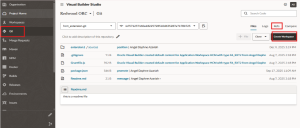
Fig 1: Creation of Workspaces
Step 2 – Specify the workspace name, branch, and development environment, and then create the workspace.
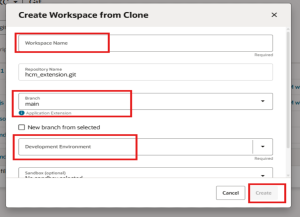
Fig 2: Specify the workspace name
Step 3 – Go to the workspace.
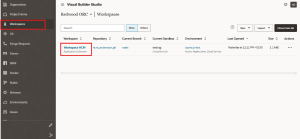
Fig 3: Go to the workspace
Step 4 – Click the Git repository or branch, then select Switch Branch/Sandbox.
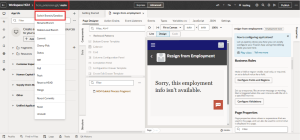
Fig 4: select Switch Branch Sandbox.
Step 5 – Enter the branch name you created, then click Commit and Switch.
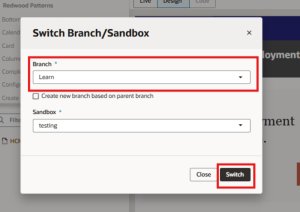
Fig 5: Enter the branch name you created
Step 6 – In Builds, access Jobs and open the hcm_extension_package job.
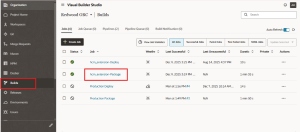
Fig 6: Access Jobs
Step 7 –switch to your created branch, tag it, and save the changes.
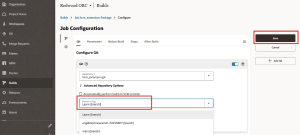
Fig 7: Switch to your created branch
Step 8 – In Merge Request, initiate Create Merge Request, clicking Next and Create.
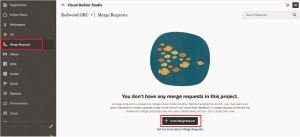
Fig 8: Create Merge Request
Step 9 – When deploying changes to production. , access Jobs > hcm_extension_package > Configure, set the branch to Main, and save the configuration.
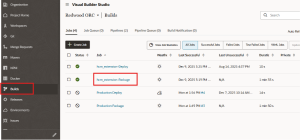
Fig 9: Deploying changes to production
Business Benefits
Implementing a structured branching strategy in Oracle Visual Builder Studio provides several operational and development advantages for organizations working with Redwood extensions.
1. Safe and Isolated Development: Branches allow developers to work on new features, UI enhancements, or bug fixes independently without impacting the main application environment.
2. Improved Code Stability: Since all changes are developed and tested in separate branches, the main branch remains stable and production-ready at all times.
3. Better Collaboration Across Teams: Multiple developers can work simultaneously on different tasks using separate branches, enabling efficient collaboration across development teams.
4. Streamlined Testing and Validation: Branches provide a controlled environment to test changes using build jobs such as hcm_extension_package, ensuring updates function correctly before merging.
5. Efficient Version Control: Branching allows teams to track development changes, manage multiple versions of enhancements, and maintain full traceability of code updates.
6. Controlled Deployment to Production: By using merge requests and structured workflows, organizations can ensure that only validated and approved changes are deployed to production.
7. Faster Development Cycles: Developers can build and test new features in parallel without waiting for other updates to complete, accelerating innovation and delivery timelines.
8. Strong Governance and Change Management: Branch-based workflows support structured development practices, helping organizations maintain governance, audit trails, and development standards.
Transform Your Redwood Development with Kovaion’s Oracle Expertise
Ready to streamline your Redwood customization and development workflows in Oracle Visual Builder Studio? At Kovaion Consulting, we help organizations implement structured branching strategies and best practices for developing extensions within the Oracle Redwood Experience.
Our experts support teams in configuring development environments, managing Git branches, optimizing build pipelines such as hcm_extension_package, and implementing efficient merge and deployment processes. By establishing a well-governed branching strategy, we help organizations reduce deployment risks, improve collaboration across development teams, and maintain stable production environments.
Partner with Kovaion to modernize your Redwood development lifecycle with expert guidance, proven implementation frameworks, and continuous support—ensuring your Oracle HCM environment remains scalable, secure, and ready for future innovation.
Conclusion
Creating a branch in Redwood using Oracle Visual Builder Studio is a critical step in maintaining a well-structured development workflow. By isolating development work from the main branch, teams can safely implement enhancements, fix issues, and test updates without disrupting the production environment.
A proper branching strategy also improves collaboration, simplifies testing, and ensures that all updates go through a controlled validation and merge process before deployment. This structured approach helps maintain code quality, ensures traceability of changes, and reduces the risk of errors during production releases.
By adopting disciplined branching practices within Visual Builder Studio, organizations can support faster innovation while maintaining the stability and reliability required for enterprise-grade Oracle HCM implementations.
Author: Smruti Samruddha, Oracle HCM Cloud Consultant.