Effective communication is critical to keeping employees informed, aligned, and engaged—especially in large enterprise environments. With PeopleSoft HCM Update Image 53, Oracle introduces key enhancements to the Notification Publisher, enabling organizations to deliver timely, targeted, and consistent messages across multiple channels.
These enhancements modernize how announcements, alerts, and updates are created and published by bringing greater visibility through landing page announcements, in-app notifications, and a unified publishing framework. By extending Notification Publisher beyond traditional HR notifications to an enterprise-wide capability, PeopleSoft HCM PUM 53 empowers organizations to streamline communication, improve employee awareness, and ensure important messages reach the right audience at the right time.

Landing Page Announcements Made Easy in HCM PUM 53
In PeopleSoft HCM Update Image 53, Oracle delivers a significant enhancement to enterprise communication through the Notification Publisher. This feature modernizes how organizations broadcast announcements, alerts, and updates across channels – ensuring timely, consistent, and targeted communication.
1.1 A Unified and Modern Notification Framework
The Notification Publisher now enables businesses to deliver content and navigation links through:
- Email notifications
- SMS/text messages
- In-app notifications using Notification Composer
With PeopleTools 8.62, in-app notifications can be seamlessly published to landing page sections, creating a centralized communication hub for employees.
1.2 Publishing on Landing Pages for Improved Visibility
One of the major enhancements is the ability to publish notifications directly to landing page sections – for example:
- Banner Announcements for organization-wide alerts
- Announcements Section for department or event-specific updates
This ensures employees see relevant updates immediately upon logging into their PeopleSoft system.
1.3 Transition from HR Notifications to Enterprise-Wide Framework
Earlier known as HR Notifications in HCM, the enhanced framework is now available under Enterprise Components, making it accessible to all application pillars. This enables:
- Department-wide messaging
- System-wide broadcast alerts
- One-time or recurring notifications
- Immediate or scheduled communication
Organizations can now manage communication across all PeopleSoft modules with a single, unified tool.
1.4 Notification Composer Adds a New Source: Notification Publisher
To support this publishing framework, Notification Composer introduces “Notification Publisher” as a new source option.
When selected, the system auto-populates the Notification Link Page with parameters from the Notification Details Page, allowing:
- Default display of notification content
- Automatic integration with landing page sections
- Easier configuration for content creators
We can view the selected notification details exactly as they will appear on the final landing page.
1.4.1 Fluid UI Support for Creating and Sending Notifications
A new, modernized Fluid page is now available to compose and publish notifications – making it easy for business users to create announcements from any device.
Example Use Case: Publishing a Travel Related Announcement
Here’s how the process works in action:
Step 1: Select a Category
PeopleSoft delivers predefined categories such as:
- Banner Announcement – for system-wide alerts
- General Notification – default, not tied to landing pages
- Custom categories (e.g., Travel Desk) can also be created for department-specific messaging.
If a category is linked to a Notification Event ID, we can click View Category Details to see:
- Which landing page section the notification will appear in
- Associated event configuration
Navigation: Menu > Enterprise Components > Notification Composer > Notification Publisher > Publish Notification
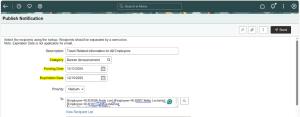
Fig 1.1 Starting with Notification setup in Notification Publisher
Step 2: Review Notification Content Details
The system pulls default content from the associated Notification Event, which we can override if needed. In our case, the Notification Content is overridden.
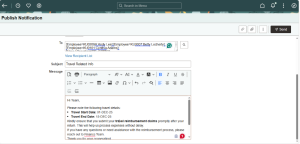
Fig 1.2 Overriding the Content to be displayed when clicked on the Notification
Step 3: Configure Dates
We can configure:
- Posting date (defaults to today; can be future-dated)
- Expiration date to automatically retire the notification
- Recurrence schedules (daily, weekly, monthly)
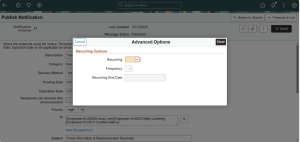
Fig 1.3 Setting up Recurrences if needed
Step 4: Select Recipients
The notification can target: All users, Specific role-based users or Custom recipient lists.
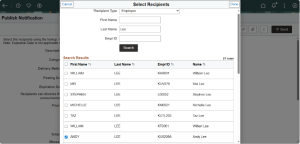
Fig 1.4 Selecting Recipients
Step 5: Add Additional Elements
We can include Predefined page links and Attachments as well.
Navigation: Menu > Enterprise Components > Notification Composer > Notification Publisher > Define Notification Links
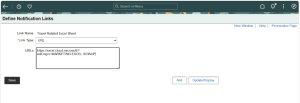
Fig 1.5 Defining URL in Define Notification Links
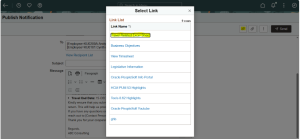
Fig 1.6 Selecting the defined URL for Publishing the Notification
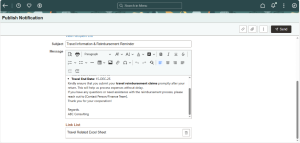
Fig 1.7 Link shown in Publish Notification Page
Step 6: Review & Publish
Once published, the announcement appears in the selected landing page section. If the landing page is not enabled, notifications appear under the Announcement tile on the homepage.
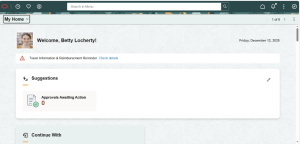
Fig 1.8 Notification Shown on Landing Page as Announcement
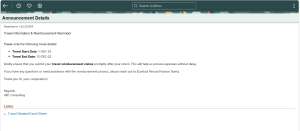
Fig 1.9 Notification Details shown when clicked on Announcement
Business Benefits:
- Improved Communication Reach: Multi-channel delivery through email, SMS, in-app notifications, and landing page announcements ensures critical messages reach employees wherever they are, reducing missed or delayed communications.
- Centralized and Highly Visible Messaging: Publishing notifications directly on landing pages creates a single, centralized communication hub, ensuring important updates are immediately visible upon login and minimizing reliance on scattered emails.
- Targeted and Relevant Notifications: Role-based, department-specific, and custom recipient targeting enables organizations to deliver the right message to the right audience, reducing information overload and improving message relevance.
- Faster Response to Time-Sensitive Updates: Scheduled, recurring, and immediate notifications allow organizations to respond quickly to business needs, policy changes, and system alerts—driving faster employee action and compliance.
- Modern and User-Friendly Experience: Fluid UI–based notification creation empowers business users to create and manage announcements easily from any device, reducing dependency on technical teams and accelerating communication cycles.
- Consistent Enterprise-Wide Communication: The transition to an enterprise-wide framework ensures consistent messaging across all PeopleSoft pillars, improving governance, standardization, and communication alignment.
- Reduced Administrative Effort: Reusable notification templates, auto-populated content, and centralized management streamline administrative tasks and reduce manual effort for HR and IT teams.
- Enhanced Employee Engagement and Awareness: Timely, relevant, and visible notifications improve employee awareness, engagement, and responsiveness—especially for high-priority or critical business communications.
Conclusion
The Notification Publisher enhancement in PeopleSoft HCM Update Image 53 significantly strengthens PeopleSoft’s communication framework by delivering a modern, flexible, and centralized notification experience. With support for multi-channel delivery, landing page publishing, and Fluid UI–based configuration, organizations can communicate critical updates more effectively while ensuring consistency and visibility across the platform.
Whether it’s system alerts, HR announcements, or department-specific messaging, organizations can now ensure the right information reaches the right audience at the right time—across devices and channels. These enhancements not only improve employee awareness and engagement but also empower administrators with greater control, scalability, and ease of use in managing enterprise-wide communication.
Ready to Modernize Communication in Your PeopleSoft HCM Environment?
At Kovaion, we help organizations unlock the full potential of PeopleSoft HCM PUM 53 by enabling and optimizing Notification Publisher enhancements—from landing page announcements to multi-channel, targeted notifications.
Whether you’re upgrading to Update Image 53, configuring enterprise-wide notifications, or streamlining employee communications across PeopleSoft modules, our experts bring deep functional and technical expertise to every engagement.
Connect with us today to see how Kovaion can help you deliver timely, relevant, and impactful communication across your PeopleSoft ecosystem.
Author: Nandhini Devi R, Senior Consultant