Efficient document management is a critical part of maintaining accurate employee records and ensuring compliance within modern HR systems. In enterprise environments using Oracle Fusion HCM, the Document of Records functionality enables organizations to securely manage important employee documents such as identification records, certifications, and official documents. However, manually entering issuing comments for each record can be time-consuming and may result in inconsistent documentation across the organization.
To address this challenge, Oracle introduces Enhanced AI-Generated Issuing Comments and Improved Document Type Descriptions, a capability that leverages artificial intelligence to automatically generate meaningful and context-aware issuing comments. By enabling the Generate option through configuration in Oracle Visual Builder Cloud Service, administrators can allow users to quickly generate, regenerate, or refine issuing comments based on the selected document type and predefined criteria.
This guide explains how administrators can enable this functionality and leverage AI-assisted capabilities to streamline document management, improve consistency in employee records, and enhance the overall efficiency of HR documentation processes.

Prerequisites
Before performing the steps outlined in this document, ensure that the following requirements are met:
- You have Administrator access to the application.
- Access to Oracle Visual Builder Cloud Service (VBCS) is available.
- The Document of Records feature is enabled in the application.
- Page Properties configuration permissions are granted for creating and managing rules.
- AI-assisted features are enabled and properly configured in the environment.
Step 1- Log in as an Administrator
- Sign in to the application using your Administrator credentials.
- Once logged in, navigate to My Client Groups.
- Under the Quick Actions section, select Document of Records.
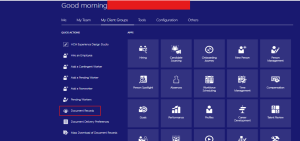
Fig 1: Log in as an Administrator
Step 2- Select the employee to whom the document of record will be added.
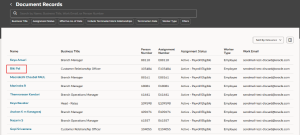
Fig 2: Select the employee
Step 3 – Navigate to VBCS.
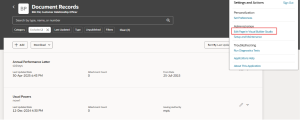
Fig 3: Navigate to VBCS
Step 4 -Navigate to Configure Page Properties.
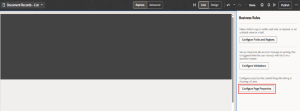
Fig 4: Navigate to Configure Page
Step 5 -Create a New Rule for page properties.
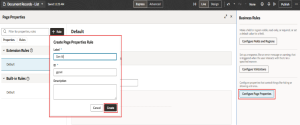
Fig 5: Creation of New Rule
Step 6 – Enabled the Generate button in VBCS and Preview it.
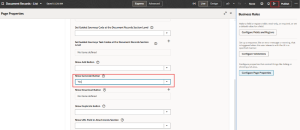
Fig 6: Enabled the Generate button
Step 7 – Navigate to Document of Record, click Add, choose Passport as the document type, and view the issuing comments.
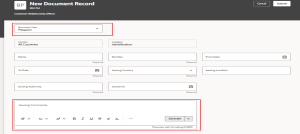
Fig 7: Navigate to Document of Record
Step 8 – When adding a document record, click Generate in the Issuing Comments field. Based on the selected document type, AI automatically generates comments in the Issuing Comments field. To regenerate the comments, click Generate again. You can use the AI-generated comments as they are or edit them as needed.
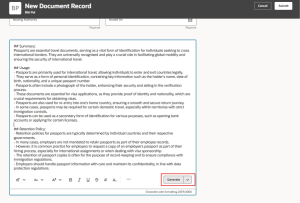
Fig 8: To regenerate the comments
Step 9 – This section describes the criteria used to generate AI-assisted issuing comments for document records.
- Tone – Engaging, Formal (default)
- Summarize- Issuing comments generated will be 1250 characters. For document records that have renewal and retention sections, issuing comments generated will be 400 characters and 350 characters respectively.
- Expand-This is the default setting. Issuing comments generated will be 2500 characters. For document records that have renewal and retention sections, issuing comments generated will be 800 characters and 400 characters respectively.
- Rewrite-Selecting this option will not consider the earlier inputs provided in this field. Issuing comments generated will be 2500 characters.
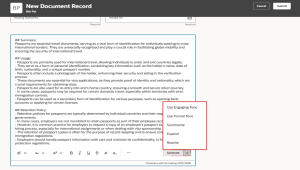
Fig 9: Generate AI-assisted issuing comments for document records
Business Benefits
Implementing AI-generated issuing comments for Document of Records in Oracle Fusion HCM provides organizations with several operational and strategic advantages by improving the way HR teams manage employee documentation.
1. Reduced Administrative Effort: AI automatically generates issuing comments based on the selected document type, eliminating the need for HR administrators to manually write descriptions for every document record. This significantly reduces repetitive work.
2. Consistent and Standardized Documentation: AI-generated comments follow a structured format and predefined tone, ensuring that documentation across employees and departments remains consistent and professional.
3. Faster Document Record Creation: With the Generate option enabled through Oracle Visual Builder Cloud Service, HR teams can quickly create issuing comments while adding document records, improving overall processing speed.
4. Improved Accuracy and Clarity: AI assists in producing clear and context-aware comments, reducing the risk of incomplete or unclear documentation while improving the overall quality of HR records.
5. Enhanced Compliance and Audit Readiness: Standardized issuing comments make document records easier to review and verify, helping organizations maintain compliance with internal policies and external regulatory requirements.
6. Flexible Content Customization: Users can summarize, expand, rewrite, or edit AI-generated comments, ensuring that the content meets both business needs and regulatory guidelines.
7. Better HR Productivity: By automating routine documentation tasks, HR professionals can focus more on strategic HR initiatives such as talent development, employee engagement, and workforce planning.
8. Scalable Document Management: AI-assisted issuing comments help organizations efficiently manage large volumes of employee documents while maintaining high data quality and consistency across the system.
Transform Your HR Document Management with Kovaion’s Oracle AI Expertise
Ready to modernize how your organization manages employee documents in Oracle Fusion HCM? At Kovaion Consulting, we help organizations unlock the full value of AI-powered capabilities such as AI-generated issuing comments for Document of Records using Oracle Visual Builder Cloud Service.
Our experts support enterprises in configuring VBCS rules, enabling AI-assisted features, and optimizing document workflows within the Oracle Redwood Experience. By automating issuing comments and improving document type descriptions, we help HR teams reduce manual effort, maintain consistent documentation standards, and strengthen compliance readiness across employee records.
Partner with Kovaion to streamline your Oracle HCM document management processes with intelligent automation, best-practice configurations, and continuous innovation—creating a smarter, more efficient, and future-ready HR ecosystem.
Conclusion
Enabling AI-generated issuing comments for Document of Records in Oracle Fusion HCM provides a smarter and more efficient approach to managing employee documentation. By configuring the Generate option through Oracle Visual Builder Cloud Service, administrators can allow users to automatically create structured issuing comments that are clear, relevant, and aligned with document types.
This AI-driven capability not only reduces manual effort but also ensures consistency and accuracy across document records. With flexible options such as Summarize, Expand, and Rewrite, users can easily customize generated comments to meet organizational standards and compliance requirements.
By adopting AI-assisted documentation features, organizations can streamline HR administrative processes, improve data quality, and maintain well-structured employee records—supporting more efficient and reliable HR operations across the enterprise.
Author: Smruti Samruddha, Oracle HCM Cloud Consultant.