In the release of PeopleTools 8.62, Oracle has delivered a series of impactful enhancements to the Content Reference Administration, significantly improving the way administrators and developers create and manage PeopleSoft Landing Pages. These updates are aimed at simplifying the homepage design process, making it faster, safer, and more intuitive to build responsive, user-friendly Fluid Homepages. Whether you’re customizing delivered content or building layouts from scratch, the new tools in 8.62 offer more control and efficiency than ever before.
Among the most notable improvements are features that address long-standing design challenges. The new “Save As” function allows seamless cloning of entire homepages, providing a quick way to back up or duplicate layouts without risk to live configurations. Designers can now instantly preview their changes using the “View in New Window” option, streamlining the review process and reducing development time. Additionally, the introduction of the “Optional Longer Title” field removes the 30-character label limitation, enabling clearer and more descriptive tile names that enhance navigation and usability. These enhancements not only support faster development cycles but also contribute to a more polished and engaging user experience across the PeopleSoft environment.

1. Effortlessly Clone and Backup with ‘Save As’
When designing a complex Landing Page, you rarely get it perfect on the first try. You need to experiment, or you might want to create a new homepage based on an existing one. The new ‘Save As’ feature is built for this workflow.
- What it is: A new ‘Save As’ button is now available on the Content Reference Administration page for Fluid Homepages. Clicking it allows you to instantly create a complete copy (a clone) of the entire homepage of Content Reference under a new name.
- How it helps: Clicking the button opens a dedicated “Homepage Save As” page where you can define the properties for your new cloned homepage, such as its name, label, and security settings.
This is incredibly useful for a few key scenarios:
- Creating a backup: Before you start a major redesign of an existing homepage, you can use ‘Save As’ to create a quick backup. If anything goes wrong, you have a safe version to revert to.
- Customizing delivered pages: You can clone a homepage delivered by Oracle and then safely customize your own version without modifying the original object.
- Iterating designs: Quickly create several versions of a homepage to test different layouts or tile configurations.
After saving, the system confirms the creation and prompts you to navigate directly to the new definition, allowing you to continue your work seamlessly.
This is a true cloning feature for the homepage of Content Reference itself, unlike the previous “Copy Object” button, which was designed for a different purpose (copying a Content Reference to another portal).
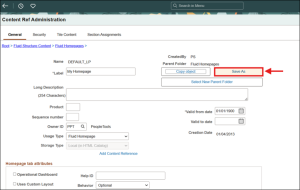
Fig 1.1: Save As (Content Reference) – Duplication of a Delivered Component
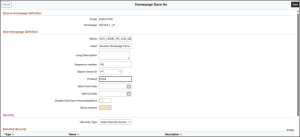
Fig 1.2: Save As (Content Reference) – Duplication of a Delivered Component (Properties)

Fig 1.3: Save As (Content Reference) – Duplication of a Delivered Component
2. Instantly Preview Your Changes with ‘View in New Window’
The typical design process can be tedious: make a change, save, navigate back to your portal, refresh the page, and see the result. The new ‘View in New Window’ button eliminates these extra steps, creating a seamless design-and-review cycle.
- What it is: When you’re on the ‘Section Assignments’ page, configuring your homepage tiles and layout, you’ll find a ‘View in New Window’ button.
- How it helps: This button doesn’t just open the admin page in a new window—it opens the actual end-user view of the Landing Page you are currently designing. Best of all, it automatically saves your latest changes before launching the preview. This immediate visual feedback is a game-changer for fine-tuning the look and feel of your Landing Pages.
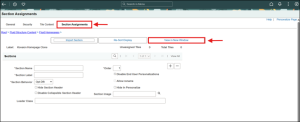
Fig 2.1: Section Assignment & View in New Window
3. Break Free from Character Limits with ‘Optional Longer Title’
A common design challenge has been fitting a descriptive title for a tile within the standard Content Reference label’s 30-character limit. This often leads to awkward abbreviations or vague titles.
- What it is: On the ‘Fluid Attributes’ tab for the title Content Reference, there is a new field called ‘Optional Longer Title’.
- How it helps: This field allows you to provide a much more descriptive, user-friendly title for your title without being constrained by the short label field. When the title is rendered on a modern Landing Page, this longer title will be displayed, giving you far more flexibility to create clear and informative navigation for your users.
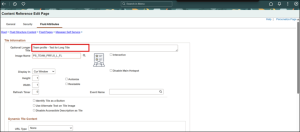
Fig 3.1: Optional Longer Tile Title Setup
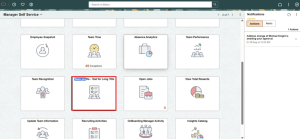
Fig 3.2: Optional Longer Tile Title
Business benefits
- Increased development speed and agility: Designers can rapidly prototype and deploy landing pages using the ‘Save As’ and ‘View in New Window’ features, reducing time-to-delivery.
- Reduced risk in homepage modifications: The ability to clone homepages provides a reliable backup before changes, minimizing the chance of errors in live environments.
- Enhanced user experience: Longer, descriptive tile titles improve clarity and usability, leading to better navigation and higher user satisfaction.
- Greater customization flexibility: Teams can safely modify delivered Oracle pages by cloning them, allowing tailored solutions without impacting delivered configurations.
- Lower development and maintenance costs: Faster design cycles and reduced rework lead to efficiency gains and cost savings across projects.
- Improved interface adoption and engagement: More intuitive and professionally designed homepages encourage user adoption and improve engagement across the organization.
- Scalable and consistent UI management: The new tools support easier management of complex layouts, ensuring consistent design standards across large implementations.
Accelerate Your PeopleSoft Homepage Innovation with Kovaion
The powerful enhancements in PeopleTools 8.62—such as ‘Save As’, ‘View in New Window’, and ‘Optional Longer Title’ equip your team to build smarter, safer, and more user-friendly Fluid Landing Pages. But unlocking their full potential requires the right strategy, tools, and expertise.
At Kovaion, we specialize in helping organizations optimize PeopleSoft environments through guided upgrades, intelligent design practices, and automation-driven delivery. From customizing Oracle-delivered homepages to enabling scalable and consistent UI governance, our experts ensure that your PeopleSoft platform not only keeps up with change—but leads it.
Whether you’re planning a rollout, retrofitting existing layouts, or looking to streamline your homepage management, Kovaion is your trusted partner in making the most of PeopleTools 8.62.
Get in touch with us today to elevate your PeopleSoft user experience and drive real business value from your UI investments.
Conclusion
The enhancements in PeopleTools 8.62 mark a meaningful improvement in how administrators and developers manage PeopleSoft Fluid Landing Pages. Features like ‘Save As’ and ‘View in New Window’ streamline the design process by enabling faster prototyping, safer customization, and immediate visual feedback. These tools reduce the risks associated with homepage changes and empower teams to work more efficiently and confidently.
Additionally, the ‘Optional Longer Title’ feature enhances the user experience by allowing clearer, more descriptive tile labels improving navigation and overall interface clarity. Together, these updates help organizations deliver more polished, user-friendly, and responsive landing pages, supporting greater adoption, reduced development time, and a stronger return on their PeopleSoft investment.
Author: Deepak R, Consultant.