Work Schedules, Shifts, and Work Patterns in Oracle HCM
Ask most HR teams how they’d define “a normal work week,” and you’ll get a confident answer in seconds. Ask Oracle HCM the same question, and the honest response is: it depends on what you’ve told it. Every calculation that assumes a worker was supposed to be somewhere at a certain time — overtime, absence duration, time card defaults, even shift premiums — traces back to one configuration underneath it all: the work schedule.
It’s one of those workforce structures that gets set up early in an implementation and then quietly runs almost everything downstream of it. Get it right, and Time and Labor, Absence Management, and Payroll all behave the way people expect. Get it wrong, and you’ll spend the first few payroll cycles explaining why a Saturday leave request came back as zero days, or why a rotating shift worker keeps showing incorrect overtime.
The Three Building Blocks
Oracle builds a work schedule out of three layers, and it’s worth understanding them in order, because each one depends on the last.
A shift is the smallest piece: a start time, an end time, and any breaks in between. A morning shift, a night shift, a 6 AM-to-2 PM rotation — each one is defined once and reused wherever it’s needed. A workday pattern strings shifts together across a repeating cycle. That cycle doesn’t have to be seven days — the pattern length is whatever the rotation actually needs, whether that’s a standard Monday-to-Friday week or a longer sequence like four days on, four days off. Inside the pattern, every day in the cycle is mapped to a specific shift, or marked as a day off. A work schedule takes a workday pattern, gives it a start date, and optionally layers in exceptions — public holidays, planned closures, or a one-off change for a specific period. This is the object that actually gets assigned to people.
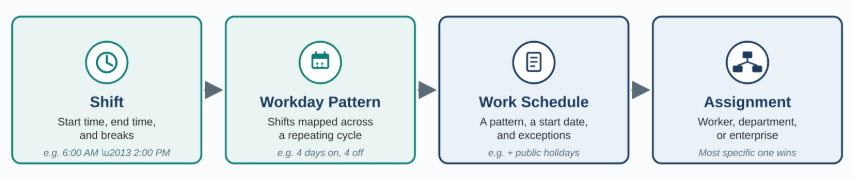
Each layer is reusable on its own. A night shift built once can appear in a dozen different patterns; a rotation pattern built once can back several different schedules across departments. That reuse is exactly why it pays to get the building blocks right before building anything on top of them.
Where This Data Actually Gets Used
A work schedule isn’t an HR record that just sits there for reference — three other modules read it constantly.
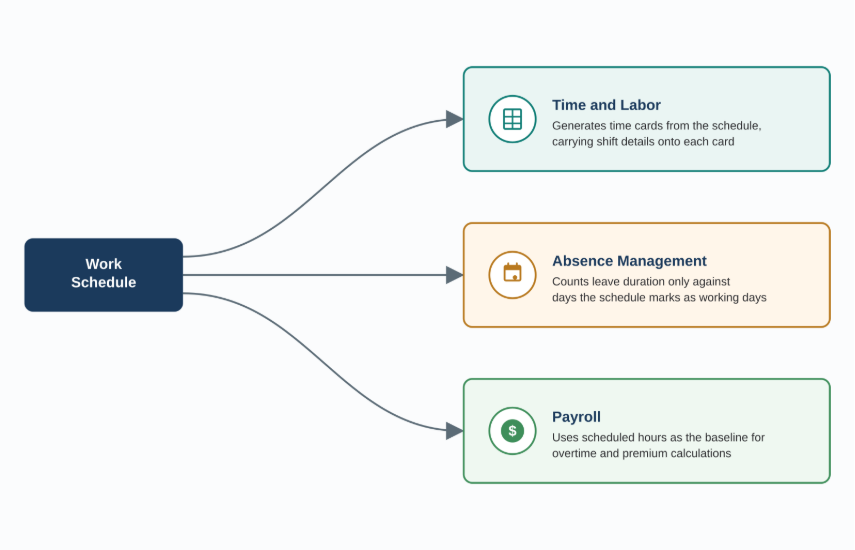
Time and Labor uses it to generate time cards. When a schedule-based time card is created, Oracle doesn’t just populate expected hours — recent releases carry the shift’s department, location, category, breaks, and even overtime eligibility onto the card itself as reference detail. That’s a meaningful head start for a time and labor manager reviewing a batch of cards.
Absence Management uses the schedule to decide what a day off actually costs someone. If a worker’s schedule says Saturday isn’t a working day, a leave request spanning Saturday simply doesn’t count it — duration is calculated only against the days the schedule says the person would have worked anyway.
Payroll relies on scheduled hours as the baseline against which actual hours get compared, which is where a lot of overtime and premium calculations start. None of these three modules invent their own definition of a working day — they all point back to the same schedule, which is exactly why getting it right at the start of an implementation matters more than it looks like it should.
Fixed Shifts or Flexible Patterns
There are two fairly different ways to define what a worker’s day looks like, and picking the right one matters.
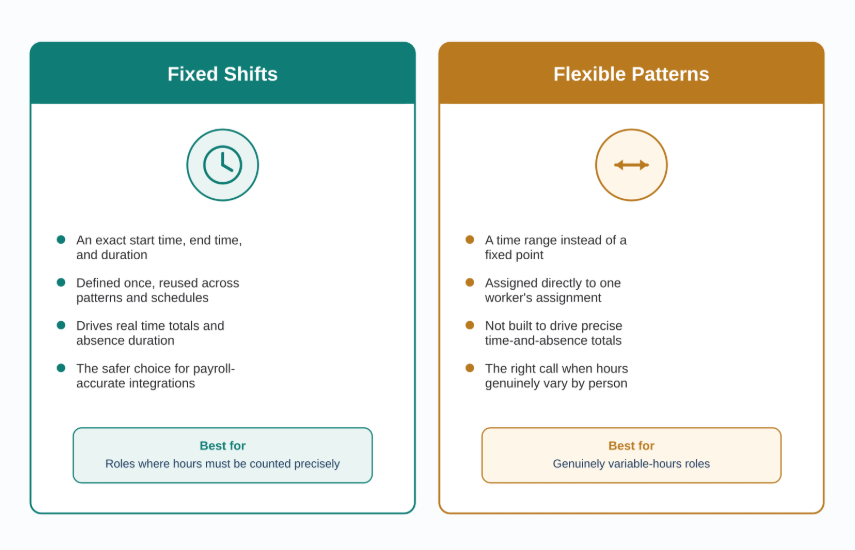
A fixed shift has a specific start time, end time, and duration — the same every time it’s used. This is the traditional building block behind the shift-and-pattern structure above, and it’s the right choice whenever Time and Labor, Absence Management, or Payroll need to derive real time totals from the schedule.
A flexible pattern, by contrast, defines a range rather than a fixed point — a worker who can take their four hours any time between 6 AM and noon, for example. Oracle can assign a work pattern like this directly to a worker’s assignment rather than routing it through a shared work schedule, which suits roles where the exact hours genuinely vary from person to person. The tradeoff is that flexible patterns aren’t meant to drive precise time-and-absence integrations the way fixed shifts are — if payroll or Time and Labor needs to calculate real numbers from the schedule, fixed shifts are the safer foundation.
Who Wins When Schedules Overlap
Schedules can be assigned at three different levels — to an individual’s primary work assignment, to a department, or to the whole enterprise — and more than one can technically apply to the same person at once. Oracle resolves that with a simple precedence rule: whatever’s assigned directly to the worker’s primary assignment wins, department-level schedules are next, and enterprise-level schedules are the fallback when nothing more specific exists.
Exceptions work independently of that hierarchy. A public holiday, a planned office closure, or a one-off change for a single worker can all be layered onto a schedule as an exception without touching the underlying pattern — which means the base rotation stays reusable even as real-world calendars keep interrupting it.
Before You Build Anything
A short readiness check saves a lot of rework later:
- Confirm which downstream calculations actually depend on the schedule — overtime rules, absence duration, payroll — before choosing between fixed shifts and flexible patterns; it changes which one you should use.
- Design the workday pattern’s cycle length around how the rotation actually works, not around a default seven-day week — a 4-on/4-off or three-shift rotation needs a pattern long enough to capture the full cycle.
- Decide the assignment level — worker, department, or enterprise — deliberately; relying only on individual assignments makes changes slow at scale, while relying only on enterprise-level schedules loses the nuance most organizations actually need.
- Build calendar events for holidays and planned closures before building schedule exceptions, since exceptions typically reference them.
- Pilot at least one full rotation cycle before rolling a pattern out broadly — errors in a rotating pattern often don’t surface until the cycle repeats.
Setting It Up
The build order matters: shifts first, since patterns reference them; workday patterns next, since schedules reference those; work schedules last, since that’s the object actually assigned to people. All three live under Workforce Structures, and each shift or pattern, once created, can be reused across as many schedules as needed — there’s no need to rebuild a night shift from scratch for every department that uses one.
For the newer, assignment-level approach, work patterns are created and assigned directly to a specific worker’s assignment through the Work Patterns quick action — the faster path when a schedule genuinely only applies to one person rather than a whole team.
What’s Changed Recently
A few recent releases are worth knowing about if it’s been a while since you last touched this area. Work pattern types used to be defined per country; that requirement is gone, and general pattern types can now be reused across any country, which removes a real amount of duplicate setup for multinational organizations. Shift and pattern durations were locked to 15-minute increments for years; that restriction can now be lifted through a profile option, letting you define breaks and work durations down to the exact minute — useful for organizations with compliance rules that don’t round neatly. And on the Time and Labor side, schedule-generated time cards now carry a much richer set of read-only shift details — department, location, category, scheduling group, qualification, incentive amount, and overtime eligibility all show up directly on the card, which cuts down on how much a time and labor manager has to cross-reference manually during review.
Lessons for a Smooth Rollout
None of the individual pieces here are complicated. The rollout around them is where most of the real work happens.
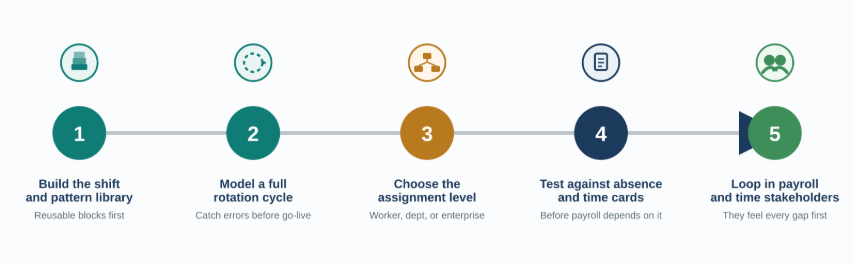
Build the shift and pattern library before touching a single work schedule — get the building blocks right once, and every schedule built on top of them inherits that accuracy. Model at least one full rotation cycle on paper or in a sandbox before configuring it, especially for anything longer than a standard week, since a mistake in a 4-on/4-off pattern often only becomes visible the second time the cycle repeats. Decide the assignment level based on how the organization actually manages change, not on what’s fastest to configure today. Test how a schedule interacts with absence requests and time card generation before go-live, not after the first payroll run depends on it. And loop payroll and time and labor stakeholders into the schedule design conversation early, since they’re the ones who’ll feel every gap in it first.
Where It Falls Short
Work schedules are a genuinely foundational piece of Oracle HCM, but they’re not self-maintaining. A pattern built for a rotation that operations later changed doesn’t update itself — someone has to own it. Flexible, assignment-level patterns solve a real problem for variable-hours roles, but they trade away the precision that fixed shifts give Time and Labor and Payroll, so using them for a role that genuinely needs accurate time totals just moves the problem downstream instead of solving it. And because the precedence hierarchy quietly picks the most specific schedule available, an old worker-level assignment nobody remembered to update can silently override a correct department-level change — exactly the kind of gap that only shows up in an audit or a confused payroll question.
Closing Thoughts
None of the three building blocks here are complicated on their own. What makes work schedules actually work is the same discipline that makes most workforce structures work: a shift library that’s genuinely reused instead of rebuilt, a pattern cycle that matches how people really rotate, an assignment level chosen on purpose, and someone accountable for keeping it current as the organization changes. Get that right, and the rest of Time and Labor, Absence Management, and Payroll stop fighting the schedule and start trusting it.
Optimize Workforce Scheduling with Oracle HCM Cloud Services
Accurate work schedules, shifts, and work patterns are essential for keeping Time and Labor, Absence Management, and Payroll processes aligned. A well-designed scheduling structure can help organizations improve calculation accuracy, reduce manual corrections, and support consistent workforce management.
Kovaion’s Oracle HCM Cloud Services help organizations configure, implement, integrate, and optimize Oracle Cloud HCM solutions based on their workforce requirements. Our expertise covers Oracle HCM configuration, Time and Labor, Absence Management, Payroll integrations, workforce structures, testing, enhancements, upgrades, and ongoing support.
Looking to improve workforce scheduling and streamline your Oracle HCM processes? Connect with Kovaion to explore how our Oracle HCM Cloud Services can help you build scalable workforce structures and get more value from your Oracle HCM environment.
FAQs
Work schedules in Oracle HCM define when workers are expected to work and provide the scheduling foundation used by Time and Labor, Absence Management, and Payroll processes.
A shift defines a specific start time, end time, and breaks. A workday pattern combines shifts into a repeating cycle, while a work schedule applies a workday pattern with a start date and any applicable exceptions.
Oracle Time and Labor uses work schedules to determine expected working hours and generate schedule-based time cards. Schedule information can also provide shift-related details such as department, location, breaks, and overtime eligibility.
Absence Management uses the worker’s schedule to determine which days are working days when calculating absence duration. For example, a non-working Saturday can be excluded from the duration of a leave request.
Fixed shifts have defined start times, end times, and durations, making them suitable when precise time calculations are required. Flexible work patterns provide a range of working hours and are useful when workers have variable schedules.
Schedules can be assigned at the worker’s primary work assignment, department, or enterprise level. When multiple schedules apply, the more specific assignment takes precedence, followed by the department-level schedule and then the enterprise-level schedule.
Organizations should identify downstream requirements, determine the appropriate pattern cycle, select the correct assignment level, configure relevant calendar events, and test at least one complete rotation cycle before broader deployment.