Work Management Framework in HCM PUM 54

PeopleSoft HCM PUM 54 introduces the Work Management Framework for HCM WorkCenters, helping administrators manage transaction errors, warnings, and follow-up activities more efficiently. This enhancement allows users to assign transactions, perform bulk actions, add comments, and track transaction history from a centralized workspace.
Work Management Framework for HCM WorkCenters
- HCM adopts Enterprise Components’ Work Management Framework for its WorkCenters, enabling administrators to view and manage transaction errors and warnings in the My Work section.
- For this demonstration, we will use the Benefits WorkCenter.
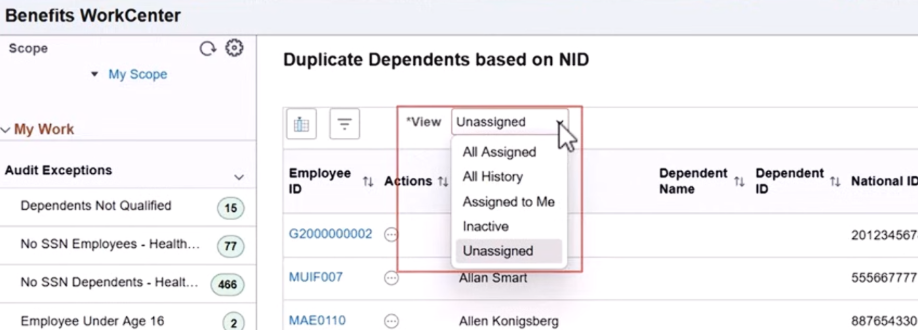
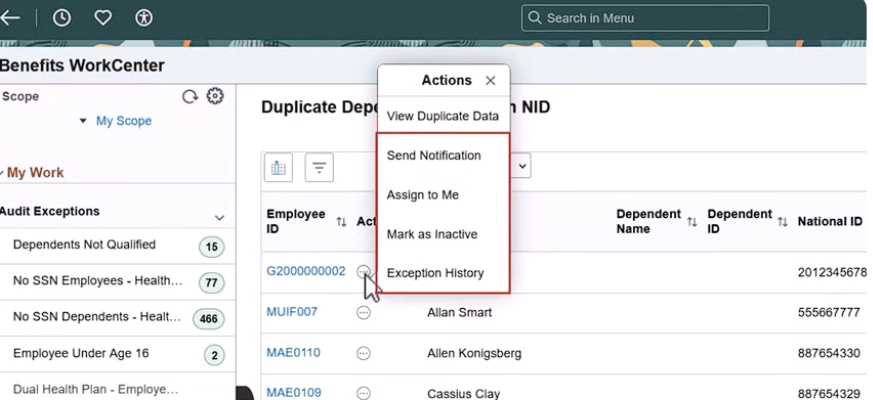
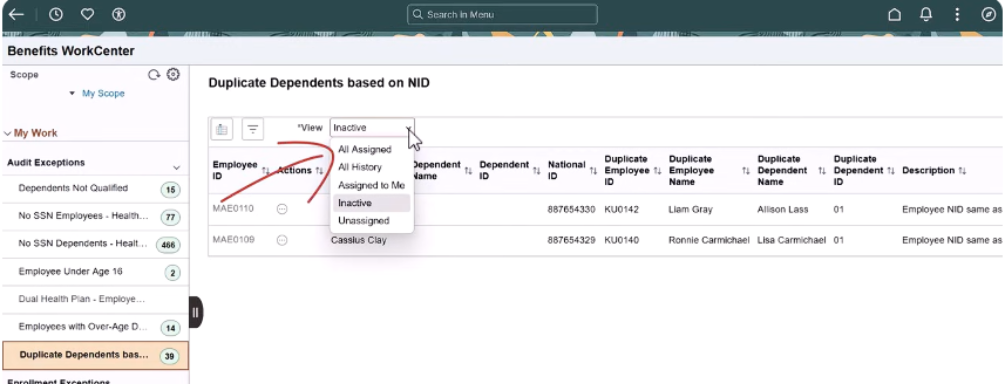
- When Work Management is enabled for a transaction in a WorkCenter, the View drop-down field appears above the grid. This field allows users to filter transactions based on their Work Management status. Five views are available, and the Actions options now include both WorkCenter and Work Management actions.
Bulk Actions and Transaction Handling
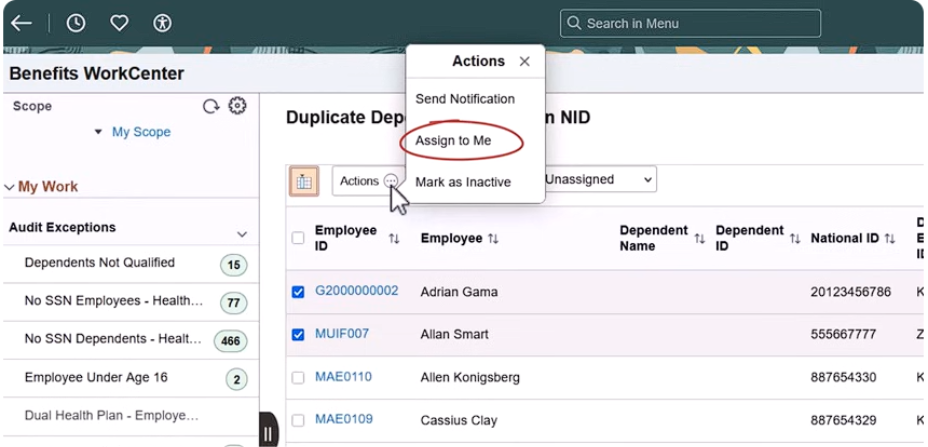
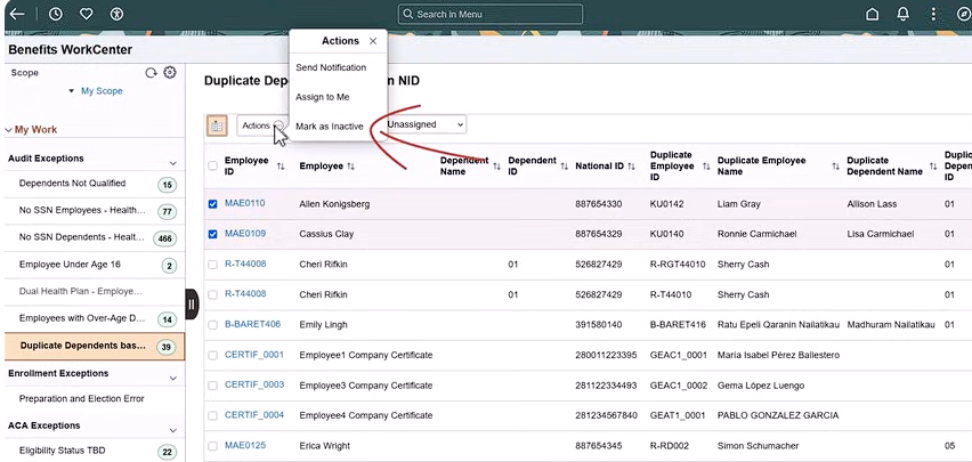
- The Enable Bulk Action button allows users to select multiple rows and perform Work Management actions on them simultaneously. Once enabled, the Actions button appears next to it.
- The default Unassigned view displays all transactions that require attention. As an administrator, you can select multiple rows and perform bulk actions, such as assigning transactions to yourself using the Assign to Me action.
Comments and Follow-Up Management
- When assigning transactions, you can provide comments describing what needs to be completed by the follow-up date. The default follow-up date is determined by the setup configuration but can be modified as needed.
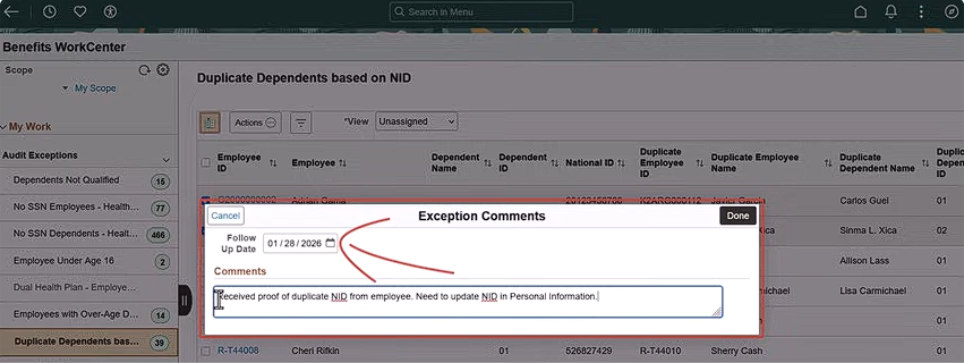
- You can also remove transactions that do not require further action using the Mark as Inactive option. Any comments entered are saved in the Transaction Exception History.
Transaction Views and Tracking
Once actions are performed, transactions move from the Unassigned view to the appropriate views.
- Use the Assigned to Me view to see transactions assigned to you. If a transaction was assigned by mistake, you can unassign it from this view.
- While working on a transaction, you can review the Action History to track what actions were taken, by whom, and any associated comments.
- The Inactive view displays all transactions marked as inactive.
- The All Assigned view shows all transactions assigned to all administrators, which is especially useful in organizations with multiple administrators.
- The All History view provides a comprehensive list of all transactions, regardless of their Work Management status.
Availability across WorkCenters
Work Management is now available for the following WorkCenters:
- Benefits
- Canadian Payroll
- Global Payroll
- US Payroll
- Time and Labor
Business Benefits of the Work Management Framework
- Improved Exception Management: Helps administrators identify and manage transaction errors and warnings from a centralized WorkCenter.
- Reduced Manual Effort: Bulk actions allow administrators to assign or update multiple transactions simultaneously.
- Better Task Accountability: Transaction assignments, comments, and follow-up dates clarify responsibilities and expected actions.
- Enhanced Tracking and Visibility: Action history helps administrators review previous actions, comments, and the individuals responsible.
- More Efficient Administration: Dedicated views for unassigned, assigned, and inactive transactions make it easier to prioritize and manage pending work.
- Better Team Coordination: The All Assigned view provides visibility into transactions assigned across multiple administrators.
Conclusion
The Work Management Framework introduced in PeopleSoft HCM PUM 54 enhances exception handling and administrative efficiency across supported HCM WorkCenters. With centralized transaction management, bulk actions, assignment options, follow-up dates, comments, and transaction history, administrators can organize pending activities, track responsibilities, and manage transaction errors and warnings more effectively.
By providing dedicated views for unassigned, assigned, inactive, and historical transactions, this enhancement improves visibility and supports better coordination among administrators. Organizations can leverage these capabilities to streamline HCM administration, reduce manual effort, and establish a more structured approach to managing transaction exceptions within PeopleSoft HCM.
Optimize Your PeopleSoft HCM WorkCenters with Kovaion
Looking to improve exception management and streamline your PeopleSoft HCM administration? Kovaion helps organizations optimize their PeopleSoft environments through expert consulting, application enhancements, and tailored PeopleSoft HCM consulting services.
Whether you are evaluating PeopleSoft HCM PUM updates, improving WorkCenter processes, or looking to make transaction management more efficient, our team can help you explore relevant PeopleSoft capabilities and align your HCM environment with your business requirements.
Ready to Get More Value from PeopleSoft HCM?
Connect with Kovaion to discuss your PeopleSoft HCM requirements and explore opportunities to simplify administrative workflows, improve transaction visibility, and optimize your existing PeopleSoft applications.
Contact Kovaion’s PeopleSoft HCM Experts to discuss your requirements and discover the right approach for your organization.