WhatsApp as a Communication Channel in ORC
WhatsApp is added as a communication channel to help recruiters interact with the external candidates. Recruiters, hiring managers, and hiring team members can now send WhatsApp messages to one or many candidates directly from a candidate profile, job application, or talent pool. They can also receive and respond to candidates’ WhatsApp messages within the system.
Ways to send a WhatsApp Message:
- WhatsApp messages can be sent to individual candidates from the Message Center, the Messages tab on their profile, or from candidate list views such as search results, job applications, pools, and the Recruiting Activity Center.
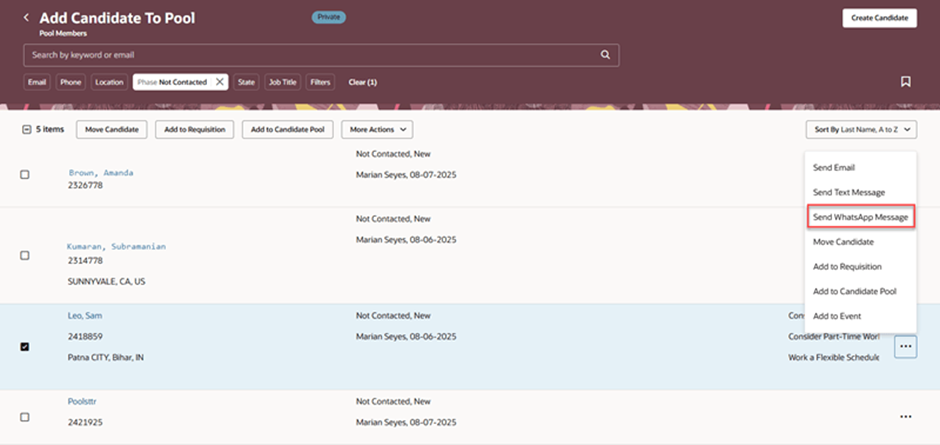
- WhatsApp messages can be sent to multiple candidates in bulk from candidate list views such as candidates search results, pools, and events.
- You can also view and reply to WhatsApp messages from the above pages.
How to configure WhatsApp Communication:
- Set up WhatsApp by creating and activating a WhatsApp messaging provider, configuring outbound message limits, and enabling WhatsApp communications.
- Next, create WhatsApp templates, submit them to Meta for approval, and link the approved templates to Content Library templates using the Recruiting Content Library task.
- Candidates must select WhatsApp as their preferred communication channel on the career site, or recruiters can set it in the Preferences section of the candidate profile.
- The allowed preferred channel options are Email, SMS, WhatsApp, Email & SMS, or Email & WhatsApp. However, only one phone-based channel, SMS or WhatsApp, can be chosen as the preferred option at a time.
Steps to compose the WhatsApp message to a particular candidate:
- My client Group -> Hiring
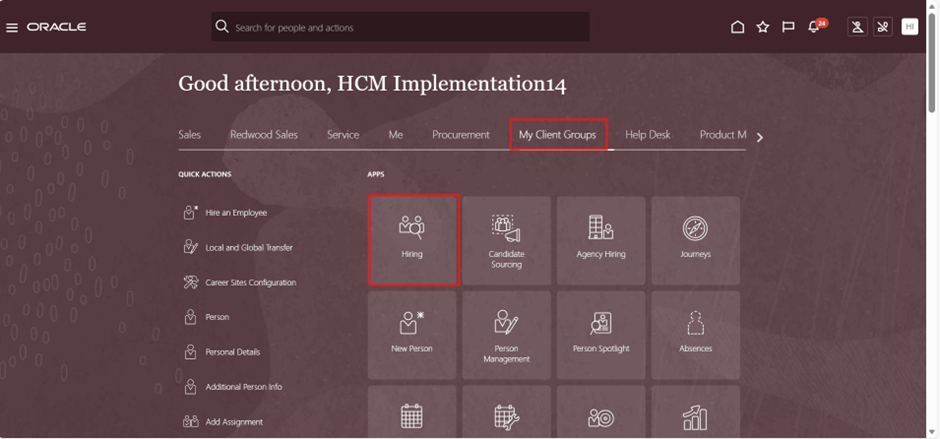
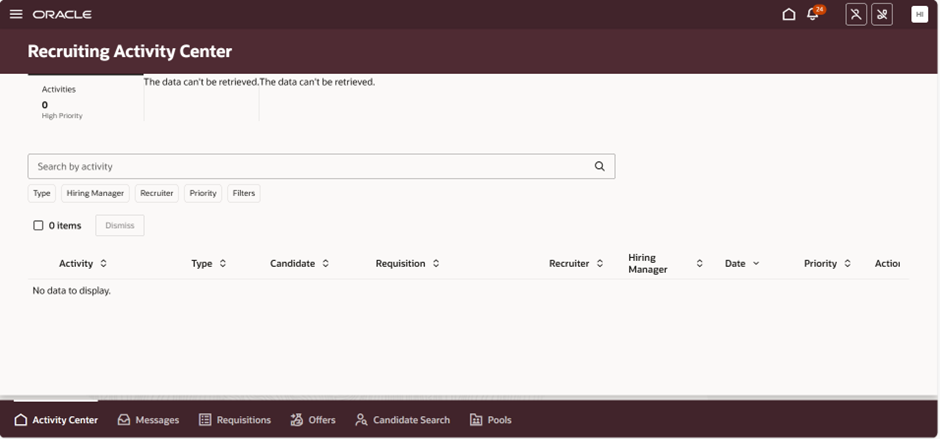
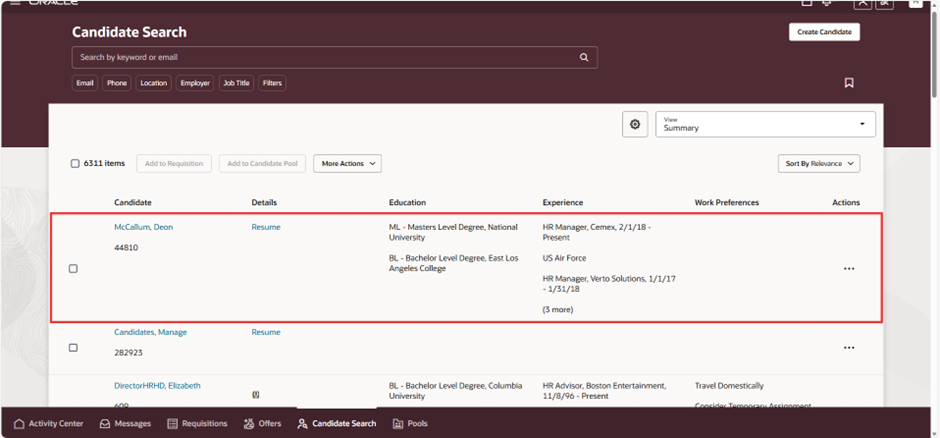
- Click on the Hiring and Recruiting Activity centre page, which will open, and then click on Candidate Search.
- The candidate search page will be displayed.
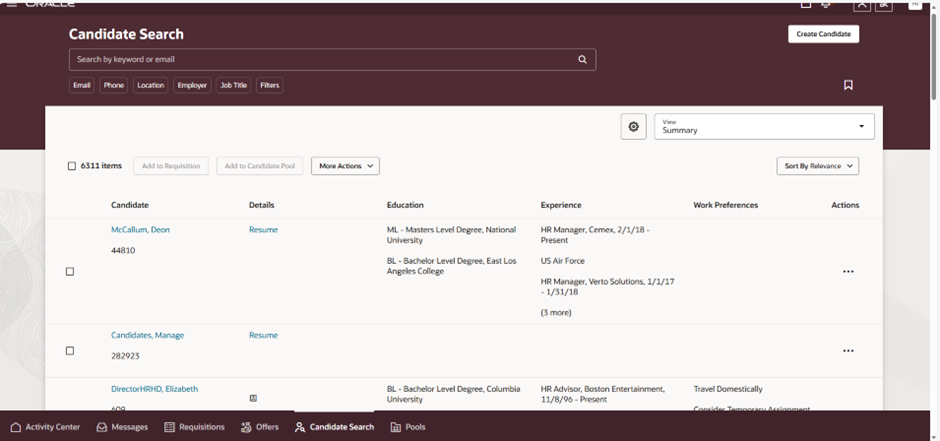
- Select the candidate to compose the WhatsApp message.
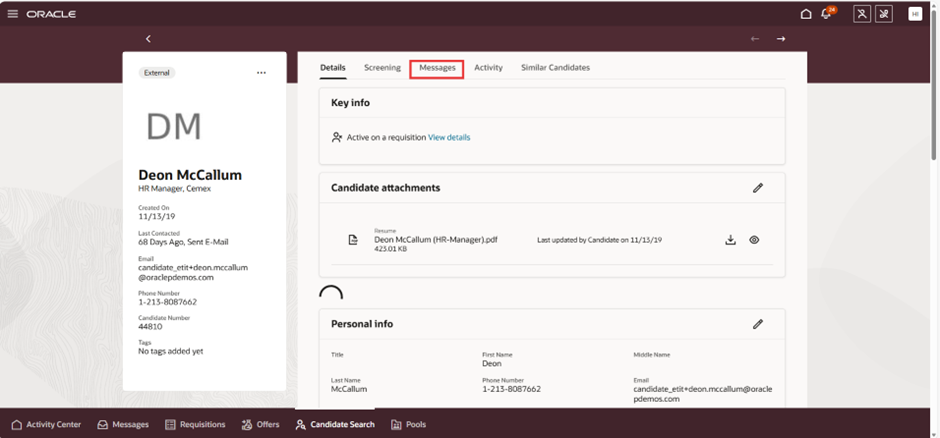
- The candidate page gets displayed, now click on the messages option
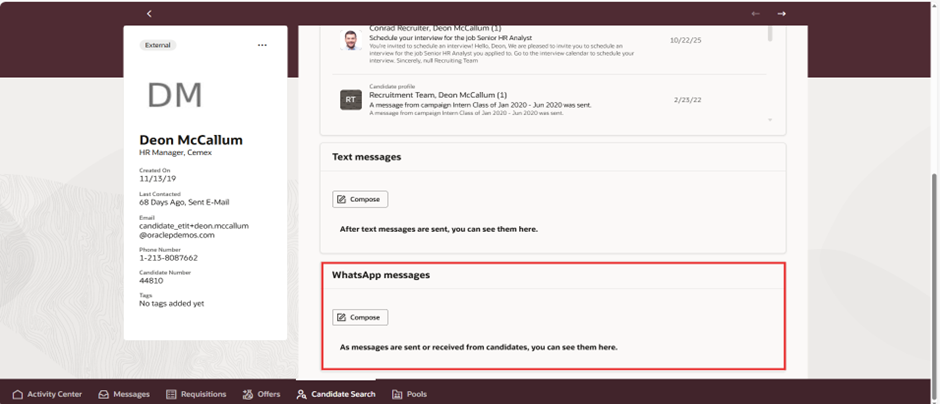
Compose and Send WhatsApp Messages
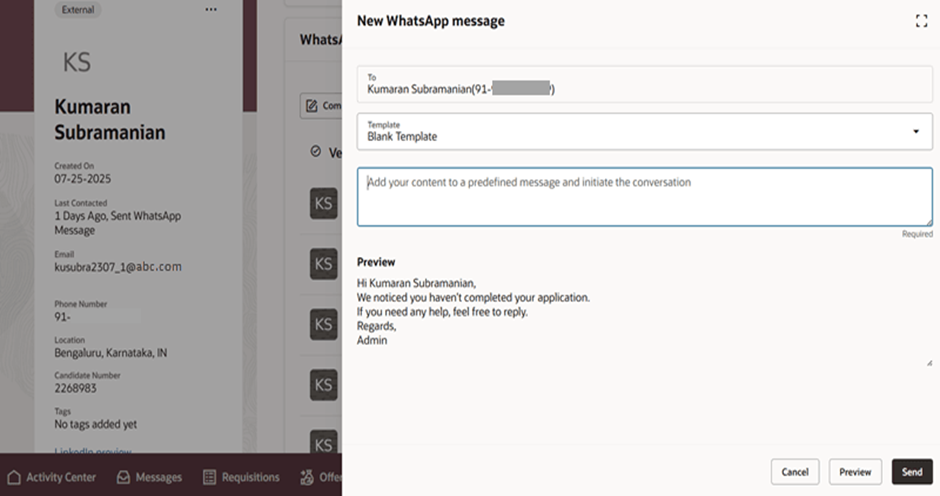
To follow Meta’s rules, WhatsApp messages must use predefined templates. You create these templates in the WhatsApp Notification Template Library, and they can be set up in any preferred language.
There are two types of templates:
1. Blank Template: This is used when composing a new message for a single candidate.
- To start a conversation, it includes predefined text that you can add to. This version must be linked to the WhatsApp Conversation Starter category and approved by Meta.
- To reply with free-form text: This version isn’t linked to any category and can be used only under certain conditions described later.
2. Business Templates: Business Templates contain predefined text and are linked to a specific content library category. They’re used for new messages, automated messages, and bulk messages and must be approved by Meta before they can be used.
- Click on WhatsApp messages compose and need to enter the message, and click on send.
- Now we can view the WhatsApp message section in the candidate profile page.
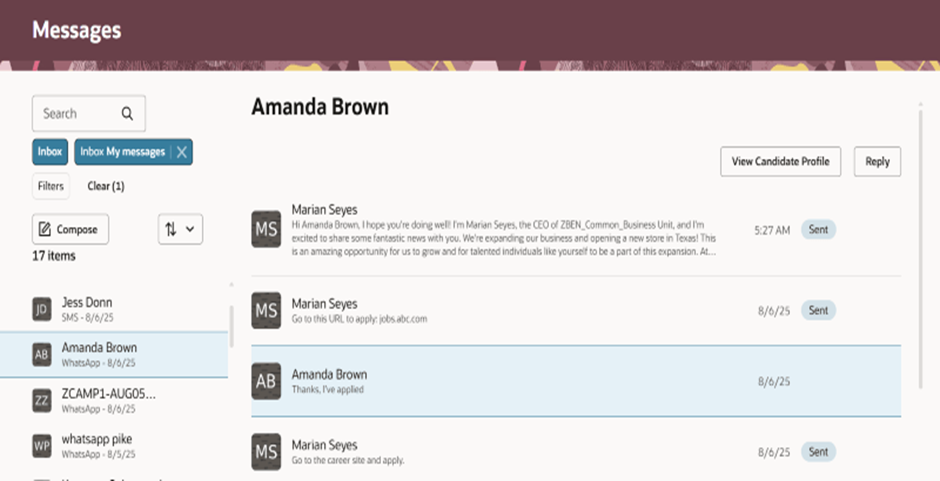
Message Centre Displaying WhatsApp Messages:
- To send a WhatsApp message from a candidate list, select the candidate and choose “Send WhatsApp Message” from the three-dot Actions menu.
Use Case Scenario:
Event or Walk-In Drive Invitations:
Bulk WhatsApp messages can be used to inform large groups of candidates about upcoming hiring events or job fairs.
Immediate Clarifications for Candidates :
Candidates often prefer quick messaging over email for doubts
Document Requests :
Recruiters can request ID proofs, certificates, or missing attachments
Offer Follow-Ups and Clarifications :
Send reminders or ask candidates to confirm acceptance timelines.
Business Benefits of WhatsApp as a Communication Channel in Oracle Recruiting Cloud
1. Faster Candidate Communication:
Recruiters can connect with candidates instantly through WhatsApp, enabling real-time conversations and quicker responses throughout the hiring process.
2. Improved Candidate Engagement:
Since WhatsApp is one of the most widely used messaging platforms, candidates are more likely to view and respond to messages promptly compared to traditional communication channels such as email or SMS.
3. Personalised Candidate Experience:
Recruiters can deliver tailored messages, interview reminders, application updates, and hiring communications that create a more engaging and candidate-centric recruitment journey.
4. Accelerated Hiring Process:
Real-time interactions help reduce communication delays, enabling faster interview scheduling, status updates, and decision-making, ultimately shortening the time-to-hire.
5. Bulk and Automated Messaging:
Organisations can efficiently communicate with large candidate pools by sending automated notifications and bulk messages, reducing manual effort and improving recruiter productivity.
6. Cost-Effective Global Communication:
WhatsApp helps organizations avoid expensive international SMS charges, making it a scalable and affordable communication channel for global recruitment initiatives.
7. Enhanced Recruiter Productivity:
Automated workflows and centralized communication allow recruiters to spend less time on follow-ups and more time focusing on strategic talent acquisition activities.
8. Centralised Communication Tracking:
All candidate interactions are stored within Oracle Recruiting Cloud, providing recruiters with complete visibility into communication history and ensuring a seamless recruitment experience.
9. Improved Compliance and Auditability
By maintaining communication records within Oracle Recruiting Cloud, organizations can support compliance requirements, improve transparency, and simplify audit processes.
10. Higher Candidate Satisfaction:
Timely, personalized, and convenient communication helps build stronger candidate relationships, resulting in a more positive hiring experience and stronger employer branding.
11. Supports Mobile-First Recruitment Strategies
WhatsApp enables organisations to effectively engage candidates who prefer mobile communication, helping recruiters reach talent wherever they are.
12. Better Recruitment Outcomes:
Improved communication, higher response rates, and streamlined engagement contribute to more successful hiring outcomes and a stronger talent acquisition process.
Conclusion
WhatsApp integration in Oracle Recruiting Cloud provides organisations with a modern and effective communication channel for engaging candidates throughout the recruitment process. By enabling real-time interactions, timely updates, and seamless communication, recruiters can improve candidate experiences while increasing recruitment efficiency.
As organizations continue to embrace digital-first hiring strategies, leveraging WhatsApp within Oracle Recruiting Cloud helps create more responsive, engaging, and candidate-centric recruitment processes. The result is faster hiring, stronger candidate relationships, and improved talent acquisition outcomes.
Transform Candidate Communication with WhatsApp in Oracle Recruiting Cloud
Looking to create a more engaging and responsive candidate experience? By leveraging WhatsApp as a communication channel in Oracle Recruiting Cloud, organizations can connect with candidates faster, improve response rates, and streamline recruitment communications throughout the hiring journey. Real-time messaging helps recruiters deliver timely updates, enhance candidate engagement, and accelerate hiring outcomes.
At Kovaion, our Oracle Recruiting Cloud experts help organisations implement and optimise modern recruiting solutions that improve candidate experiences and recruiter productivity. From Oracle Recruiting Cloud implementations and communication channel integrations to end-to-end talent acquisition transformation, we deliver tailored solutions that help you attract, engage, and hire top talent more effectively.
Ready to modernise your recruitment communications? Contact Kovaion today to explore how WhatsApp integration in Oracle Recruiting Cloud can help you create a more connected and efficient hiring experience.