PeopleTools 8.63: Strengthening Security with TOTP-Based 2FA
Security is a critical part of every enterprise application, and PeopleTools 8.63 introduces an important enhancement: support for two-factor authentication (2FA) using time-based one-time passwords (TOTP).
This feature adds an additional layer of protection after successful primary authentication. Instead of relying solely on a username and password, users must also verify their identity using a temporary code generated by a registered authenticator app.
What Is TOTP-Based Two-Factor Authentication?
TOTP stands for Time-Based One-Time Password. It generates a unique verification code that changes at regular intervals.
With PeopleTools 8.63, users can use a standard authenticator application on a phone, tablet, or other compatible device. Once enrolled, the authenticator app generates a time-limited code that is required during sign-in.
This means that even if a user’s primary credentials are compromised, an additional verification step is required to complete authentication.
First-Time Sign-In and Device Enrollment
When 2FA is enabled, users are prompted to enroll an authenticator device during their first sign-in.
The enrollment process is straightforward:
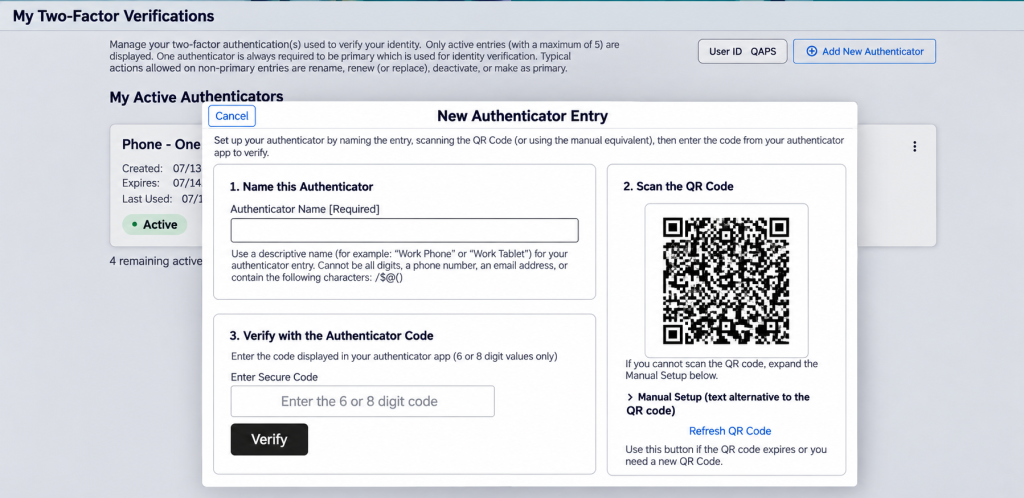
- Enter a descriptive name for the authenticator device.
- Scan the displayed QR code using a compatible authenticator app.
- Enter the verification code generated by the authenticator app.
- Complete the enrollment process.
The generated code is time-based and valid only for a configured period. Users therefore need to enter the code before it expires.
Once the device has been successfully enrolled, it can be used for future sign-ins.
The Two-Factor Authentication Sign-In Experience
After enrollment, subsequent sign-ins include the additional verification step.
The process is:
- Enter your normal primary authentication credentials.
- When prompted for 2FA, open your registered authenticator app.
- Enter the current one-time code.
- Complete the sign-in process.
Because the code changes periodically, the verification provides an additional, time-sensitive layer of security.
Because the code changes periodically, the verification provides an additional, time-sensitive layer of security.
Manage Multiple Authenticator Devices
PeopleTools 8.63 also provides flexibility by allowing users to manage their enrolled authenticator devices through My 2FA Verification.
Users can enroll multiple devices, such as:
- A primary mobile phone
- A tablet
- Another compatible device
Having multiple enrolled devices provides an alternative verification option when the primary device isn’t available.
Managing Enrolled Devices
From the device action menu, users can manage each enrolled authenticator device.
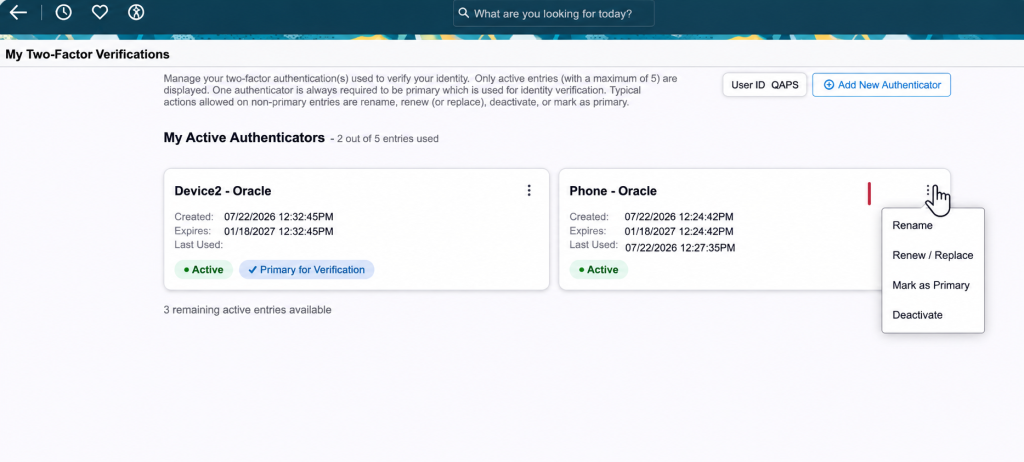
Depending on their needs, users can:
- Deactivate a device
- Renew a device
- Replace a device
- Rename a device
- Set a different device as the primary option
During sign-in, the primary device is selected by default. However, if multiple devices are enrolled, users can choose another enrolled device for verification.
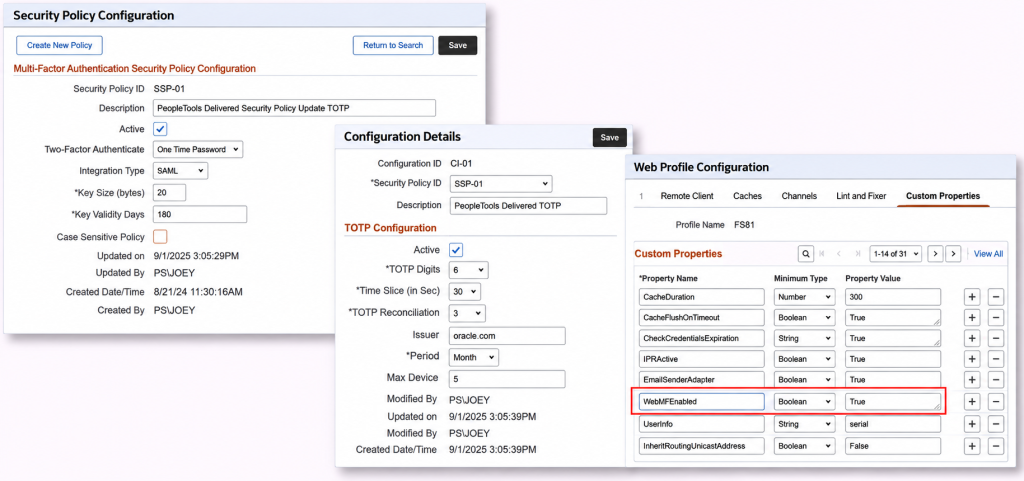
Admin Configuration
Why This Matters
The introduction of TOTP-based 2FA in PeopleTools 8.63 provides organizations with a practical way to strengthen authentication without requiring specialized hardware.
The combination of primary authentication and a time-sensitive verification code helps provide an additional barrier against unauthorized access. At the same time, support for multiple authenticator devices gives users flexibility when managing their day-to-day access.
Conclusion
PeopleTools 8.63 strengthens enterprise application security with TOTP-based two-factor authentication, offering an additional layer of protection through authenticator apps, time-sensitive verification codes, and flexible device management. These capabilities help organizations improve sign-in security while maintaining a convenient user experience.
By adopting effective security practices and authentication controls, organizations can strengthen their enterprise applications. Kovaion supports businesses in managing and enhancing their PeopleSoft environments through its PeopleSoft authentication security capabilities.
Enhance PeopleSoft Security with Expert Support from Kovaion
Strengthening authentication is an important step toward protecting enterprise applications and sensitive business data. With PeopleTools 8.63 introducing TOTP-based two-factor authentication, organizations can explore additional ways to secure user sign-ins while maintaining a convenient access experience.
Kovaion helps organizations optimize, maintain, and enhance their PeopleSoft environments through tailored PeopleSoft consulting and support services. From evaluating platform capabilities to improving application configurations and supporting ongoing system optimization, our team can help align your PeopleSoft environment with your business and security requirements.
Whether you are planning to adopt new PeopleTools security features, review your existing authentication setup, or modernize your PeopleSoft applications, our experts can help you identify the right next steps.
Looking to Improve Your PeopleSoft Security?
Connect with Kovaion to discuss your PeopleSoft requirements and explore opportunities to strengthen application security, streamline administration, and get more value from your existing environment.
Contact Kovaion’s PeopleSoft Experts to discuss your requirements and explore the right PeopleSoft services for your organization.