Set Up Bidirectional Replication for Oracle GoldenGate Microservices Architecture

Introduction
This quick start demonstrates an active-active bidirectional replication between two Oracle databases in different regions.
An active-active bidirectional replication implies that both data sources and targets have the potential to send updates to each other. There are two data sources with identical sets of data that can be changed by application users on either side.
Oracle GoldenGate replicates transactional data changes from each database to the other to keep both sets of data current.
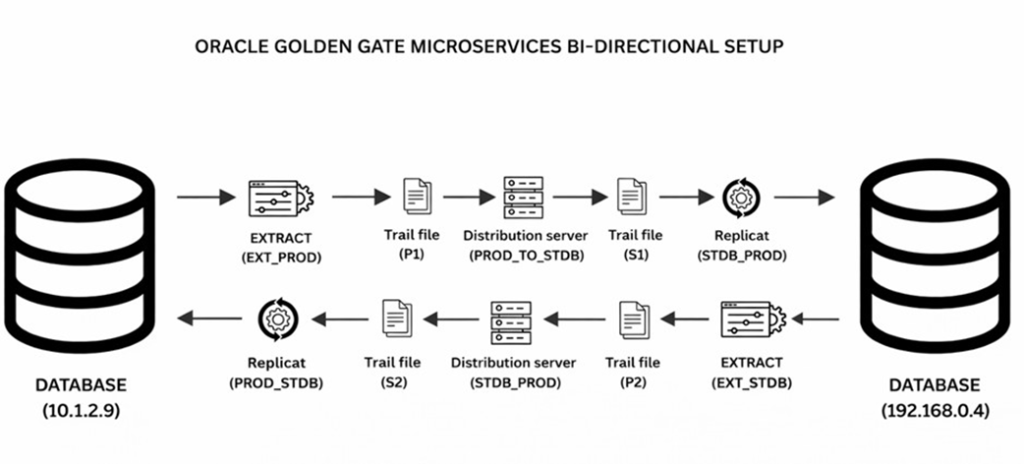
In this Oracle GoldenGate Microservices Bidirectional setup, data changes made on either database are captured and synchronized in real time to the other database. When a transaction occurs on the source database (10.1.2.9), the
Extract process (EXT_PROD) reads the redo logs, captures the committed changes, and writes them to a local trail file (P1). The Distribution Server (PROD_TO_STDB) then reads this trail data and transmits it across the network to the target system (192.168.0.4), where it is written to a remote trail file (S1). The Replicat process (STDB_PROD) on the target side reads from this trail and applies the changes to the target database. At the same time, the reverse flow operates in parallel, capturing changes from the second database and applying them back to the first database, ensuring continuous and seamless two-way data synchronization.
Note
This uses two databases to demonstrate bidirectional replication between them. However, in most real-life scenarios, bidirectional data replication happens across different database instances and different regions. Also, Oracle supports GoldenGate not only between Oracle to Oracle, but also for different databases:
Example:
- Sources: Oracle, MySQL, PostgreSQL, SQL Server, MongoDB, etc.
- Targets: Oracle, SQL Server, Kafka, Hadoop, Data Lakes, Cloud Storage, NoSQL
Process Names in the Bidirectional Data Replication Environment
The following nomenclature is used to refer to processes for the database and Oracle GoldenGate.
| DB1 ORACLE 19C CWTSMLP(10.1.2.9) | DB2 ORACLE 19C CWTSMLP(192.168.0.4) |
| DB USER : GGUSERDB alias : DB1_ALIASSERVICE MANAGER USERNAME : oggadmin EXTRACT : EXT_PRODREPLICAT : PROD_REP | DB USER : GGUSERDB alias : DB1_ALIASSERVICE MANAGER USERNAME : oggadmin EXTRACT : EXT_PRODREPLICAT : PROD_REP |
Considerations for Configuring a Bidirectional Replication:
To maintain data integrity and avoid conflicts, you need to configure the Extract and Replicat processes to prevent data looping and conflicts using certain parameters and the automatic conflict detection and resolution (ACDR) feature.
Ideally, all situations that could lead to potential conflicts in a bidirectional or multidirectional replication must be avoided. However, if conflicts occur, Oracle
GoldenGate provides the automatic conflict detection and resolution (ACDR) feature to handle them.
At the DB Level:
The Automatic Conflict Detection and Resolution feature (ACDR) available with the Oracle database allows you to manage conflict detection and resolution using the DBMS_GOLDENGATE_ADM package, using the ADD_AUTO_CDR procedure.
- Oracle GoldenGate Extract:
- Function: Captures committed transactional changes (INSERT, UPDATE, DELETE, and optionally DDL) from the source Oracle database.
- Action in Setup: Reads the redo logs, captures committed changes, and writes them to a local trail file (e.g., P1 or P2) for downstream replication.
- Oracle GoldenGate Distribution Server:
- Function: A Microservices component responsible for moving trail data between GoldenGate deployments.
- Action in Setup: Reads trail data from the source system (created by the Extract process) and transmits it across the network to the target system, where it is written to a remote trail file.
- Oracle GoldenGate Replicat:
- Function: Applies replicated data changes to the target database.
- Action in Setup: Reads data from the remote trail files on the target side, reconstructs the DML or DDL operations, and applies these changes to the target database.
Set the Required Privileges for Oracle Database
In the Oracle database, you need to enable replication for Oracle GoldenGate and assign privileges to the database user at the database level.
The database is in ARCHIVELOG mode and FORCE LOGGING, and Supplemental Logging is enabled.
User Privileges in both DB
SHUTDOWN IMMEDIATE; STARTUP MOUNT;
ALTER DATABASE ARCHIVELOG; ALTER DATABASE OPEN;
ALTER SYSTEM SET ENABLE_GOLDENGATE_REPLICATION=TRUE; ALTER SYSTEM SET STREAMS_POOL_SIZE=2G;
ALTER DATABASE FORCE LOGGING;
ALTER DATABASE ADD SUPPLEMENTAL LOG DATA; CREATE TABLESPACE GGADMIN DATAFILE
‘C:\ORACLE\ORADATA\cwtsmlp\ggadmin01.dbf’ size 1G AUTOEXTEND ON;
CREATE USER GGUSER IDENTIFIED BY GGUSER123 DEFAULT TABLESPACE GGADMIN
TEMPORARY TABLESPACE TEMP QUOTA UNLIMITED ON GGADMIN;
GRANT CONNECT, RESOURCE, DBA TO GGUSER; GRANT CREATE SESSION, ALTER SESSION TO GGUSER;
EXEC DBMS_GOLDENGATE_AUTH.GRANT_ADMIN_PRIVILEGE(‘GGUSER’);
Granting the DBA role is not mandatory for every database user. Privileges should be assigned based on the specific operations the user is required to perform on the database, following the principle of least privilege.
For example, if the user GGUSER needs to perform DML operations such as INSERT, UPDATE, and DELETE, only the required DML privileges should be granted. Similarly, if the user must create or modify database objects as part of application operations, the appropriate object-creation privileges (such as CREATE, ALTER, or DROP privileges) should be provided explicitly.
Unnecessary system-wide privileges should be avoided to reduce security risk and ensure controlled database access.
Enable ACDR for schema:
EXEC DBMS_GOLDENGATE_ADM.ADD_AUTO_CDR (‘SCHEMA_NAME’,’TABLE_NAME’, RECORD_CONFLICTS=>TRUE);
The output will show as:
PL/SQL procedure successfully completed.
This enables the ACDR package on both Databases.
Set Up Bidirectional Replication for Oracle GoldenGate Microservices Architecture
Configure the Extract, Replication, and Distribution Process from Oracle GoldenGate MA Web Interface.
Using the following steps, you’ll be able to configure data capture (Extract) and apply (Replicat) processes. You’ll also be able to test if the replication has started.
Step 1: Add Credentials from the Administration Service
In this section, you’ll add the database credentials and GG Web user credentials to connect to the source and target databases.
- Keep your database user credentials, which were created in the previous session, ready. You’ll use them to connect Oracle GoldenGate to the database server.
- Then add the administrator account user details
- Open the Service Manager login page in a web browser and log in to the Service Manager with your Oracle GoldenGate administrator user credentials. If logging in for the first time, you have to log in with the administrator account user credentials, created when adding your deployment with the Oracle GoldenGate Configuration Assistant wizard.
- From the Service Manager Overview page, click the port number for the Administration Service of the deployment.
Reference
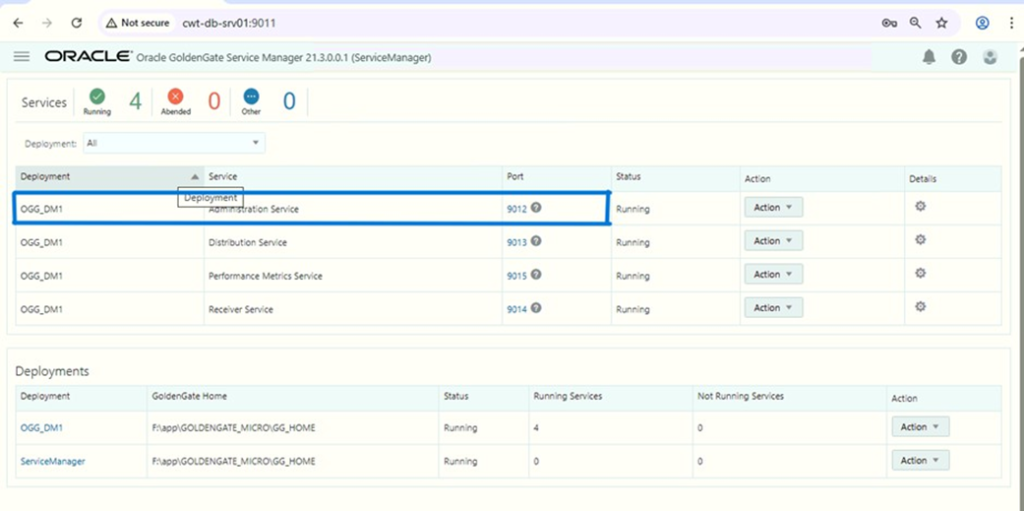
This opens the Administration Service login page.
5. Log in to the Administration Service using the same credentials that you used to log in to the Service Manager. The Administration Service Overview page is displayed.
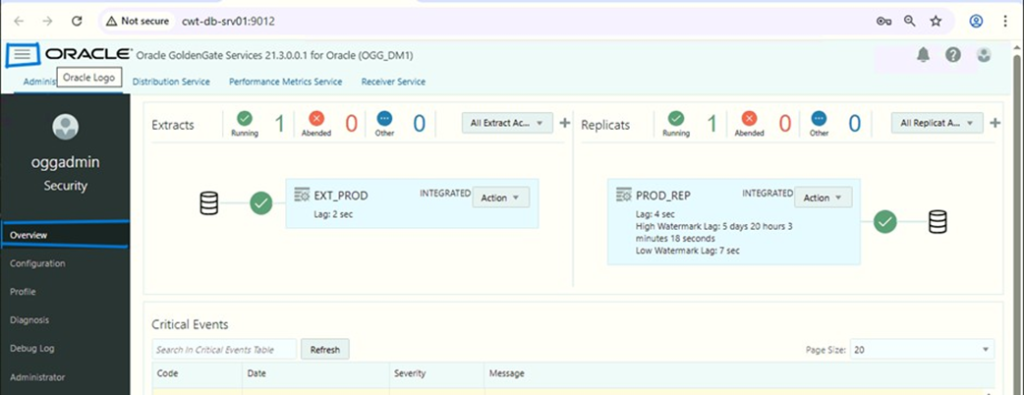
6. Click the Application Navigation icon to open the left-navigation pane and click Configuration to open the Database tab of the Configuration page.
7. Click the plus (+) sign in the Credentials section to begin adding database user credentials.
8. For Machine 1, add DB credentials of Machine 1 as DB1_ALIAS and add administrator user credentials of Machine 2 as M2_OGGADMIN.
9. As we did above, we need to do for Machine 2. For Machine 2, add DB credentials of Machine 2 as DB2_ALIAS and add administrator user credentials of Machine 2 as M2_OGGADMIN.
After connecting to the database, the sections add a checkpoint table.
Step 2: Add Checkpoint Tables
Add a checkpoint table for the database to ensure that if there is a failure, then the Extract and Replicat processes can restart from the point of failure.
Note
You don’t need to add TRANDATA as this is internally done with the PL/SQL call of ADD_AUTO_CDR. You might want to check that supplemental logging is enabled for the tables.
Use the TRANDATA Information section to check if supplemental logging has been enabled for the tables set up for capture.
You can search for the schema for which you added the trandata using the magnifying glass search icon. This will display the trandata information. The following image shows the trandata information for the SCOTT schema in the database
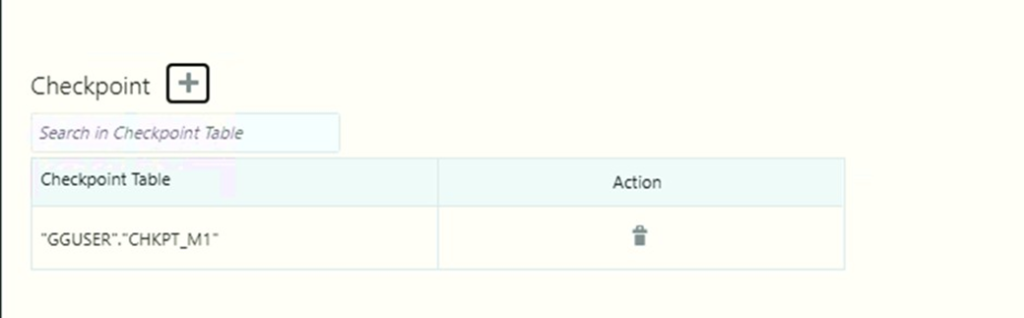
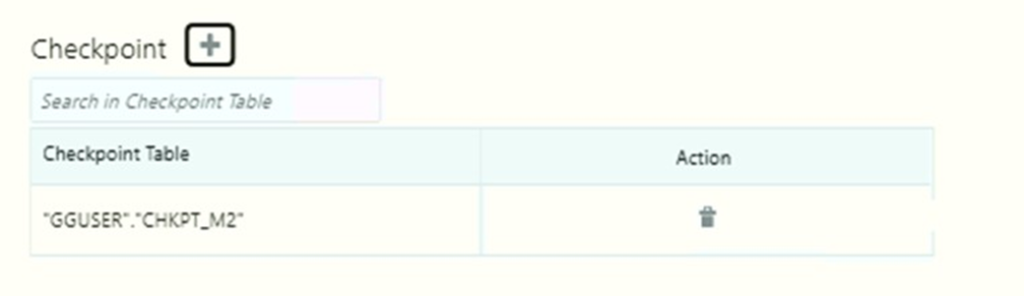
- To set up the checkpoint table, you need to connect to the database using the credentials from the Credentials section.
- Click the plus sign (+) to add the checkpoint table.
- Add another checkpoint table for Machine 2.
MACHINE 1:
MACHINE 2:
Step 3: Add Extracts and Distribution:
In this section, you will add two extracts, EXT_PROD and EXT_STDB. The Extract process captures data from the source database and writes it to a trail file. The trail file for EXT_PROD is P1 and for EXT_STDB is P2.
ADDING EXTRACT EXT_PROD FOR MACHINE 1:
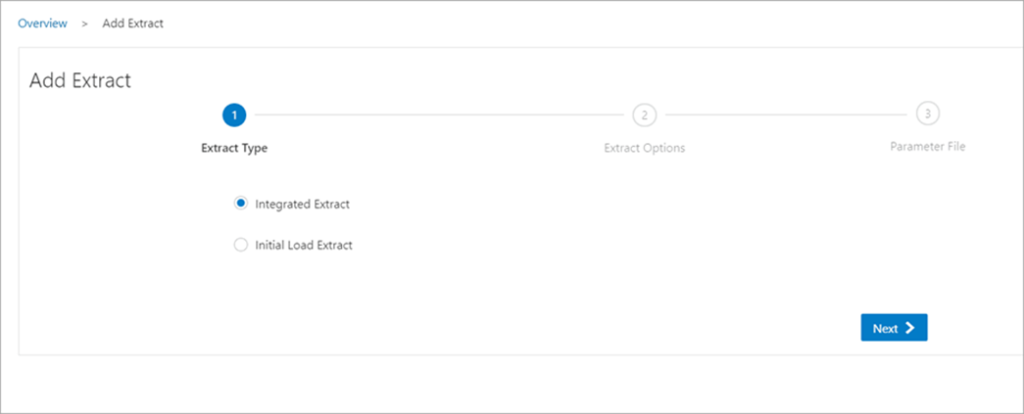
- Click the Overview option from the left-navigation pane of the Administration Service and click the plus sign (+) from the Extract section.

2. From the Add Extract wizard, select Integrated Extract.
3. Click Next and specify the Extract options in the Extract Options screen. See the detailed steps to add an Extract.
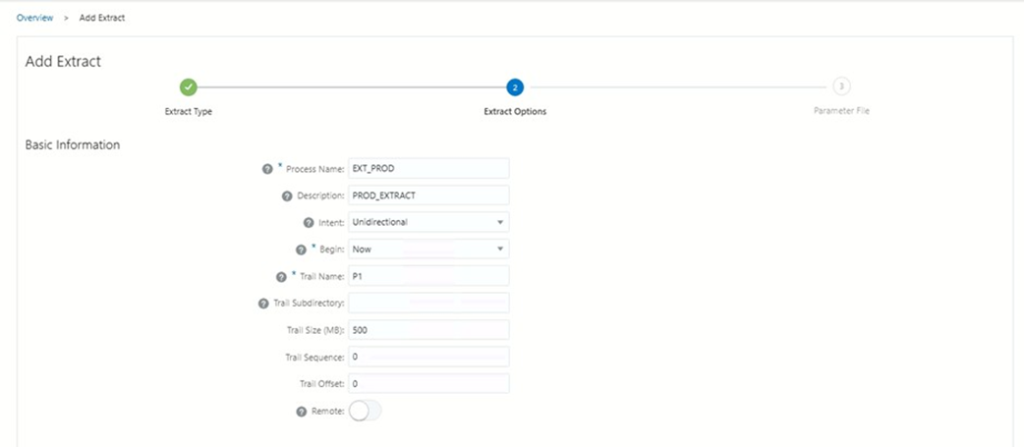
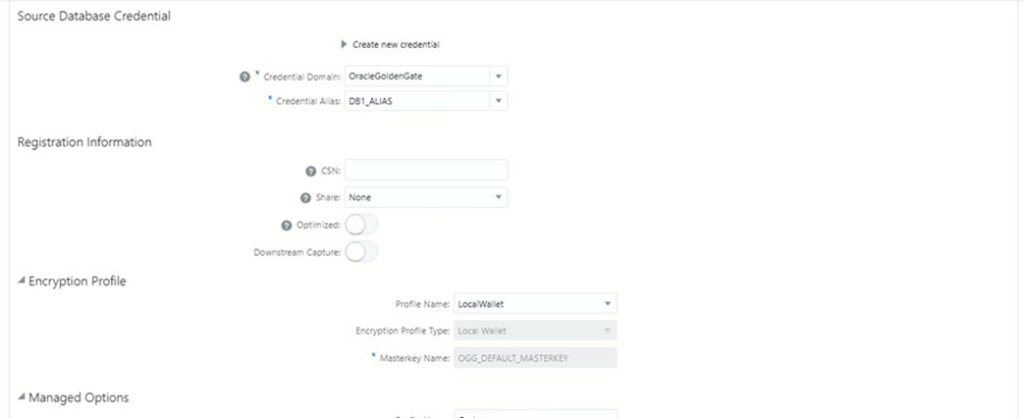
4 . After you enter the options for the Extract (EXT_PROD ), click Next. The next screen displays the Extract parameter file to help you review the Extract settings.
Here’s the Extract parameter file for the Extract EXT_PROD :
EXTRACT EXT_PROD
USERIDALIAS DB1_ALIAS DOMAIN OracleGoldenGate
— Loop prevention
TRANLOGOPTIONS EXCLUDETAG 01 TRANLOGOPTIONS EXCLUDEUSER GGUSER
— Trail EXTTRAIL P1
— DDL (Bidirectional enabled) DDL INCLUDE MAPPED DDLOPTIONS REPORT
— Monitoring
WARNLONGTRANS 2h, CHECKINTERVAL 5m
— Tables
TABLE SCOTT.*;
6: Click Create and Run to start your Extract.
ADDING Distribution FOR MACHINE 1:
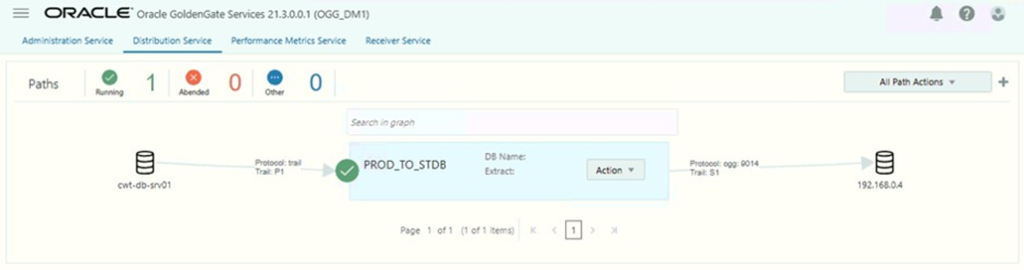
In this section, you will add Distribution PROD_TO_STDB. The Distribution process delivers the change data from the trail file (P1) created by the Extract to the target database. Replicat reads the trail file on the target database, reconstructs the DML or DDL operations, and applies them to the target database.
- Navigate to the distribution server from the Service administrator.
- Now add Distribution Path,
- ADD
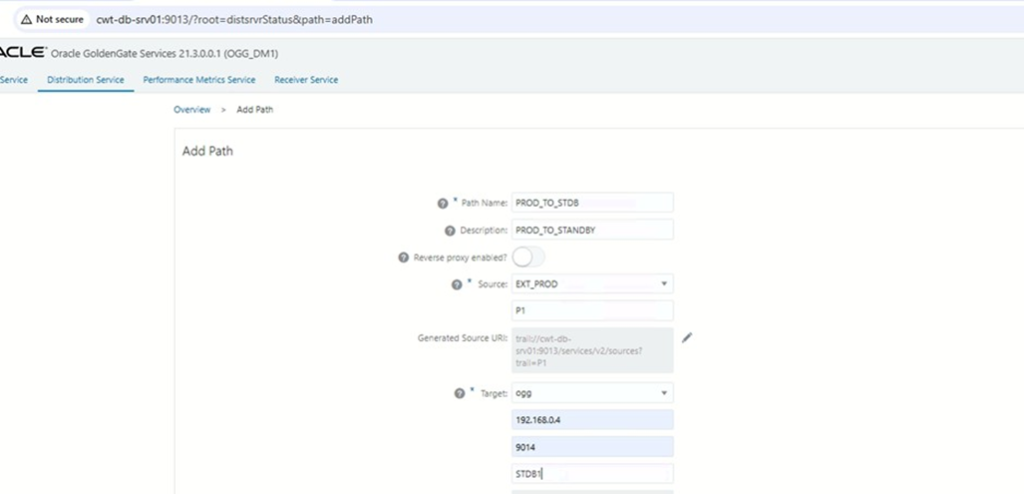
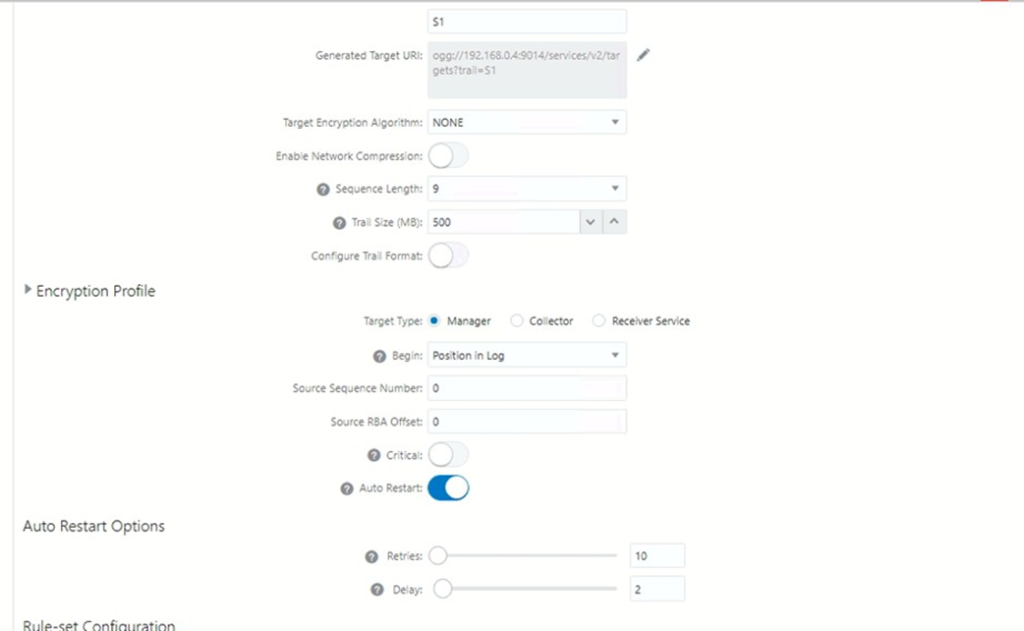
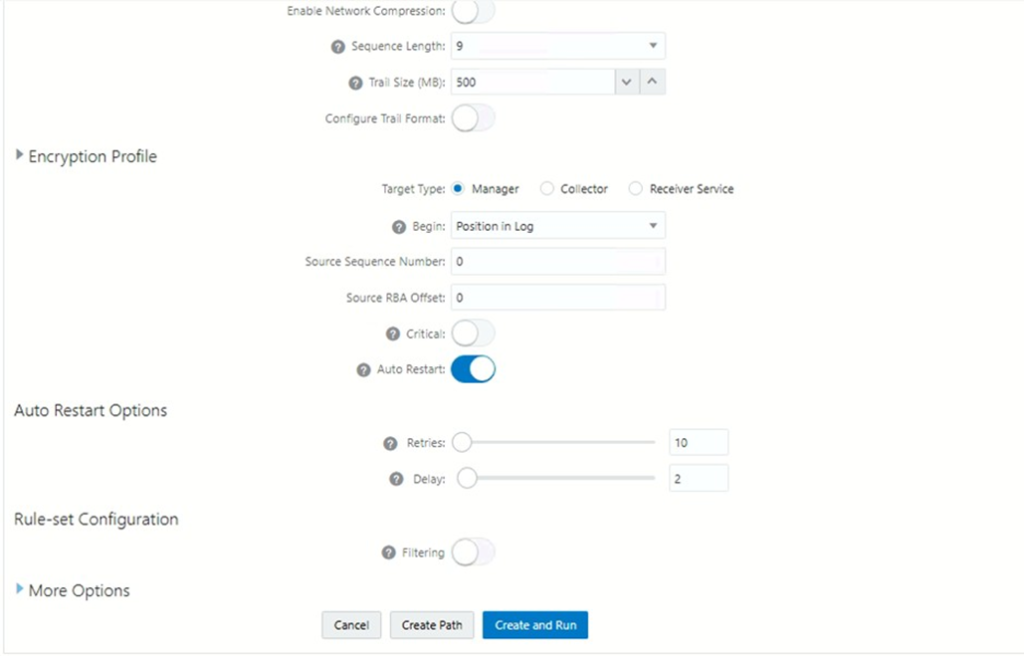
ADDING EXTRACT EXT_STDB FOR MACHINE 2:
- Click the Overview option from the left-navigation pane of the Administration Service and click the plus sign (+) from the Extract section.

2. From the Add Extract wizard, select Integrated Extract.
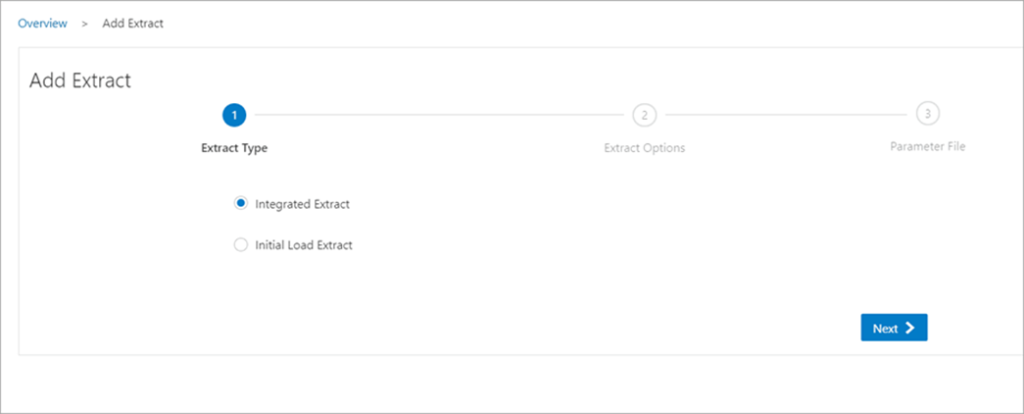
3. Click Next and specify the Extract options in the Extract Options screen. See the detailed steps to add an Extract.
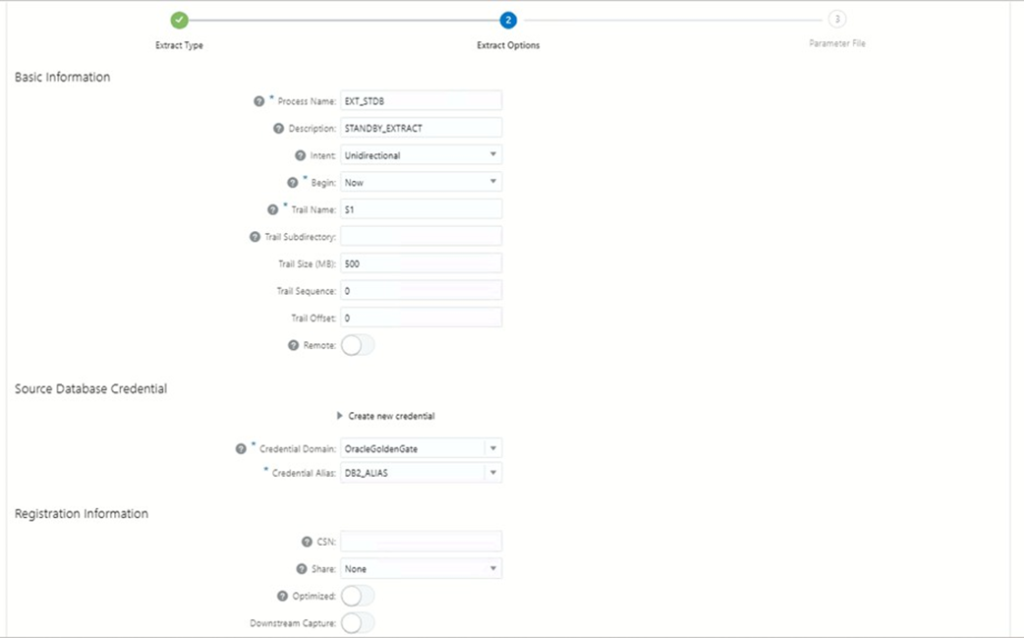
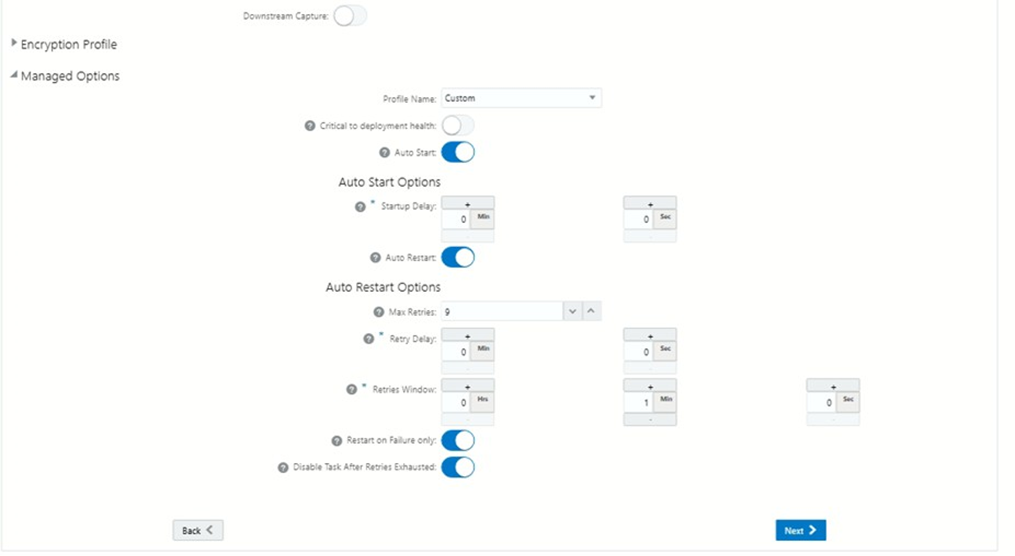
4 . After you enter the options for the Extract (EXT_STDB), click Next. The next screen displays the Extract parameter file to help you review the Extract settings.
Here’s the Extract parameter file for the Extract EXT_STDB:
EXTRACT EXT_STDB
USERIDALIAS DB2_ALIAS DOMAIN OracleGoldenGate
— Loop prevention
TRANLOGOPTIONS EXCLUDETAG 02 TRANLOGOPTIONS EXCLUDEUSER GGUSER
— Trail EXTTRAIL P2
— DDL (Bidirectional enabled) DDL INCLUDE MAPPED DDLOPTIONS REPORT
— Monitoring
WARNLONGTRANS 2h, CHECKINTERVAL 5m
— Tables
TABLE SCOTT.*;
6. Click Create and Run to start your Extract.
Adding distribution for machine 2:
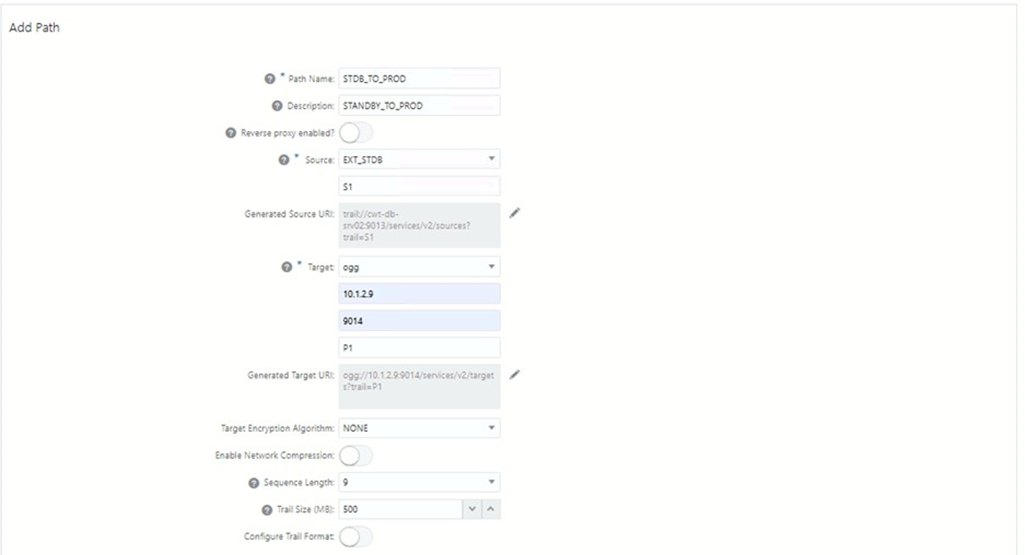
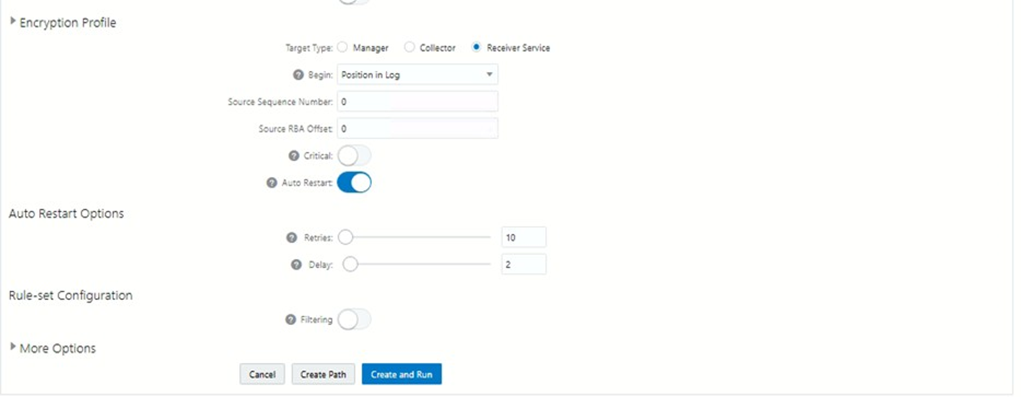
In this section, you will add Distribution STDB_TO_PROD. The Distribution process delivers the change data from the trail file (P2) created by the Extract to the target database. Replicat reads the trail file on the target database, reconstructs the DML or DDL operations, and applies them to the target database.
- Navigate to the distribution server from the Service administrator.
- Now add Distribution Path,
- ADD
Step 4: Add a Replicat
In this section, you will add Replicat PROD_REP and STDB_REP. The Replicat process delivers the change data from the trail file created by the Distribution server to the target database. Replicat reads the trail file on the target database, reconstructs the DML or DDL operations, and applies them to the target database.
ADDING REPLICAT PROD_REP FOR MACHINE 1:
- Select the Integrated Replicat option in the Replicat Options screen.
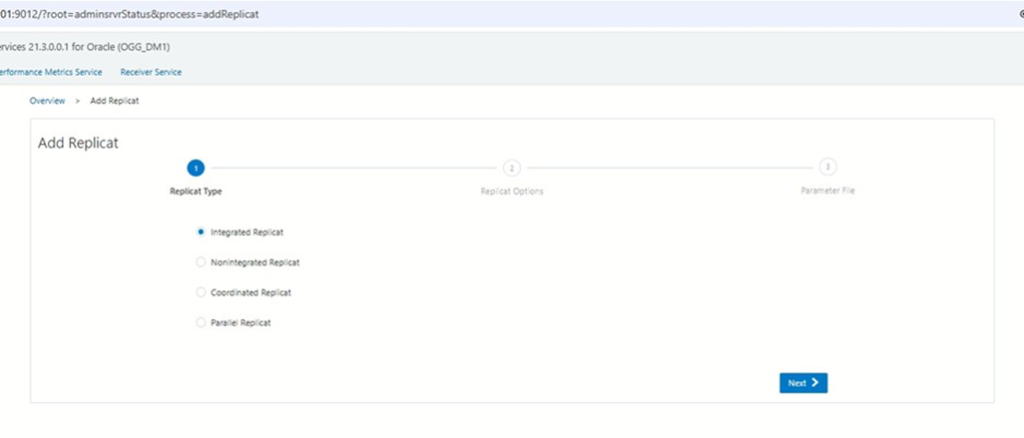
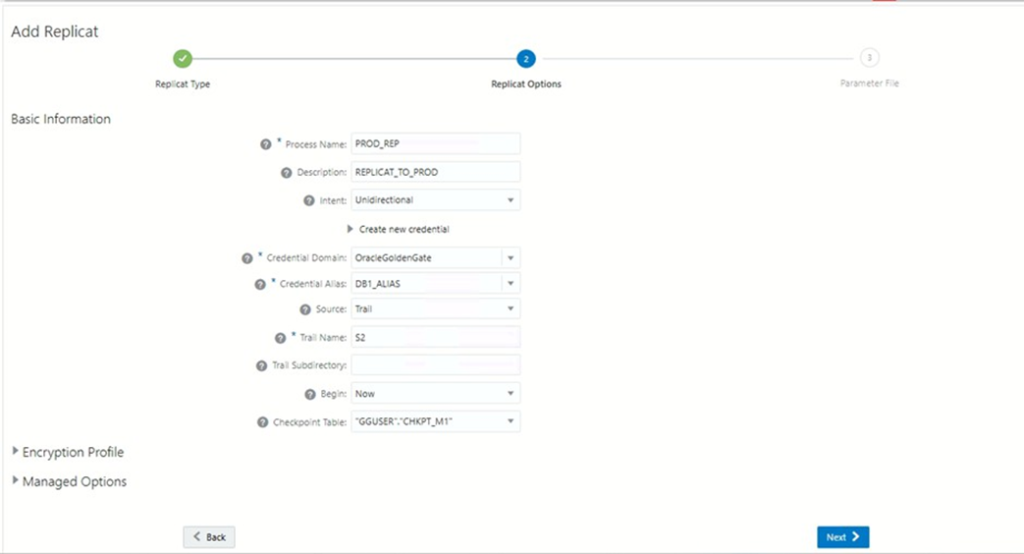
2. Click Next to view the Replication Parameter File screen. All the parameters that you have specified are available for review here.
REPLICAT PROD_REP
USERIDALIAS DB1_ALIAS DOMAIN OracleGoldenGate
— Loop prevention DBOPTIONS SETTAG 01
— Suppress triggers
DBOPTIONS SUPPRESSTRIGGERS
— DDL handling (CRITICAL) DDL INCLUDE ALL
DDLERROR 955 IGNORE — object already exists DDLERROR 942 IGNORE — object does not exist DDLERROR 1430 IGNORE — column already exists
DDLERROR 1442 IGNORE — cannot drop column used by constraint
— Mapping
MAP ., TARGET .;
3. Click Create and Run to start your Replicat.
ADDING REPLICAT STDB_REP FOR MACHINE 2:
- Select the Integrated Replicat option in the Replicat Options screen.
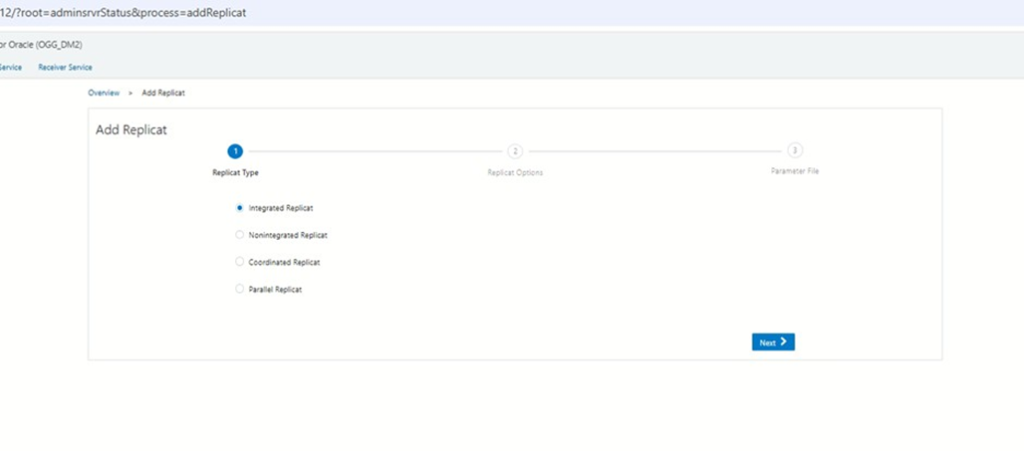
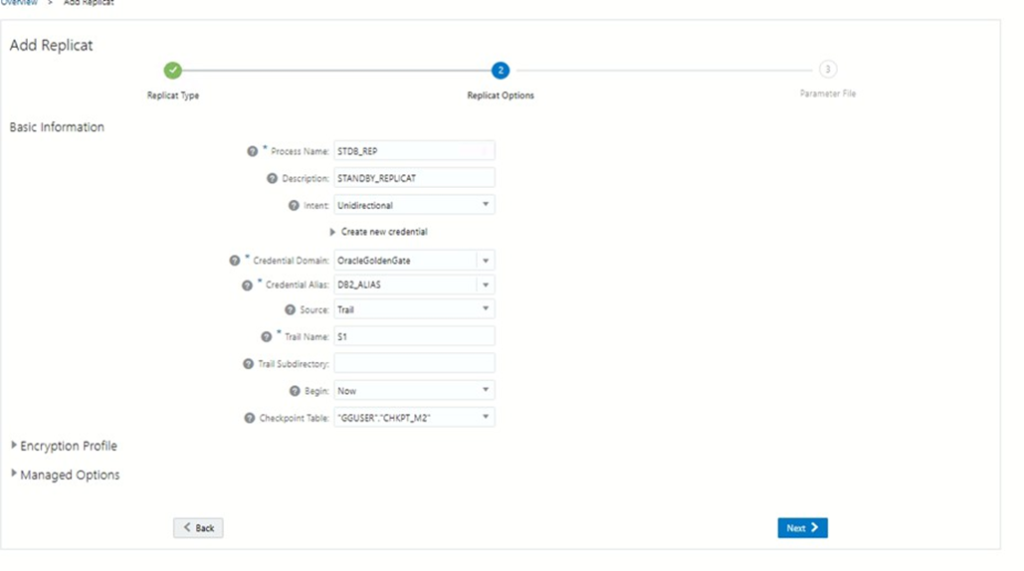
2. Click Next to view the Replicat Parameter File screen. All the parameters that you have specified are available for review here.
REPLICAT STDB_REP
USERIDALIAS DB2_ALIAS DOMAIN OracleGoldenGate
— Loop prevention DBOPTIONS SETTAG 02
— Suppress triggers
DBOPTIONS SUPPRESSTRIGGERS
— DDL handling (CRITICAL) DDL INCLUDE ALL
DDLERROR 955 IGNORE — object already exists DDLERROR 942 IGNORE — object does not exist DDLERROR 1430 IGNORE — column already exists
DDLERROR 1442 IGNORE — cannot drop column used by constraint
— Mapping
MAP ., TARGET .;
4. Click Create and Run to start your Replicat.
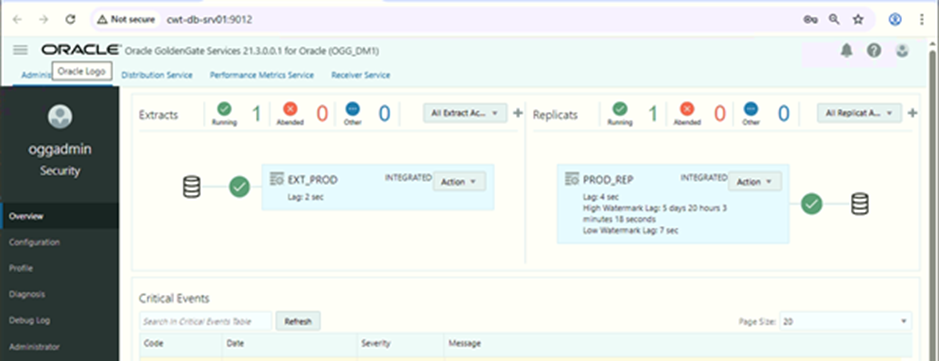
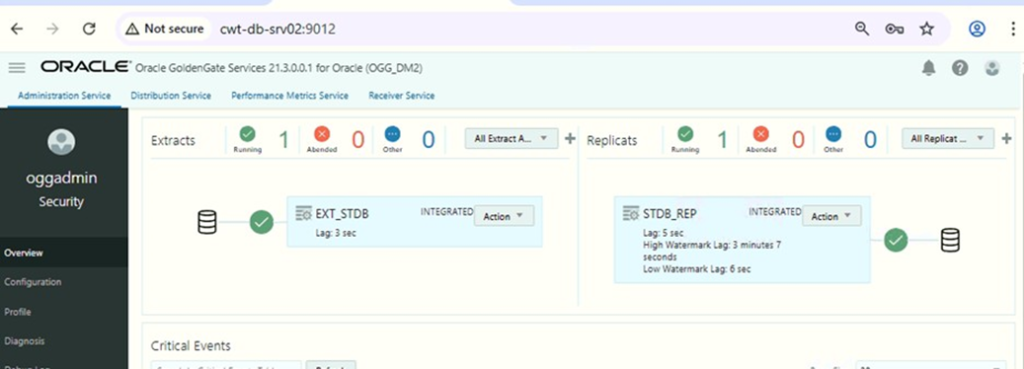
Now verify that the EXTRACT, REPLICAT, and DISTRIBUTION are running on both machines.
Machine 1:
Machine 2:
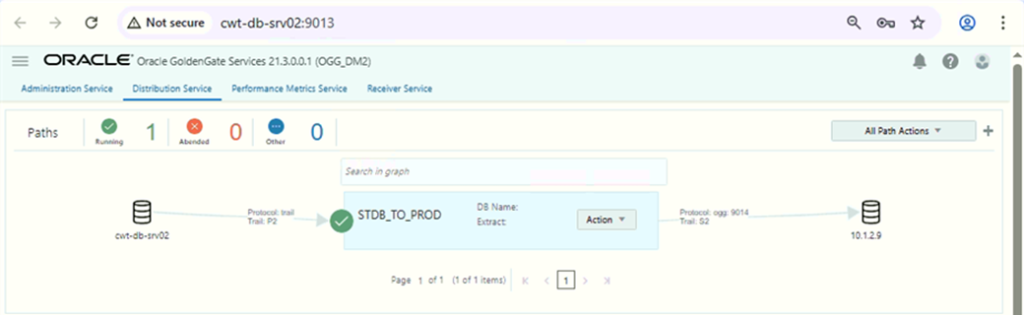
TESTING
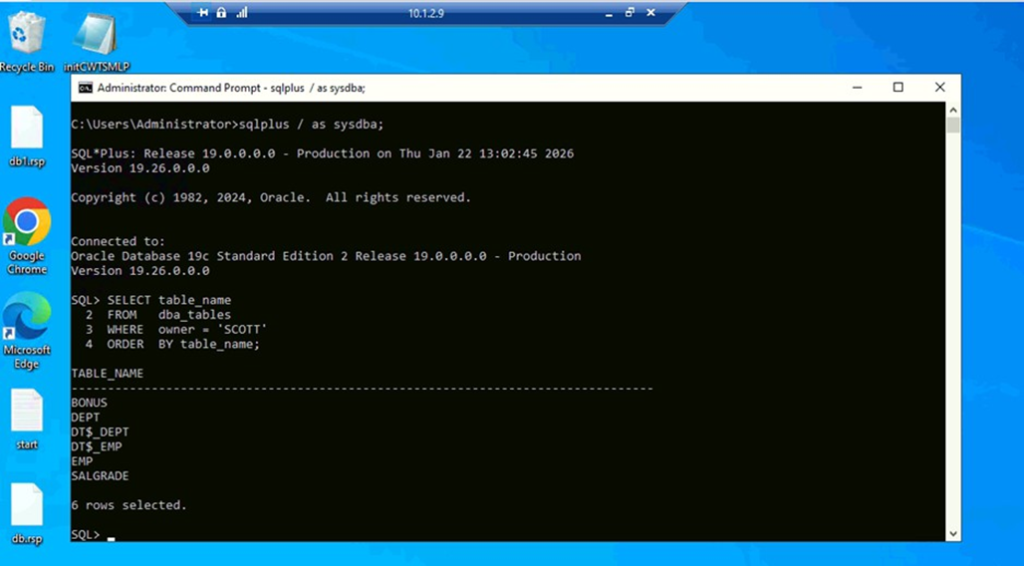
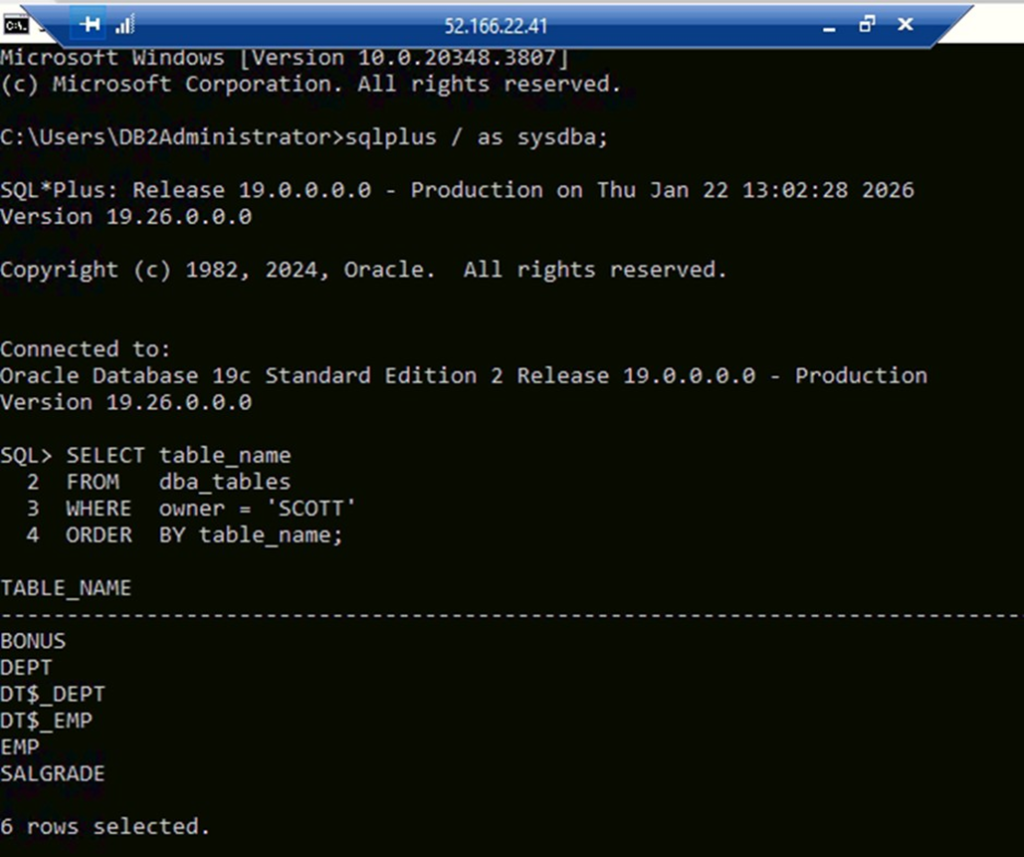
We will first list the tables in both machines
Machine 1
Machine 2
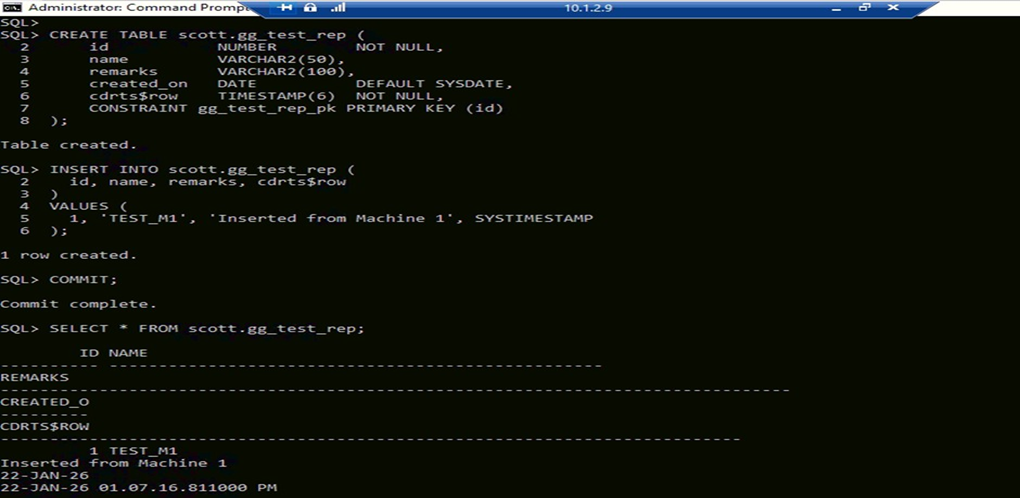
Now we will create a table in Machine 1 and insert a row. After that, we will check in Machine2:
Machine 1:
Machine 2 :
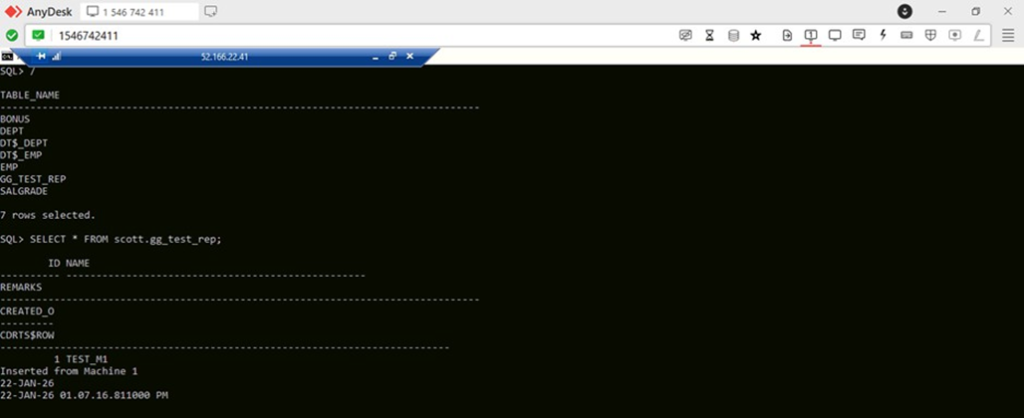
Now we will insert data from m1 and check in m1. On Machine 2:
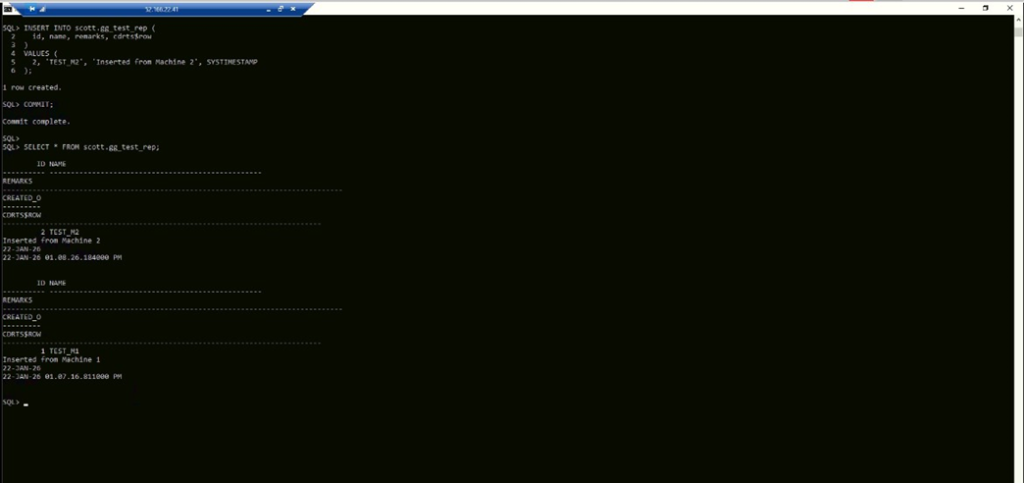
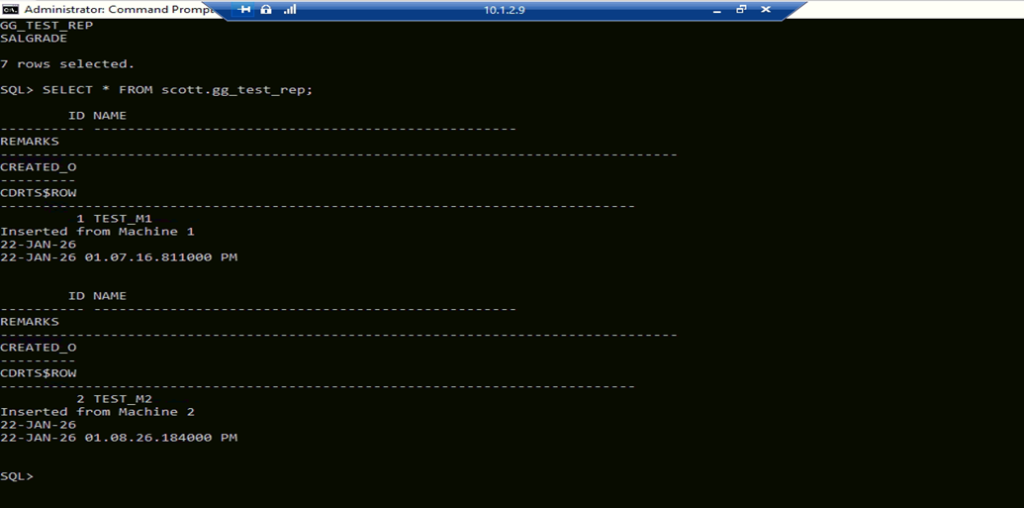
On Machine 1 :
Now we will remove the row in Machine 1 and check in Machine 2
Machine 1:
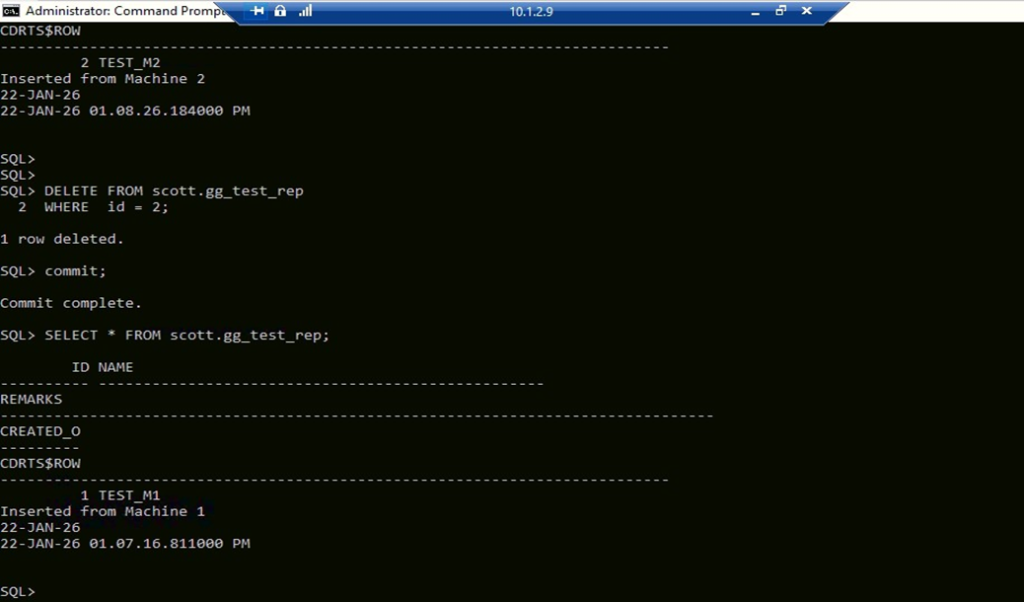
On Machine 2:
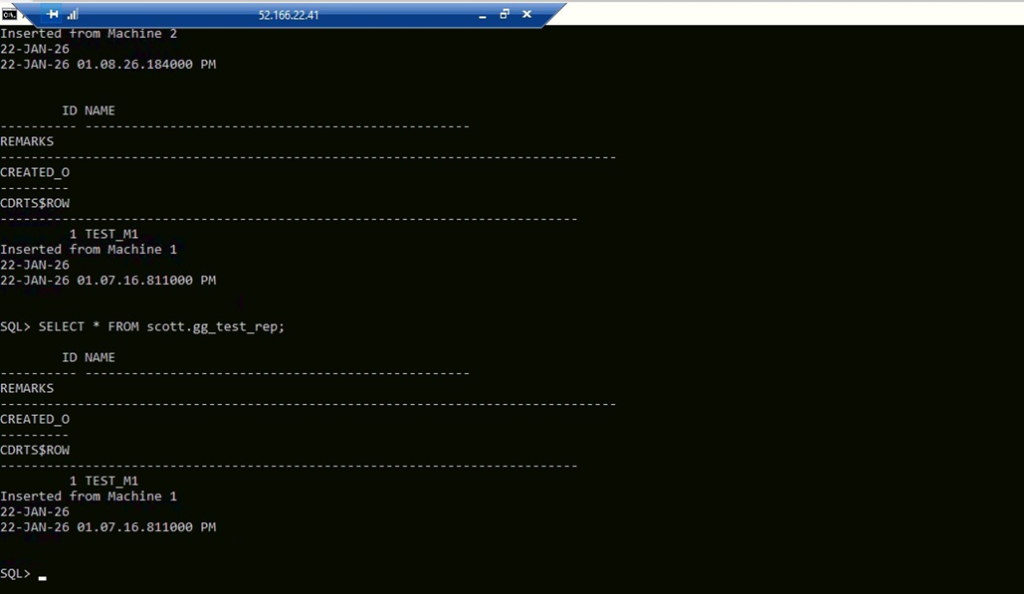
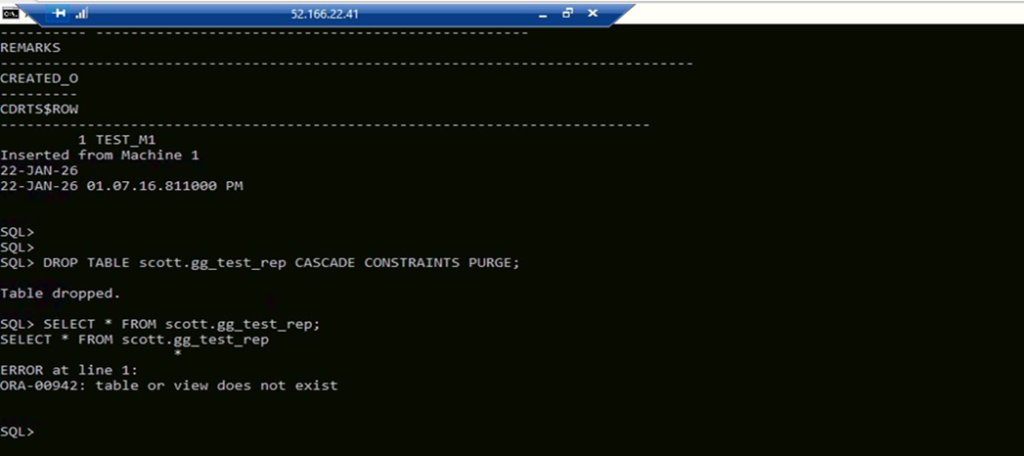
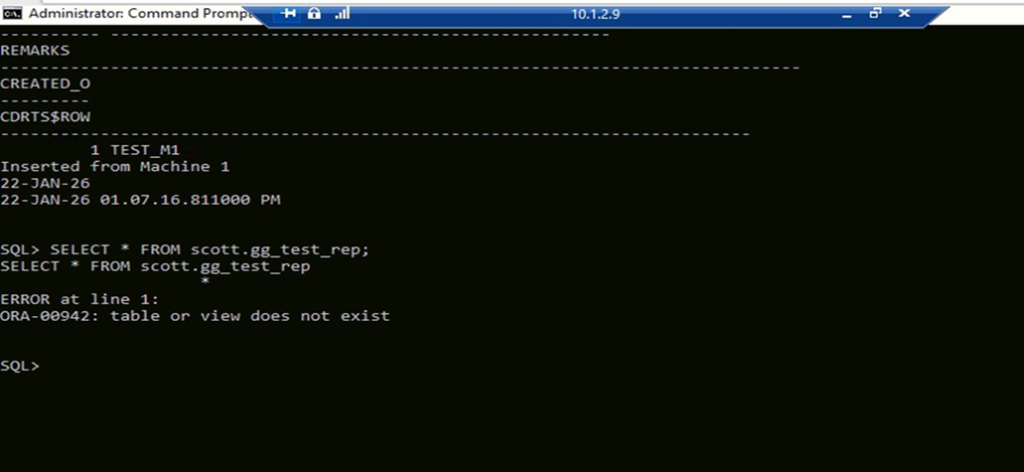
Now we will drop the table in m2 and check in m1
Machine 2:
Machine 1:
Business Benefits
1. Real-Time Data Synchronisation
Bidirectional replication ensures that data changes are captured and synchronized across multiple databases in near real time. This enables users and applications to access the most current information regardless of the database location.
2. Enhanced Business Continuity
Organizations can maintain uninterrupted operations by keeping multiple database environments synchronized. In the event of system failures or outages, replicated databases can help minimize downtime and support business continuity requirements.
3. Improved Disaster Recovery Readiness
By continuously replicating critical business data between environments, organizations strengthen their disaster recovery strategy and reduce the risk of data loss during unexpected disruptions.
4. Support for Distributed Operations
Global organizations often operate across multiple locations and systems. Bidirectional replication enables seamless data sharing between geographically distributed environments, improving collaboration and operational efficiency.
5. Reduced Downtime During Migrations
Oracle GoldenGate allows organizations to perform database upgrades, migrations, and maintenance activities with minimal business disruption by keeping source and target systems synchronized throughout the transition.
6. High Availability for Critical Applications
Maintaining synchronized databases helps ensure that critical business applications remain available and responsive, supporting continuous operations and improved user experiences.
7. Scalable Data Integration Framework
Oracle GoldenGate Microservices Architecture provides a modern and scalable approach to data replication, enabling organizations to accommodate growing data volumes and evolving business requirements.
8. Improved Data Consistency and Accuracy
Automated replication minimizes manual data movement processes and helps maintain consistency across systems, reducing the risk of discrepancies and improving trust in enterprise data.
9. Operational Efficiency
By automating data synchronization and replication processes, IT teams can reduce administrative effort, streamline data management activities, and focus on strategic initiatives that drive business value.
10. Future-Ready Data Architecture
Organizations can build a flexible and resilient data infrastructure capable of supporting cloud adoption, hybrid environments, analytics initiatives, and enterprise-wide digital transformation programs.
Conclusion
Setting up bidirectional replication in Oracle GoldenGate Microservices Architecture enables organizations to achieve real-time data synchronization across multiple databases while supporting high availability, disaster recovery, and distributed application environments. By leveraging Oracle GoldenGate’s advanced replication capabilities, businesses can ensure data consistency, minimize downtime, and improve operational resilience. A well-designed bidirectional replication strategy not only enhances business continuity but also provides the scalability and flexibility needed to support modern enterprise data integration requirements.
Enable Real-Time Data Integration with Oracle GoldenGate Solutions
Looking to implement bidirectional replication and ensure seamless data synchronization across your enterprise systems? Oracle GoldenGate Microservices Architecture provides a robust framework for real-time data movement, high availability, and business continuity. By enabling secure and efficient replication, organizations can improve data accessibility, reduce downtime, and support mission-critical operations with confidence.
At Kovaion, our experienced Oracle integration and database experts help organizations design, implement, and optimize Oracle GoldenGate environments tailored to their business needs. From replication architecture planning and migration support to performance tuning and managed services, we deliver scalable solutions that help businesses maximize data availability, enhance operational efficiency, and accelerate digital transformation initiatives.
Start your Oracle GoldenGate journey with confidence. Connect with our experts today!