Redwood Experience: Create Interview Schedule
Oracle is redefining the recruiting experience with its latest Redwood UX innovation. The newly redesigned Interview Schedule creation flow, powered by Visual Builder Studio (VBS) within Oracle Fusion Recruiting, brings a fresh, modern approach to interview coordination.
More than just a visual upgrade, this transformation delivers a smarter, AI-driven scheduling experience that simplifies complexity, increases flexibility, and empowers recruiting teams to move faster. With intuitive navigation, intelligent automation, and enhanced usability, organizations can streamline interview management while delivering a seamless experience for both candidates and hiring teams.
How to Start?
The interview schedule creation process begins in the How to Start section, where you define who will be responsible for scheduling the interview. You can choose between the Hiring Team and the Candidate. In the Redwood experience, these options replace the previous terminology of “Hiring Team Managed” and “Candidate Managed,” reflecting a more streamlined and intuitive naming convention.
Based on the selected scheduling type, the system dynamically displays relevant fields, ensuring that users are presented only with options applicable to their chosen configuration.
Navigation:
My Client Groups → Hiring → Requisitions → Select Application → Interview Tab → Schedule
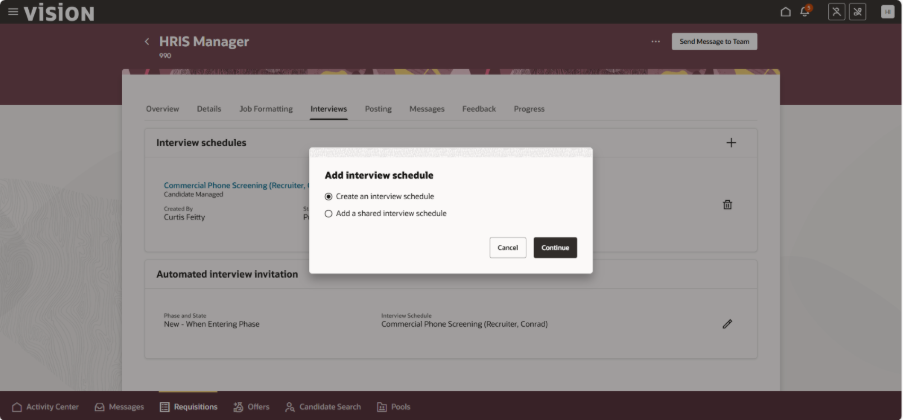
Fig 1
How to Start a Section When Creating an Interview Schedule?
How Will Time Slots Be Determined?
This field appears only when the Candidate scheduling type is selected and Recruiting Booster is enabled with calendar integration configured. It allows administrators to determine how interview time slots will be generated.
Time slots can either be automatically created, based on interviewer availability through calendar integration, or manually defined by users.
This flexibility enables organizations to align interview scheduling with their operational preferences and technical setup.
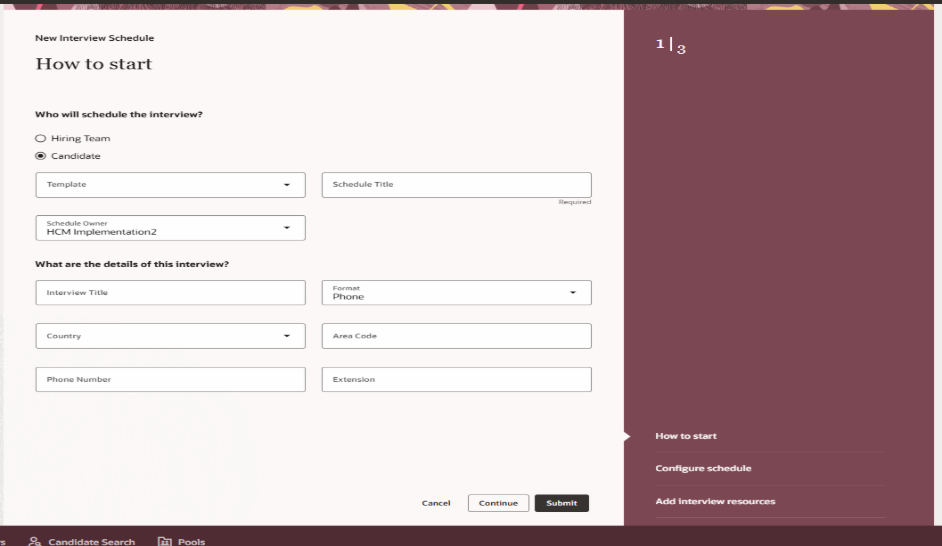
Fig 2
Configure Schedule
The Configure Schedule section adapts dynamically based on the scheduling type selected in the How to Start step, delivering a personalized and streamlined setup experience. This design ensures that users only see options relevant to their chosen scheduling approach, making configuration faster. One of the key highlights is the ability to control when candidates can book their interview.
- By selecting “Same Day,” candidates can immediately choose an available time slot as soon as they access the scheduling page, accelerating the hiring process and reducing delays.
- By selecting “Number of Days,” organizations can introduce a controlled scheduling window, allowing candidates to book interviews only after a defined number of days. This provides recruiters with flexibility to manage preparation time and interviewer availability effectively.
Configure Schedule Section When Creating an Interview Schedule
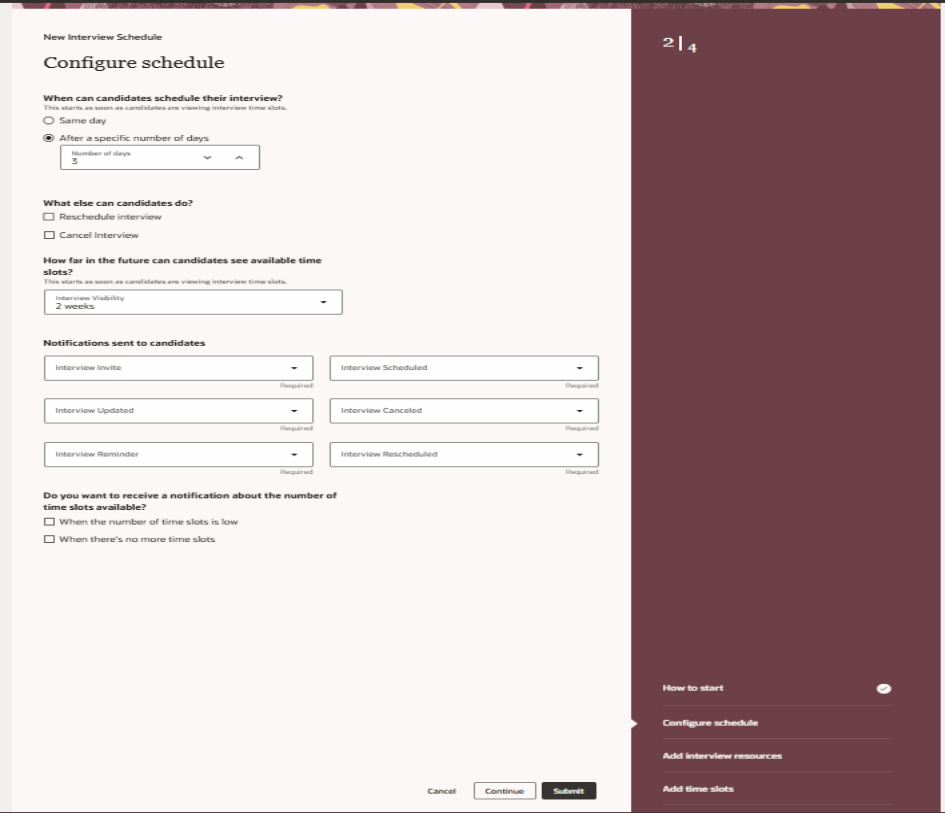
Fig 3
Add Interview Resources
The Redwood Interview Schedule flow introduces new options in the Add Interview Resources section to help interviewers prepare better. These features ensure that interviewers have all the necessary information in one place, improving preparation and maintaining consistency across interviews.
Two new fields are available:
- Interviewer Guidelines – Used to provide instructions, evaluation criteria, or important points to focus on during the interview.
- Documents – Used to attach helpful materials such as job descriptions, case studies, or interview templates.
AI Assist Support
When AI Assist is enabled, it can help generate content for:
- Additional Notes
- Interviewer Guidelines
For scheduled interviews, the AI considers details from the related job requisition to generate relevant and role-specific guidance.
For shared schedules (used across multiple requisitions), the AI generates more general content, since those schedules are not tied to a single job.
This helps save time and reduces manual effort while maintaining quality.
ICS Calendar Attachments
When sending interview invites, you can now choose whether the calendar (.ics) attachment is sent to the candidate, the interviewers, or both. These enhancements make interview scheduling more organized, efficient, and user-friendly.
Add Interview Resources Section When Creating an Interview Schedule
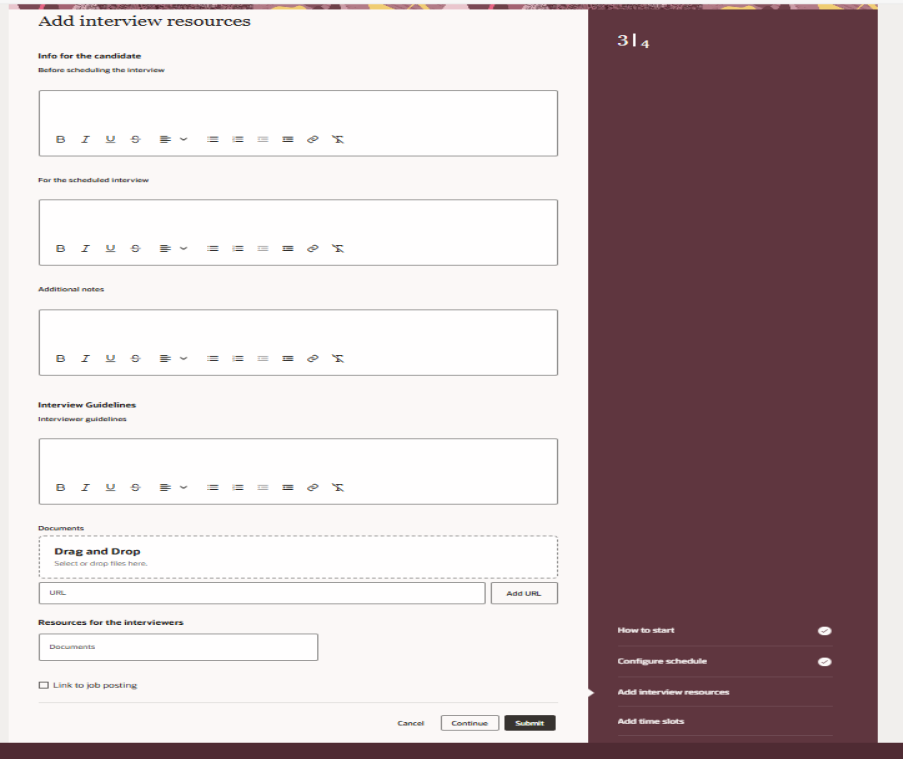
Fig 4
Add Time Slots
The Add Time Slots section is available only when creating a Candidate-managed schedule with manually created time slots.
In this case, recruiters can define specific dates and time ranges that candidates can choose from when booking interviews. For Hiring Team-managed schedules or when time slots are automatically generated through calendar integration, manual time slot creation is not available.
This structured approach ensures clarity and consistency across different scheduling methods.
Add Time Slots Section When Creating an Interview Schedule
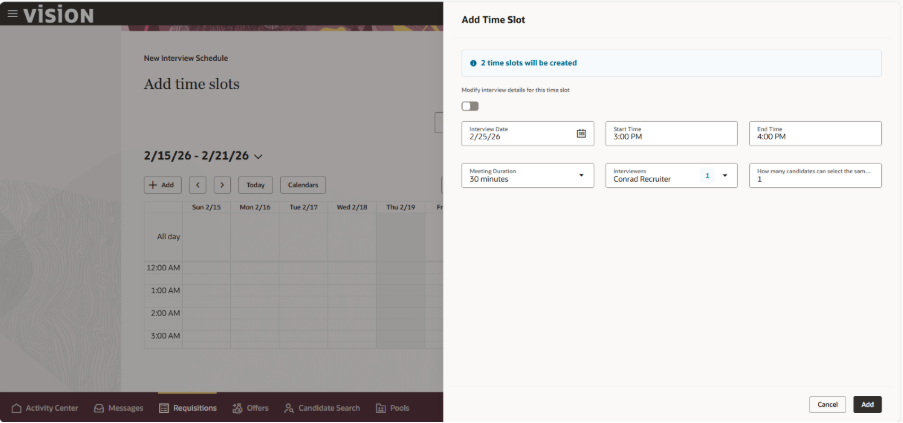
Fig 5
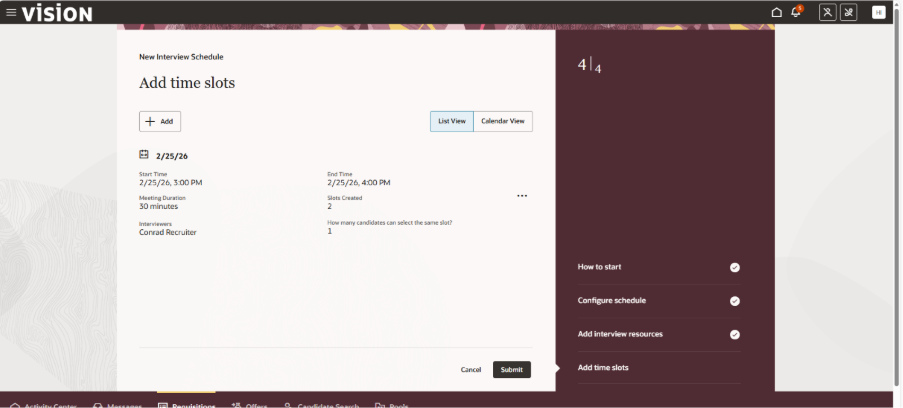
Fig 6
Steps to Enable and Configure
To use the Redwood experience for interviews, set the following profile options to Yes.
- ORA_IRC_RECRUITING_REDWOOD_ENABLED
- ORA_IRC_JOB_APPLICATION_REDWOOD_ENABLED
- ORA_IRC_INTERVIEW_REDWOOD_ENABLED
Benefits of Redwood Candidate Interview Schedule:
The Redwood Interview Schedule flow delivers:
- A cleaner, modern user interface
- Flexible scheduling models
- AI-assisted content creation
- Improved interviewer preparation
- Better candidate experience
- Seamless integration with calendar systems
Key Takeaways
The Redwood Interview Schedule experience is not just an enhancement; it’s a transformation of how organizations manage interview coordination. By blending modern design, intelligent automation, and AI-powered assistance, Oracle Fusion Recruiting enables teams to move faster, collaborate smarter, and deliver a premium candidate experience. With greater flexibility, improved efficiency, and seamless integration, Redwood empowers recruiting teams to focus less on administrative tasks and more on what truly matters hiring the right talent.
Transform Interview Scheduling with Oracle HCM Solutions
Looking to streamline interview coordination and create a seamless hiring experience? Oracle Redwood Experience simplifies interview scheduling by providing an intuitive, user-friendly interface that enhances collaboration between recruiters, hiring managers, and candidates. By reducing administrative effort and improving scheduling efficiency, organizations can accelerate hiring decisions and deliver a more engaging recruitment journey.
At Kovaion, our experienced Oracle HCM consultants help organisations implement and optimise Oracle HCM solutions that modernise talent acquisition processes and improve workforce experiences. From Oracle Recruiting enhancements and Redwood adoption to end-to-end HCM implementations, we deliver tailored solutions that help businesses attract top talent, improve recruiter productivity, and maximise the value of their Oracle HCM investment.