Receivables Receipt Processing with Customer Withholding (TDS) – India
Objective
This document explains the basic steps to handle customer receipts where TDS is deducted in India. It covers how to record the receipt, adjust the withheld amount, and reconcile the TDS with Form 26AS so that the customer balance is properly closed.
Prerequisites (One-Time Setup)
2.1 Receivables Activities Setup for Withholding
Navigation:
Navigator → Setup and Maintenance → Receivables → Manage Receivables Activities
Steps:
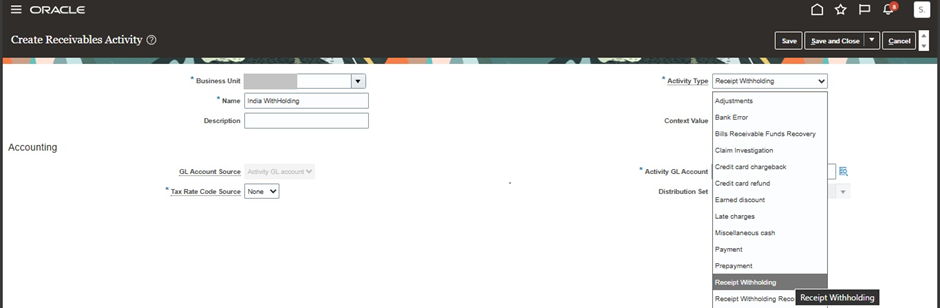
1. Create a receivables activity with the following details:
- Activity Name: Receipt Withholding
- Activity Type: Receipt Withholding
- GL Account Source: Activity GL Account
- GL Account: Withholding Clearing Account
- Tax Rate Code Source: None
- Status: Active
2. Create another receivables activity for reconciliation:
- Activity Name: Receipt Withholding Reconciliation
- Activity Type: Receipt Withholding Reconciliation
- GL Account: Withholding Prepaid Account
- Status: Active
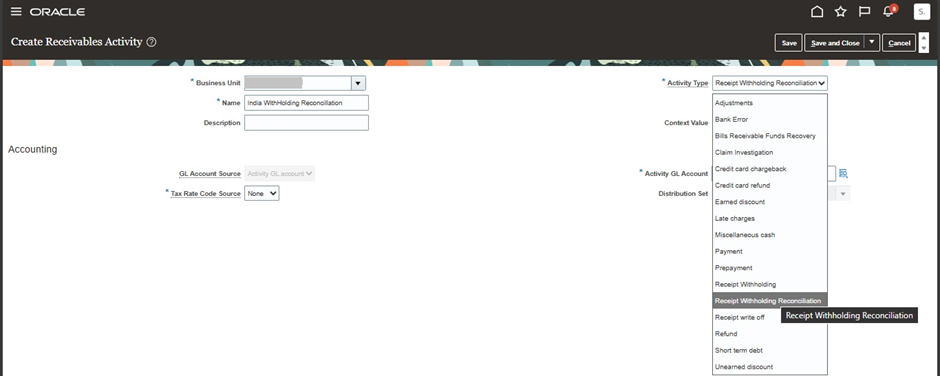
These activities are used to record the withheld amount and to move it to the appropriate account after reconciliation.
2.2 PAN Setup for Legal Entity
Navigation:
Navigator → Setup and Maintenance → Legal Structures → Manage Legal Entity Registrations
Steps:
1. Search and open the required legal entity
2. Add a new registration with the following details:
- Jurisdiction: India Income Tax
- Registration Type: PAN
- Registration Number: Legal Entity PAN
3. Save the changes
PAN setup is mandatory for matching Form 26AS data.


2.3 Accounting Calendar Setup (India Financial Year)
Navigation:
Navigator → Setup and Maintenance → Financial Reporting Structures → Manage Accounting Calendars
Steps:
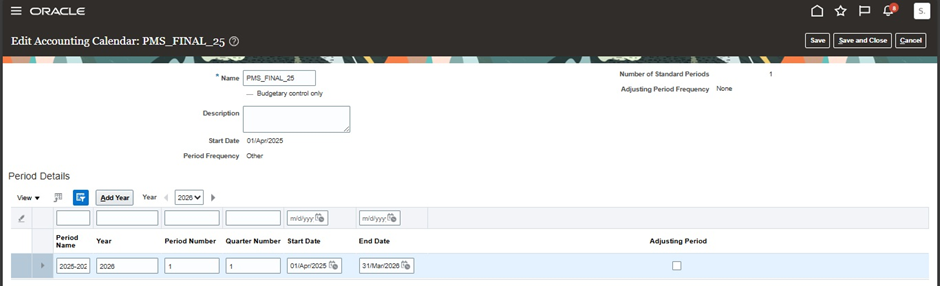
- Create a new accounting calendar
- Define the financial year as:
- Start Date: 01-Apr-YYYY
- End Date: 31-Mar-YYYY+1
- Ensure the period names follow the format YYYY-YYYY+1 (example: 2024-2025)
- Save the calendar
This calendar format is required to align accounting periods with Form 26AS reporting.
Associate Accounting Calendar with Legal Entity
Navigation:
Navigator → Setup and Maintenance → Legal Structures → Manage Legal Entity Financial Information
Steps:
- Search and open the required legal entity
- Assign the newly created accounting calendar
- Save the changes

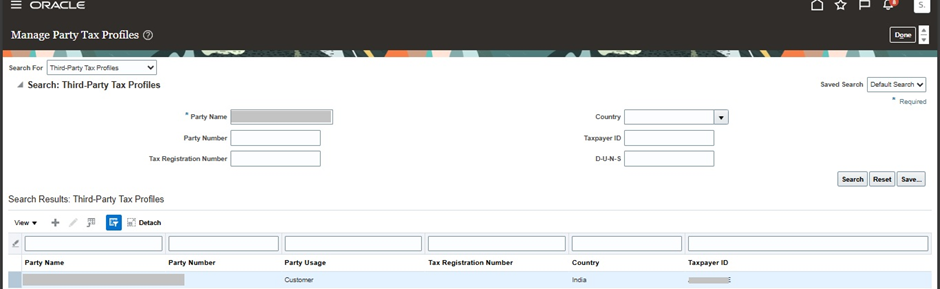
2.3 TAN Setup for Customer
Navigation:
Navigator → Setup and Maintenance → Tax → Manage Party Tax Profiles
Steps:
1. Search for the customer
2. Open or create the party tax profile
3. Add a tax registration:
- Registration Type: TAN
- Country: India
4. Save
TAN can be maintained either at the customer level or at the site level.
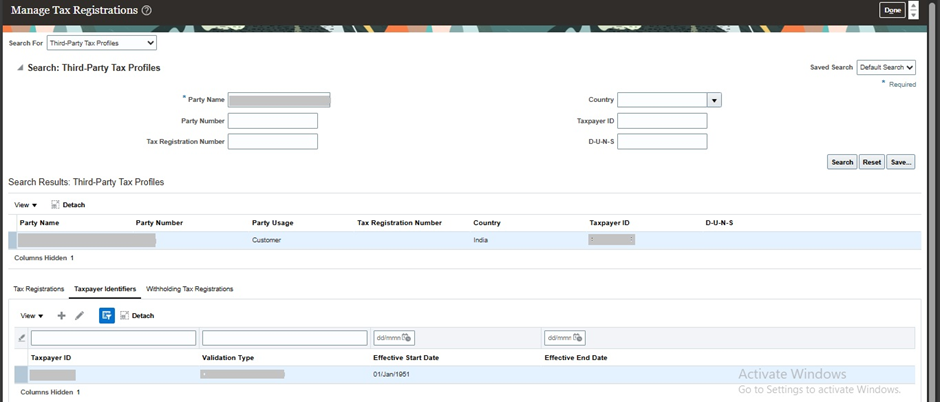
2.5 Third-Party Tax Profile Setup for Customer (TAN – Taxpayer Identifiers)
Navigation:
Navigator → Setup and Maintenance → Tax → Manage Tax Registrations
Steps:
1. Search and select the customer (Third Party)
2. Navigate to the Taxpayer Identifiers tab
3. Define the following:
- Identifier Type: TAN
- Country: India
- TAN Number: As provided by the customer
Save and close
This setup ensures that the customer TAN is properly available for withholding processing and reconciliation with Form 26AS.
Important Points
- Header-level and transaction-level withholding cannot be used together for the same receipt
- Receipt application must be within the same business unit
- The applied amount should not be less than the applied withholding amount
- Receipts already reconciled with Form 26AS cannot be modified
- Foreign currency receipts are not supported
Business Benefits of Receivables Receipt Processing with Customer Withholding (TDS)
1. Improved Compliance with Indian Tax Regulations
Oracle ERP Cloud enables organizations to accurately manage customer withholding tax (TDS) deductions and reconcile them with Form 26AS, helping ensure compliance with Indian tax requirements. Automated tracking of withholding amounts, PAN details, and TAN registrations reduces compliance risks and supports accurate tax reporting and audit readiness.
2. Accurate Receivables and Customer Balance Management
By properly recording customer receipts, withholding amounts, and reconciliation transactions, organizations can ensure that invoice balances are accurately closed and customer accounts remain up to date. This improves accounts receivable accuracy and provides greater visibility into outstanding receivables and collections.
3. Reduced Manual Reconciliation Effort
Managing TDS deductions manually can be time-consuming and prone to errors. Oracle ERP Cloud streamlines the reconciliation process by providing structured withholding activities and automated accounting treatments, reducing administrative effort and minimizing discrepancies between customer payments and tax deductions reflected in Form 26AS.
4. Enhanced Financial Control and Transparency
The ability to separately track withheld tax amounts and reconcile them against customer receipts improves financial transparency and strengthens internal controls. Finance teams gain better visibility into receivables transactions, tax deductions, and reconciliation status, enabling more accurate financial reporting and decision-making.
5. Faster Period-End and Tax Reconciliation Processes
With standardized receipt withholding processes and predefined accounting configurations, organizations can accelerate month-end and year-end reconciliation activities. This helps finance teams close accounting periods more efficiently while ensuring tax-related transactions are properly accounted for.
6. Improved Data Accuracy and Reduced Errors
Automated handling of customer withholding transactions minimizes manual intervention and reduces the risk of posting errors, incorrect receipt applications, or reconciliation mismatches. This improves the quality of financial data and supports more reliable receivables management processes.
7. Scalable Receivables and Tax Management
As transaction volumes increase, Oracle ERP Cloud provides a scalable framework for managing customer receipts and withholding tax deductions across multiple customers and business units. This enables organizations to efficiently support business growth while maintaining strong compliance and financial governance practices.
By leveraging Oracle ERP Cloud for customer withholding (TDS) processing, organizations can improve receivables accuracy, simplify tax compliance, enhance financial visibility, and streamline reconciliation processes while ensuring adherence to Indian regulatory requirements.
Conclusion
This update explains the complete process for handling customer receipts with TDS deduction in India. It helps ensure that receipts are recorded correctly, invoice balances are fully closed, and withheld tax amounts are properly tracked and reconciled with Form 26AS.
By following this process, organisations can maintain accurate receivables balances, comply with Indian tax requirements, and avoid manual reconciliation issues related to customer-deducted TDS.
Simplify TDS Compliance and Receivables Management with Oracle ERP Solutions
Looking to streamline customer withholding tax (TDS) processing and improve receipt application accuracy? Oracle ERP Cloud enables organizations to automate receivables workflows, ensure compliance with Indian tax regulations, and gain greater visibility into customer transactions. By reducing manual intervention and enhancing financial controls, businesses can improve efficiency and strengthen their receivables operations.
At Kovaion, our experienced Oracle ERP consultants help organisations implement and optimise Oracle ERP solutions that simplify tax compliance, automate receivables processes, and improve financial performance. From Oracle Financials implementations to process optimisation and managed services, we deliver scalable solutions that help businesses maximise operational efficiency and achieve long-term success.