PeopleSoft FSCM Update Image 56: Expense Report Processing Enhancements

Discover the latest Expense Report Processing enhancements in PeopleSoft FSCM Update Image 56, including expense report templates, cash advance validation, wallet improvements, hire date expense reporting, and employee profile updates.
Introduction
Oracle continues to enhance the PeopleSoft Expenses module with features that improve efficiency, strengthen compliance, and simplify expense management. In PeopleSoft FSCM Update Image 56, several enhancements have been introduced to streamline expense report creation, improve cash advance management, and provide better visibility for employees, approvers, and administrators.
Whether your organization processes hundreds or thousands of expense reports each month, these updates help reduce manual effort while supporting stronger financial controls.
Let us explore the new capabilities.
1. Populate Expense Reports Using Templates
Recurring business trips often require employees to enter the same expense types repeatedly. To reduce repetitive work, Image 56 introduces the ability to create expense reports using predefined templates.
Employees can now select Add from Template from the Expense Report actions menu and choose either:
- User Templates - Personal templates created by individual users.
- Public Templates - Organization-wide templates maintained by administrators.
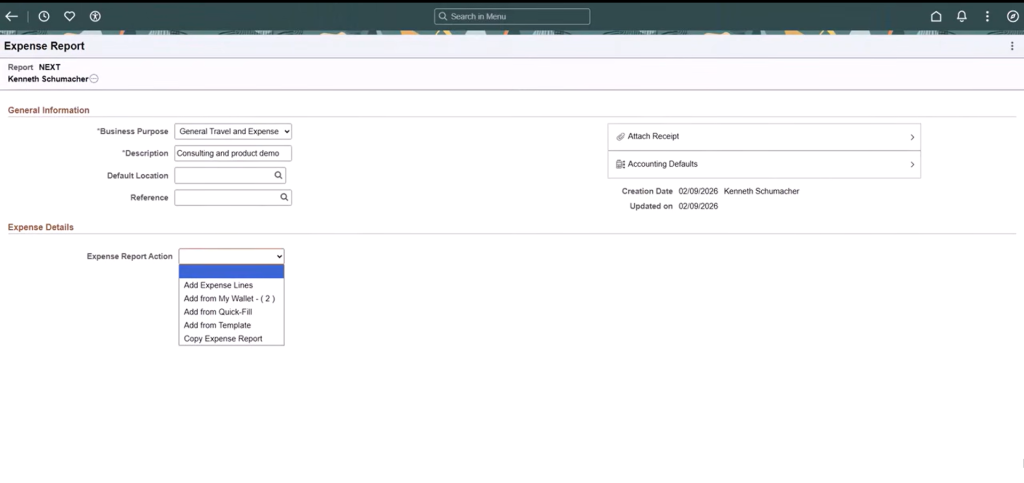
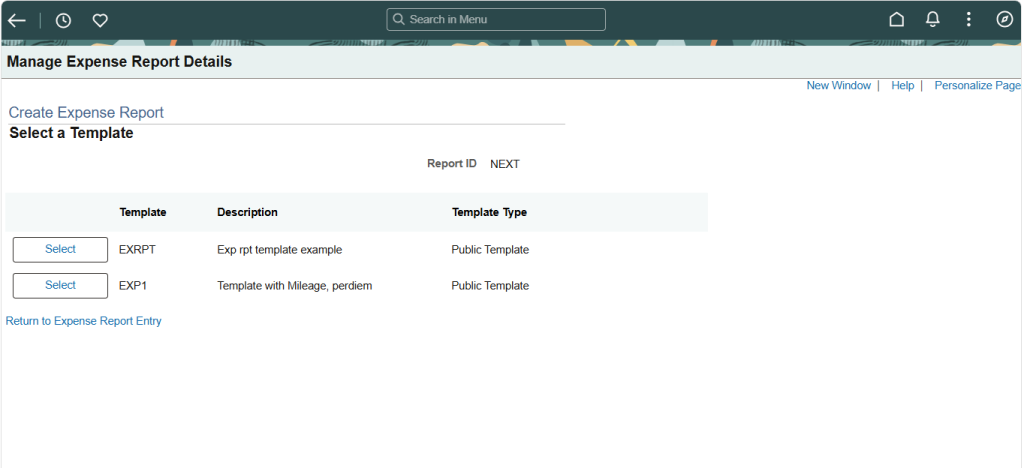
After selecting a template, users simply verify the dates and expense types before updating the expense report. The system automatically populates the expense entries based on the selected template.
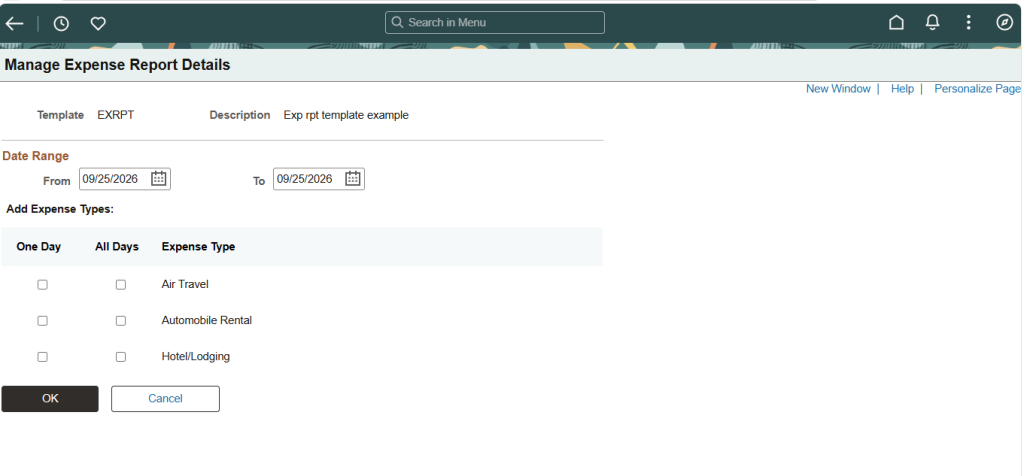
Benefits
- Reduces manual data entry
- Speeds up expense report creation
- Improves reporting consistency
- Minimizes entry errors
2. Stronger Cash Advance Validation
Managing outstanding cash advances is essential for maintaining accurate financial records. Image 56 introduces an optional feature that encourages employees to reconcile cash advances before submitting expense reports.
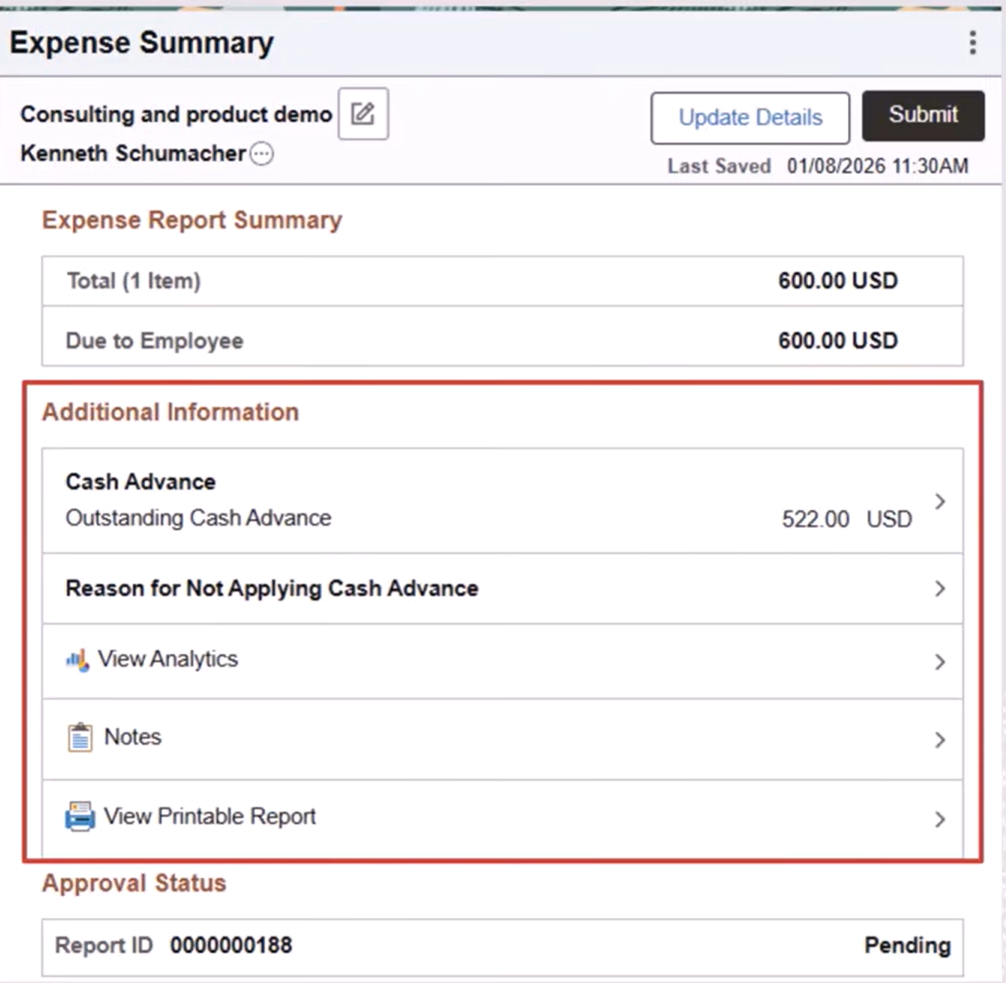
When an employee has an outstanding cash advance, the Expense Summary page now displays:
- Outstanding cash advance amount
- Additional information section
- Option to apply the cash advance
- Option to provide a reason for not applying it
If the employee attempts to submit the report without applying the cash advance or providing a justification, the system displays a reminder message. The employee can either apply the cash advance or return to the expense summary to enter a valid reason before submitting the report.
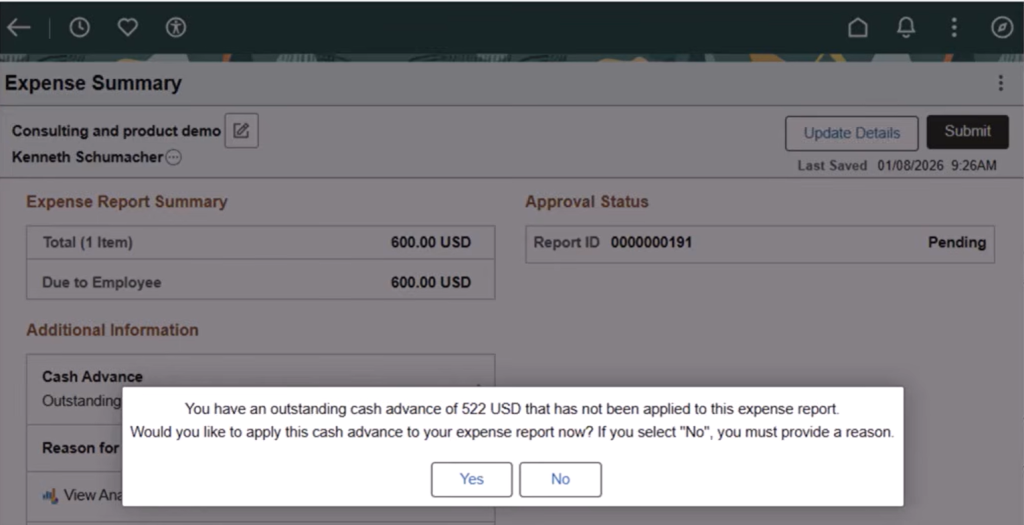
This enhancement helps organizations:
- Improve cash advance reconciliation
- Reduce policy violations
- Strengthening internal financial controls
- Maintain accurate expense reporting
3. Better Visibility for Expense Approvers
Approval workflows have also been enhanced.
If an employee submits an expense report without applying an available cash advance but provides a justification, approvers can review this information directly from the Pending Approvals page.
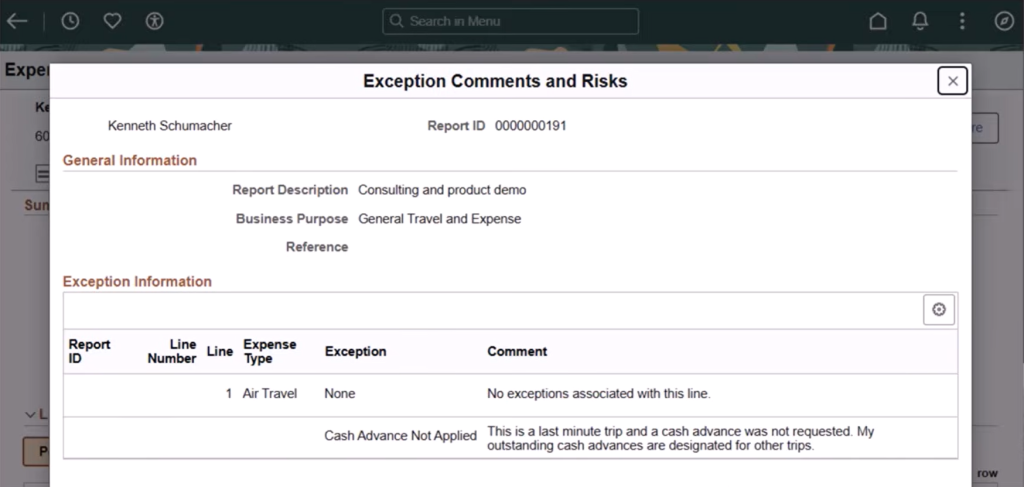
Using the Exceptions and Risk link, approvers can:
- View employee comments
- Review potential risks
- Make informed approval decisions
- Approve or deny expense reports based on business policies
This provides greater transparency throughout the approval process.
4. Improved Wallet Experience
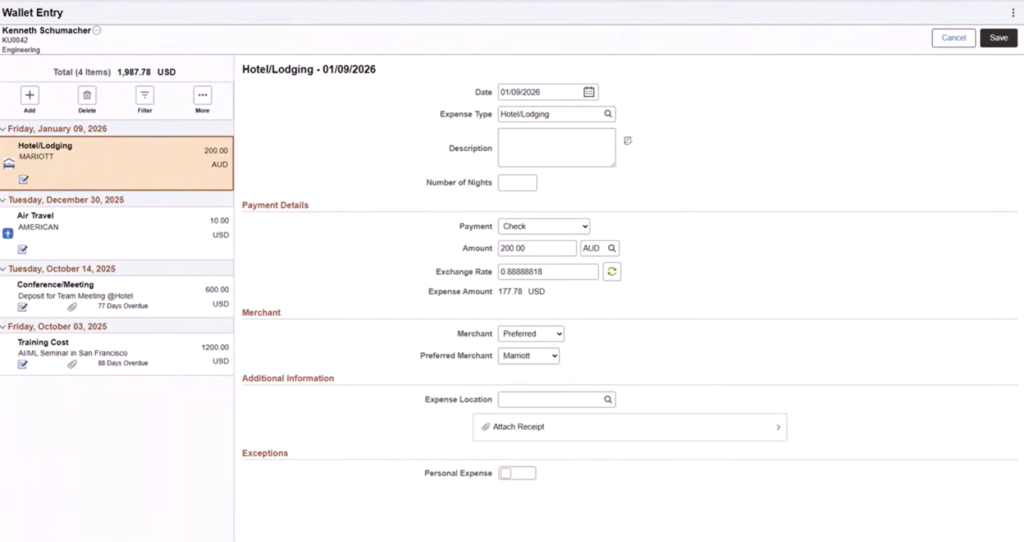
The Expense Wallet has received usability improvements that make transaction selection easier.
Employees can now view:
- Merchant Name
- Transaction Currency
These details appear both on the Wallet Entry page and while selecting transactions from My Wallet during expense report creation.
This additional information helps users quickly identify the correct transactions and reduces selection errors.
5. Create Expense Reports Back to the Employee Hire Date
Organizations occasionally need employees to submit expenses incurred earlier in their employment, such as relocation costs, onboarding expenses, or delayed reimbursements.
With the appropriate Business Unit configuration enabled, employees can now create and submit expense reports dating back to their hire date.
Business value
- Supports delayed reimbursements
- Simplifies onboarding expense claims
- Improves flexibility for expense processing
6. Easier Employee Profile Management
Expense administrators can now maintain employee profile information directly through the Manage Employee Information component.
Instead of relying on separate processes, administrators can update employee expense-related profile information more efficiently, reducing administrative overhead and improving data accuracy.
7. Business Benefits of Image 56 Expense Enhancements
The Expense Report Processing enhancements deliver value across multiple areas of the organization.
For Employees
- Faster expense report creation
- Less manual data entry
- Better visibility into wallet transactions
- Simplified cash advance handling
For Managers and Approvers
- Improved insight into policy exceptions
- Better visibility of outstanding cash advances
- More informed approval decisions
For Finance Teams
- Stronger compliance controls
- Better cash advance reconciliation
- Improved reporting accuracy
- Reduced Administrative effort
8. Why Organizations Should Consider These Features
Expense management is more than reimbursement processing – it is a critical component of financial governance. The enhancements introduced in PeopleSoft FSCM Update Image 56 help organizations automate routine tasks while strengthening policy enforcement.
Features such as reusable templates, enhanced wallet details, cash advance validation, and improved approval visibility contribute to a smoother user experience while helping finance teams maintain greater control over organizational spending.
Organizations planning to adopt Image 56 should evaluate these capabilities and enable the features that best support their business processes.
9. Conclusion
The Expense Report Processing enhancements in PeopleSoft FSCM Update Image 56 represent meaningful improvements in expense management, combining a smoother employee experience with stronger financial governance. From reusable expense report templates and enhanced cash advance validation to improved wallet visibility and approval workflows, these updates help organizations streamline expense operations, reduce manual effort, and strengthen compliance.
As organizations continue to optimize their PeopleSoft environments, adopting the right enhancements is essential to maximizing system efficiency and business value. Kovaion helps organizations optimize their PeopleSoft applications through expert consulting, implementation, and support services. Explore Kovaion’s PeopleSoft Services to discover how your organization can drive greater efficiency and value from its PeopleSoft investment.