PeopleSoft HCM PUM 55: Emergency Contact Management
Oracle PeopleSoft HCM PUM 55 introduces an enhancement to PeopleSoft Emergency Contact Management, allowing employees to designate one or more contacts to be notified if they are arrested or detained while at work or during work hours.
This enhancement supports compliance with California Senate Bill (SB) 294, which requires employers to notify an employee’s designated emergency contact in such situations.
The functionality is available through Employee Self Service, HR Administration, and Manager Self Service.
Key Enhancements
PUM 55 includes the following updates:
- Employees can designate one or more emergency contacts for arrest or detention notifications.
- HR Administrators can view and manage emergency contact details.
- Managers can view emergency contact information for their direct reports.
- The feature can be enabled through the HCM Installation Table.
1. Configure Emergency Contact Setup Values
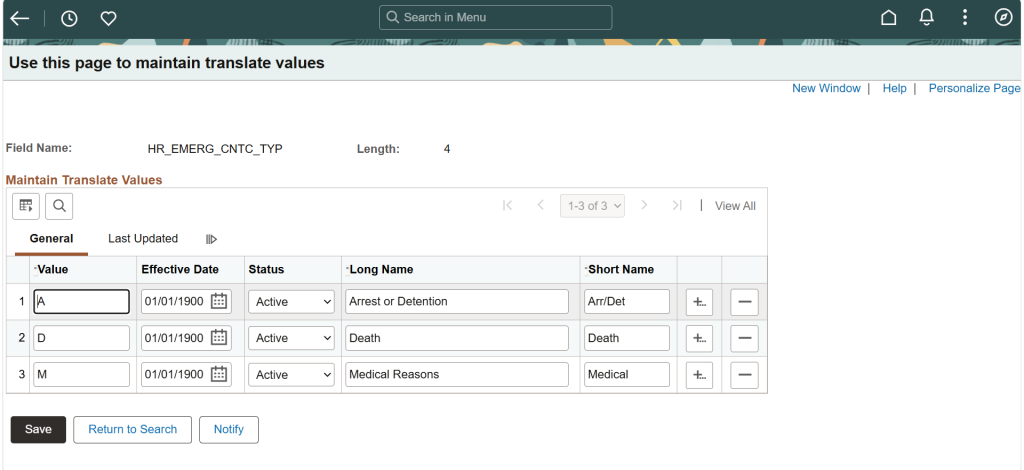
Before using the feature, verify that the required translate values are configured.
Navigation: PeopleTools > Utilities > Maintain Translate Values
Review and maintain the Emergency Contact setup values according to your organization’s requirements.
2. Enable the Feature
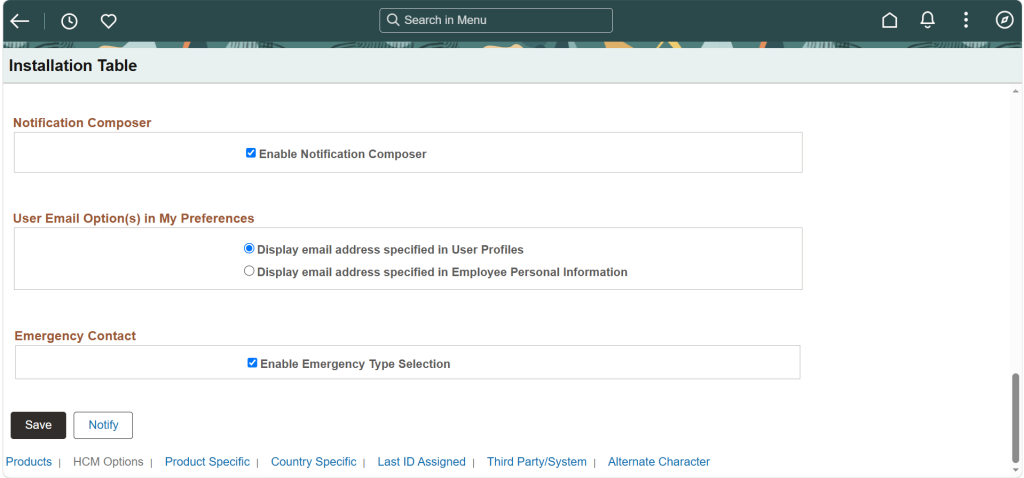
To activate this functionality, enable the Emergency Contact Type option in the Installation Table.
Navigation: Set Up HCM > Install > Installation Table
After enabling the option, employees can designate emergency contacts for arrest or detention notifications.
This enhancement was delivered by Oracle PeopleSoft to support compliance with California SB 294.
3. Employee Self Service
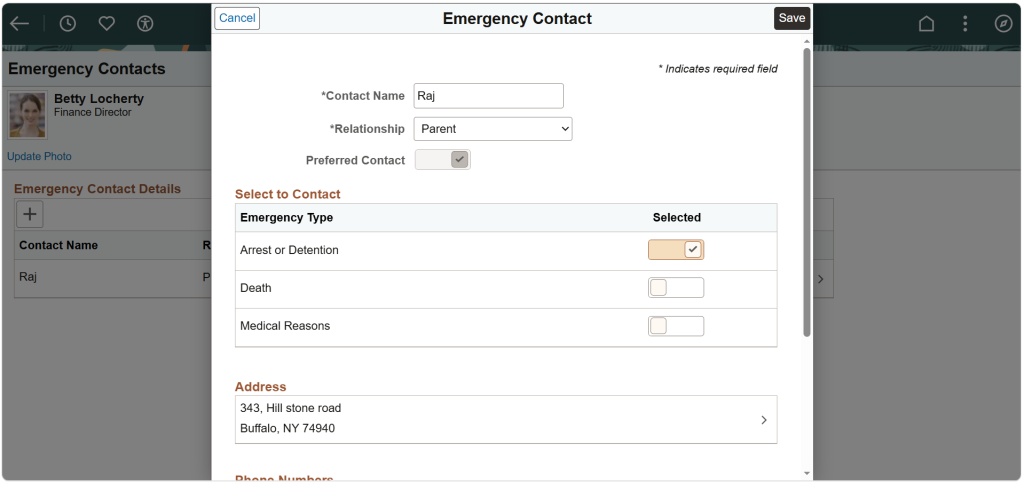
Employees can maintain their emergency contact information by:
- Adding one or more emergency contacts.
- Selecting contacts for arrest or detention notifications.
- Updating contact information whenever needed.
This allows employees to manage their notification preferences independently.
4. HR Administrator
HR Administrators can manage emergency contact information by:
- Viewing employee emergency contacts.
- Adding or updating contact details.
- Changing the designated contact for arrest or detention notifications.
This helps ensure employee records remain accurate and up to date.
Managers can view emergency contact information for their direct reports. This provides managers with quick access to employee emergency contact details when required.
Business Benefits
Support Regulatory Compliance: The enhancement supports organizations in meeting the requirements of California SB 294 by enabling employees to designate contacts for arrest or detention notifications.
Strengthen Emergency Preparedness: Maintaining designated emergency contacts helps organizations establish a more structured approach to workplace emergency situations.
Empower Employees: Employees can independently add, update, and select their emergency contacts, giving them greater control over their notification preferences.
Simplify HR Administration: HR administrators can view and manage emergency contact information, making it easier to maintain accurate and up-to-date employee records.
Improve Manager Visibility: Managers can access emergency contact information for their direct reports when required, providing appropriate visibility during workplace emergencies.
Conclusion
The Emergency Contact enhancement in Oracle PeopleSoft HCM PUM 55 improves emergency contact management while helping organizations comply with California SB 294. By extending this functionality across Employee Self Service, HR Administration, and Manager Self Service, organizations can maintain accurate contact information and respond more effectively during workplace emergencies.
Enhance PeopleSoft HCM with Kovaion
Looking to strengthen HR processes, improve emergency contact management, and keep employee information up to date? Kovaion helps organizations optimize their PeopleSoft HCM environment with solutions designed to streamline HR administration, enhance employee self-service, and support evolving business requirements.
Explore our Oracle PeopleSoft Services to discover how our expertise can help you make better use of PeopleSoft HCM capabilities and improve the efficiency of your HR operations.
Connect with our PeopleSoft experts to explore solutions tailored to your organization’s HR needs.
Frequently asked Questions
-
PeopleSoft Emergency Contact Management allows employees to designate emergency contacts and enables HR administrators and managers to manage or view relevant emergency contact information.
+ -
PUM 55 allows employees to designate one or more contacts for arrest or detention notifications and provides related access through Employee Self Service, HR Administration, and Manager Self Service.
+ -
The feature can be enabled through the HCM Installation Table by selecting the Emergency Contact Type option.
+ -
Yes. Employees can add, update, and select emergency contacts for arrest or detention notifications through Employee Self Service.
+ -
Yes. HR administrators can view, add, update, and change designated emergency contact information.
+