PeopleSoft Campus Solutions Image 36 – Student Groups Delete


In the complex ecosystem of higher education administration, managing large populations of students efficiently is critical to maintaining operational accuracy and data integrity. Higher education institutions rely on student groups for everything from tuition calculation and academic advising to financial aid packaging and targeted communications. However, managing the life-cycle of students within these groups—specifically, removing them when their status changes—has historically required tedious manual updates.
With the release of PeopleSoft Campus Solutions PUM Image 36, Oracle has addressed this administrative bottleneck by introducing a highly anticipated enhancement within the Campus Community Common Utilities: the Student Groups Delete functionality.
This update significantly overhauls the “Process Student Groups” feature, eliminating manual administrative overhead, tightening data security, and ensuring financial records remain perfectly in sync. Let’s explore the key features of this enhancement and how it delivers immediate strategic value to your institution.
Key Features
1. Bulk Deletion Using Population Selection
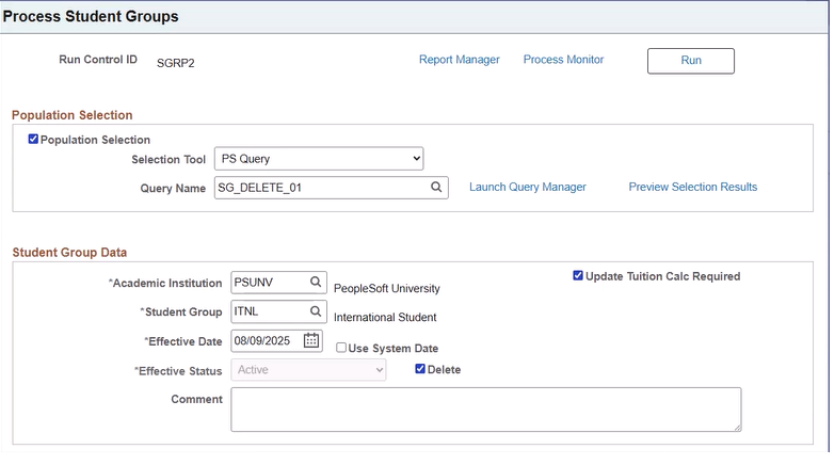
Image 36 introduces a new Delete Mode option within the Process Student Groups run control page.
When this option is selected, the process uses the existing Population Selection criteria along with any Student Override parameters to identify the required students. Instead of deleting records individually, the system removes all eligible students from the selected student group in a single batch process.
This significantly reduces the effort involved in managing large student populations.
2. Automatic Date Selection with “Use System Date”
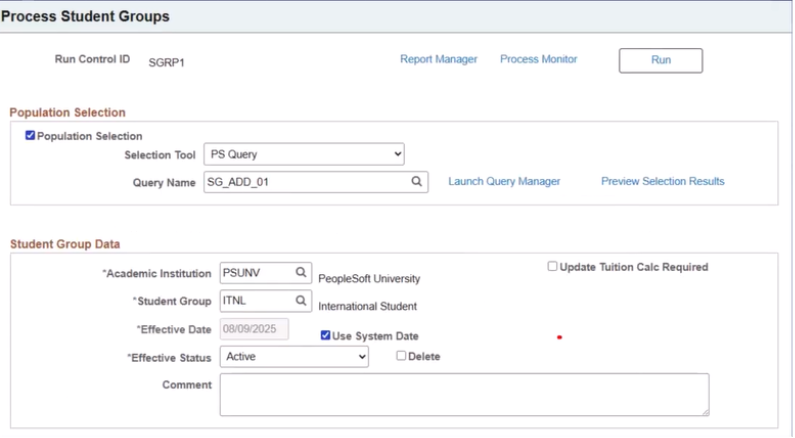
To make scheduled processes easier to manage, Image 36 adds a Use System Date option.
When enabled, the system automatically uses the current processing date instead of requiring users to enter an effective date manually. This allows administrators to schedule recurring Student Group processes without updating run control parameters every time the process is executed.
The result is a more efficient and fully automated scheduling experience.
3. Automatic Tuition Calculation Update
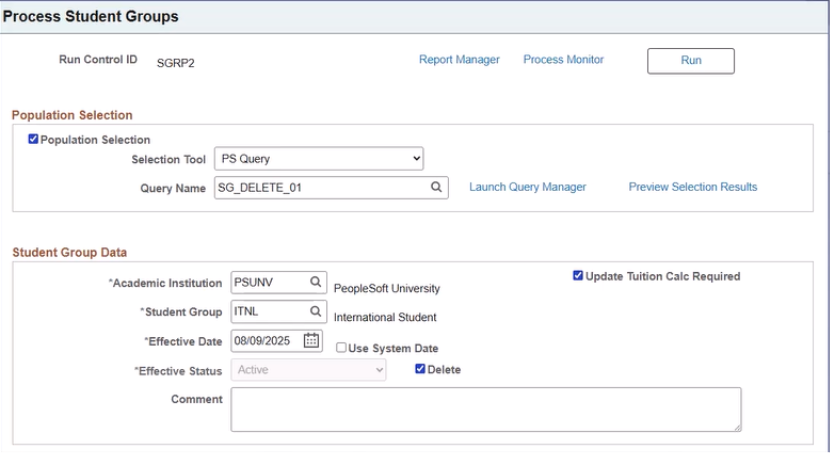
Student group membership can directly impact tuition calculation and financial processing.
When the Update Tuition Calculation Required option is selected during the deletion process, the system automatically marks the Tuition Calculation Required flag as Yes for all applicable student terms beginning on or after the effective date (or system date).
This ensures that tuition calculations remain synchronized with the latest student group information, helping institutions avoid billing inconsistencies and maintain accurate financial records.
4. Enhanced Security Controls
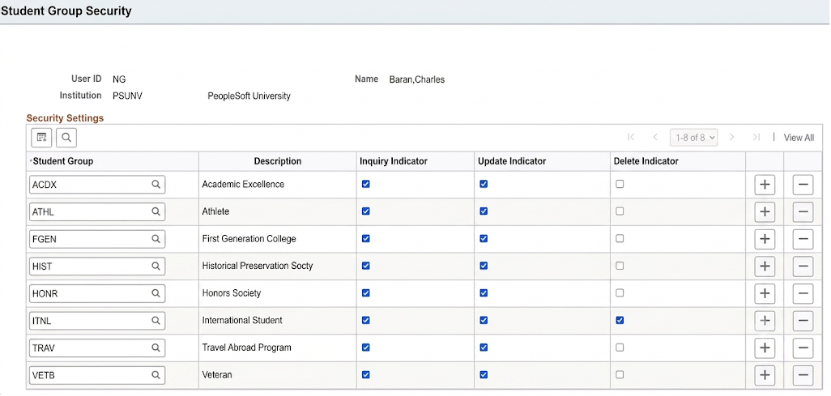
Since deleting student group records is a sensitive operation, Image 36 introduces additional security controls.
A new Delete Indicator has been added to the Student Group Security setup. Only users with this permission enabled for a specific Institution and Student Group can access and use the delete functionality.
The same security validation also applies when users attempt to delete student groups manually in the Student Groups component, ensuring that only authorized users can perform deletions.
This enhancement strengthens data security while preventing accidental or unauthorized record changes.
Business Benefits
The Student Groups Delete enhancement offers several valuable benefits for higher education institutions.
- Reduced Administrative Effort – Bulk deletion through Population Selection eliminates repetitive manual updates, allowing administrators to manage large numbers of student records quickly and efficiently.
- Improved Process Automation – The Use System Date feature enables recurring batch jobs to run automatically without requiring manual updates to the effective date, making scheduled processing more reliable.
- Better Data Accuracy – Removing outdated or incorrect student group assignments helps maintain clean and accurate student records, improving overall data quality across the institution.
- Enhanced Security and Governance – Role-based delete permissions ensure that only authorized users can remove student group records, reducing the risk of accidental data loss and supporting institutional security policies.
- Accurate Financial Processing – Automatic tuition calculation updates ensure that billing and financial aid processes always reflect the student’s current group membership, reducing errors and improving financial accuracy.
Conclusion
The Student Groups Delete enhancement in PeopleSoft Campus Solutions Image 36 provides a practical solution for efficiently managing student group memberships. By introducing bulk deletion, automated scheduling through the Use System Date option, automatic tuition calculation updates, and stronger security controls, Oracle has significantly improved the student group maintenance process.
These enhancements reduce manual effort, improve operational efficiency, strengthen data security, and ensure that student and financial records remain accurate and up to date. For institutions managing large student populations, this feature offers a simple yet impactful improvement that streamlines administration and supports better data management across Campus Solutions.
Simplify Student Group Management with Kovaion
Managing student groups efficiently is essential for maintaining accurate academic, administrative, and financial records. While the Student Groups Delete enhancement in PeopleSoft Campus Solutions Image 36 simplifies bulk deletion, automated scheduling, tuition recalculations, and security management, maximizing its value requires the right implementation strategy. Kovaion helps higher education institutions adopt the latest PeopleSoft updates with minimal disruption, ensuring new features are configured correctly and aligned with institutional processes.
With deep expertise in PeopleSoft Campus Solutions, Kovaion supports institutions through PUM adoption, application enhancements, system optimization, and ongoing managed services. Whether you’re planning an upgrade, optimizing existing workflows, or looking to improve operational efficiency, our experts can help you unlock the full potential of your PeopleSoft environment while ensuring data accuracy, security, and compliance.