PeopleSoft Campus Solutions Document Verification Module for Student Admissions
Student admissions require institutions to collect, review, and validate numerous documents before counselling and enrollment. Managing this process manually often leads to delays, missing documents, duplicate verification efforts, and inconsistent tracking across different academic programs. As the number of applications grows, admission teams need a more efficient and standardized approach to ensure every required document is verified accurately.
The Document Verification Module in PeopleSoft Campus Solutions simplifies this process by providing a centralized platform for configuring and managing program-specific document requirements. Through the Master Setup page, admission administrators can define document checklists for each academic program, while the verification page automatically displays the relevant checklist based on the student’s application details. This eliminates manual tracking and ensures consistency across the admission process.
With real-time verification, bulk “Verify All” functionality, and remarks for documenting verification outcomes, admission teams can process applications faster while maintaining complete visibility and audit readiness. By digitising document verification, educational institutions can improve operational efficiency, reduce administrative workload, and provide students with a smoother and more transparent counselling experience.
Overview of the Document Verification
Document Verification has two phases
Master Setup by Admission Team:
- The Admission Team configures program-specific document requirements through a centralized Master Setup page, defining the exact checklist for each academic program (e.g., BE/BTECH, MTECH).
Document Verification Workflow:
- On the Document Verification page, staff review and select a checkbox for documents physically submitted by students, updating verification status in real-time.
Detailed Features of Document Verification
Document Verification is the guide, offering:
- The admission team can easily access the details of the student through Document Verification.
- The checkbox interface enables staff to mark documents as “Verified” after physical review, with bulk selection for complete applications.
- Real-time grid view displays all required documents with sequence numbers, allowing quick scanning of pending items like Counseling Form, Migration, and Anti-Ragging proofs.
The page (Fig 1) is the Document verification master setup page, where the Admission team can set up the documents for each academic programme
Document Verification Master Field setup search page:(with details fetched)
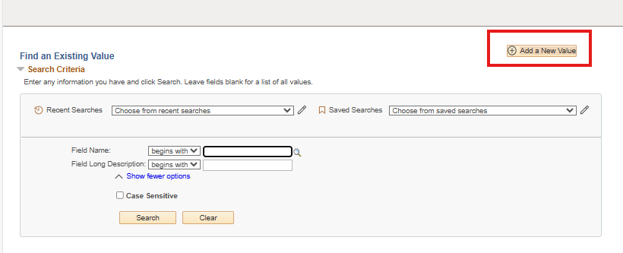
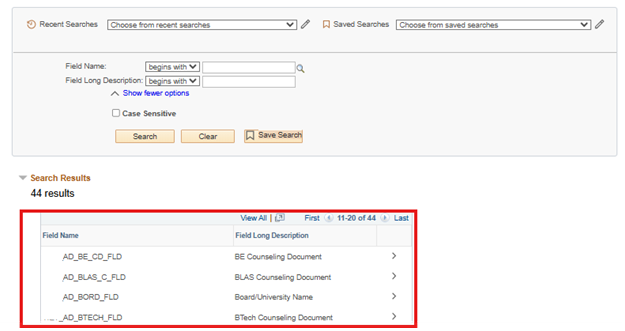
Admission team interacts with the Master setup field through this page:
- On this page, the Admission team can set up the document through the search page. (Fig 1)
- After that, Document which are set up will be fetched in the Document Verification page.
- List of already setup-ed document list for some programs (Fig 2)
Document Verification Master Setup Page:
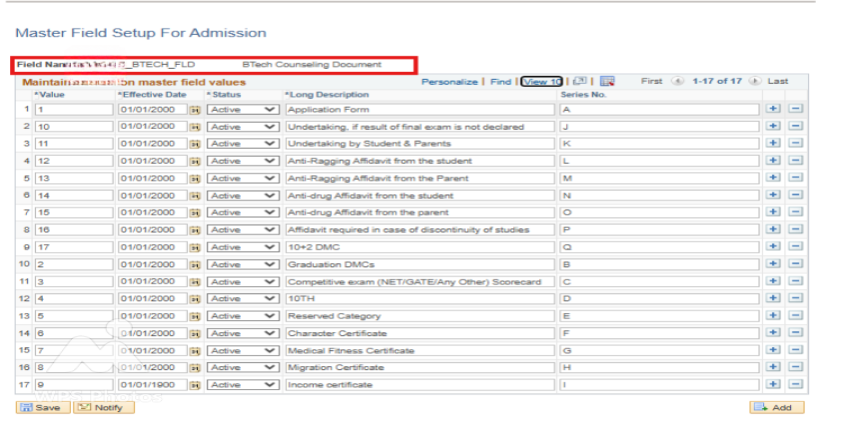
- In the Master Field setup page, the list of documents can be set up. (Fig 3)
- Mainly, this page is controlled and has access only to the admin and admission team.
- Users can set up the list of documents in serial order as they want.
- They can also make documents active and inactive based on the requirement.
Document Verification Main Page:
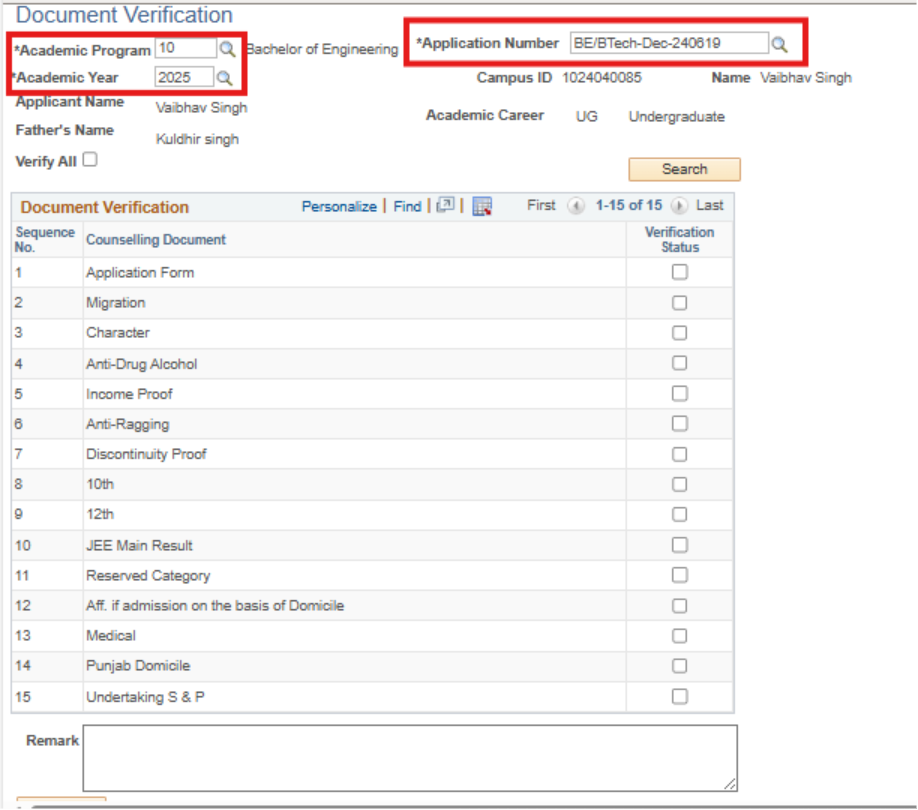
- After configuring documents in the Master Setup page, the Document Verification main page automatically fetches the program-specific checklist using Academic Programme, Academic Year, and Application Number (e.g., BE/TECH-104608).
- The academic team reviews the pre-populated checklist and marks verification status for counselling clearance, ensuring all required documents are physically submitted by students.
- Academic team members mark the Verification Status field with simple check boxes to indicate whether students have physically provided each required document.
- Academic team members can add detailed remarks in the dedicated remark field to document specific issues for individual students.
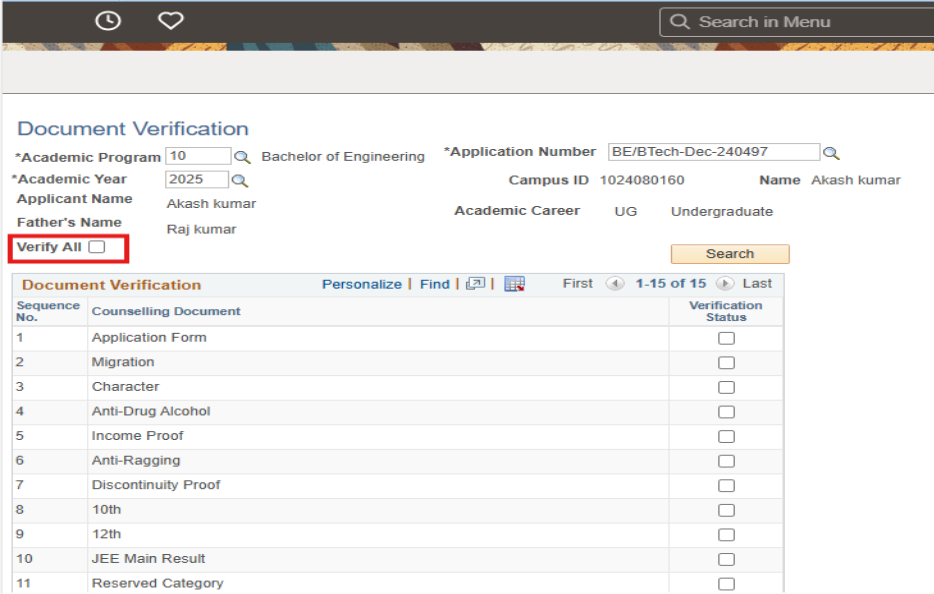
- Users can select the ”Verify All” master checkbox at the top of the document grid to mark every document as valid when a student has provided complete, authentic submissions. (Fig 5)
Benefits of Document Verification for Admission Team and Students:
For Admission Team:
- Faculty easily manage program-specific document checklists, reducing manual tracking by 70% during peak counselling seasons.
- Centralized dashboard shows real-time verification progress by batch/application, eliminating spreadsheet dependency.
- Bulk “Verify All” and remarks streamline high-volume processing while maintaining audit-ready documentation.
- Academic Team can filter by program (BE/BTECH), academic year (2025), or completion status to prioritize incomplete applications.
For Students:
- Clear, personalized checklist shows exactly which documents are due based on their program (BE/BTECH requirements).
- No hassle or confusion for Students tracking document submission status.
- Students can be informed by the academic team easily which documents are submitted and which are not
Conclusion
The Document Verification Module in PeopleSoft Campus Solutions transforms the way educational institutions manage admission document verification. By replacing manual checklists and spreadsheets with a centralized digital workflow, it enables admission teams to verify student documents accurately, consistently, and with greater efficiency throughout the counselling process.
Features such as configurable document master setup, real-time verification status, bulk verification, and detailed remarks help institutions streamline high-volume admissions while maintaining complete audit trails and compliance. The module also gives admission teams better visibility into incomplete applications, allowing them to prioritize verification and reduce processing delays.
For students, the solution creates a more transparent admission experience by ensuring required documents are tracked and verified promptly. Overall, the Document Verification Module helps institutions improve productivity, strengthen compliance, and deliver a faster, more organized, and student-centric admission process using PeopleSoft Campus Solutions.
Ready to Optimize Your PeopleSoft Campus Solutions?
Whether you’re looking to streamline student admissions, modernize administrative workflows, or extend the capabilities of your PeopleSoft Campus Solutions environment, Kovaion can help. With deep expertise in PeopleSoft consulting, implementation, customization, support, and managed services, our specialists deliver tailored solutions that improve operational efficiency and enhance the experience for both institutions and students. Backed by a global presence, Kovaion partners with educational institutions worldwide to maximize the value of their PeopleSoft investment.
Connect with our PeopleSoft experts to discover how Kovaion can help you implement innovative solutions like the Document Verification Module and accelerate your digital transformation journey. Whether you need a new implementation, system enhancements, upgrades, or ongoing support, we’re ready to help you achieve your institutional goals with reliable, scalable, and future-ready PeopleSoft services.