Save Your Searches on Redwood Workforce Structures Search Pages – Oracle HCM Cloud
Searching for the right department, job, grade, or location record shouldn’t mean re-entering the same filters every single time. With this release, Oracle HCM makes that friction disappear on Redwood workforce structures search pages by letting you save the searches you use most, reuse them instantly, and even share them across your team.
You can now save the search criteria that you use often on the Redwood workforce structures search pages. These saved searches can be reused anytime, and you can also set a default search or a system search that’s shared with other users.
In addition to the Redwood Jobs search page, saved searches are available on the following Redwood workforce structures search pages:
- Departments
- Divisions
- Grade Ladders
- Grade Rates
- Grades
- Job Families
- Locations
- Positions
- Reporting Establishments
- Worker Unions
What You Can Do with Saved Searches
1. Types of Saved Searches
Redwood workforce structures pages support personal searches you create for yourself, a default search that loads automatically when you open the page, and a system search that an administrator can share with all users.
2. Save and Reuse a Search
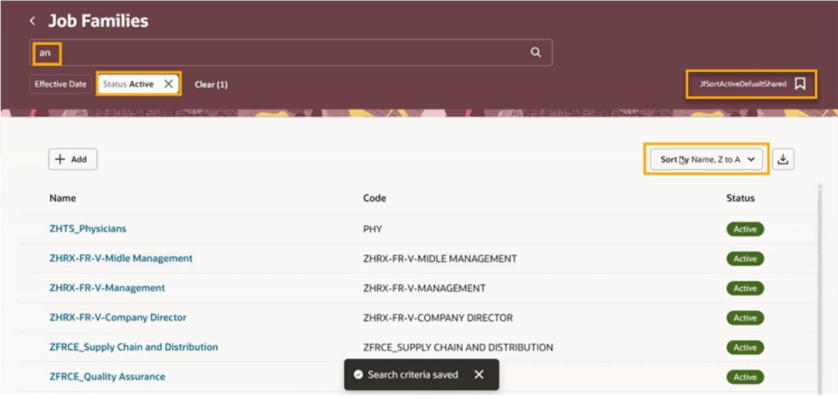
On any of the listed search pages, such as Job Families, enter your search criteria and save it with a name you’ll recognize later. The next time you visit the page, your saved search appears in the list, ready to run with a single click.
3. View Your Personal Searches
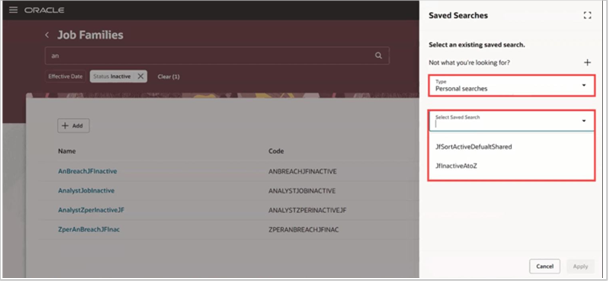
All the searches you’ve created are listed in one place, making it easy to find, run, or manage them without recreating criteria from scratch.
4. Create a Saved Search
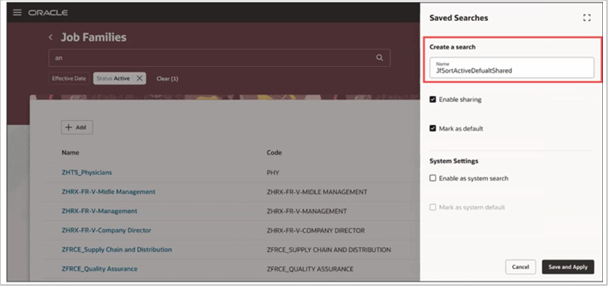
Set up your search filters as usual, then save them as a new saved search for future use.
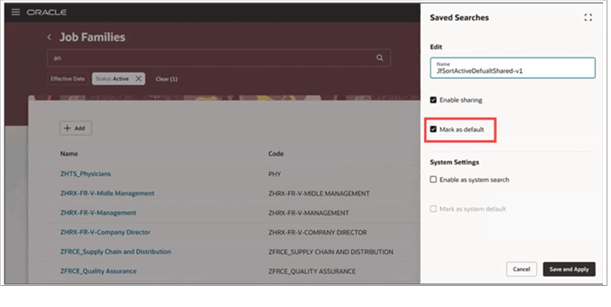
5. Set Your Default Search
Mark any saved search as your default so it loads automatically each time you open the page, removing the need to reapply filters.
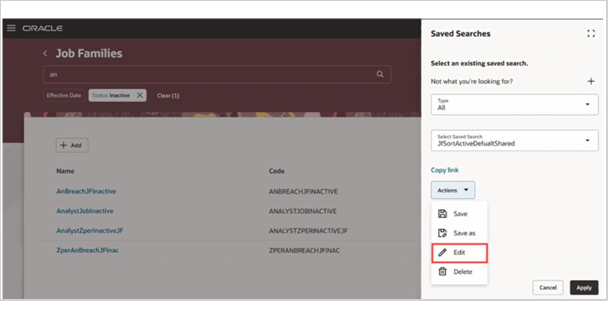
6. Edit a Saved Search
Update the criteria of an existing saved search at any time as your needs change, without having to create a new one.
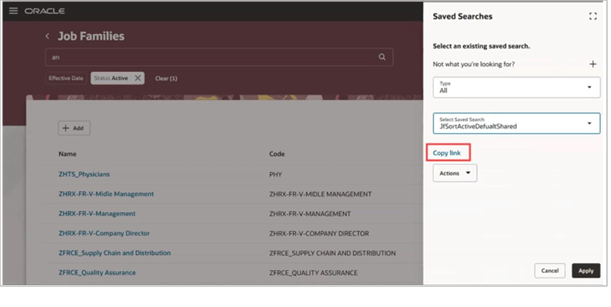
7. Share a Saved Search
Copy the link for a saved search that’s enabled for sharing, and send it to colleagues so they can run the same search directly.
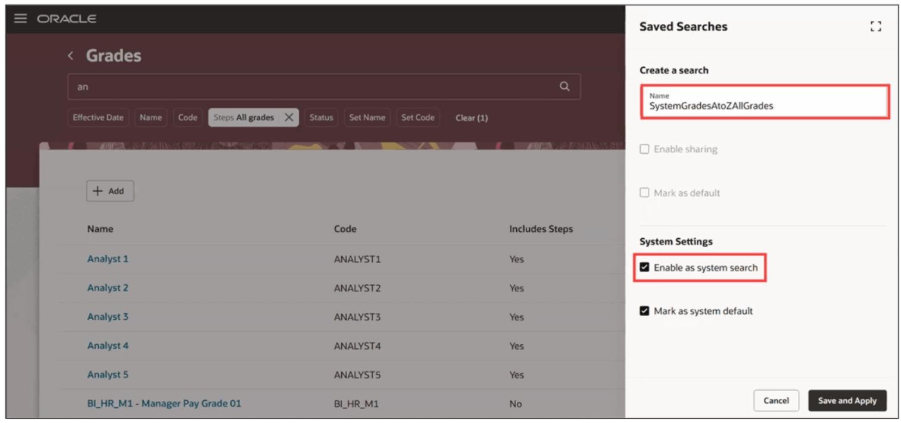
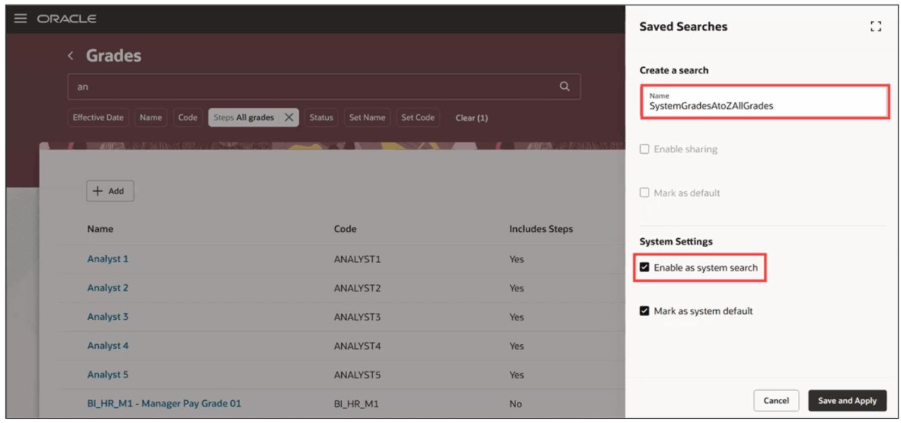
8. Enable a Search as a System Search
Administrators with the right privilege can promote a saved search to a system search, making it available to every user.
Steps to Enable and Configure
No setup is required to enable this feature. For more information about how you save and reuse searches, see “How do I save my searches on Redwood pages and reuse them?” in the Oracle Help Center.
Tips and Considerations
- This feature is available only on the listed Redwood workforce structures search pages. Saved searches on Responsive pages don’t carry forward to the Redwood Experience.
- Saved search isn’t available for the following Redwood pages, as they’re rarely used by admin users and have very few search attributes:
- Enterprise HCM Information – It doesn’t have a search page.
- Legal Entity HCM Information
- Legal Reporting Unit HCM Information
- Disability Organizations
- Legislative Data Groups
- Position Budgets
Access Requirements
To set a search as a system search so it’s shared with all users, you need the HRC_MANAGE_SYSTEM_SEARCHES_PRIV privilege.
This privilege is included by default only in these predefined roles:
- Human Capital Management Application Administrator
- Human Capital Management Integration Specialist
Key Resources
For more information, refer to these resources on the Oracle Help Center:
- Implementing Global Human Resources guide – Jobs and Positions
- Implementing Global Human Resources guide – Divisions, Departments, Worker Unions, and Trees
- Implementing Global Human Resources guide – Locations
- Playbook – How do I set up grades, grade rates, and grade ladders?
Why It Matters
Saved searches turn a repetitive, multi-click task into a one-click action. Whether you’re an HR admin who runs the same Job Families filter every week, or a manager who regularly checks Positions in a specific department, this feature cuts down the time spent rebuilding search criteria.
System searches also ensure that the whole team can benefit from a well-built query, rather than limiting it to the person who created it.
Business Benefits of Oracle HCM Redwood Saved Searches
Oracle HCM Redwood saved searches help HR teams reduce repetitive search activities and access frequently used workforce structure information more efficiently. By saving, reusing, and sharing search criteria, organizations can simplify everyday HR administration and create a more consistent user experience.
Reduce Repetitive HR Administration
Users can save frequently used search criteria and reuse them whenever required, reducing the need to repeatedly enter the same filters across workforce structure pages.
Improve HR Team Productivity
Quick access to commonly used searches helps HR administrators spend less time recreating search criteria and more time focusing on essential HR processes and activities.
Standardize Frequently Used Searches
System searches allow administrators to make commonly required queries available to users across the organization, supporting a more consistent approach to accessing workforce structure information.
Streamline Workforce Structure Management
With saved and default searches, users can quickly access departments, jobs, grades, locations, positions, and other workforce structure records without rebuilding search criteria each time.
Support Better Team Collaboration
Shared saved searches make it easier for teams to access and run commonly used queries, helping users work with consistent search criteria across supported Redwood pages.
Enhance the Redwood User Experience
By reducing repetitive clicks and filter entry, saved searches provide a simpler and more convenient way for HR teams to navigate frequently used workforce structure searches in Oracle HCM Redwood.
Conclusion: Simplify Workforce Structure Management with Oracle HCM Redwood
Oracle HCM Redwood saved searches provide a practical way to simplify recurring searches across workforce structure pages. Instead of rebuilding the same criteria each time, users can save, reuse, edit, and set frequently used searches as defaults. Administrators can also create system searches that make standardized queries available across the organization.
For organizations looking to get greater value from Oracle Cloud HCM, features such as saved searches can contribute to a more efficient and consistent user experience. When combined with the right configuration, process alignment, and adoption strategy, Oracle HCM Redwood can support more streamlined HR administration.
Optimize Your Oracle HCM Cloud Experience with Kovaion
Small improvements in everyday HR processes can make a meaningful difference to how effectively teams use Oracle HCM Cloud. From Redwood user experiences and workforce structures to broader HCM processes, the right configuration and continuous optimization can help organizations get more value from their Oracle investment.
Kovaion provides end-to-end Oracle HCM Cloud services across implementation, configuration, integrations, upgrades, managed services, enhancements, data migration, testing, and user enablement. Our approach combines Oracle expertise with an understanding of your HR processes to build an HCM environment that is aligned with your business requirements and designed for continuous improvement.
FAQs
Saved searches allow users to save frequently used search criteria on supported Redwood workforce structure search pages and reuse them without entering the same filters repeatedly.
Saved searches are available on pages including Jobs, Departments, Divisions, Grade Ladders, Grade Rates, Grades, Job Families, Locations, Positions, Reporting Establishments, and Worker Unions.
Yes. A saved search can be set as the default so that it automatically loads when you open the relevant search page.
Yes. A saved search that is enabled for sharing can be shared through its link. Administrators with the required privilege can also promote a saved search to a system search that is available to all users.
A system search is a saved search that an authorized administrator can make available to all users. It can help teams use a standardized search query for commonly required information.
The HRC_MANAGE_SYSTEM_SEARCHES_PRIV privilege is required to set a search as a system search. It is included by default in the Human Capital Management Application Administrator and Human Capital Management Integration Specialist predefined roles.
No. Saved searches created on Responsive pages don’t carry forward to the Redwood Experience. The saved search capability described in this blog applies to the supported Redwood workforce structure search pages.