Oracle Fusion HCM Loading Location: Simplifying Location Data with HDL – Process Documentation
HCM Data Loader (HDL) is Oracle’s bulk-data import tool used to load and maintain data across Oracle Fusion Human Capital Management. Oracle Fusion HCM Loading Location using HDL provides a structured approach to importing and maintaining location data efficiently. This document records the end-to-end process followed to import and load the Location.dat file (packaged as Location.zip) into the Vision (Fusion HCM) test instance using the Import and Load Data feature under Data Exchange.
Purpose
- To load a new Work Location (Hyderabad Office) into Oracle Fusion HCM using HDL.
- To validate that the file uploads, imports, and loads without errors.
- To confirm that the resulting Location record is visible and active in the application.
Scope
This document covers navigation to the HDL work area, the Import and Load Data screen, uploading the Location.zip file, configuring load parameters, monitoring the job to completion, and validating the loaded record in Location Details.
Summary of Outcome
- File processed: Location.zip
- Content ID: UCMFA07654548
- Import Status: Success — 100%
- Load Status: Success — 100%
- Failed Lines / Failed Objects: 0
- Result: Hyderabad Office (HYD001) created as an Active location.
Step 1 – Navigate to Data Exchange
From the Fusion HCM homepage, the relevant My Client Groups tile set is used to reach the workforce management tools. The Data Exchange tile provides access to the HCM Data Loader utilities, alongside related tools such as Workforce Structures, Workforce Modeling, and Mass Updates.
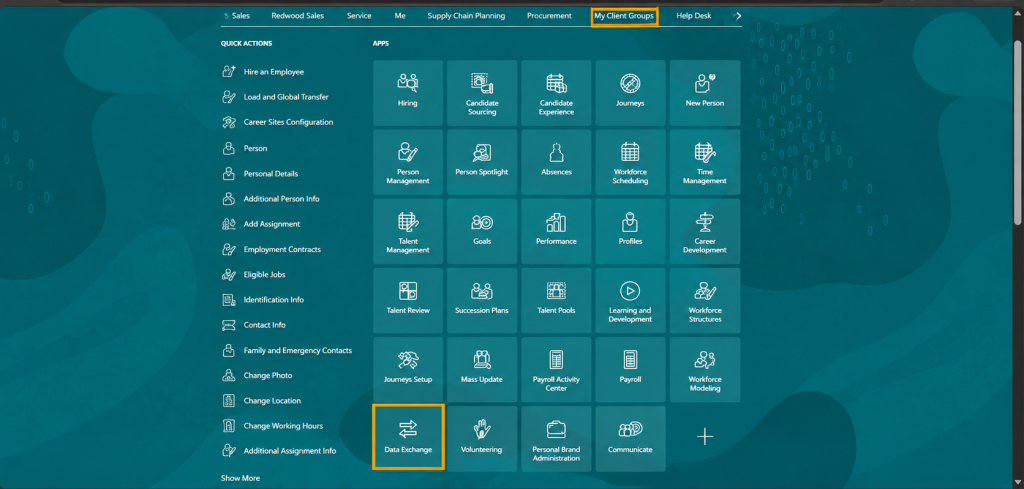
Selecting Data Exchange opens the HCM Data Loader landing page, which lists the available loader utilities.
Step 2 – Open Import and Load Data
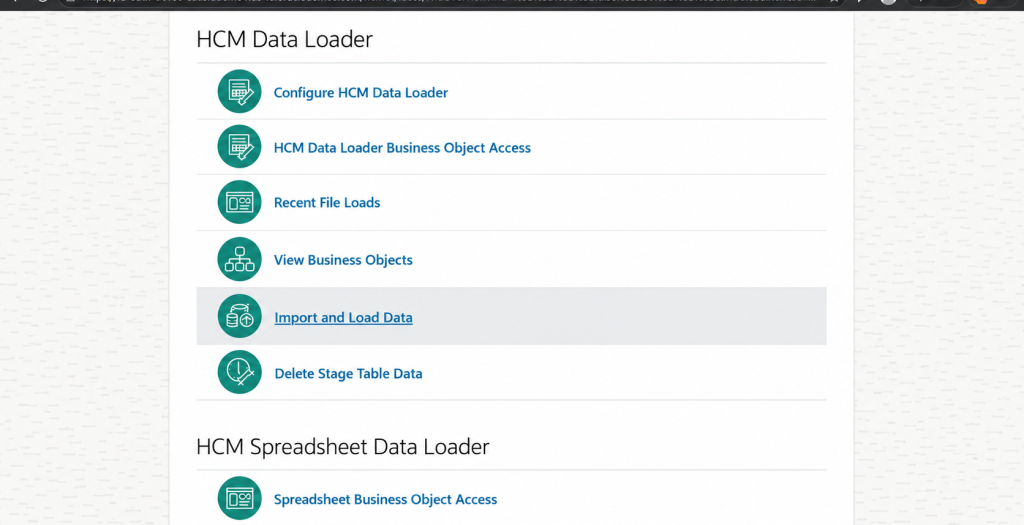
The HCM Data Loader page presents several options, including Configure HCM Data Loader, HCM Data Loader Business Object Access, Recent File Loads, View Business Objects, Import and Load Data, and Delete Stage Table Data. For this task, Import and Load Data is selected, as it allows a prepared .zip file to be uploaded directly and loaded into the application in a single action.x`x
Step 3 – Import and Load Data Workspace
The Import and Load Data workspace displays a dashboard of stage table capacity, data sets in progress, data sets in error, and unprocessed data sets, along with a history of prior loads filtered by Created By (SAAS.IMP1), Last Updated date range, and Archived Status. The Import File dropdown offers two options: Import Local File and Import Oracle WebCenter File.
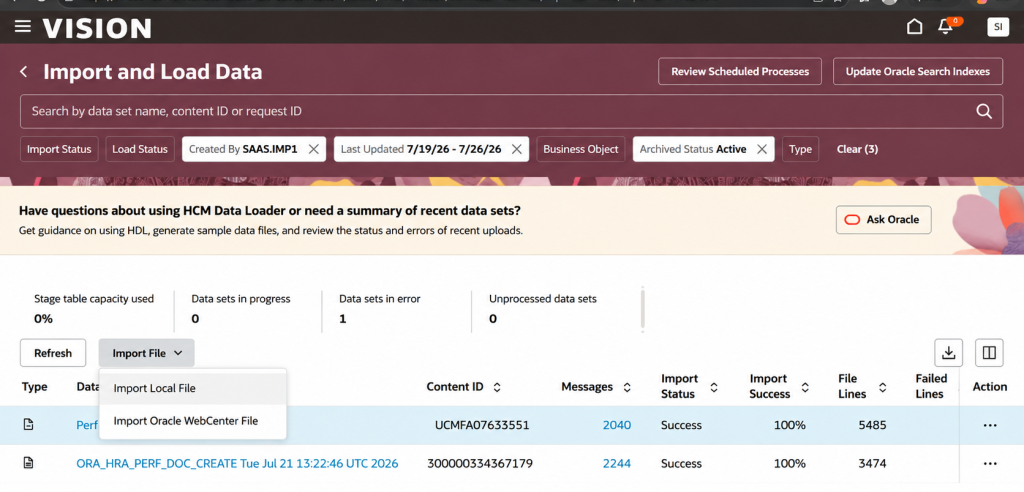
- Import Local File – used to upload the Location.zip file from the local machine.
- Import Oracle WebCenter File – used for files already staged in WebCenter Content.
Step 4 – Configure Load Parameters
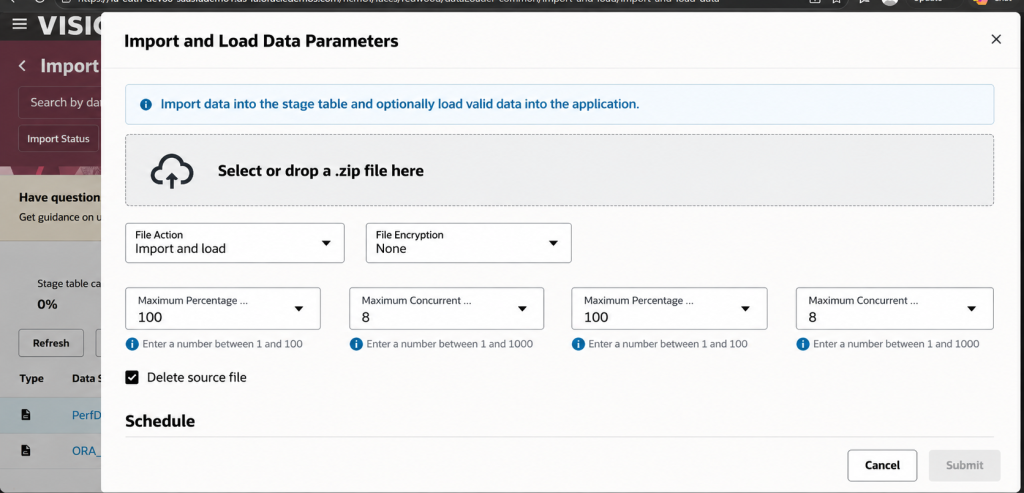
After selecting Import Local File and choosing the Location.zip file, the Import and Load Data Parameters dialog is displayed. The File Action is set to Import and load, so the file is both staged and applied in one run, with File Encryption set to None.
Parameters Used
- File Action: Import and load
- File Encryption: None
- Maximum Percentage / Maximum Concurrent Threads: Default system values (100 / 8)
- Delete source file: Enabled
Once parameters are confirmed, the job is submitted for processing.
Step 5 – Monitor Results (Import & Load Success)
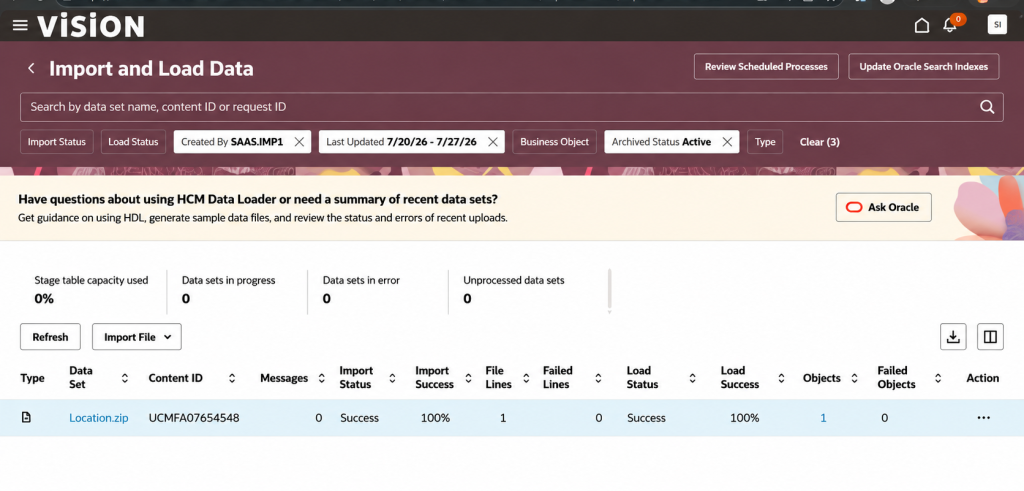
After the scheduled process completes, the Import and Load Data list is refreshed and filtered by Created By SAAS.IMP1 for the date range 7/20/26 – 7/27/26. The Location.zip data set shows an Import Status of Success at 100%, a Load Status of Success at 100%, with 1 file line and 1 object processed, and zero failed lines or failed objects.
| Field | Value |
|---|---|
| Data Set | Location.zip |
| Content ID | UCMFA07654548 |
| Import Status | Success (100%) |
| File Lines | 1 |
| Failed Lines | 0 |
| Load Status | Success (100%) |
| Objects Loaded | 1 |
| Failed Objects | 0 |
| Created By | SAAS.IMP1 |
| Last Updated | 7/20/26 – 7/27/26 |
Step 6 – Validate the Loaded Location
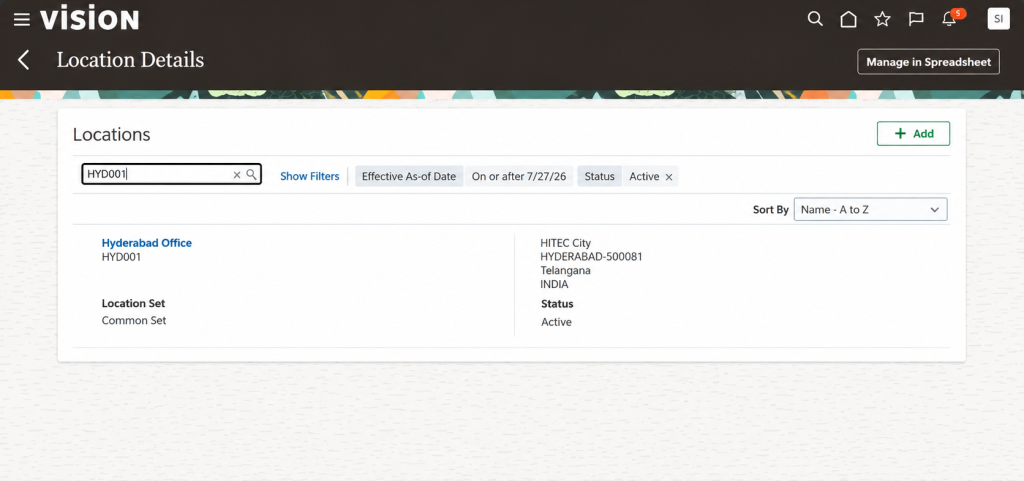
To confirm the data was applied correctly, the Location Details page is opened and searched using the code HYD001. The record returned confirms that the Hyderabad Office location was created successfully with the expected address and status.
| Field | Value |
|---|---|
| Location Name | Hyderabad Office |
| Location Code | HYD001 |
| Location Set | Common Set |
| Address | HITEC City, HYDERABAD-500081, Telangana, INDIA |
| Status | Active |
| Effective As-of Date | On or after 7/27/26 |
Common Errors and Solutions
- Invalid or missing Location Set / Business Group reference — verify the reference data exists and codes match exactly before uploading.
- Duplicate Location Code (e.g., HYD001 already exists) — either update the existing record or use a unique code for the new location.
- File not recognized / wrong .dat structure — confirm the file follows the HDL METADATA/MERGE format and is zipped correctly (no nested folders).
- Job stuck In Progress — check Review Scheduled Processes for the ESS job status and re-submit if it errors out.
- Effective date conflicts — ensure the Effective As-of Date on the record does not overlap with an existing row for the same location.
Best Practices
- Always validate the .dat file structure and reference codes in a test/stage instance before loading to production.
- Use the METADATA rules from a working sample file to avoid column mismatch errors.
- Keep batch sizes small during initial testing to isolate errors quickly.
- Review the Import and Load Data dashboard (data sets in error, failed lines/objects) immediately after each run.
- Retain the Content ID and Request ID for traceability and to support any rollback if required.
Business Benefits
Effective Oracle Fusion HCM Loading Location processes help organizations maintain accurate and standardized workforce location data across their Oracle Fusion HCM environment. Using HCM Data Loader enables organizations to load location information efficiently, reduce manual data entry, and minimize the risk of errors during bulk data updates.
Key business benefits include:
- Improved Data Accuracy: Structured HDL files help ensure location records are loaded consistently with the required reference data and codes.
- Reduced Manual Effort: Bulk loading through HCM Data Loader reduces the time required to create and maintain multiple location records manually.
- Faster Data Processing: The Import and Load Data feature enables organizations to efficiently process location data within Oracle Fusion HCM.
- Better Data Validation: Import and Load Data results make it easier to monitor successful records, failed lines, and failed objects.
- Enhanced Traceability: Content IDs, load results, and validation records support better auditability and issue resolution.
- Reduced Operational Risk: Testing Location.dat files in a test or stage environment before production helps identify potential errors early.
Conclusion
Oracle Fusion HCM Loading Location through HCM Data Loader provides a structured and reliable approach to managing workforce location data while improving accuracy, reducing manual effort, and strengthening data traceability. By following the right validation practices and maintaining consistent location data, organizations can build a more dependable foundation for their HCM processes.
As organizations continue to optimize their workforce management, having the right Oracle HCM configuration, data management, and implementation strategy becomes increasingly important. To streamline your Oracle HCM processes and maximize the value of your HCM environment, explore Kovaion’s Oracle HCM Cloud Services and connect with our Oracle HCM experts.
Frequently asked Questions
-
Oracle Fusion HCM Loading Location refers to the process of creating, updating, or maintaining location records in Oracle Fusion HCM. Organizations can use HCM Data Loader (HDL) to efficiently load location data through structured .dat files.
+ -
You can load a location using HCM Data Loader by preparing the Location.dat file in the required HDL format, packaging it as a .zip file, and uploading it through the Import and Load Data feature under Data Exchange.
+ -
The Location.dat file contains the structured data required to create or update location records in Oracle Fusion HCM using HCM Data Loader. The file must follow the required HDL METADATA and MERGE format.
+ -
After the HDL process is completed, you can review the Import Status and Load Status in the Import and Load Data workspace. You can then validate the loaded record in Location Details using the relevant Location Code.
+ -
If the load fails, review the Import and Load Data results and identify failed lines or failed objects. Common issues include invalid reference data, duplicate location codes, incorrect .dat file structure, effective date conflicts, or scheduled process errors.
+ -
HCM Data Loader helps organizations efficiently manage bulk Oracle Fusion HCM data. It reduces manual effort, supports data consistency, improves validation, and provides greater traceability for location data loads.
+