Oracle Fusion HCM Geography: Configuration, Setup, Validation, and Business Benefits

Oracle Fusion HCM Geography is a foundational configuration that directly impacts address validation, payroll processing, tax calculations, and legislative compliance. In real-world Oracle Fusion implementations, geography is not just a reference setup-it becomes a critical dependency for multiple modules, including Core HR, Payroll, Absence Management, and even integrations.
In most client projects, improper geography configuration can lead to downstream issues such as incorrect tax deductions, invalid addresses, or integration failures with third-party systems.
What is Geography in Oracle Fusion HCM?
Geography in Oracle Fusion HCM refers to the structured definition of locations such as countries, states, cities, postal codes, and addresses. These geographies are used across the application to:
- Validate employee addresses
- Derive tax jurisdictions
- Enable legislative compliance
- Standardize location-based reporting
Oracle provides predefined geography hierarchies, but they often require customization based on client-specific business needs.
Key Features of Geography in Oracle Fusion
Hierarchical Structure
Geographies are defined in a hierarchical format:
- Country
- State/Province
- County/District
- City
- Postal Code
Address Validation
Oracle validates addresses using geography data to ensure consistency and accuracy.
Integration with Legislative Data
Geography plays a key role in:
- Payroll tax calculations
- Legal reporting requirements
- Compliance with regional laws
Flexibility in Configuration
You can:
- Define custom geography types
- Enable/disable validation
- Map geographies to address styles
Geocoding Support
Supports latitude and longitude mapping for advanced use cases like logistics or workforce planning.
Step-by-Step Configuration in Oracle Fusion
Task: Manage Geography
Manage Geographies is a task for configuring geographical boundaries in Oracle Cloud Applications, such as countries, states, cities, villages, and PIN codes.
Here, we can add geographical information manually or automatically.
A. Manual way of creating country and geographical information – UI
B. Import Management – FBDI (Rarely used)
C. Importing geographical information via GB Locate, Nokia, and Vertex, which are all geolocation partner companies.
How to Manage the Geographies in HCM
Go to Settings & Actions → Setup & Maintenance → Select Workforce Deployment Offering → Search for “Manage Geographies”.
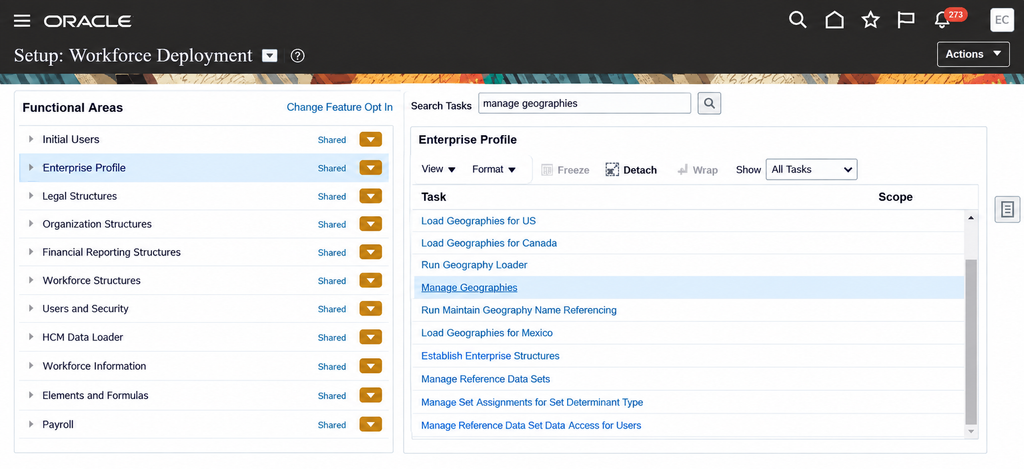
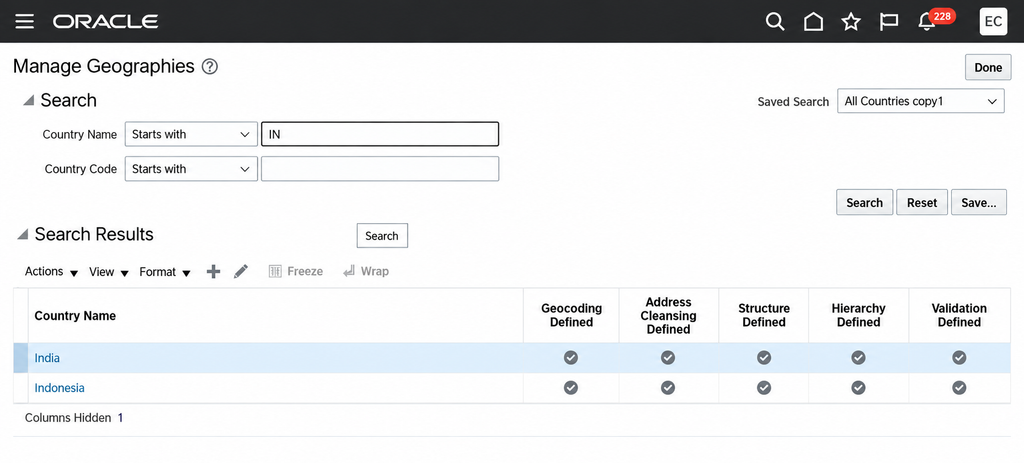
Select Manage Geographies → Search for the country name, for example, India (IN).
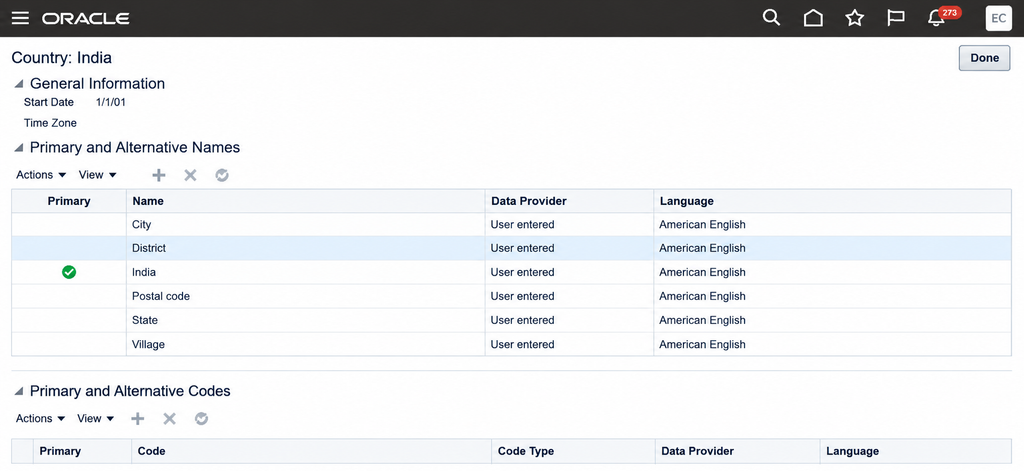
Select the country India. On the page, check the geography types.
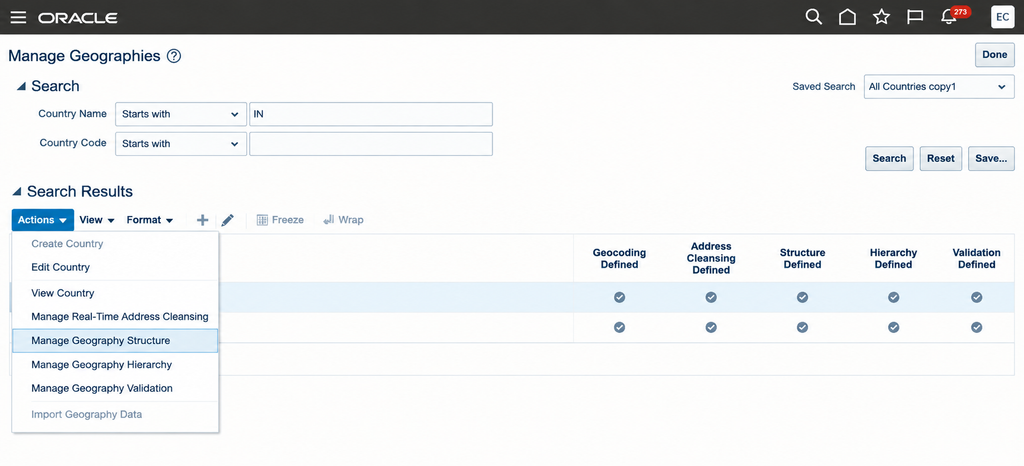
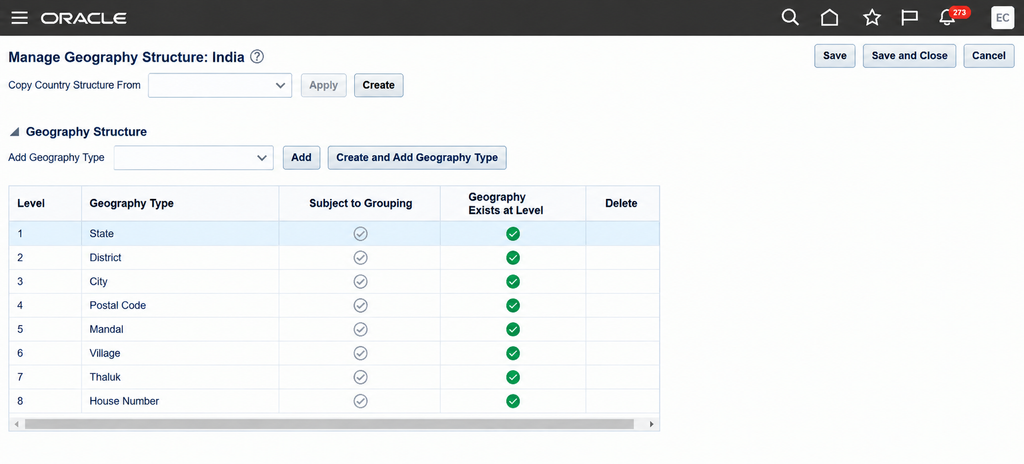
If you want to add types of geographies, such as Municipality or others, go back to India → Action → Manage Geography Structures.
Select the types from the Add Geography Type lookups and add them.
If you want to add additional types that are not available in the lookups, such as Sub-city, go to Create and add the geography type.
Business Benefits of Oracle Fusion HCM Geography
A well-configured Oracle Fusion HCM Geography structure provides a reliable foundation for managing location and address data across the organization. It helps businesses improve data consistency, reduce operational risks, and support critical HCM processes more effectively.
- Improves Data Accuracy: Ensures employee addresses and location information are standardized and validated across the Oracle Fusion HCM system.
- Supports Accurate Payroll and Tax Processing: Helps derive the correct tax jurisdictions and supports location-based payroll calculations.
- Strengthens Legislative Compliance: Enables organizations to maintain geographical data required for regional laws, legal reporting, and compliance requirements.
- Reduces Data Errors and Rework: Proper geography configuration minimizes invalid addresses, incorrect location data, and downstream processing issues.
- Enhances Reporting Accuracy: Standardized geographical information supports reliable location-based workforce reporting and analysis.
- Improves System Integration: Consistent geography data helps reduce integration issues when Oracle Fusion HCM connects with third-party systems.
- Supports Scalable Business Operations: A well-structured geography hierarchy can accommodate new locations, regions, and business expansion requirements more efficiently.
Conclusion
Oracle Fusion HCM Geography provides the structural foundation for managing location-based information consistently across the HCM environment. When geography data is organized and validated correctly, organizations can improve data accuracy, simplify compliance requirements, and create more dependable processes across HR, payroll, reporting, and integrations.
As organizations expand across regions, having a scalable geographic structure becomes increasingly important. To strengthen your Oracle HCM environment and support a smoother transformation journey, explore Kovaion’s Oracle Fusion Cloud HCM services for expert implementation and consulting support.
Frequently asked Questions
-
Oracle Fusion HCM Geography refers to the configuration of geographical structures such as countries, states, provinces, counties, cities, postal codes, and addresses. These structures support address validation, payroll processes, tax calculations, legislative requirements, and location-based reporting.
+ -
Geography configuration is important because multiple Oracle Fusion HCM processes depend on accurate location and address data. Proper configuration helps support address validation, payroll tax calculations, compliance requirements, reporting, and system integrations.
+ -
You can access the geography setup through Settings & Actions → Setup & Maintenance → Workforce Deployment → Manage Geographies. From there, administrators can search for countries and manage geography structures and geography types.
+ -
Yes. Oracle Fusion HCM provides flexibility to add and manage geography types based on business requirements. Organizations can use available geography type lookups or create additional geography types when required.
+ -
Geography data supports accurate address information and can play an important role in payroll tax calculations, legal reporting requirements, and compliance with regional laws. Proper configuration helps reduce errors that may affect downstream payroll and compliance processes.
+ -
Yes. Geography information can be managed manually through the user interface or imported using available methods such as FBDI and supported geographical data sources.
+ -
Incorrect geography configuration can lead to invalid addresses, inaccurate tax deductions, reporting inconsistencies, integration failures, compliance risks, and additional rework. A well-planned Oracle Fusion HCM Geography structure helps reduce these risks and improves system reliability.
+