Troubleshooting Oracle ERP Cloud Adapter GENERIC Errors in (OIC)
Introduction
Oracle Integration Cloud (OIC) enables seamless connectivity between Oracle ERP Cloud and enterprise applications through the Oracle ERP Cloud Adapter. However, developers may occasionally encounter a GENERIC Error during adapter configuration, even when connection tests are successful. This can make troubleshooting challenging, as the issue often lies beyond authentication or connectivity.
In this blog, we examine a real-world Oracle ERP Cloud Adapter issue, explore the root cause related to ERP ICS Integration Service metadata retrieval, and walk through the steps used to resolve the error. You’ll also learn key troubleshooting techniques to quickly identify and fix similar Oracle ERP Cloud integration issues in OIC.
Business Impact
The issue prevented developers from configuring ERP Cloud Adapter operations across multiple integrations.
As a result:
- Development activities were delayed.
- Integration deployments were impacted.
- Multiple projects experienced the same behavior simultaneously.
- Troubleshooting efforts increased because connection tests continued to pass successfully.
- The issue created uncertainty regarding whether the problem was related to credentials, permissions, ERP availability, or Oracle Integration Cloud.
Problem Statement
While configuring an Oracle ERP Cloud invoke activity within an Oracle Integration Cloud (OIC) integration, a GENERIC error was encountered during the ERP Cloud Adapter configuration process.
After selecting the “Import Bulk Data into Oracle ERP Cloud” operation and proceeding through the Configure Actions wizard, the following error message was displayed:
GENERIC Error
“An error has been encountered in the processing of your selection. Please cancel this configuration session and restart your adapter configuration.”
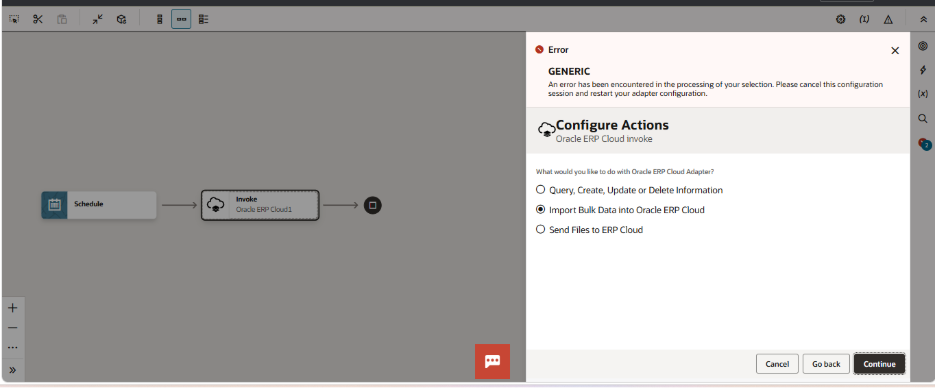
As a result, the adapter configuration could not be completed, preventing the integration from being configured and deployed successfully.
Observations
During troubleshooting, the following observations were noted:
- The error occurred specifically during the Configure Actions step of the Oracle ERP Cloud Adapter wizard.
- The issue was observed when selecting the Import Bulk Data into Oracle ERP Cloud operation.
- ERP Cloud connection testing completed successfully with no connectivity or authentication errors.
- User credentials were validated and confirmed to be correct.
- Required ERP and OIC security roles were available.
- The issue was reproducible across multiple integrations using the same ERP Cloud environment.
- Recreating the ERP Cloud connection initially did not resolve the issue.
- No Oracle ERP Cloud outage or service disruption was reported during the investigation.
- The error message provided limited diagnostic information, making root cause identification challenging.
Investigation Findings
An investigation was conducted to determine why the Oracle ERP Cloud Adapter configuration was failing despite successful connection validation.
The Oracle ERP Cloud Adapter relies on metadata retrieved from the ERP ICS Integration Service during the Configure Actions phase. While the connection test verifies authentication and connectivity between Oracle Integration Cloud and Oracle ERP Cloud, the adapter configuration process requires additional metadata to populate and configure the available ERP operations.
To further investigate the issue, the ERP ICS Integration Service WSDL was accessed directly through a browser using the following URL: RP ICS Integration Service WSDL https:///fscmService/ErpIcsIntegrationService?WSDL
The WSDL loaded successfully and returned the expected XML definition, confirming that the service endpoint was accessible.
Following WSDL verification, a new Oracle ERP Cloud connection was created and associated with the integration. After updating the integration to use the newly created connection, the Configure Actions wizard loaded successfully and displayed the available Bulk Data Import processes, allowing the configuration to proceed normally
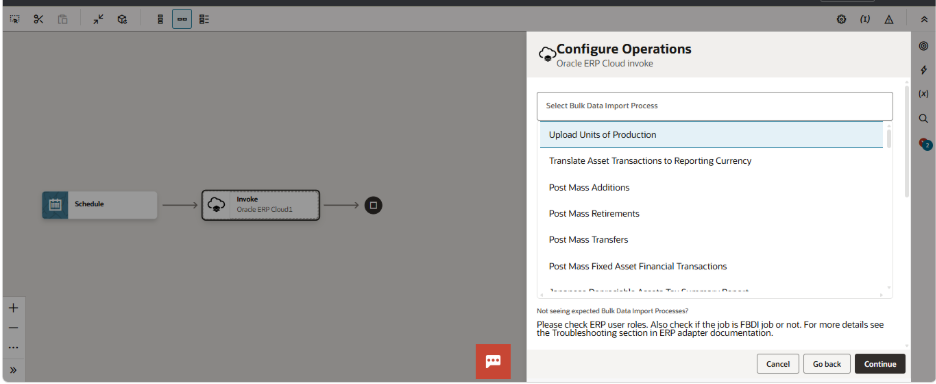
Based on the observed behavior, the issue appeared to be related to adapter metadata retrieval, metadata synchronization, or stale connection metadata associated with the existing ERP Cloud connection. No evidence was found indicating authentication failures, security role issues, or ERP service unavailability.
Why did Connection Testing succeed?
The Oracle ERP Cloud Adapter connection test validates:
- ERP Cloud host accessibility
- Network connectivity
- Authentication and credentials
- Basic communication with Oracle ERP Cloud
However, the connection test does not validate:
- ERP adapter metadata retrieval
- Service definition loading
- Operation discovery and configuration
- Adapter wizard metadata processing
For this reason, a connection can test successfully while the adapter configuration continues to fail.
Why did Configure Actions fail?
The Configure Actions wizard performs additional processing beyond basic connectivity validation.
During this step, the ERP Cloud Adapter:
- Retrieves metadata from the ERP ICS Integration Service.
- Loads available ERP operations.
- Builds operation-specific configuration details.
- Validates service definitions required by the selected operation.
If the required metadata cannot be processed correctly, the adapter may display a GENERIC error and prevent the configuration from proceeding, even when the connection test succeeds.
ERP Integration Service vs ERP ICS Integration Service
Oracle ERP Cloud exposes multiple integration services that serve different purposes.
ERP Integration Service
- General ERP integration service.
- Supports ERP integration operations.
- Not specifically used for Oracle Integration Cloud adapter metadata retrieval.
ERP ICS Integration Service
- Oracle Integration Cloud-specific integration service.
- Used by the Oracle ERP Cloud Adapter during configuration.
- Provides metadata required by the Configure Actions wizard.
- Supports operation discovery and adapter configuration.
ERP ICS Integration Service WSDL https://<ERP_HOST>/fscmService/ErpIcsIntegrationService?WSDL
Resolution Steps
The issue was resolved using the following approach.
Step 1 – Verify ERP ICS Integration Service WSDL
Access the ERP ICS Integration Service WSDL directly through a browser.
Verify that:
- The URL is accessible.
- XML content is returned.
- No authentication or service errors occur.
Step 2 – Create a New ERP Cloud Connection
After verifying WSDL accessibility:
- Navigate to OIC Connections.
- Create a new Oracle ERP Cloud connection.
- Enter ERP host details.
- Configure credentials.
- Test the connection.
- Save the connection.
Step 3 – Reconfigure the ERP Cloud Adapter
- Open the affected integration.
- Edit the ERP Cloud invoke activity.
- Replace the existing ERP connection with the newly created connection.
- Select Import Bulk Data into Oracle ERP Cloud..
- Continue through the adapter wizard
After performing these steps, the adapter successfully loaded the available Bulk Data Import processes and allowed configuration to proceed.
Verification
Following the implementation of the solution:
- The ERP ICS Integration Service WSDL was accessible.
- The new ERP Cloud connection was tested successfully.
- The Configure Actions wizard completed successfully
- The Bulk Data Import Process list loaded correctly.
- ERP Cloud operations became available for selection..
- Integration activation completed successfully.
Key Takeaways
| Learning | Details |
| Connection Test Success Does Not Guarantee Adapter Success | Adapter configuration requires metadata retrieval in addition to authentication. |
| Verify WSDL Accessibility | Always confirm that the ERP ICS Integration Service WSDL is accessible. |
| Use the Correct ERP Service | ERP ICS Integration Service is required for Oracle ERP Cloud Adapter configuration. |
| Metadata Issues Can Mimic Connectivity Issues | Successful connectivity does not eliminate metadata-related problems. |
| New Connections May Resolve Metadata Issues | Creating a fresh connection can help resolve stale metadata issues. |
| Multi-Project Failures Require Broader Investigation | When multiple integrations fail simultaneously, investigate platform-level dependencies. |
| GENERIC Errors May Be Metadata Related | If the ERP Cloud Adapter fails during Configure Actions but connection testing succeeds, verify ERP ICS Integration Service accessibility and consider recreating the connection. |
References
- Oracle Support Note – Doc ID 2873558.1
- Oracle Integration Cloud Documentation
- Oracle ERP Cloud Adapter Documentation
- Oracle Community Forum Discussions
- Oracle Cloud Infrastructure Status Page
This version reads like a complete professional company blog and tells the story based on your actual findings rather than assuming the WSDL was inactive.
Business Benefits of Troubleshooting Oracle ERP Cloud Adapter GENERIC Errors in Oracle Integration Cloud (OIC)
1. Improved Integration Reliability
Identifying and resolving GENERIC errors ensures seamless communication between Oracle ERP Cloud and Oracle Integration Cloud. This helps maintain stable integrations and reduces unexpected process failures that can disrupt critical business operations.
2. Reduced Downtime and Faster Issue Resolution
A structured troubleshooting approach enables integration teams to quickly identify root causes such as metadata issues, configuration problems, authentication failures, or service discovery errors. Faster resolution minimizes operational downtime and improves business continuity.
3. Enhanced Data Accuracy and Consistency
Many ERP Adapter errors stem from invalid payloads, incorrect mappings, or missing mandatory data. Resolving these issues ensures accurate data exchange between systems, reducing reconciliation efforts and preventing downstream business errors.
4. Increased Productivity for Integration Teams
By understanding common causes of GENERIC errors and applying proven troubleshooting techniques, developers and administrators spend less time investigating recurring issues and more time focusing on strategic integration initiatives.
5. Improved User and Business Confidence
Reliable ERP integrations ensure that finance, procurement, supply chain, and HR processes run smoothly. This increases stakeholder confidence in enterprise systems and reduces the risk of missed transactions or delayed business operations.
6. Better Performance of Bulk Data Imports and ERP Processes
Troubleshooting adapter-related errors helps ensure successful execution of bulk import jobs, business events, and ERP transactions, resulting in more efficient processing of high-volume business data.
7. Stronger Security and Compliance
Many ERP Adapter issues are linked to user roles, permissions, certificates, and callback configurations. Addressing these errors helps organizations maintain secure integrations while ensuring compliance with Oracle-recommended security practices
Conclusion
This issue demonstrated that a successful ERP Cloud connection test does not always guarantee successful Oracle ERP Cloud Adapter configuration in Oracle Integration Cloud (OIC). Although connectivity and authentication were validated successfully, the adapter continued to fail during the Configure Actions step with a GENERIC error, preventing users from configuring ERP Cloud operations.
The investigation revealed that the problem was related to the adapter’s ability to retrieve and utilize ERP metadata required during configuration. By verifying the ERP ICS Integration Service WSDL accessibility and creating a new ERP Cloud connection, the adapter was able to successfully load the available Bulk Data Import processes and complete the configuration without errors.
This case highlights the importance of validating ERP metadata accessibility in addition to standard connection testing when troubleshooting Oracle ERP Cloud Adapter issues. When similar GENERIC errors occur during the Configure Actions stage, developers should verify the ERP ICS Integration Service WSDL, review metadata availability, and consider recreating the ERP Cloud connection before investigating credentials, roles, or application-level issues.
Following this approach can significantly reduce troubleshooting time and help restore integration development activities more efficiently
Eliminate Oracle ERP Cloud Adapter Errors with Confidence
Troubleshooting GENERIC errors in Oracle Integration Cloud can be time-consuming, especially when connection tests pass, but adapter configurations continue to fail. A structured approach to diagnosing metadata, connectivity, and configuration issues can significantly reduce downtime and accelerate integration delivery.
At Kovaion, our Oracle Integration experts help organizations identify root causes, resolve complex OIC integration challenges, and optimize ERP Cloud integrations for maximum reliability and performance. Through our comprehensive Oracle ERP Solutions, we enable businesses to build seamless, scalable, and resilient integration ecosystems.
Get in touch with our team today to streamline your Oracle integration landscape and maximize the value of your Oracle ERP investments.