Oracle Compensation Cloud 26B: Line Manager Salary Change AI Agent
A line manager who wants to give a direct report a raise shouldn’t need a walkthrough to do it. Yet for many managers, an off-cycle salary change means finding the right page, remembering which fields are required, and hoping nothing else is already pending for that employee.
Oracle Compensation Cloud’s 26B release addresses this directly with the new Line Manager Salary Change AI Agent — a conversational way to evaluate, prepare, and submit an individual salary change without leaving a chat window.
What’s New in Oracle Compensation Cloud 26B?
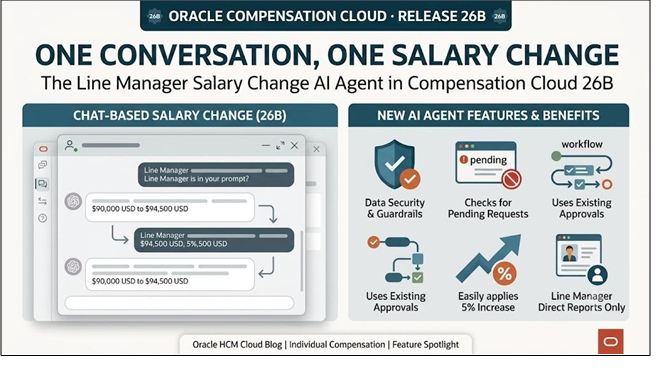
The Line Manager Salary Change AI Agent, available through Oracle’s AI Agent Studio, lets a line manager handle an off-cycle salary change for one direct report at a time. Rather than navigating to the Change Salary transaction and working through every field, the manager tells the agent who the change is for and what they want to do, and the agent takes it from there.
The agent is built specifically around individual compensation decisions, and it:
- Verifies the manager’s data security access before doing anything else.
- Checks whether a salary change is already pending approval for that employee to prevent duplicate or conflicting submissions.
- Guides the manager through updating a focused set of fields, including Salary Amount, Adjustment Amount, or Adjustment Percentage.
- Submits the change into the same standard approval workflow already configured in the application.
How the Line Manager Salary Change AI Agent Works
The conversational experience is designed to give managers the relevant employee and salary information before a change is submitted.
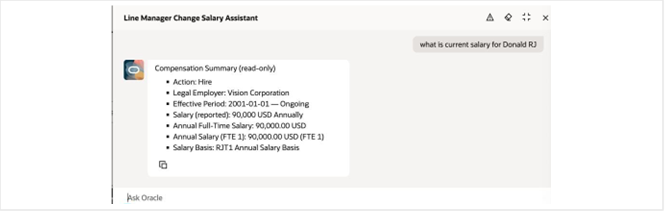
Before anything is proposed, the agent surfaces the employee’s current salary details, giving the manager the context needed to determine the appropriate change.
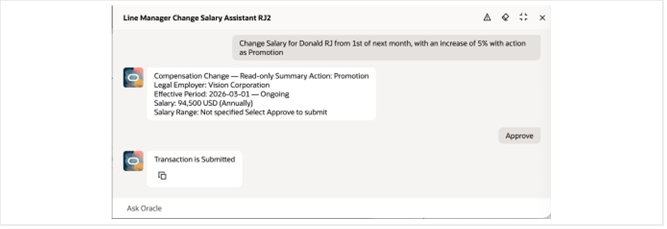
Fig 3: The AI Agent seeking approval to submit a salary change
Once the manager specifies the change, the agent presents it back for confirmation before submitting. This review-and-submit approach keeps the manager in control of the final decision.
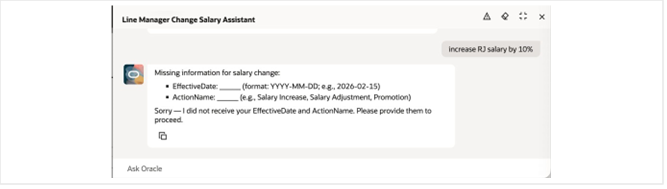
If required information is missing, the agent identifies it rather than submitting an incomplete request. Managers can then provide the required information before proceeding.
“Creates a smarter, more intuitive experience that elevates productivity and quality.” — Oracle, Compensation 26B Release Notes
Why the Line Manager Salary Change AI Agent Matters
1. One Employee, One Salary Decision
The agent is deliberately scoped to a single employee and a single salary change at a time. It does not support mass or group updates. Instead, it is designed for individual off-cycle adjustments, retention increases, or market corrections that a manager needs to initiate quickly.
2. Built-In Duplicate Protection
One of the key guardrails is the agent’s ability to check whether a salary change or promotion with salary change is already pending for the employee before allowing a new request to proceed. This helps reduce duplicate or conflicting submissions in the approval process.
3. Governance Without Extra Friction
Every submission continues through the standard configured approval workflow. This means HR and compensation teams can continue to use their existing approval processes and governance controls while managers get a more conversational way to initiate salary changes.
What to Know Before You Turn It On
Organizations should consider several scope limitations when planning the rollout of the Line Manager Salary Change AI Agent:
- The agent supports a line manager’s direct reports only; indirect reports are not supported.
- Only one salary update method can be used per request: a new salary amount, an adjustment amount, or an adjustment percentage.
- Only salaries using a user-determined salary basis are supported.
- Documents of Record cannot be attached through the agent, and warning messages are not displayed.
- Salary changes can be proposed for current or future effective dates only. Past effective dates are not permitted.
- Input must be provided as a single, complete statement containing all required values; free-form conversational back-and-forth is not supported.
- Amounts must be entered in the salary element’s designated currency because currency conversion is not available.
How to Enable the Line Manager Salary Change AI Agent
Similar to the Personal Contribution AI Agent released alongside it in 26B, enabling the Line Manager Salary Change AI Agent involves environment-level configuration rather than a simple opt-in toggle.
Step 1: Confirm the Required Environment Configuration
Confirm that the environment has the necessary configurations. Your help desk can raise the required configuration request with Oracle Support, including reference to FAQ2521 on My Oracle Support.
Step 2: Enable Security Console External Application Integration
Set the Enable Security Console External Application Integration profile option, ORA_ASE_SAS_INTEGRATION_ENABLED, to Yes and enable the appropriate permission groups.
Step 3: Configure the AI Agent
Use the Create AI Agents Using Preconfigured Agent Team Templates guidance available in AI Agent Studio to configure the agent according to your organization’s requirements.
The Bigger Picture: AI-Powered Individual Compensation in Oracle 26B
The Line Manager Salary Change AI Agent illustrates Oracle’s approach to individual compensation in 26B: focused AI agents designed to handle specific transactions while operating within existing security and approval frameworks.
Paired with the Personal Contribution AI Agent for employees, Oracle is expanding conversational experiences across individual compensation — from the changes managers award to the compensation-related actions employees initiate.
For compensation and total rewards teams, the agent can also provide an opportunity to evaluate a focused AI use case with a defined group of line managers. Its scope, security checks, pending-transaction detection, and standard approval routing provide clear areas to consider during implementation and testing.
Optimize Oracle Compensation Cloud with Kovaion
Introducing AI-powered capabilities into Oracle Compensation Cloud requires more than enabling a new feature. Organizations need to assess their existing compensation configuration, security model, approval workflows, integrations, and business processes to determine how a new AI agent fits into the overall HCM landscape.
Kovaion helps organizations evaluate and optimize Oracle Cloud HCM capabilities with a focus on configuration, integration, testing, AI adoption, and ongoing optimization. Our Oracle HCM expertise can help your HR and compensation teams assess new quarterly release capabilities, identify relevant use cases, and plan a practical approach to adoption.
Whether you are evaluating the Line Manager Salary Change AI Agent or planning broader Oracle Compensation Cloud enhancements, Kovaion can help you translate new Oracle capabilities into business-ready solutions.
Talk to Kovaion’s Oracle HCM experts to assess Oracle Compensation Cloud 26B and identify the right AI opportunities for your organization.
FAQs
The Line Manager Salary Change AI Agent is a conversational AI capability that allows line managers to initiate an individual salary change for a direct report through Oracle AI Agent Studio.
The agent supports three salary update methods: a new salary amount, an adjustment amount, or an adjustment percentage. Only one method can be used per request.
Yes. Before processing a new request, the agent checks whether a salary change or promotion with salary change is already pending for the employee, helping prevent duplicate or conflicting submissions.
No. The salary change continues through the organization’s existing configured approval workflow after the manager confirms the request.
The agent supports direct reports only, does not support mass salary updates, and cannot process past effective dates. Documents of Record and warning messages are also not supported.
Enabling the agent requires environment-level configuration, including enabling the ORA_ASE_SAS_INTEGRATION_ENABLED profile option, configuring the appropriate permission groups, and setting up the agent through Oracle AI Agent Studio.
Kovaion can help organizations assess Oracle Compensation Cloud 26B updates, evaluate relevant AI capabilities, review configuration and security requirements, support testing and implementation, and optimize Oracle HCM processes for business needs.