MongoDB to Oracle Migration with the Oracle Database API for MongoDB

Executive Summary
Kovaion Consulting, an active Oracle Partner Network member, has successfully migrated Engage – its production low-code MERN-stack ERP platform used internally by the entire organisation – from native MongoDB onto the Oracle Database using the Oracle Database API for MongoDB, served through Oracle REST Data Services (ORDS).
This work was carried out under the Oracle Partner Enablement Plan for MongoDB Migrations, providing a real, end-to-end reference implementation of Oracle’s prescribed four-phase migration methodology. The migration preserved the existing MongoDB document model and application code path, while moving the underlying datastore to a converged Oracle Database – unlocking enterprise-grade reliability, JSON Duality, advanced security, and a single platform for relational, JSON, vector, graph, and spatial workloads.
This document describes the engagement, the technical implementation of ORDS and the Mongo API endpoint, the application-layer challenges encountered during cutover, and the practical solution Kovaion engineered using a SQL-based query layer. It is intended both as a delivery artefact for the Engage migration and as a repeatable playbook Kovaion can offer to clients undertaking similar MongoDB-to-Oracle modernisation programmes.
Engagement at a Glance
| Item | Detail |
|---|---|
| Partner | Kovaion Consulting (Oracle Partner Network member) |
| Programme | Oracle Partner Enablement Plan – MongoDB Migration to Oracle |
| Workload migrated | Engage – internal ERP / low-code platform (engage.kovaion.com) |
| Source stack | MERN (MongoDB, Express, React, Node.js / Fastify) |
| Target stack | Oracle Database 23ai (PDB: KOVPDB) with ORDS 25.4 and Oracle Database API for MongoDB |
| Migration effort | Low-effort path – no document re-modelling required at the database layer |
| Approach | Oracle’s four-phase methodology: Plan → Prepare → Execute → Validate |
About Kovaion and the Engage Platform
Kovaion Consulting
Kovaion is an Oracle Partner Network member specialising in Oracle Cloud Infrastructure, Oracle Database modernisation, enterprise application implementation, and low-code product engineering. Through its OPN membership and active NDA framework, Kovaion is positioned to deliver the standards-aligned, confidential migration projects called for under Oracle’s Partner Enablement Plan.
The Engage Platform
Engage (engage.kovaion.com) is Kovaion’s in-house low-code application platform, built on a MERN stack and used company-wide as the organisation’s ERP backbone. It hosts a broad portfolio of business modules – including RecruitHub for end-to-end talent acquisition, an internal Help Desk, HR workflows, internal job postings and mobility, project tracking, and approvals – all composed visually on the platform’s low-code framework.
The screenshot below shows Engage’s RecruitHub Recruitment Dashboard in production use, surfacing the live state of the talent-acquisition pipeline: profile screening, multi-stage interviews (L1, L2, HR), offer processing, and onboarding, alongside recruitment-status and applicant-by-month analytics. This is one of many modules Engage delivers from the same underlying low-code platform.
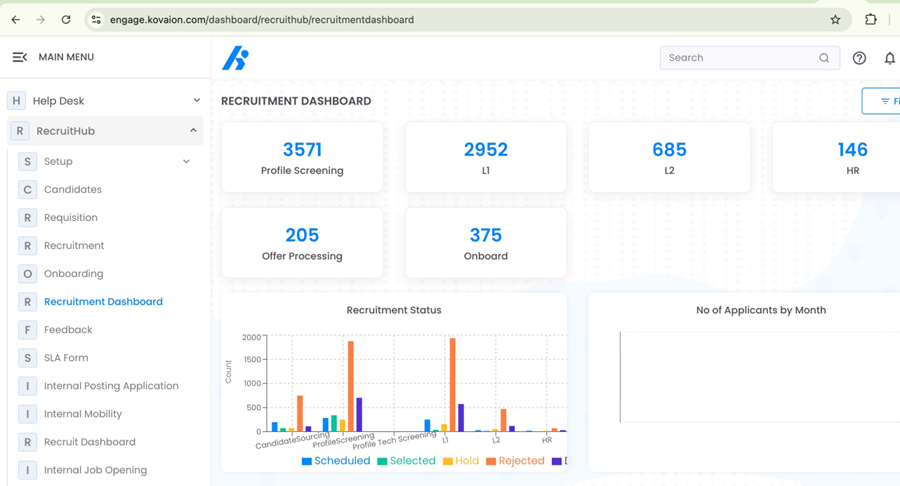
Figure 1 – Engage RecruitHub: live Recruitment Dashboard in production
Because Engage is the system of record for day-to-day operations across Kovaion, any change to its persistence layer carried two strict requirements: zero data loss and minimal disruption to the application code that hundreds of internal users rely on. Those requirements made Engage an ideal candidate for the low-effort migration path enabled by the Oracle Database API for MongoDB – and a credible, high-stakes proving ground for the methodology Kovaion now offers to its clients.
Why the Oracle Database API for MongoDB
The Oracle Database API for MongoDB exposes an Oracle Database as a Mongo-wire-protocol endpoint. Applications written against the MongoDB driver can connect to Oracle without changing connection idioms, document model, or – in most cases – application code. JSON documents are stored natively in the Oracle Database and remain queryable through the same MongoDB CRUD and aggregation operations the application already uses.
Why it was the right fit for Engage
- Low-effort migration path. The existing JSON document model from MongoDB was preserved, eliminating the re-modelling cost that a relational rewrite would have imposed on a live ERP system.
- Application compatibility. Engage’s Node.js / Fastify backend already used the standard MongoDB driver pointing it at the Oracle endpoint required configuration changes, not a rewrite.
- Operational consolidation. Running Engage on Oracle places the platform on a single converged database alongside Kovaion’s other Oracle workloads – one backup, one HA strategy, one security model.
- Forward path to innovation. Once the data is on Oracle, Engage can progressively adopt JSON Duality views, in-database analytics, and 23ai capabilities such as AI Vector Search without a second migration.
This aligns with Oracle’s three-stage value model – Migrate, Optimise, Innovate – where the first stage moves the workload with minimal friction, and subsequent stages unlock the converged-database advantages over time.
Migration Approach
The Engage migration followed Oracle’s prescribed four-phase methodology end-to-end. The phases below summarise how each was executed against Engage.
1. Planning
- Complexity assessment of the existing MongoDB collections backing Engage, including authentication, OTP, and ERP transactional collections.
- Stakeholder alignment with internal Engage users to capture availability windows, acceptable downtime, and data-integrity criteria.
- Definition of clear migration goals: preserve the document model, preserve the application API surface, and validate business workflows post-cutover.
2. Preparation
- Provisioning of the target Oracle environment – Oracle Database 23ai (PDB: KOVPDB) on the Kovaion estate, with ORDS 25.4 deployed at /u01/ORDS_HOME and configured against /u01/ords_config.
- Compatibility checks against MongoDB aggregation operators used by Engage, with remediations identified up front (covered later in this document).
- Schema and access design in Oracle, including a dedicated database user (STAGE1_ENGAGE) with the SODA_APP role and ORDS schema enablement.
3. Execution
- Installation and configuration of ORDS in the target PDB.
- Activation of the Mongo API endpoint on port 27017.
- Connection of Engage’s Node.js backend to the new Oracle-backed Mongo endpoint.
- Data transfer from MongoDB into the Oracle-hosted SODA collections, preserving JSON document structure.
4. Validation
- Operational testing of Engage end-to-end: sign-in, OTP validation, core ERP workflows, and reporting.
- Identification and remediation of one application-layer issue affecting OTP validation under the Oracle Mongo API (described in Section 7).
- Sign-off against the original migration goals before promoting the new endpoint to production traffic.
Technical Implementation: ORDS and the Mongo API
The following section documents the actual installation and configuration steps performed by Kovaion’s engineering team to stand up the Oracle Database API for MongoDB for the Engage workload. Commands shown are taken from the production deployment runbook.
Prerequisites
- Oracle Database with target pluggable database KOVPDB.
- ORDS distribution unpacked at /u01/ORDS_HOME.
- ORDS configuration directory at /u01/ords_config.
- Network connectivity from the application tier to the database server on port 1521 (SQL*Net) and 27017 (Mongo wire protocol).
Step 1 – Validate Database Connectivity
Confirm the target PDB is reachable from the ORDS host before any configuration begins:
tnsping KOVPDBA successful TNS ping against the KOVPDB service confirms listener registration and network path.
Step 2 – Install ORDS
Run the interactive installer against the configured ORDS_HOME:
export ORDS_HOME=/u01/ORDS_HOME
export PATH=$ORDS_HOME/bin:$PATH

ords --config /u01/ords_config install
During the interactive install, the SYS administrator credentials are supplied, the TNS connection to KOVPDB is selected, and ORDS is configured for HTTP access on port 8080 in standalone mode. On completion the runtime user (ORDS_PUBLIC_USER) is created in the database and the configuration folder is populated.
Step 3 – Create the Application Schema
A dedicated schema is created to host the Engage collections. The SODA_APP role is granted so the schema can act as a Simple Oracle Document Access container:
CREATE USER STAGE1_ENGAGE IDENTIFIED BY "WeLCome#123#"
DEFAULT TABLESPACE USERS
QUOTA UNLIMITED ON USERS;

GRANT CREATE SESSION TO STAGE1_ENGAGE;
GRANT SODA_APP TO STAGE1_ENGAGE;
GRANT db_developer_role, CREATE TABLE, CREATE VIEW, CREATE SEQUENCE,
CREATE PROCEDURE, CREATE JOB, CREATE USER, ALTER USER, DROP USER,
UNLIMITED TABLESPACE TO STAGE1_ENGAGE;
In production, schema passwords are managed through Kovaion’s standard secret-management process, the value above is illustrative.
Step 4 – Enable the Schema for ORDS
Enabling the schema for ORDS exposes it through REST and, in conjunction with the Mongo API setting, through the Mongo wire endpoint:
BEGIN
  ORDS.ENABLE_SCHEMA(
    p_enabled => TRUE,
    p_schema => 'STAGE1_ENGAGE'
  );
  COMMIT;
END;
/
Step 5 – Enable the Mongo API
Three configuration values activate the Mongo wire endpoint on the ORDS instance:
ords --config /u01/ords_config config set mongo.enabled true
ords --config /u01/ords_config config set mongo.port 27017
ords --config /u01/ords_config config set mongo.host 0.0.0.0
ords --config /u01/ords_config config set mongo.tls false
In the Engage staging environment TLS termination is handled at the ingress layer, so mongo.tls is set to false at the ORDS endpoint. For production traffic, TLS should be enabled directly on ORDS or fronted by a TLS-terminating proxy in line with the customer’s security policy.
Step 6 – Restart ORDS
Restart the ORDS process so the new Mongo settings take effect:
kill -9 <PID>
nohup ords --config /u01/ords_config serve > ords.out 2>&1 &
ORDS log output (ords.out) confirms successful initialisation and that the local pool /ords/ has resolved as VALID against the configured database.
Step 7 – Verify the Mongo Endpoint
A standard mongosh client validates connectivity, authentication and the SODA-backed namespace:
mongosh "mongodb://STAGE1_ENGAGE:WeLCome%23123%23@<host>:27017/STAGE1_ENGAGE?authMechanism=PLAIN&authSource=%24external&tls=false&loadBalanced=true&retryWrites=false"On success, the shell drops into the STAGE1_ENGAGE> prompt – confirming that Engage’s existing Node.js MongoDB driver, configured with the same connection string, will be able to read and write documents against the Oracle Database without code changes.
Application-Layer Challenge: OTP Validation
During Validation, Engage’s sign-in flow surfaced a single, well-defined application-layer issue: OTP validation failed under the Oracle-backed Mongo API. This section captures the symptom, the root cause, and the engineering solution Kovaion put in place. It is included here both for transparency on the migration and because the same pattern is likely to recur in other MongoDB-to-Oracle migrations of MERN applications.
Symptom
On submission of an OTP at sign-in, the Fastify backend returned an Internal Server Error. The Mongo driver surfaced the underlying error from ORDS:
MongoServerError: The field name $expr is not a recognized operator.The same OTP collection and the same aggregation pipeline had worked correctly against native MongoDB before cutover.
Root Cause
Engage’s original OTP validation used a MongoDB aggregation that combined a $match with $and / $or filters and a top-level $expr clause comparing the current time to the document’s expiration_time. The specific composition of $expr at the top level of the $match – rather than nested inside its own pipeline stage – was not supported by the Oracle Database API for MongoDB at the version in use. The aggregation was rejected at the operator-validation layer before any data was read.
Original aggregation (abridged)
let otp_table = fastify.mongo[slugdata].db.collection("user_OTP_details");
let otpDetails = await otp_table.aggregate([
  {
    $match: {
      $and: [
        {
          $or: [
            { email: typeof email === "string" ? email.toLowerCase() : email },
            { user_id: email },
            { phone: email }
          ]
        },
        { otp_code: password }
      ],
      $expr: { $lt: [new Date(), "$expiration_time"] }
    }
  }
]).toArray();
Solution: SQL-Based Query Layer via AlaSQL
Rather than rewrite every affected aggregation into a strictly-compatible Mongo pipeline (and risk further compatibility deltas elsewhere in the codebase), Kovaion introduced a thin, application-side query helper. The helper fetches documents from the underlying collection through the standard Mongo driver and then evaluates a SQL expression against an in-memory table using AlaSQL. The result is a stable, declarative query surface for the Engage application that is decoupled from the specific operator coverage of the Mongo API.
Helper implementation
export const executeSQLQuery = async (database, collectionName, sqlQuery, params = {}) => {
  try {
    // 1. Fetch collection data via the standard Mongo driver
    const collection = database.collection(collectionName);
    const data = await collection.find({}).toArray();

    // 2. Register the result set as an in-memory SQL table
    alasql.tables[collectionName] = { data };

    // 3. Bind named parameters into the query
    let finalQuery = sqlQuery;
    Object.entries(params).forEach(([key, value]) => {
      finalQuery = finalQuery.replace(
        new RegExp(`:${key}`, "g"),
        typeof value === "string" ? `'${value}'` : value
      );
    });

    // 4. Execute and return
    return alasql(finalQuery);
  } catch (err) {
    console.error("SQL Query Error:", err.message);
    throw err;
  }
};
OTP validation rewritten in SQL
SELECT *
FROM user_OTP_details
WHERE ( email = LOWER(:email)
   OR user_id = :email
   OR phone = :email )
  AND otp_code = :password
  AND expiration_time > NOW();
Call site
const otpRows = await executeSQLQuery(
  fastify.mongo[slugdata].db,
  "user_OTP_details",
  `SELECT *
   FROM user_OTP_details
   WHERE ( email = LOWER(:email)
      OR user_id = :email
      OR phone = :email )
     AND otp_code = :password
     AND expiration_time > NOW();`,
  { email, password }
);
Why this approach
- Minimal surface change. The Mongo driver, connection string, and Oracle endpoint remain untouched; only the query construction is replaced.
- Operator-coverage independence. The application no longer depends on the exact aggregation operator set supported by any specific version of the Mongo API.
- Readability. SQL with named parameters is unambiguous for the security-sensitive OTP validation path and easier to review.
- Forward path. The same helper can later be re-pointed to native Oracle SQL or JSON Duality views as Engage progresses through the Optimise and Innovate stages of Oracle’s value model – without changing the call sites.
Operational notes
- The current helper performs an unfiltered find({}) before SQL evaluation, which is acceptable for small reference collections such as user_OTP_details but should be paired with a Mongo-side pre-filter for large collections.
- Parameter substitution wraps strings in single quotes; production hardening adds explicit escaping or parameter binding to eliminate any injection surface for user-supplied values.
- Where Engage workflows benefit from server-side execution, equivalent queries can be promoted to Oracle SQL views or JSON Duality views, leaving the application code unchanged thanks to the helper boundary.
Outcomes and Business Value
Technical outcomes
- Engage runs end-to-end against an Oracle Database via the Oracle Database API for MongoDB, with no change to the JSON document model.
- The application code path is preserved – the same MongoDB driver, the same connection idioms, the same collection and document interactions.
- OTP validation, the single application-layer issue surfaced during validation, is resolved through a reusable SQL-based query helper that hardens the application against future operator-coverage variation.
- The platform now sits on a converged Oracle Database, opening a forward path to JSON Duality, in-database analytics, and 23ai capabilities including AI Vector Search.
Business outcomes
- A live, in-production reference workload (Engage) demonstrating the low-effort migration path under Oracle’s Partner Enablement Plan.
- A repeatable runbook covering ORDS install, Mongo API enablement, schema provisioning, and application-layer remediation patterns.
- Foundation for joint Oracle–Kovaion go-to-market activity, including marketing announcements and Oracle endorsement of Kovaion’s enhanced migration capability.
- A new Kovaion service offering: MongoDB-to-Oracle migration for MERN-stack and document-database workloads, delivered by senior consulting engineers trained under Oracle’s 100–400 level enablement curriculum.
Lessons Learned and Best Practices
The following observations from the Engage migration are now part of Kovaion’s standard delivery playbook for MongoDB-to-Oracle engagements.
- Treat the Mongo API as a first-class compatibility surface. Inventory the aggregation operators and pipeline patterns the application uses before cutover; flag any that compose at the top level of $match (such as $expr) for early testing.
- Introduce an application-side query helper early. A thin abstraction over the driver – even a simple SQL-on-results helper such as the AlaSQL pattern used here – pays for itself the first time an operator behaves differently between native MongoDB and the Oracle endpoint.
- Validate auth and OTP paths first. They are the highest-frequency, highest-sensitivity workflows in any ERP-style application; if they pass under the new endpoint, most of the remaining surface area follows quickly.
- Keep the schema model unchanged in phase one. Resist the temptation to relationalise during migration. The low-effort path is fastest precisely because it defers re-modelling to the Optimise stage, where it can be done with measurement.
- Document every ORDS configuration value. mongo.enabled, mongo.port, mongo.host, and mongo.tls all have direct production implications and should be captured in environment-specific runbooks rather than re-derived per deployment.
- Plan the TLS story up front. The endpoint can be terminated at ORDS, at an upstream proxy, or both; the choice has implications for client driver configuration and certificate management that are easier to design than to retrofit.
Conclusion
The migration of Engage from MongoDB to the Oracle Database via the Oracle Database API for MongoDB is a concrete demonstration of what the Oracle Partner Enablement Plan is designed to produce: a partner with the depth to deliver, a workload that proves the methodology, and a repeatable path that other customers can now follow.
Kovaion has migrated its own production ERP workload using exactly the same approach it now offers to clients – under Oracle’s prescribed methodology, with Oracle’s training, and with the Oracle Database API for MongoDB as the technical enabler. The Engage migration confirms the low-effort path in a real operational setting, surfaces the application-layer patterns that matter, and provides the engineering artefacts to address them.
Together with Oracle, Kovaion is now positioned to take this capability to market – helping organisations move MongoDB workloads onto a converged Oracle Database, optimise them with Oracle’s tuning and JSON facilities, and innovate on top of Oracle Database.
Appendix A – Reference Command Sequence
For convenience, the full command sequence used to stand up the Oracle Database API for MongoDB on the Engage target environment is reproduced below.
Environment
export ORDS_HOME=/u01/ORDS_HOME
export PATH=$ORDS_HOME/bin:$PATH
Connectivity check
tnsping KOVPDBORDS install
ords --config /u01/ords_config installSchema provisioning (SQL*Plus as SYS)
CREATE USER STAGE1_ENGAGE IDENTIFIED BY "WeLCome#123#"
DEFAULT TABLESPACE USERS QUOTA UNLIMITED ON USERS;

GRANT CREATE SESSION TO STAGE1_ENGAGE;
GRANT SODA_APP TO STAGE1_ENGAGE;

BEGIN
  ORDS.ENABLE_SCHEMA(p_enabled => TRUE, p_schema => 'STAGE1_ENGAGE');
  COMMIT;
END;
/
Mongo API enablement
ords --config /u01/ords_config config set mongo.enabled true
ords --config /u01/ords_config config set mongo.port 27017
ords --config /u01/ords_config config set mongo.host 0.0.0.0
ords --config /u01/ords_config config set mongo.tls false
Service start
nohup ords --config /u01/ords_config serve > ords.out 2>&1 &
tail -f ords.out
Client connection test
mongosh "mongodb://STAGE1_ENGAGE:WeLCome%23123%23@<host>:27017/STAGE1_ENGAGE?authMechanism=PLAIN&authSource=%24external&tls=false&loadBalanced=true&retryWrites=false"Document prepared by Kovaion Consulting under the Oracle Partner Enablement Plan for MongoDB Migrations.