Enhancing Oracle Cloud HCM with Defaulting and Validation Rules Using Visual Builder Studio


In today’s fast-paced business environment, ensuring data accuracy and streamlining user experience is more important than ever. Oracle Cloud HCM (Human Capital Management) offers powerful tools to help organisations improve their workflows. One such tool is Visual Builder Studio (VB Studio), which allows you to customise and enhance applications through features like defaulting and validation rules.
In this blog, we’ll explore how you can create defaulting and validation rules using Business Rules in Visual Builder Studio. These features not only enhance user experience but also ensure data quality, consistency, and quick adaptation to HR compliance requirements.
What Are Defaulting and Validation Rules?
Defaulting allows fields to be automatically filled based on specific criteria, reducing the need for users to input repetitive information. For example, if a user selects a certain job role, the corresponding fields like “Full-time/Part-time” can be auto-filled based on the working hours.
Validation, on the other hand, ensures that the data entered by users meets certain standards or criteria before it’s saved. This feature is useful for ensuring that no invalid data is entered into critical fields, maintaining the integrity of the data.
By following these steps, you’ve created a defaulting rule that automatically fills in employee information based on their working hours, saving users time and improving accuracy.
Accessing Defaulting and Validation Features in VB Studio
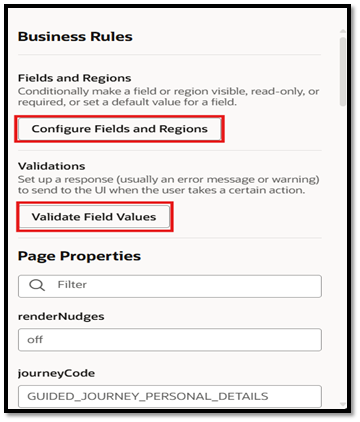
To access and configure these features, you need to navigate to the Business Rules section in Oracle Cloud HCM within Visual Builder Studio. Here’s a breakdown of the key capabilities:
- Configure Fields and Regions: This allows you to set up default values for fields, hide/unhide fields, and set them as required or read-only.
- Validate Field Values: Ensures that user entries meet the specified validation criteria before saving the data.
Let’s dive deeper into how you can implement these features to optimize your HCM workflows.
Creating Defaulting Rules in Visual Builder Studio
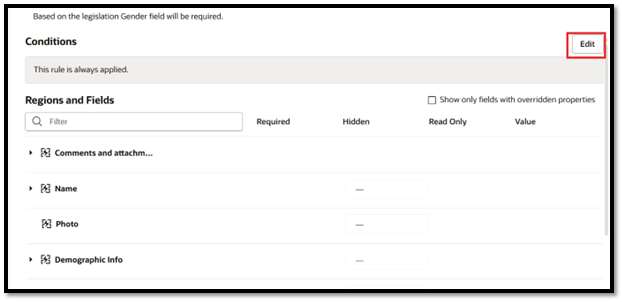
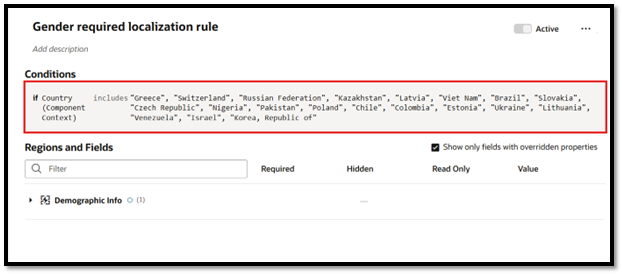
Let’s take an example of a Personal Information scenario where we want to default the Gender field based on the Legislation of an employee.
Step-by-Step: Creating a Defaulting Rule
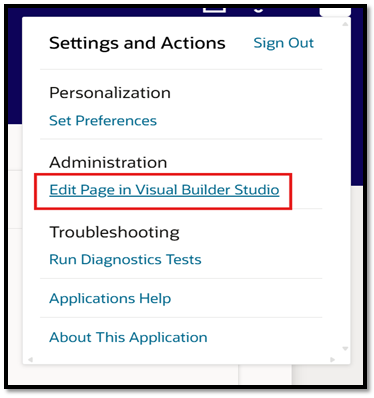
- Access Business Rules: First, navigate to the “Personal Information” page in Oracle Cloud HCM. Then, click on “Edit page in Visual Builder Studio.”
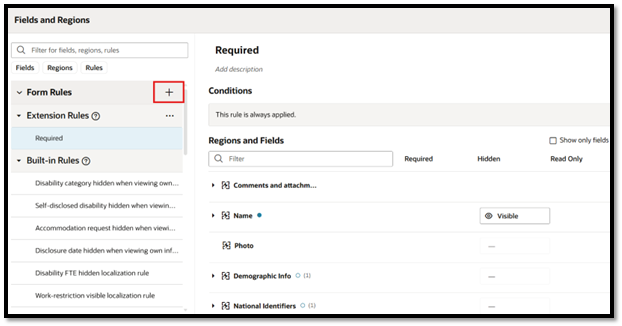
- Configure Fields and Regions: Once the page opens in VB Studio, click on the “Configure Fields and Regions” option from the menu on the right. Then click the “+” button to create a new Business Rule.
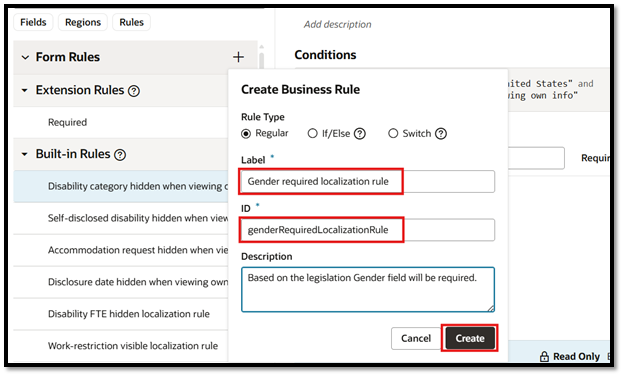
- Create the Rule: Enter a rule label, such as “Gender Required localization rule” The system will automatically generate an ID for this rule.
- Set Conditions: In the conditions section, click “Edit” and then add the condition.
- Make Fields Visible: Since these fields are hidden by default, create another rule to
By following these steps, you’ve created a defaulting rule that automatically fills in employee information based on their working hours, saving users time and improving accuracy.
Supported Pages for Defaulting and Validation
As of Oracle Cloud HCM 24D, the following Redwood pages are supported for defaulting and validation rules:
- Additional Person Info
- Departments
- Change Assignment
- Correct Assignment Details
- Document Records
- Change Salary
- Team Goals Center
- Jobs
- Position
- Payroll
- Talent Review and Succession Management
This ensures that these rules can be applied across various HCM pages, streamlining operations and ensuring consistency across your HR processes.
Business Benefits
1. Improved Data Accuracy
By automatically defaulting values and validating user inputs during transactions, organizations can significantly reduce manual data entry errors and inconsistencies. Accurate workforce data is essential for HR operations, payroll processing, compliance reporting, and strategic workforce planning. Automated validations ensure that only complete and correct information is submitted, helping organizations maintain a reliable and trustworthy HR data foundation while minimizing costly downstream corrections.
2. Enhanced User Experience
Defaulting frequently used values and guiding users through validation checks simplifies the overall transaction experience. Employees, managers, and HR professionals spend less time entering repetitive information and correcting mistakes, resulting in faster transaction completion and improved productivity. A streamlined user experience encourages greater adoption of Oracle Cloud HCM processes while reducing frustration associated with manual data entry and system navigation.
3. Stronger Compliance and Governance
Organizations often need to enforce complex business policies, regulatory requirements, and internal governance standards. Validation rules within Visual Builder Studio help ensure that transactions comply with these requirements before they are submitted for approval or processing. By preventing non-compliant or incomplete entries from entering the system, organizations can reduce compliance risks, strengthen audit readiness, and maintain greater control over critical HR processes.
4. Increased Operational Efficiency
Automated defaulting and validation reduce the need for HR teams to review, correct, and reprocess transactions caused by inaccurate data. By preventing errors at the point of entry, organizations can minimize administrative overhead, accelerate transaction processing, and improve overall operational efficiency. This allows HR teams to focus more on strategic initiatives and employee support rather than spending time resolving avoidable data quality issues.
5. Consistent Business Processes
Organizations with multiple business units, geographic locations, or employee populations often face challenges maintaining standardized HR practices. Visual Builder Studio enables organizations to enforce consistent data entry rules and business logic across all users and transactions. This standardization helps ensure uniform process execution, reduces variability in data capture, and supports enterprise-wide alignment with organizational policies and procedures.
6. Reduced Dependency on Customizations
Traditional customizations can be costly to develop, maintain, and upgrade over time. By leveraging Visual Builder Studio’s low-code framework, organizations can implement sophisticated business rules, validations, and defaulting logic without extensive custom development. This approach helps organizations remain aligned with Oracle’s quarterly update strategy, reduce technical debt, and lower long-term maintenance costs while still meeting unique business requirements.
7. Faster Decision-Making
Business leaders depend on accurate and consistent workforce data to make informed decisions related to talent management, workforce planning, compensation, and organizational growth. By improving data quality at the source, organizations can enhance the reliability of reports, dashboards, and analytics. Better data integrity enables faster access to actionable insights, supporting more confident decision-making and improved business outcomes.
8. Greater Flexibility and Scalability
As organizations evolve, HR processes and business requirements often change. Visual Builder Studio provides the flexibility to modify default rules and validation logic without requiring extensive coding or redevelopment efforts. This allows organizations to quickly adapt to new policies, organizational structures, regulatory changes, and workforce needs. The scalable nature of the platform ensures that business rules can continue to support growth and transformation initiatives while maintaining system consistency and performance.
9. Improved Productivity Across the Workforce
When users encounter fewer errors and spend less time manually entering information, overall workforce productivity improves. Automated guidance and intelligent defaults help employees and managers complete transactions more efficiently, reducing delays and improving turnaround times. This increased efficiency creates a more seamless HR experience while allowing users to focus on higher-value activities rather than administrative tasks.
10. Better Employee and Manager Satisfaction
A user-friendly and intuitive HCM experience contributes to higher satisfaction among employees and managers. By reducing complexity, minimizing errors, and simplifying common HR transactions, organizations can create a more positive digital experience. This not only improves engagement with HR systems but also strengthens confidence in organizational processes and technology investments.
Conclusion
Using defaulting and validation rules in Oracle Cloud HCM can greatly enhance the user experience and ensure data integrity. By leveraging Business Rules in Visual Builder Studio, you can create personalized workflows that meet the unique needs of your organization. These rules help automate data entry, enforce business rules, and reduce the risk of errors, which ultimately improves operational efficiency and user satisfaction.
Whether you’re automating field values or validating user entries, these features provide the flexibility needed to adapt to HR compliance requirements and organizational standards.
Unlock the Full Potential of Oracle Cloud HCM with Kovaion
Implementing defaulting and validation rules through Visual Builder Studio empowers organizations to create smarter, more intuitive Oracle Cloud HCM experiences. By automating data entry and enforcing business rules at the point of transaction, businesses can improve data quality, streamline operations, and enhance user productivity.
At Kovaion, our Oracle Cloud HCM expert solutions help organisations leverage Visual Builder Studio to build scalable, low-code extensions that align with unique business requirements. Whether you’re looking to improve employee transactions, strengthen compliance, or optimise user experiences, we can help you unlock the full potential of Oracle Cloud HCM.