Create Journals Using Spreadsheet (ADFDI) in Oracle ERP Cloud and 25D Upgrade – General Ledger

Creating and managing journal entries efficiently is critical for maintaining accurate financial records and ensuring smooth accounting operations. Oracle ERP Cloud simplifies this process through Spreadsheet-Based Journal Entry using ADF Desktop Integration (ADFdi), allowing finance professionals to create, validate, and upload journals directly from Microsoft Excel. By combining the familiarity of Excel with the robust controls of Oracle General Ledger, organizations can streamline journal entry management, reduce manual effort, and improve data accuracy while maintaining compliance with financial governance standards.
The ADFdi integration provides a seamless connection between Microsoft Excel and Oracle ERP Cloud, enabling users to enter large volumes of journal data, perform validations before upload, and quickly resolve errors without navigating multiple application screens. This approach significantly improves productivity for accounting teams, accelerates financial close processes, and minimizes the risk of data entry mistakes that can impact reporting and compliance.
With the Oracle ERP Cloud 25D update, General Ledger capabilities have been further enhanced through improved spreadsheet validations, better handling of balancing and descriptive flexfields, and a more efficient journal upload experience. These enhancements help organizations reduce upload failures, minimize rework, and strengthen financial controls. In this blog, we will walk through the step-by-step process of creating journals using ADFdi in Oracle ERP Cloud and explore the latest 25D General Ledger enhancements that help finance teams operate more efficiently and accurately.
Pre-requisites
- Microsoft Excel (desktop version)
- ADF Desktop Integration (ADFdi) enabled
Required roles:
- General Accountant
- General Accounting Manager
- Financial Application Administrator
Step-by-Step Guide:
Step 1:
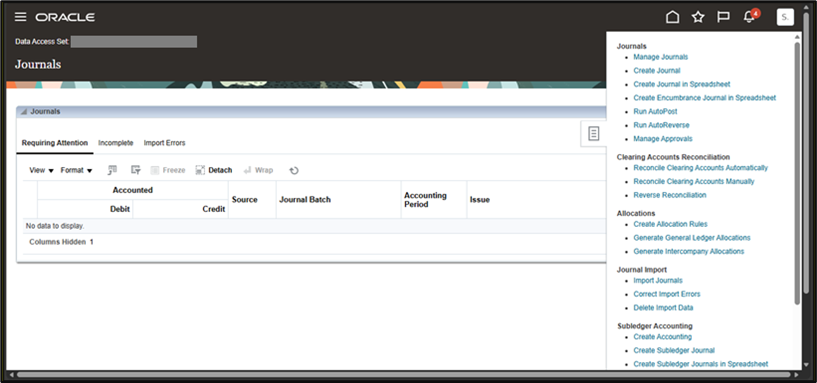
Navigation to Create Journal in Spreadsheet
- Log in to Oracle ERP Cloud
- Navigate to:
General Accounting >> Journals >> Create Journal in Spreadsheet
- Click Create Journal in Spreadsheet. This action downloads the ADFdi-enabled Excel template.
Step 2:
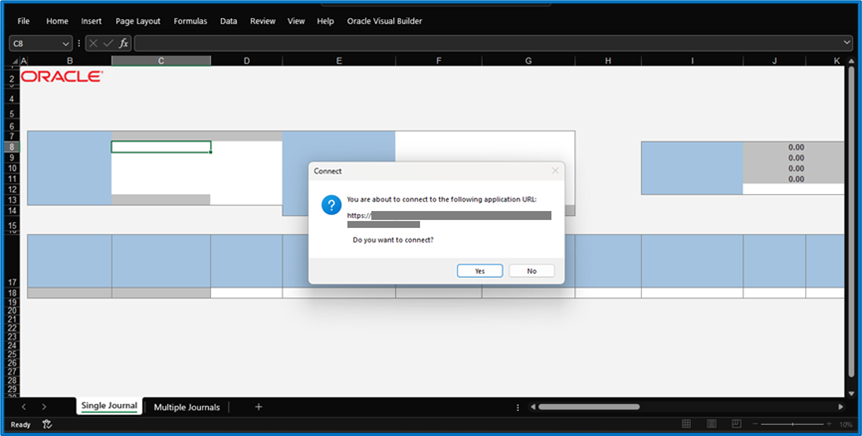
Open the Spreadsheet and Sign In
- Open the downloaded Excel file
- Click Enable Editing
- In the Excel ribbon, click the Oracle ADFdi tab
- Click Sign In
- Enter your Oracle Cloud URL, username, and password
After successful login, the spreadsheet connects to the General Ledger application.
Step 3:
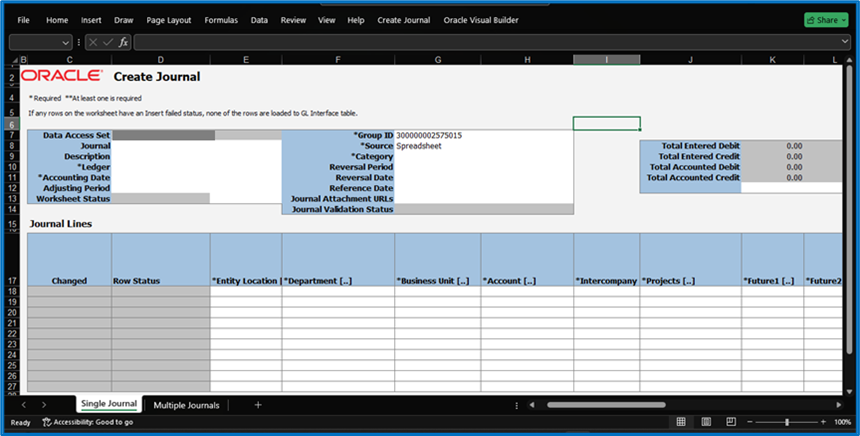
Enter Journal Header Information
- In the Journal Header section, enter the following details:
- Ledger
- Accounting Date
- Journal Category
- Journal Source
The ledger and currency values default based on your setup.
Step 4:
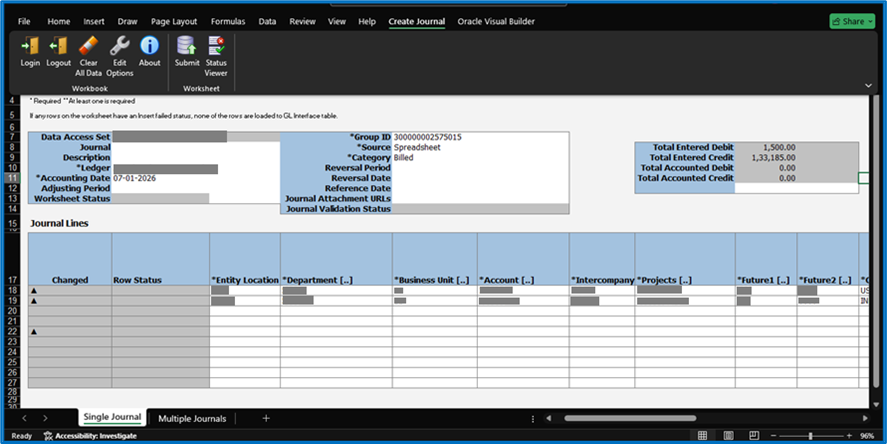
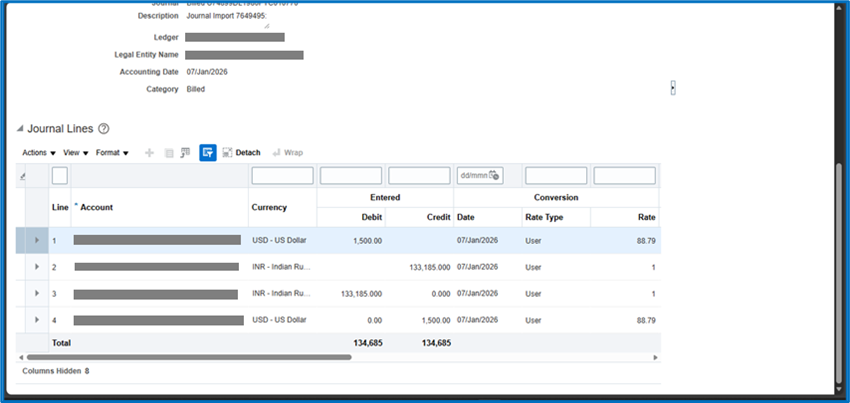
Enter Journal Line Details
- In the Journal Lines section, enter:
- Line Number
- Account Combination
- Debit Amount or Credit Amount
- Ensure that:
- Total debits equal total credits
- Account combinations are valid and active
Step 5:
Validate the Journal
- From the Create Journal ribbon, click Submit
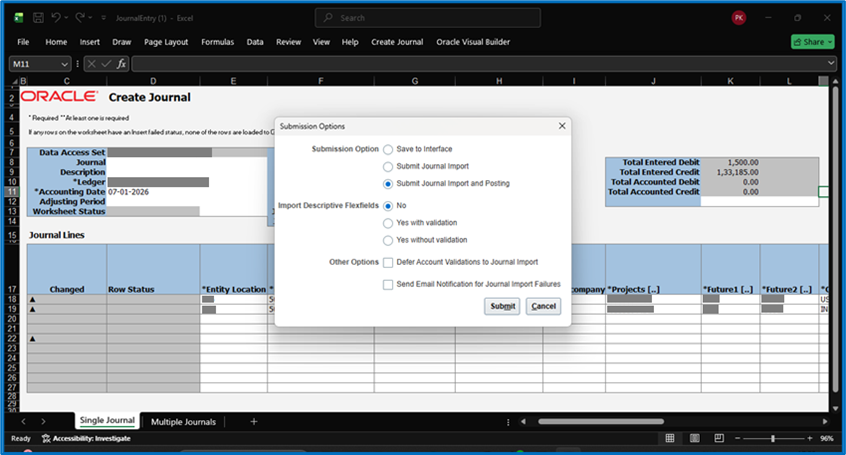
- Review validation messages:
- Errors must be corrected
- Warnings can be reviewed and accepted if applicable
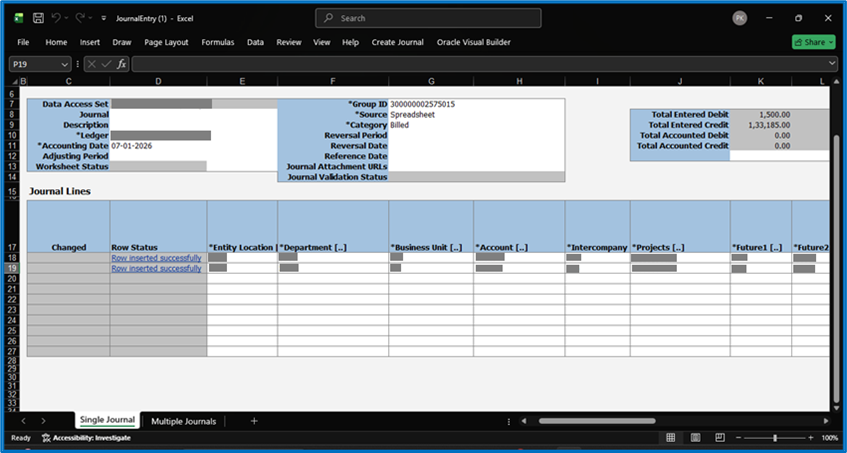
- Wait for the upload confirmation message.
- Note the Journal Batch Name generated by the system.
Step 6 :
Review and Post the Journal
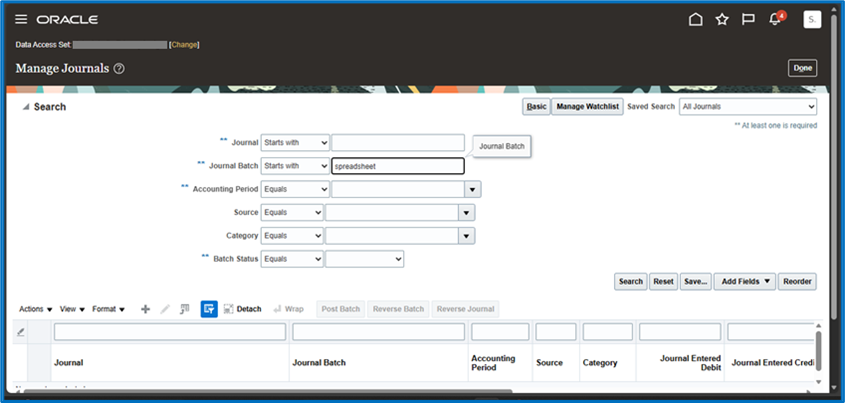
- Navigate to:
General Accounting >> Journals >> Manage Journals
- Search using the Journal Batch Name
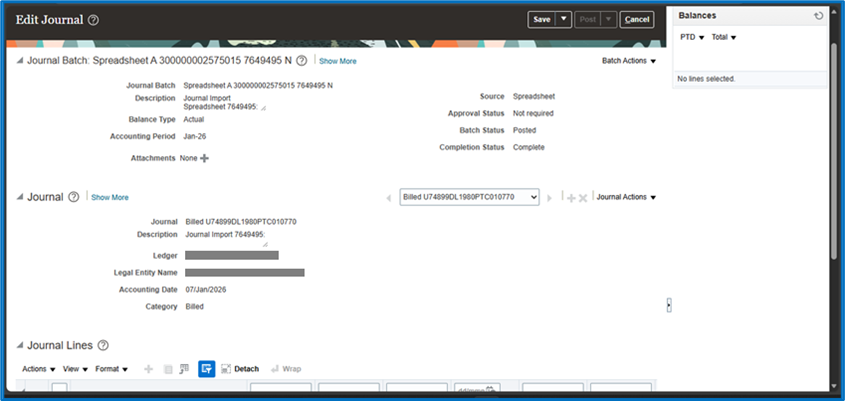
- Review journal details.
Business Benefits
Oracle ERP Cloud’s Spreadsheet-Based Journal Entry functionality using ADF Desktop Integration (ADFdi) enables finance teams to create, validate, and upload General Ledger journals directly from Microsoft Excel. Combined with the Oracle ERP Cloud 25D General Ledger enhancements, this feature helps organizations improve financial accuracy, reduce manual effort, and streamline accounting operations.
Faster Journal Entry Creation Using Excel
ADF Desktop Integration (ADFdi) enables finance users to create and upload journal entries directly from Microsoft Excel, eliminating the need to enter transactions line by line within Oracle ERP Cloud. This familiar spreadsheet-based approach allows users to manage large volumes of journal data more efficiently, accelerating journal preparation and reducing the time required to complete accounting activities.
Reduced Manual Data Entry Errors
Manual journal entry processes can increase the risk of incorrect account combinations, data inconsistencies, and posting errors. With ADFdi, users can leverage structured templates and predefined fields to ensure journal information is entered consistently. This helps reduce data entry mistakes, improves financial data quality, and minimizes the effort required to identify and correct errors.
Built-In Validations Prior to Upload
Oracle ERP Cloud performs validations before journals are uploaded to the General Ledger, helping users identify issues such as invalid account combinations, balancing discrepancies, or missing required information. By resolving errors before submission, organizations can reduce journal upload failures, minimize rework, and improve the accuracy and reliability of financial transactions.
Improved Productivity for Finance Users
By combining the flexibility of Excel with the controls of Oracle General Ledger, ADFdi streamlines journal management and significantly improves user productivity. Finance teams can create, validate, and upload multiple journal entries in less time, enabling them to focus on higher-value activities such as financial analysis, compliance, reporting, and strategic decision-making rather than repetitive administrative tasks.
Points to Consider
- Always download the latest spreadsheet after quarterly upgrades
- Use the Validate option before uploading to minimize errors
- Ensure the accounting period is open before uploading journals
- Avoid modifying protected cells in the spreadsheet
25D Update
Spreadsheet-Based Journal Entry Enhancements
The 25D update enhances the ADFdi spreadsheet integration for General Ledger, improving usability and significantly reducing data entry errors.
Enhancements Include
- Enhanced validations before upload
- Improved handling of balancing and descriptive flexfields
These enhancements help accounting users reduce upload errors and minimize rework.
Points to Consider
- Journal import integrations should be tested after the 25D upgrade
- Users should download the latest ADFdi spreadsheets after the update
Conclusion
Creating journals using ADFDI in Oracle ERP Cloud, combined with the latest 25D General Ledger enhancements, provides organisations with a powerful way to streamline accounting operations and improve financial efficiency. By reducing manual effort, improving data accuracy, and accelerating financial close processes, businesses can strengthen financial governance while enhancing productivity across finance teams. Leveraging these capabilities enables organisations to build a more agile, scalable, and future-ready finance function that supports long-term growth and operational excellence.
Streamline Journal Management with Oracle ERP Expertise
Looking to simplify journal creation and enhance financial reporting processes? Oracle ERP Cloud’s ADFDI capabilities and the latest 25D General Ledger enhancements help organizations automate journal entry management, improve accuracy, and accelerate financial close activities. By leveraging modern financial tools and automation, businesses can reduce manual effort and strengthen financial controls.
At Kovaion, our experienced Oracle ERP consultants help organizations maximize the value of their Oracle ERP solutions through implementation, optimization, upgrades, and managed services. From General Ledger process improvements to enterprise-wide financial transformation initiatives, we deliver tailored solutions that enhance efficiency, improve compliance, and support sustainable business growth.