Building a Smart Tooltip Plugin in Oracle APEX


Modern enterprise applications often require contextual guidance for users. When screens
become complex, simple UI hints can significantly improve usability. One effective way to
achieve this is through tooltips small information boxes that appear when users hover over or
click on an element.
In this article, we will learn how to build a reusable Smart Tooltip Plugin in Oracle
APEX. This plugin allows developers to easily attach interactive tooltips anywhere in their
application, making interfaces more intuitive and user-friendly.
Introduction to the Smart Tooltip Plugin?
The Smart Tooltip Plugin is a custom Oracle APEX Item Plugin designed to display
contextual help through dynamic tooltips.
Instead of placing static help text across the page, developers can attach a tooltip to any label,
icon, or item. When a user hovers over or clicks the element, a tooltip appears with additional
information.
This improves:
- User guidance
- UI cleanliness
- Application usability
- Self-documentation of fields
Key Features of the Plugin
The Smart Tooltip Plugin includes several advanced capabilities.
Hover or Click Activation: Tooltips can appear when a user:
- Hovers over an element
- Clicks on an element
Rich HTML Content: The tooltip supports HTML formatting such as:
- Bold text
- Links
- Images
- Lists
Example:
Includes Base Salary + Allowances
Smart Positioning: The tooltip can appear in different positions relative to the element:
- Top
- Bottom
- Left
- Right
- Auto (automatic positioning)
Custom Styling: Developers can configure:
- Background colour
- Text colour
- Animation effects
Responsive Design: The tooltip works on:
- Desktop browsers
- Mobile devices
Performance Optimization: The plugin loads CSS and JavaScript only once, ensuring better
performance.
Plugin Architecture:
The plugin follows a modular design pattern combining PL/SQL, JavaScript, and CSS.
Plugin Components:
However, in this implementation, the JavaScript and CSS are embedded directly inside
the PL/SQL render function. This simplifies deployment and avoids external resource
loading issues.
Prerequisites
Before creating the plugin, ensure you have the following:
Software Requirements
- Oracle APEX 19.1 or higher
- Oracle Database 11g R2 or higher
Knowledge Requirements
Basic knowledge of:
- PL/SQL
- JavaScript
- HTML / CSS
- Oracle APEX plugin architecture
Creating the Plugin in Oracle APEX
Step 1: Create the Plugin
- Open Oracle APEX
- Go to Shared Components
- Click Plugins
- Click Create
- Choose:
Plugin Type: Item - Enter the plugin details. Example:
Name: Smart Tooltip Plugin
Internal Name: SMART.TOOLTIP.PLUGIN
Step 2: Define Plugin Attributes
Next, configure plugin attributes that allow developers to customize tooltip behavior
| Attribute | Label | Purpose |
| attribute_01 | Trigger Mode | Hover or Click |
| attribute_02 | Position | Tooltip location |
| attribute_03 | Background Color | Tooltip background |
| attribute_04 | Text Color | Tooltip text color |
| attribute_05 | Tooltip Content | HTML content |
| attribute_06 | Show Arrow | Enable arrow pointer |
| attribute_07 | Trigger Delay | Delay before showing |
| attribute_08 | Auto Close | Auto hide timer |
| attribute_09 | Animation | Fade / Slide / None |
| attribute_10 | Dismissible | Allow manual close |
These attributes allow the plugin to be highly customizable without code changes.
Implementing the Render Function
The render function is the core of the plugin. It generates the HTML, injects CSS, and
initializes the JavaScript logic.
The procedure below is responsible for rendering the tooltip element.
PROCEDURE render_smart_tooltip (
p_item IN apex_plugin.t_item,
p_plugin IN apex_plugin.t_plugin,
p_param IN apex_plugin.t_item_render_param,
p_result IN OUT NOCOPY apex_plugin.t_item_render_result
)
IS
l_trigger VARCHAR2(20) := NVL(LOWER(p_item.attribute_01), 'hover');
l_position VARCHAR2(20) := NVL(LOWER(p_item.attribute_02), 'top');
l_bg VARCHAR2(20) := NVL(p_item.attribute_03, '#333333');
l_fg VARCHAR2(20) := NVL(p_item.attribute_04, '#ffffff');
l_content VARCHAR2(4000) := NVL(p_item.attribute_05, 'Tooltip text here');
l_anim VARCHAR2(10) := NVL(LOWER(p_item.attribute_09), 'fade');
l_autoclose NUMBER := NVL(TO_NUMBER(p_item.attribute_08), 0);
l_trigger_attr VARCHAR2(10);
l_id VARCHAR2(200) := p_item.id;
l_label VARCHAR2(4000);
BEGIN
l_label := CASE WHEN p_param.value IS NOT NULL
THEN apex_escape.html(p_param.value)
ELSE 'ⓘ:'
END;
l_trigger_attr := CASE WHEN l_trigger = 'click' THEN 'click' ELSE 'hover' END;
htp.p('<script>');
htp.p('(function(){');
htp.p(' if(document.getElementById("_stt_css")){return;}');
htp.p(' var s=document.createElement("style");');
htp.p(' s.id="_stt_css";');
htp.p(' s.innerHTML=');
htp.p(' ".stt-trigger{cursor:pointer;display:inline-block;vertical-align:middle;font-size:16px;}"');
htp.p(' +".stt-trigger:focus{outline:2px solid #0066cc;outline-offset:2px;}"');
htp.p(' +"#_stt_box{position:fixed;display:none;padding:10px 14px;border-radius:6px;"');
htp.p(' +"font-size:13px;line-height:1.6;max-width:280px;"');
htp.p(' +"z-index:2147483647;box-shadow:0 6px 20px rgba(0,0,0,0.35);"');
htp.p(' +"word-wrap:break-word;font-family:Arial,sans-serif;}"');
htp.p(' +"#_stt_arrow{position:absolute;width:0;height:0;border-style:solid;}";');
htp.p(' document.head.appendChild(s);');
htp.p('}());');
htp.p('</script>');
htp.p('<script>');
htp.p('(function(){');
htp.p(' if(typeof window._sttShow!=="undefined"){return;}');
htp.p(' function _getBox(){');
htp.p(' var b=document.getElementById("_stt_box");');
htp.p(' if(!b){');
htp.p(' b=document.createElement("div");');
htp.p(' b.id="_stt_box";');
htp.p(' var ar=document.createElement("div");');
htp.p(' ar.id="_stt_arrow";');
htp.p(' b.appendChild(ar);');
htp.p(' var bd=document.createElement("div");');
htp.p(' bd.id="_stt_body";');
htp.p(' b.appendChild(bd);');
htp.p(' document.body.appendChild(b);');
htp.p(' }');
htp.p(' return b;');
htp.p(' }');
htp.p(' function _place(el,pos,bg){');
htp.p(' var b=_getBox();');
htp.p(' var r=el.getBoundingClientRect();');
htp.p(' b.style.visibility="hidden";');
htp.p(' b.style.display="block";');
htp.p(' var bW=b.offsetWidth||220;');
htp.p(' var bH=b.offsetHeight||44;');
htp.p(' b.style.visibility="";');
htp.p(' b.style.display="none";');
htp.p(' var wW=window.innerWidth;');
htp.p(' var wH=window.innerHeight;');
htp.p(' var t,l;');
htp.p(' var ar=document.getElementById("_stt_arrow");');
htp.p(' ar.style.cssText="position:absolute;width:0;height:0;border-style:solid;";');
htp.p(' if(pos==="auto"){pos=r.top>bH+16?"top":"bottom";}');
htp.p(' if(pos==="top"){');
htp.p(' t=r.top-bH-10;');
htp.p(' l=r.left+(r.width-bW)/2;');
htp.p(' ar.style.bottom="-6px";');
htp.p(' ar.style.left="50%";');
htp.p(' ar.style.marginLeft="-6px";');
htp.p(' ar.style.borderWidth="6px 6px 0 6px";');
htp.p(' ar.style.borderColor=bg+" transparent transparent transparent";');
htp.p(' }else if(pos==="bottom"){');
htp.p(' t=r.bottom+10;');
htp.p(' l=r.left+(r.width-bW)/2;');
htp.p(' ar.style.top="-6px";');
htp.p(' ar.style.left="50%";');
htp.p(' ar.style.marginLeft="-6px";');
htp.p(' ar.style.borderWidth="0 6px 6px 6px";');
htp.p(' ar.style.borderColor="transparent transparent "+bg+" transparent";');
htp.p(' }else if(pos==="left"){');
htp.p(' t=r.top+(r.height-bH)/2;');
htp.p(' l=r.left-bW-10;');
htp.p(' ar.style.top="50%";');
htp.p(' ar.style.right="-6px";');
htp.p(' ar.style.marginTop="-6px";');
htp.p(' ar.style.borderWidth="6px 0 6px 6px";');
htp.p(' ar.style.borderColor="transparent transparent transparent "+bg;');
htp.p(' }else{');
htp.p(' t=r.top+(r.height-bH)/2;');
htp.p(' l=r.right+10;');
htp.p(' ar.style.top="50%";');
htp.p(' ar.style.left="-6px";');
htp.p(' ar.style.marginTop="-6px";');
htp.p(' ar.style.borderWidth="6px 6px 6px 0";');
htp.p(' ar.style.borderColor="transparent "+bg+" transparent transparent";');
htp.p(' }');
htp.p(' l=Math.max(5,Math.min(l,wW-bW-5));');
htp.p(' t=Math.max(5,Math.min(t,wH-bH-5));');
htp.p(' b.style.left=l+"px";');
htp.p(' b.style.top=t+"px";');htp.p(‘ }’);
htp.p(‘ window._sttShow=function(el){‘);
htp.p(‘ clearTimeout(window._sttHT);’);
htp.p(‘ clearTimeout(window._sttAT);’);
htp.p(‘ var content = el.getAttribute(“data-stt-content”);’);
htp.p(‘ var pos = el.getAttribute(“data-stt-pos”) ||”top”;’);
htp.p(‘ var bg = el.getAttribute(“data-stt-bg”) ||”#333″;’);
htp.p(‘ var fg = el.getAttribute(“data-stt-fg”) ||”#fff”;’);
htp.p(‘ var anim = el.getAttribute(“data-stt-anim”) ||”fade”;’);
htp.p(‘ var ac = parseInt(el.getAttribute(“data-stt-ac”)||”0″,10);’);
htp.p(‘ var b=_getBox();’);
htp.p(‘ b.style.backgroundColor=bg;’);
htp.p(‘ b.style.color=fg;’);
htp.p(‘ document.getElementById(“_stt_body”).innerHTML=content;’);
htp.p(‘ _place(el,pos,bg);’);
htp.p(‘ b.style.display=”block”;’);
htp.p(‘ if(anim===”fade”){‘);
htp.p(‘ b.style.transition=”opacity 0.2s ease”;’);
htp.p(‘ b.style.opacity=”0″;’);
htp.p(‘ setTimeout(function(){b.style.opacity=”1″;},10);’);
htp.p(‘ }else{‘);
htp.p(‘ b.style.transition=””;’);
htp.p(‘ b.style.opacity=”1″;’);
htp.p(‘ }’);
htp.p(‘ if(ac>0){‘);
htp.p(‘ window._sttAT=setTimeout(function(){window._sttHide();},ac);’);
htp.p(‘ }’);
htp.p(‘ };’);
htp.p(‘ window._sttHide=function(){‘);
htp.p(‘ clearTimeout(window._sttAT);’);
htp.p(‘ var b=document.getElementById(“_stt_box”);’);
htp.p(‘ if(!b||b.style.display===”none”){return;}’);
htp.p(‘ b.style.transition=”opacity 0.15s ease”;’);
htp.p(‘ b.style.opacity=”0″;’);
htp.p(‘ window._sttHT=setTimeout(function(){‘);
htp.p(‘ b.style.display=”none”;’);
htp.p(‘ },160);’);
htp.p(‘ };’);
htp.p(‘ window._sttToggle=function(el){‘);
htp.p(‘ var b=document.getElementById(“_stt_box”);’);
htp.p(‘ if(b&&b.style.display===”block”){‘);
htp.p(‘ window._sttHide();’);
htp.p(‘ }else{‘);
htp.p(‘ window._sttShow(el);’);
htp.p(‘ }’);
htp.p(‘ };’);
htp.p(‘}());’);
htp.p(”);
IF l_trigger_attr = ‘hover’ THEN
htp.p(‘<span’
|| ‘ id=”‘ || apex_escape.html_attribute(l_id) || ‘”‘
|| ‘ class=”stt-trigger”‘
|| ‘ tabindex=”0″‘
|| ‘ role=”button”‘
|| ‘ aria-label=”More information”‘
|| ‘ data-stt-content=”‘ || apex_escape.html_attribute(l_content) || ‘”‘
|| ‘ data-stt-pos=”‘ || apex_escape.html_attribute(l_position) || ‘”‘
|| ‘ data-stt-bg=”‘ || apex_escape.html_attribute(l_bg) || ‘”‘
|| ‘ data-stt-fg=”‘ || apex_escape.html_attribute(l_fg) || ‘”‘
|| ‘ data-stt-anim=”‘ || apex_escape.html_attribute(l_anim) || ‘”‘
|| ‘ data-stt-ac=”‘ || TO_CHAR(l_autoclose) || ‘”‘
|| ‘ onmouseenter=”_sttShow(this)”‘
|| ‘ onmouseleave=”_sttHide()”‘
|| ‘ onfocus=”_sttShow(this)”‘
|| ‘ onblur=”_sttHide()”‘
|| ‘>’
|| l_label
|| ”);
ELSE
htp.p(‘<span’
|| ‘ id=”‘ || apex_escape.html_attribute(l_id) || ‘”‘
|| ‘ class=”stt-trigger”‘
|| ‘ tabindex=”0″‘
|| ‘ role=”button”‘
|| ‘ aria-label=”More information”‘
|| ‘ data-stt-content=”‘ || apex_escape.html_attribute(l_content) || ‘”
|| ‘ data-stt-pos=”‘ || apex_escape.html_attribute(l_position) || ‘”‘
|| ‘ data-stt-bg=”‘ || apex_escape.html_attribute(l_bg) || ‘”‘
|| ‘ data-stt-fg=”‘ || apex_escape.html_attribute(l_fg) || ‘”‘
|| ‘ data-stt-anim=”‘ || apex_escape.html_attribute(l_anim) || ‘”‘
|| ‘ data-stt-ac=”‘ || TO_CHAR(l_autoclose) || ‘”‘
|| ‘ onclick=”_sttToggle(this)”‘
|| ‘>’
|| l_label
|| ”);
END IF;
END render_smart_tooltip;
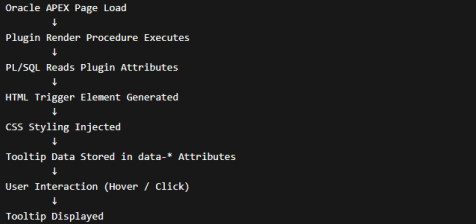
The render function performs the following tasks:
- Reads plugin attributes
- Handles user interactions
- Generates tooltip HTML
- Injects CSS styling
- Registers JavaScript functions
How the plugin works
The plugin uses a data attribute driven approach.
Instead of embedding complex JavaScript objects in HTML, the tooltip configuration is
stored in data-* attributes.
Example:
<span
class="stt-trigger"
data-stt-content="Includes base salary and allowances"
data-stt-pos="top"
data-stt-bg="#333"
data-stt-fg="#fff">
</span>
When the user interacts with the element, JavaScript reads these attributes and renders the
tooltip dynamically.
This approach prevents JavaScript quoting issues, which were causing errors in earlier
implementations.
Using the Plugin in Oracle APEX
After installing the plugin, using it is very simple.
Step 1: Create an Item on a page.
Step 2: Select Type
Smart Tooltip Plugin
Step 3: Configure the attributes.
Example configuration:
Trigger Mode: Hover
Position: Top
Background Color: #333
Text Color: #fff
Tooltip Content: Includes base salary + allowances
Animation: Fade
Auto Close: 5000
Testing the plugin in APEX
After implementing the plugin, perform the following tests.
Functional Tests
- Hover trigger works
- Click trigger works
- Tooltip positioning is correct
- Animation works
UI Tests
- Works on desktop
- Works on mobile
- Tooltip stays within viewport
Performance Tests: Ensure:
- CSS loads only once
- JavaScript functions are not duplicated
Deployment
To deploy the plugin:
- Export the plugin from APEX
- Save the SQL file
- Import it into another workspace
This makes the plugin fully reusable across applications.
Troubleshooting
Tooltip Not Appearing: Check:
- Plugin attributes
- JavaScript console errors
Tooltip Position Incorrect: Verify:
- Position attribute
- Viewport size calculations
Styling Issues: Ensure CSS is loaded properly in the render function.
Conclusion
The Smart Tooltip Plugin is a powerful enhancement for Oracle APEX applications. It
enables developers to add dynamic contextual help across the interface with minimal
effort.
By combining PL/SQL, JavaScript, and CSS, the plugin provides a reusable solution that
improves both user experience and application’s maintainability.
If you are building enterprise applications in Oracle APEX, integrating a smart tooltip system
can significantly improve usability while keeping your interface clean and professional.
Author: Sushree Manaswini Biswal, Oracle APEX consultant