Enabling AI Integration in PeopleTools 8.63
The landscape of enterprise software is rapidly shifting toward embedded intelligence, context-aware assistance, and seamless developer productivity. With the release of PeopleSoft PeopleTools 8.63, Oracle introduces a comprehensive suite of AI integration capabilities designed to empower both end users and developers. By prioritizing configurable, non-customizing design patterns and adopting open standards, PeopleTools 8.63 provides robust building blocks for bringing AI directly into day-to-day business operations.
Magic Button
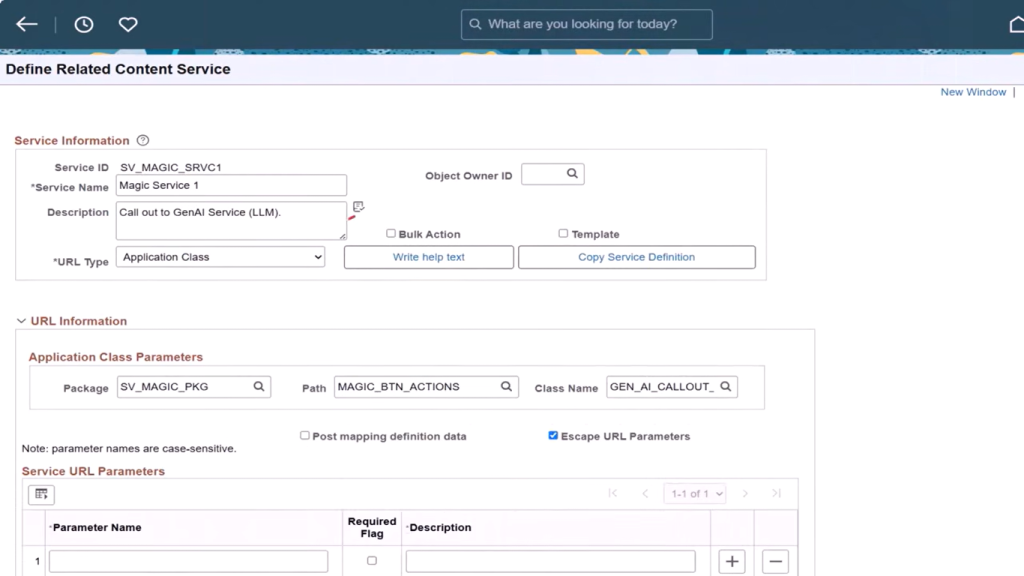
One of the standout user experience enhancements in PeopleTools 8.63 is the field-level Magic Button. It provides a direct entry point for user productivity and AI interaction within Fluid application pages.
What It Does
The Magic Button lets customers add a clear, single-click action button next to any field on a Fluid page, including long edit boxes, without making design-time customizations to the underlying page.
Steps to Set Up the Magic Button
- On the Assign Related Content page, in the Page Level Related Content grid, add a new row.
- (Optional) Select Unrestricted Prompt if the field is on a page that is not part of the component structure, such as a secondary page invoked through PeopleCode.
- Select the Fluid page that contains the edit field.
- Select the Related Content service that you created.
- Enter a value in the Service Label field. The label is displayed as hover text for the button.
- Select the Magic Button checkbox.
- (Optional) Specify an image in the Image field. By default, the system displays the delivered Magic Button icon. You can specify a different image to better represent the action performed by the button.
- On the Configure Service page, select the edit field that you want to associate with the Magic Button.
- Save the configuration.
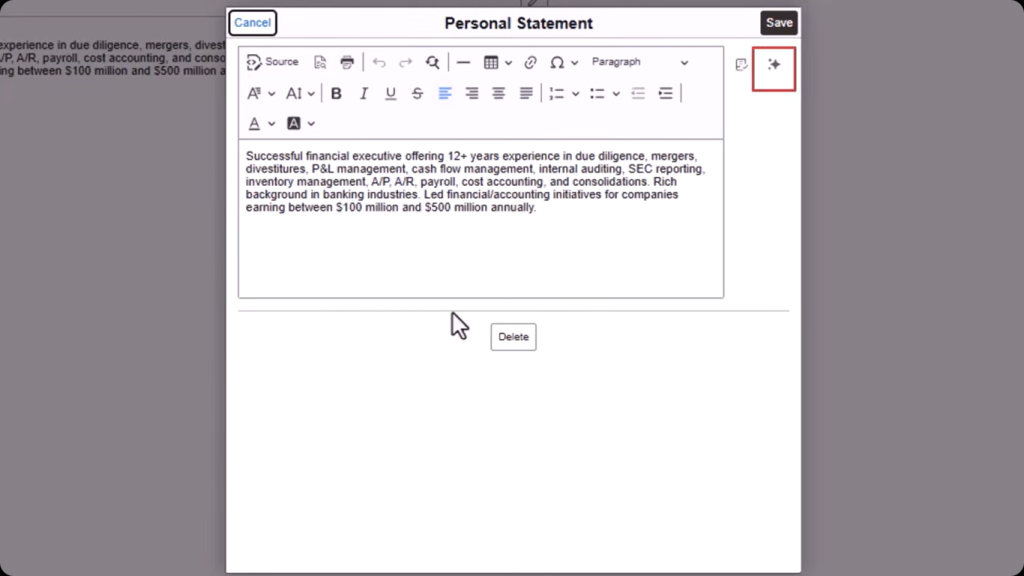
Navigation: PeopleTools > Portal > Related Content Services > Manage Related Content Service >Assign Related Actions
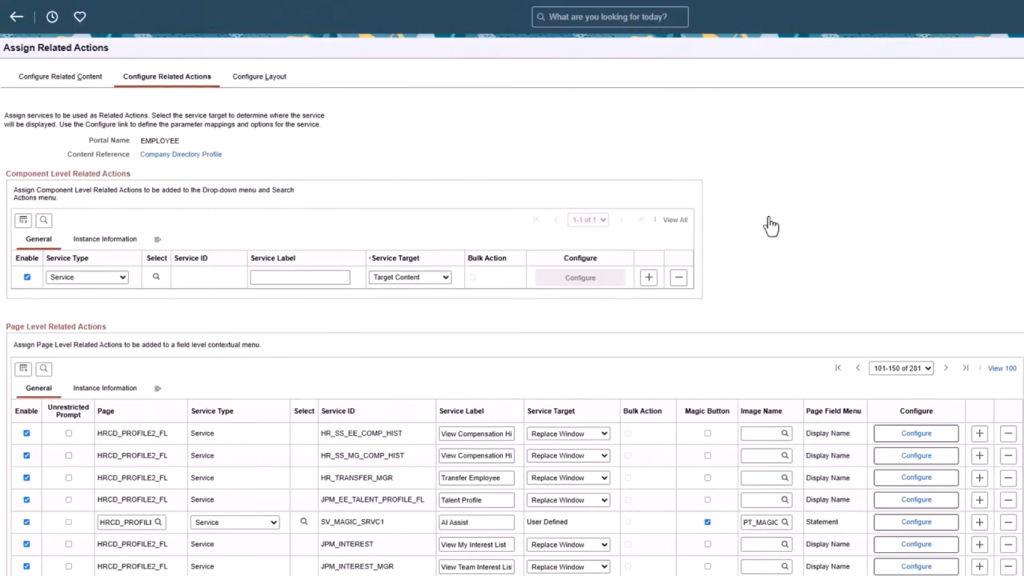
Navigation: PeopleTools > Portal > Related Content Services > Define Related Content Service
Key Capabilities & Configuration
- Native Look & Feel: Appears seamlessly next to designated fields with customizable icons, hover text, and labels.
- Flexible Action Execution: Leverages an enhanced Related Actions Framework linked to an Application Class-based service.
- AI & Integration Ready: Behind the button, PeopleCode can trigger REST API calls, business rules, or direct calls to external AI services (e.g., summarizing text, generating automated responses, or fetching smart recommendations).
App Designer AI Assist
To streamline coding, debugging, and documentation, PeopleTools 8.63 introduces App Designer AI Assist directly into the developer’s workspace.
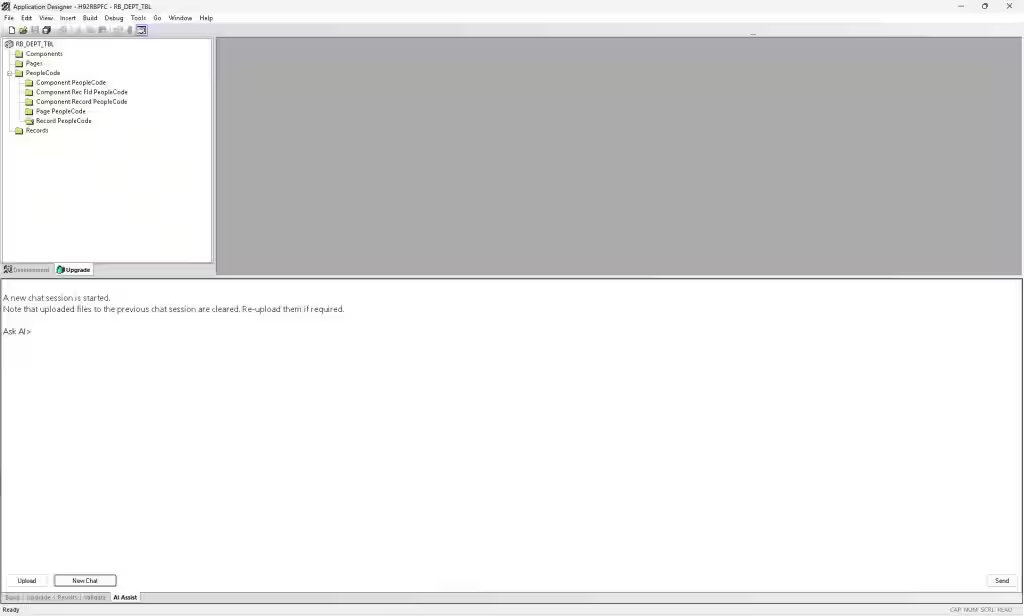
Use the Ask AI> prompt in the AI Assist window to interact with the LLM client configured for Application Designer. After the query is sent to the LLM, the response is streamed and displayed below the query in the same AI Assist window.
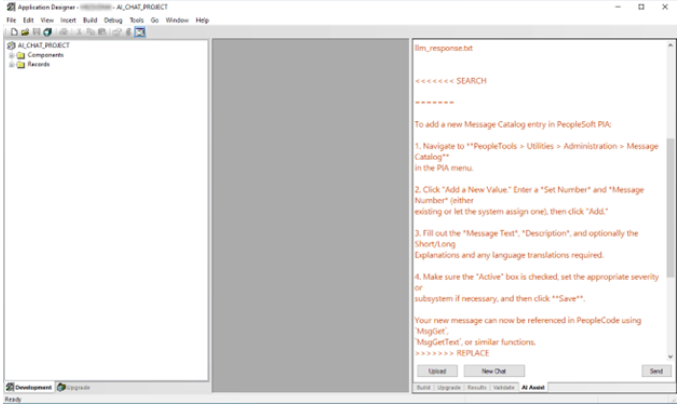
Key Developer Features
- In-Context Assistance: Query the AI assistant about specific PeopleCode logic within your active Application Designer project without switching tools.
- Iterative Refactoring: Ask AI Assist to restructure code, move logic inline, or propose code updates while keeping the developer in full control.
- Automated Code Documentation: Automatically generate inline comments and documentation-style summaries to improve code readability and maintainability.
- Context Expansion: Developers can upload supporting context files to guide the AI on specific enterprise requirements and business rules.
Key Benefits of AI Integration in PeopleTools 8.63
Magic Button
- No Page Customizations: Placed next to any field on a Fluid page using the Related Actions Framework without design-time customizations.
- Contextual Productivity: Gives users immediate access to field-level actions, productivity shortcuts, and business rules where they work.
- AI & Integration Ready: Connects directly via PeopleCode to REST APIs, business logic, or external AI services.
- Native User Experience: Fits natively into the interface with custom icons, labels, and hover text.
App Designer AI Assist
- In-Context Assistance: Allows developers to query project-specific code directly inside Application Designer without switching tools.
- Accelerated Refactoring: Suggests inline code updates and logic restructuring based on developer instructions while keeping the developer in control.
- Automated Documentation: Generates inline comments and summaries automatically to improve code readability and maintainability.
- Expanded Context Support: Accepts uploaded project and supporting files to give precise, enterprise-specific answers.
Conclusion
PeopleTools 8.63 brings AI closer to everyday PeopleSoft operations by combining contextual user interactions with AI-assisted development capabilities. The Magic Button enables configurable, field-level actions and AI integrations, while App Designer AI Assist helps developers improve coding, refactoring, documentation, and overall productivity within their existing development environment.
As organizations look to modernize their PeopleSoft environments, adopting the right PeopleSoft AI integration solutions can help extend existing capabilities while reducing development effort and improving user experiences. Explore how modern PeopleSoft capabilities can support your organization’s evolving digital transformation and enterprise technology goals.