Team Time Dashboard for Managers and Card Traversal in PeopleSoft HCM Image 55
Oracle’s PeopleSoft HCM Image 55 introduces the new Fluid Team Time Dashboard, providing managers with a centralized and intuitive workspace to efficiently manage employee time and absence activities. This enhancement simplifies daily managerial tasks by bringing together employee information, approvals, exceptions, and navigation into a single Fluid interface.
The new dashboard improves productivity, enhances visibility, and reduces the time spent switching between multiple pages, enabling managers to focus on timely decision-making.
Key Highlights of the Team Time Dashboard in Image 55
Centralized Team Time Management
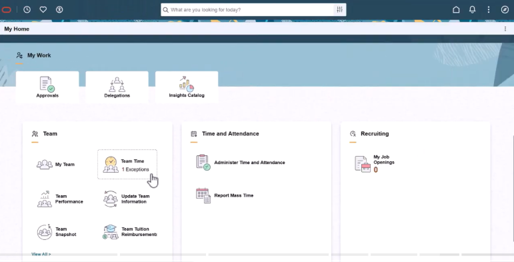
The new Fluid Team Time Dashboard offers managers a single location to perform all essential time and absence-related activities. From one dashboard, managers can:
- Select employees from their team.
- Review reported time exceptions.
- Approved employee reported time.
- Approve employee absences.
- Access key actions related to the selected employee.
This centralized approach eliminates the need to navigate across multiple pages, making managerial tasks faster and more efficient every day.
Dynamic Employee Card Traversal
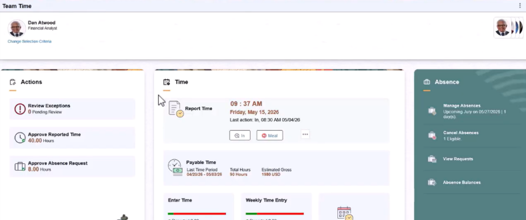
A key enhancement in Image 55 is the introduction of Employee Card Traversal. Managers can quickly move between employees using intuitive employee cards displayed on the dashboard.
The dashboard includes a contextual header that displays important employee information, allowing managers to easily identify the selected employee while navigating through their team.
As managers switch between employee cards, the dashboard dynamically refreshes the corresponding:
- Time information
- Absence details
- Exception counts
- Available actions
This provides a seamless and responsive user experience without requiring page reloads.
Improved Navigation and User Experience
The Team Time Dashboard has been designed with the modern Fluid User Interface, making navigation faster and more intuitive.
Key usability improvements include:
- Easy employee selection using navigation cards.
- Real-time dashboard refresh based on the selected employee.
- Context-sensitive information displayed throughout the page.
- Reduced clicks for common managerial actions.
These enhancements help managers quickly identify pending work and complete approvals more efficiently.
Business Benefits of the Team Time Dashboard in PeopleSoft HCM Image 55
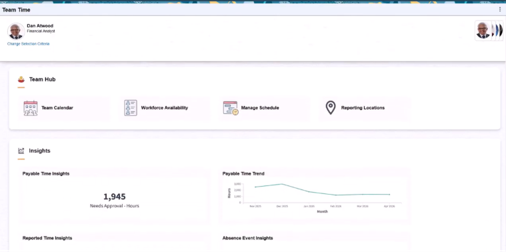
The Fluid Team Time Dashboard introduced in PeopleSoft HCM Image 55 helps managers streamline employee time and absence management through a centralized, user-friendly interface. By bringing employee navigation, reported time exceptions, time approvals, and absence approvals into one workspace, this enhancement helps reduce administrative effort, improve workforce visibility, and simplify routine managerial tasks.
1. Improved Manager Productivity
The centralized Team Time Dashboard reduces the need to navigate between multiple pages to complete common managerial tasks. Managers can select employees, review time information, identify exceptions, and access relevant actions from one workspace. This streamlined experience helps minimize routine administrative effort and allows managers to focus more on team coordination and operational priorities.
2. Faster Employee Time and Absence Approvals
Timely approval of employee-reported time and absence requests is essential for efficient workforce operations. The PeopleSoft HCM Image 55 Team Time Dashboard brings these activities into a single interface, helping managers review pending items and access the relevant approval actions more conveniently. This can support smoother approval workflows and more consistent management of employee time and absence activities.
3. Better Visibility into Employee Time Activities
The dashboard provides access to employee-specific time information, absence details, and exception counts. This visibility helps managers identify reported time exceptions and determine which activities require attention. By making relevant workforce information easier to access, the dashboard supports informed decision-making and helps managers monitor outstanding team responsibilities more effectively.
4. Simplified Employee Navigation with Card Traversal
The Employee Card Traversal feature allows managers to move between team members using employee cards displayed on the dashboard. As the selected employee changes, the contextual information and associated dashboard content update dynamically. This functionality simplifies employee navigation and helps managers review individual time and absence details without repeatedly returning to separate employee pages.
5. Reduced Navigation and Administrative Effort
Navigating across multiple application pages can add unnecessary steps to routine workforce management activities. The Fluid Team Time Dashboard consolidates access to key employee time and absence functions, helping managers reduce repetitive navigation and locate commonly used actions more easily. These improvements can make everyday PeopleSoft HCM time management tasks more efficient.
6. Enhanced PeopleSoft Fluid User Experience
Built on the PeopleSoft Fluid User Interface, the Team Time Dashboard presents employee information and available actions in a structured, contextual layout. Dynamic updates based on employee selection provide a more responsive navigation experience. This intuitive interface helps managers access relevant information and complete routine activities more conveniently within their PeopleSoft HCM environment.
7. More Consistent Workforce Management Processes
By providing a common workspace for reviewing employee time, identifying exceptions, and accessing time and absence approvals, the dashboard supports a more consistent approach to routine workforce administration. Managers can use the available employee information and actions to monitor team activities and address pending responsibilities more systematically.
8. Greater Value from PeopleSoft HCM Image Updates
PeopleSoft HCM Image updates introduce delivered enhancements that organizations can evaluate to improve application usability and existing business processes. The Team Time Dashboard in Image 55 demonstrates how improved navigation, contextual employee information, and centralized access to managerial actions can simplify time and absence administration. Reviewing these capabilities helps organizations identify opportunities to make better use of their existing PeopleSoft HCM solutions.
Overall, the Team Time Dashboard in PeopleSoft HCM Image 55 offers a more centralized and intuitive approach to employee time and absence management. With employee card traversal, contextual information, and convenient access to key actions, this enhancement helps reduce administrative friction, improve visibility into team activities, and support more efficient managerial workflows.
Conclusion
The Team Time Dashboard for Managers in PeopleSoft HCM Image 55 delivers a modern, centralized approach to managing employee time and absence activities. With Employee Card Traversal, contextual employee information, and dynamic dashboard updates, managers can navigate their teams more efficiently and complete day-to-day tasks with fewer clicks.
Overall, this enhancement streamlines managerial workflows, improves usability, and provides a more intuitive experience within the PeopleSoft Fluid interface. To learn more, explore Team Time Dashboard in PeopleSoft and discover how Kovaion supports organizations in optimizing their PeopleSoft HCM environment.
Optimize Your PeopleSoft HCM Environment with Kovaion
Looking to simplify workforce administration and get more value from your PeopleSoft HCM investment? Kovaion helps organizations optimize their PeopleSoft environments through expert consulting, application enhancements, and tailored PeopleSoft HCM services.
Whether you are evaluating PeopleSoft HCM Image updates, improving time and absence management, or streamlining managerial workflows, our team can help you identify opportunities to enhance system usability and align PeopleSoft capabilities with your business needs.
Ready to Enhance Your PeopleSoft HCM Capabilities?
Connect with Kovaion to explore how our PeopleSoft expertise can help your organization improve HR operations, simplify workforce processes, and maximize the value of your existing PeopleSoft applications.
Contact Kovaion’s PeopleSoft HCM Experts to discuss your requirements and explore the right solution for your organization.