PeopleSoft HCM PUM 55: Simplifying Position Administration with Position Management Insights

Managing a large number of positions across different departments, locations, job titles, and organizational structures can be challenging for HR administrators. As the number of positions increases, it becomes important to quickly understand the current status of positions, identify vacancies, monitor positions that are awaiting approval, and review how positions are distributed across the organization.
Traditionally, obtaining this information may require administrators to navigate through different position-related pages and review individual position records. This can make it difficult to get a consolidated view of the organization’s position structure and quickly identify areas that require attention.
Position Management Insights addresses this requirement by providing a centralized, visual way to analyze position information. It enables administrators to view key position-related metrics and identify trends and statuses through interactive charts, graphs, filters, and detailed information. Instead of reviewing position records individually, administrators can use the dashboard to get a broader view of the organization’s positions and then drill into the information relevant to them.
The dashboard can help administrators understand areas such as open and filled positions, headcount associated with positions, position approval status, and position details across different organizational dimensions. By bringing these details together in a single analytical interface, Position Management Insights can support faster analysis and help administrators identify positions that may require further review or action.
Position Management Insights is delivered as part of the PeopleSoft Insights framework. In PeopleSoft HCM 9.2.055, the dashboard uses the HC_POSITION_DATA_INDEX search index as its underlying data source. The indexed position information is presented through various analytical views, allowing users to filter and explore position data according to their requirements.
This blog provides an overview of Position Management Insights in PeopleSoft HCM PUM 55, explains the information available through the dashboard, and describes how administrators can use the delivered insights to analyze and monitor position data.
1. Introduction
Position Management Insights provides administrators with a visual and analytical view of position information.
The dashboard can be used to evaluate:
- Open positions
- Open headcount
- Partially filled positions
- Filled positions
- Overallocated positions
- Position requests awaiting approval or rework
- Positions without a manager
- Position characteristics such as full-time/part-time and regular/temporary
- Position details based on the user’s security access
The dashboard is built using PeopleSoft Insights, which provides visual reports in the form of charts, tables, graphs, and other visualizations.
The index is designed to retrieve position data for positions in Approved, Pending Approval, and Rework workflow statuses. Oracle also documents support for real-time indexing for this index with supported PeopleTools versions.
1.1 Core Features
1.1.1 Centralized Position Analytics
Position Management Insights brings important position information into a centralized dashboard.
Instead of reviewing position information individually, administrators can use visualizations to understand the overall position structure and identify areas requiring attention.
1.1.2 Position Metrics
The dashboard provides several position-level metrics, including:
- Total Positions
- Open Positions
- Partially Filled Positions
- Filled Positions
- Overallocated Positions
- Positions eligible for remote work
- Full-Time versus Part-Time Positions
- Regular versus Temporary Positions
- Position Filled Status
- Open and Partially Filled Positions by Department
- Positions Without Manager
These metrics provide administrators with a consolidated view of the current position structure.
1.1.3 Position Headcount Analysis
Position Management Insights also provides specific visualizations for position headcount.
Administrators can view:
- Total headcount allocated to active positions
- Open headcount
- Open headcount by department
- Open headcount by job title
This helps administrators understand where position headcount is available and where positions still have vacancies.
1.1.4 Position Request Approval Monitoring
The dashboard also provides visibility into the approval status of position requests.
The Days Approval In Progress visualization allows administrators to specify a minimum and maximum number of days.
The Pending Approval Status visualization then displays the percentage of position requests that are pending approval or have been pushed back for rework within the selected range.
1.1.5 Position-Level Details and Actions
Position Management Insights is not limited to graphical analysis.
The Position Details section provides detailed position information based on the selected filters and visualizations.
From this section, users can navigate to:
- Manage Position
- Incumbents List
- Reports To Incumbents List
The available actions depend on the user’s security access.
2. Understanding PeopleSoft Insights for Position Management
Position Management Insights is an analytical feature for reviewing position-related information. It presents information in different forms, including numerical summaries, bar charts, doughnut charts, pie charts, and a detailed position grid.
The dashboard is designed to help administrators answer practical questions such as:
- How many approved positions are available in the organization?
- How many positions are open, partially filled, filled, or overallocated?
- Which departments have the largest numbers of open or partially filled positions?
- How much headcount is allocated to positions, and how much remains open?
- Which position requests are awaiting approval or have been returned for rework?
- How many days have position requests remained in the approval process?
- Which active positions have no manager position assigned, or have a manager position that is vacant?
- Which position records require further examination?
The dashboard presents position data available to the logged-in user according to their security access. The results therefore depend on the data available in the environment, the search index, the selected filters, and the user’s access permissions.
The visualizations are generated from data retrieved through the PeopleSoft Search Framework.
For Position Management Insights, the primary search index is:
HC_POSITION_DATA_INDEX
The relationship can therefore be represented as:
Position Data → Search Definition/Index → PeopleSoft Insights → Position Management Insights Dashboard
The Search Framework provides the underlying indexed data, while PeopleSoft Insights uses that data to display charts, tables, metrics, and other visualizations.
Oracle specifically identifies HC_POSITION_DATA_INDEX as the search index used by Position Management Insights.
2.1 Security
The dashboard and the tile show only the data available to the logged-in user according to their security access. Two users can therefore see different numbers on the same dashboard. Access to the tile is controlled by the HR Administrator role, and the underlying Insights catalog item is secured by the Ins Cat Position Insights role.
3. Position Management Insights: Delivered Objects
Oracle documents the following delivered objects for Position Management Insights.
| Object | Oracle Delivered Definition |
|---|---|
| Position Management Insights Tile | HC_POSITION_DATA_INSIGHTS_FL |
| Position Management Insights Dashboard | HC_POSITION_DATA_INSIGHTS_FL |
| Search Index | HC_POSITION_DATA_INDEX |
| Catalog Item Role | Ins Cat Position Insights |
| Tile Role | HR Administrator |
The Position Management Insights tile provides access to the position analytics, while the dashboard displays the detailed visualizations.
Oracle’s HCM Insights security documentation also identifies Ins Cat Position Insights for the catalog item and HR Administrator for the tile.
4. Implementation
The implementation of Position Management Insights follows a Search Framework and PeopleSoft Insights deployment sequence.
Oracle documents four main steps:
- Deploy the HC_POSITION_DATA_INDEX index.
- Build the HC_POSITION_DATA_INDEX search index.
- Deploy the Position Management Insights tile and dashboard.
- Assign the HR Administrator role to users who require access.
An important Oracle requirement is that the full index must be run before the dashboard is deployed.
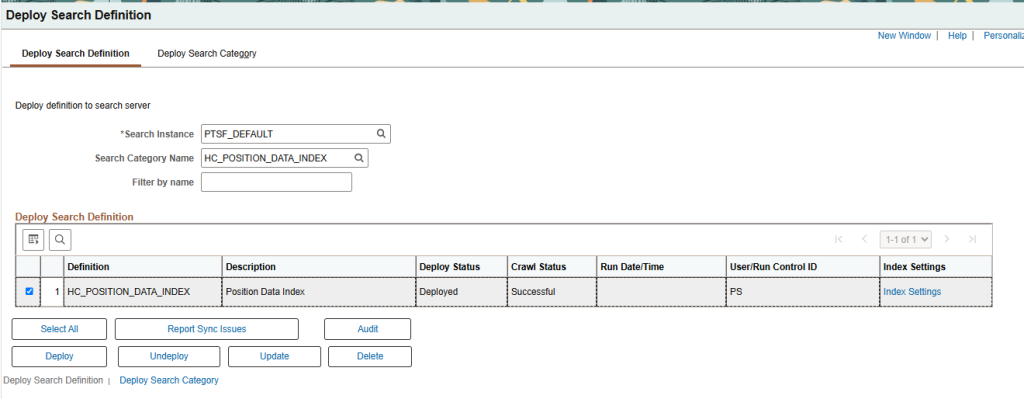
4.1 Deploy the Position Data Index
The first step is to deploy the delivered Position Data Index.
The search index used by Position Management Insights is:
HC_POSITION_DATA_INDEX
Navigation:
PeopleTools → Search Framework → Administration → Deploy Search Objects
From the page, locate the delivered HC_POSITION_DATA_INDEX search definition and deploy the corresponding search object.
The deployment makes the search definition available for indexing.
4.2 Build the HC_POSITION_DATA_INDEX Search Index
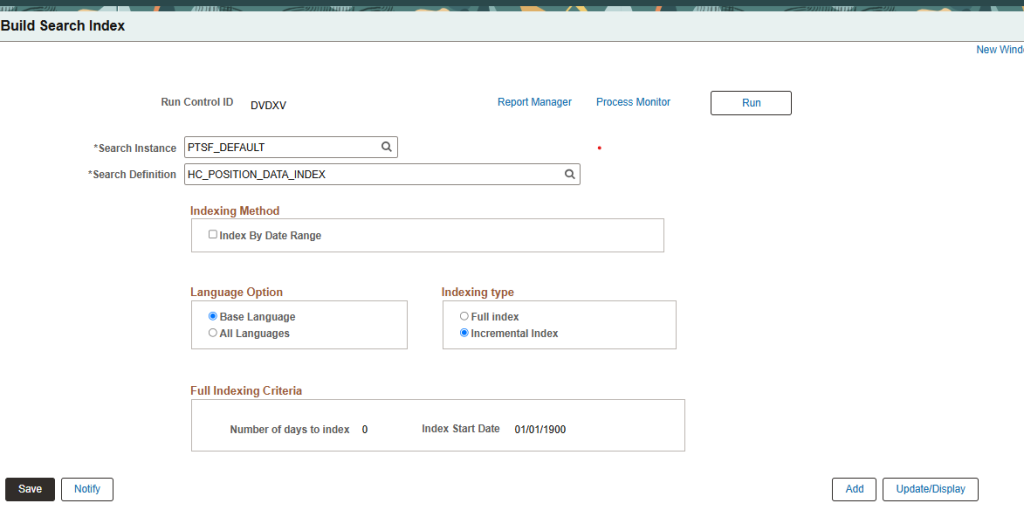
After deploying the search definition, the next step is to build the search index.
Navigation:
PeopleTools > Search Framework > Search Admin Activity Guide > Administration > Schedule Search Index
Locate: HC_POSITION_DATA_INDEX
Schedule the search index build from this page.
For the initial implementation, Oracle requires a Full Index before the Position Management Insights dashboard can be deployed.
The full index populates the search repository with the applicable position information.
4.3 What Is HC_POSITION_DATA_INDEX?
HC_POSITION_DATA_INDEX is the delivered Position Data Index used by Position Management Insights.
Oracle’s HCM documentation identifies the following details:
| Item | Oracle-Delivered Value |
|---|---|
| Search Definition / Index | HC_POSITION_DATA_INDEX |
| Usage | PeopleSoft Insights |
| Dashboard | Position Management Insights |
| Purpose | Provides position data used by the dashboard |
Oracle’s Insights documentation explicitly lists Position Management Insights with HC_POSITION_DATA_INDEX as its Search Definition.
The index is designed to fetch position data for positions having the following workflow statuses:
- Approved
- Pending Approval
- Rework
Therefore, the dashboard’s data is not an arbitrary collection of all position records. The delivered search index determines the position data made available to the Insights dashboard.
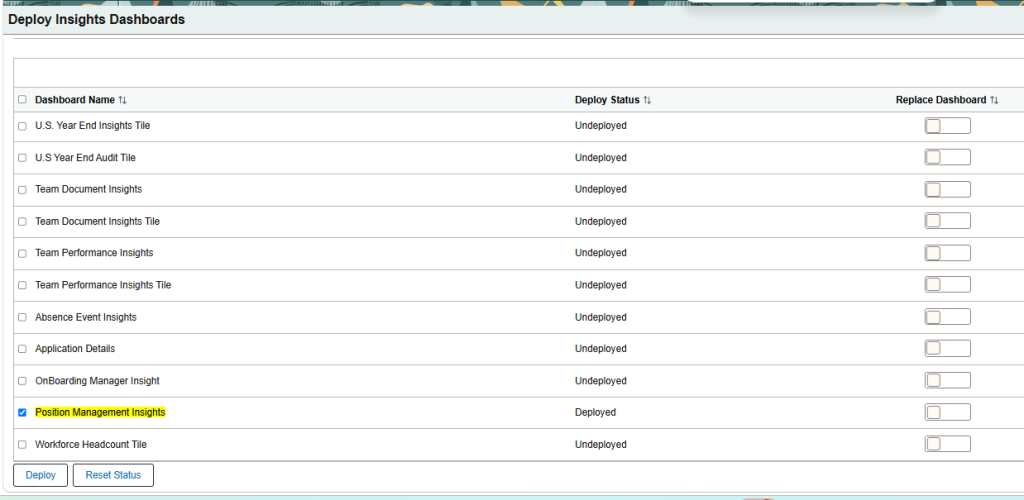
4.4 Deploy Position Management Insights Dashboard
After the full index has successfully completed, the Position Management Insights tile and dashboard can be deployed.
Navigation:
PeopleTools > Search Framework > Administration > Deploy Insights Dashboards
From the Deploy Insights Dashboards page, deploy the delivered Position Management Insights dashboard.
4.5 Configure Security and Assign Roles
Users need the appropriate roles to view the tile and access the dashboard.
- Tile role: HR Administrator
- Insights catalog item role: Ins Cat Position Insights. When a generic role such as HR Administrator secures a dashboard, the Insights catalog item is secured by an Insights-specific role.
Navigation:
PeopleTools > Security > User Profiles > User Profiles > Roles tab
- Open the user profile of the administrator who needs access.
- On the Roles tab, add HR Administrator or a custom role that carries equivalent access, if your organization uses one.
- Save the profile. Ask the user to sign out and sign back in so the role takes effect.
- Review the user’s data permissions. The dashboard and the tile show only data the user is authorized to see.
4.6 Validate the Setup
Use this checklist after implementation:
- Definition deployed: Deploy Search Definition shows HC_POSITION_DATA_INDEX as Deployed.
- Full index complete: The Build Search Index process finished successfully in Process Monitor.
- Dashboard deployed: Deploy Insights Dashboards shows Position Management Insights as Deployed.
- Tile visible: An HR Administrator user can see the Position Management Insights tile.
- Data present: The dashboard opens and shows Position Metrics with non-zero counts.
- Counts reasonable: Spot-check a few positions and departments against Manage Position. Remember that only Approved, Pending Approval, and Rework positions are indexed.
- Data refresh works: Change a position and confirm the update appears immediately with RTI or after the next incremental build.
- Security works: A user with restricted data access sees only their permitted data.
5. Accessing Position Management Insights
After deployment and security configuration, administrators can open the delivered tile from the Workforce Administrator home page.
Navigation:
Workforce Administrator home page > Position Management tile > Position Management Insights tile
The Position Management Insights tile provides a quick visual summary of approved positions with Partially Filled, Open, and Overallocated statuses. Filled positions are excluded from this tile’s horizontal bar graph.
The data shown on the tile is limited by the logged-in user’s security access.
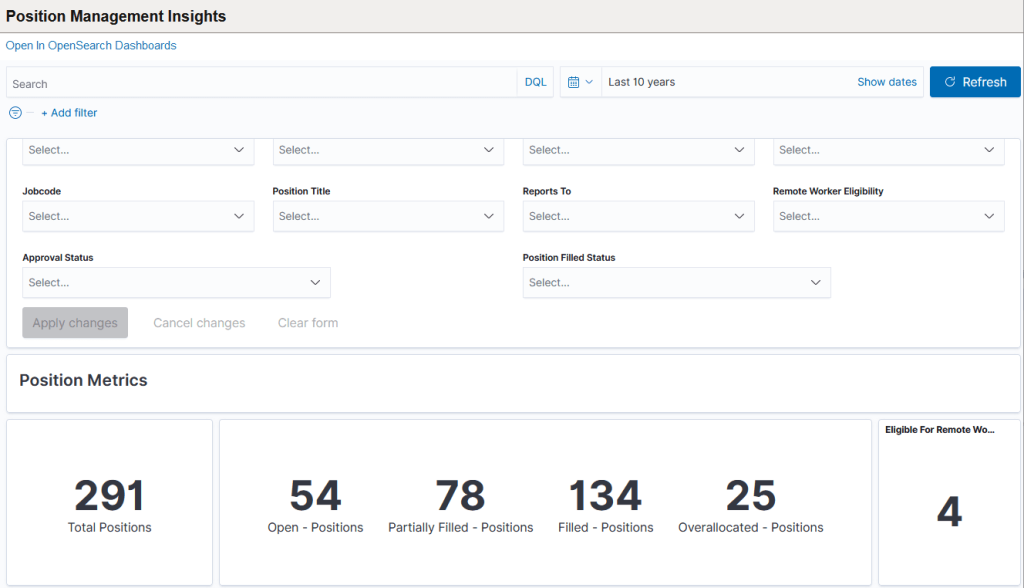
Selecting the tile opens the Position Management Insights dashboard, where administrators can examine the detailed visualizations and position records.
5.1 Where Does the Original Position Data Come From?
The starting point is the position information maintained in PeopleSoft HCM Position Management.
For example, position-related information such as:
- Position
- Business Unit
- Department
- Location
- Job Code
- Position Title
- Reports To
- Position Filled Status
- Approval Status
- Remote Worker Eligibility
- Headcount information
is maintained as part of the PeopleSoft application data.
Position Management Insights uses this position information for its analytical views.
However, the dashboard does not simply execute a conventional SQL query against the underlying application tables whenever a chart is displayed.
Instead, Oracle uses the PeopleSoft Search Framework to make the required position data available to PeopleSoft Insights. Oracle specifically identifies HC_POSITION_DATA_INDEX as the search index used by the Position Management Insights dashboard.
5.2 What Happens When Position Data Changes Later?
This is where Real Time Indexing (RTI) becomes important.
Oracle documents that HC_POSITION_DATA_INDEX supports Real Time Indexing with the specified PeopleTools releases.
Oracle states that when RTI is enabled, it allows real-time updates to the indexed data so that searches can use the latest information.
Oracle’s general RTI documentation further explains that Real Time Indexing uses DirectTransfer methods to transmit search-indexing data directly from PeopleSoft batch servers to the search engine and that indexing can occur as data is saved.
Therefore, conceptually:
Without RTI
A change in PeopleSoft position data may require the appropriate indexing process for the search index to reflect the change.
With RTI enabled
Changes can be propagated to the search index in near real time, subject to the supported PeopleTools version and RTI configuration.
This is important because the dashboard is displaying information from the search index. If the underlying PeopleSoft data changes, the index must also receive the corresponding change before the dashboard can reflect the updated indexed information.
6. Demonstration of Dashboard
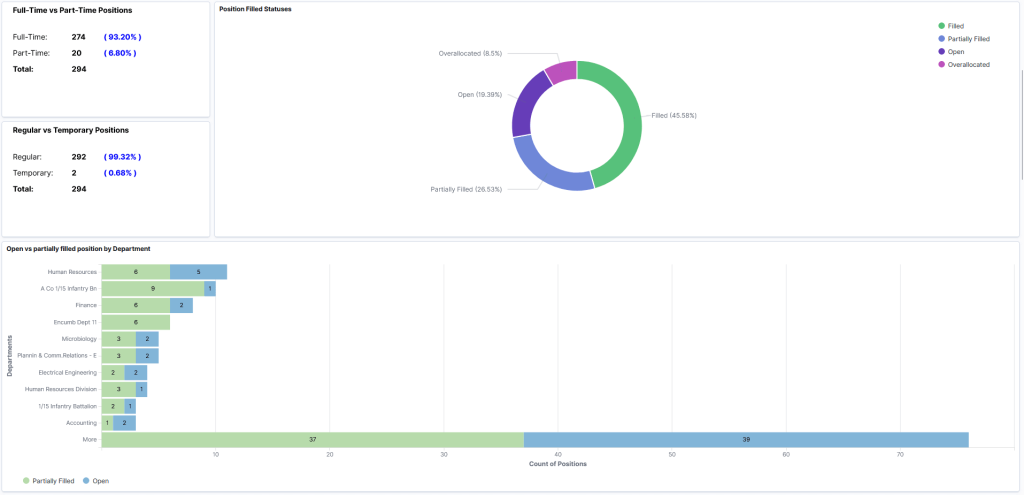
The Position Metrics section provides an overview of approved positions and their current status. It includes total, open, partially filled, filled, overallocated, remote-work eligible, full-time/part-time, and regular/temporary positions. It also provides visualizations for position status by department and positions without a manager, allowing administrators to identify vacancies, headcount conditions, and reporting-structure gaps.
6.1 Position Without Manager
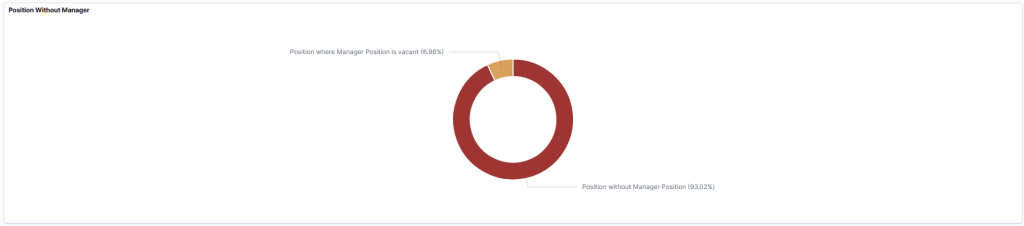
The Position Without Manager visualization displays active positions based on their manager-position relationship. It distinguishes between positions where a manager position has been assigned but is vacant and positions where no manager position has been assigned.
6.2 Position Head Count Metrics
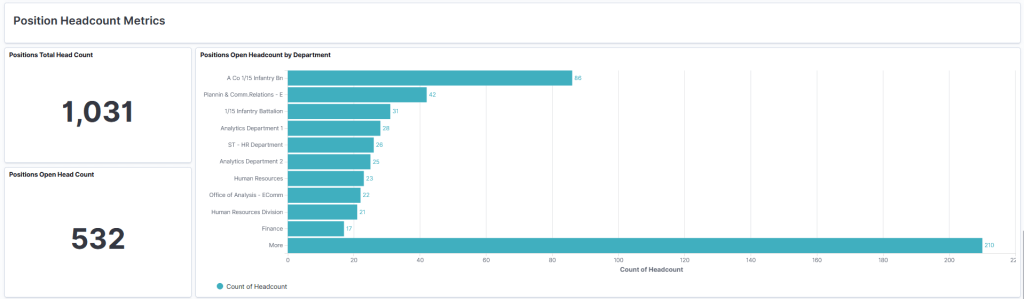
The Position Headcount Metrics section focuses on allocated and open headcount rather than simply counting position records. Administrators can view total headcount, open headcount, and open headcount by department and job title. This helps identify where unfilled headcount exists, including within partially filled positions.
6.3 Positions Open Headcount by Title
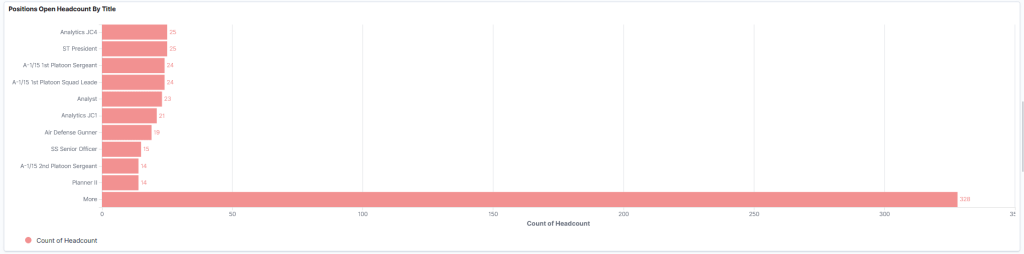
The Positions Open Headcount by Title visualization displays the top 10 job titles and the number of open headcount positions associated with each title. It applies to approved positions, excluding positions that are pending or pushed back. Selecting More displays the next 10 job titles with open headcount.
6.4 Approval Status of Position Requests
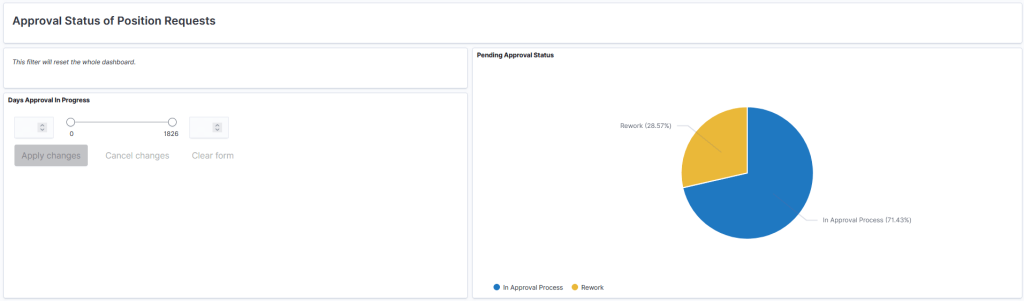
The Approval Status of Position Requests section allows administrators to analyse pending and pushed-back position requests based on how long they have remained in progress. The dashboard also provides search, filters, date ranges, and interactive chart selections. Filters can be applied using fields such as Business Unit, Department, Location, Jobcode, Position Title, Reports To, Approval Status, and Position Filled Status, allowing the displayed analytics to be narrowed to specific business requirements.
6.5 Position Details
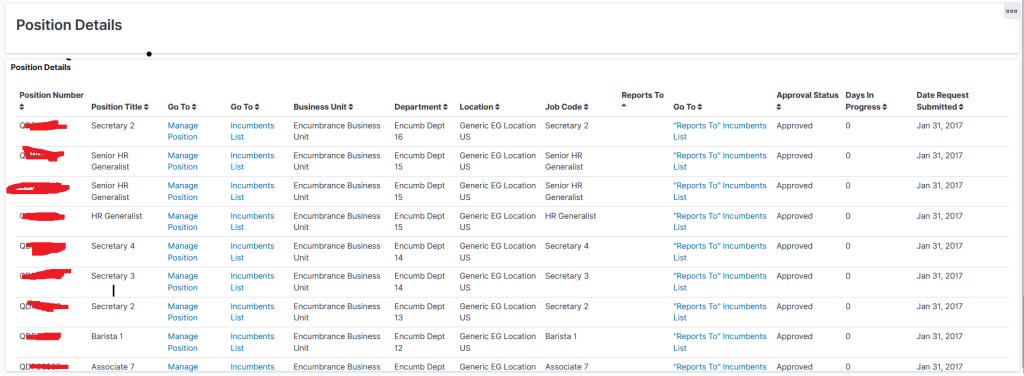
The Position Details section provides position-level information based on the selected filters and visualizations. Administrators can sort records, filter for or exclude specific values, and navigate from the analytical results to the Manage Position page. This connects the dashboard’s analytical information with the underlying position records for further review.
7. Summary
PeopleSoft HCM 9.2.055 Position Management Insights provides administrators with an analytical dashboard to evaluate position data through interactive visualizations. The dashboard presents information such as approved positions, open and partially filled positions, open headcount, position approval status, and position details. Administrators can use filters, chart selections, and drill-down options to analyze the information according to their requirements and security access.
The dashboard is built on the PeopleSoft Insights platform and uses the HC_POSITION_DATA_INDEX search index as its data source. Position data is made available to Insights through the PeopleSoft Search Framework; the index is designed to provide data for positions in Approved, Pending Approval, and Rework workflow statuses. Oracle documents the setup process as deploying and building the search index and then deploying the Position Management Insights dashboard. Where supported, Real Time Indexing can provide updates to the indexed data so that Insights can use the latest available information.
8. Conclusion
PeopleSoft HCM 9.2.055 Position Management Insights provides administrators with a centralized view of position information through interactive analytics. By bringing together position status, headcount, approval information, and detailed position data, the dashboard helps administrators gain better visibility into their organization’s position structure and analyze position information more efficiently.
Optimize Your PeopleSoft HCM Experience with Kovaion
Looking to improve position visibility, streamline HR operations, and make better use of your PeopleSoft HCM capabilities? Kovaion helps organizations optimize their HR systems through tailored PeopleSoft HCM solutions, technical consulting, and application optimization services.
Connect with our experts to explore how we can help you enhance your PeopleSoft HCM environment, simplify position management, and improve workforce visibility.