Oracle Fusion Cloud HCM 26C: Workforce Compensation Analyst AI Agent
Compensation planning is a critical part of workforce management, but keeping track of budgets, manager progress, approvals, and worksheet status can make compensation cycles time-consuming for HR and compensation teams. With Oracle Fusion Cloud HCM 26C, Oracle introduces the Workforce Compensation Analyst AI Agent to simplify these routine status checks through conversational AI.
The new AI agent allows worksheet managers to ask natural-language questions about a compensation plan and quickly access information such as manager worksheet status, overall budgets, due dates, approval progress, and budget overages—without navigating through multiple worksheets or reports.
In this blog, we explore what the Workforce Compensation Analyst AI Agent can do, how it supports compensation planning, its current capabilities and limitations, and what organizations need to know to configure and enable it in Oracle Fusion Cloud HCM.
The Compensation Planning Challenge: Too Many Clicks, Too Little Time
Anyone who has run a compensation cycle knows the drill. Budgets need to be checked. Manager progress needs to be tracked. Overages need to be caught before they become a finance headache. And all of that usually means the same worksheet manager clicking through screen after screen, plan after plan, just to answer a simple question: “Where do things stand right now?”
With the Oracle Fusion Cloud HCM 26C update, Oracle introduces a feature built specifically to close that gap — the Workforce Compensation Analyst AI Agent. Instead of navigating multiple worksheet pages to piece together a status update, managers can simply ask.
This conversational approach gives worksheet managers a more direct way to access important compensation plan information without relying on multiple reports or manual worksheet checks.
What Can the Workforce Compensation Analyst AI Agent Do?
The Workforce Compensation Analyst AI Agent operates directly in the context of a compensation plan and lets worksheet managers ask natural-language questions instead of hunting through reports.
Today, it can answer questions about:
- The status of reporting managers’ worksheets
- Overall budget information for the plan
- Manager due dates and where approvals are lagging
- Manager-level budget overages
These capabilities give managers a faster way to check the overall status of a compensation cycle and identify areas that may need attention.
It’s worth noting the current scope: the agent reports on managers and plan-level status, not individual employee compensation details. Oracle has flagged employee-level detail as a planned enhancement for a future release, so this first version is squarely aimed at giving managers a faster read on the overall health of their team’s compensation cycle.
For organizations exploring AI-powered compensation management, this distinction is important. The current version is focused on improving visibility into compensation plans rather than replacing existing worksheets or providing employee-level compensation information.
How the AI Agent Simplifies Compensation Planning
The key difference with the Workforce Compensation Analyst AI Agent is how managers access information. Instead of opening individual worksheets, reviewing multiple pages, or searching through reports, managers can use natural-language questions to retrieve plan-related information.
For example, a manager can check whether reporting managers have completed their worksheets, review the overall compensation budget, identify managers with budget overages, or check where approvals are still pending.
This conversational experience can reduce the number of routine navigation steps involved in monitoring a compensation cycle. For managers responsible for multiple reporting managers, that can make it easier to identify exceptions and follow up where action is required.
Workforce Compensation Analyst AI Agent in Action
Because this is a conversational agent, it’s easiest to understand by looking at how a manager would actually use it. Here are three interactions taken straight from Oracle’s 26C Compensation release documentation.
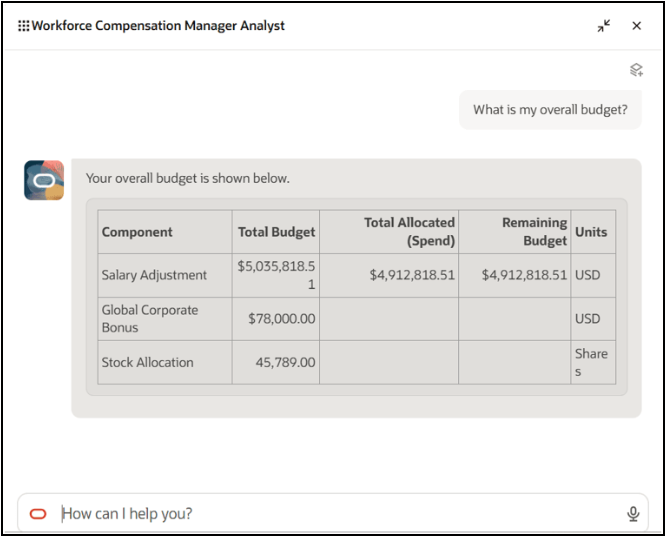
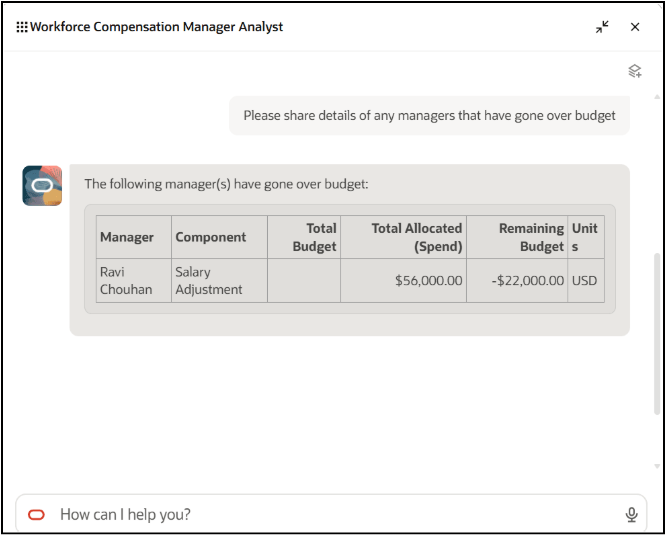
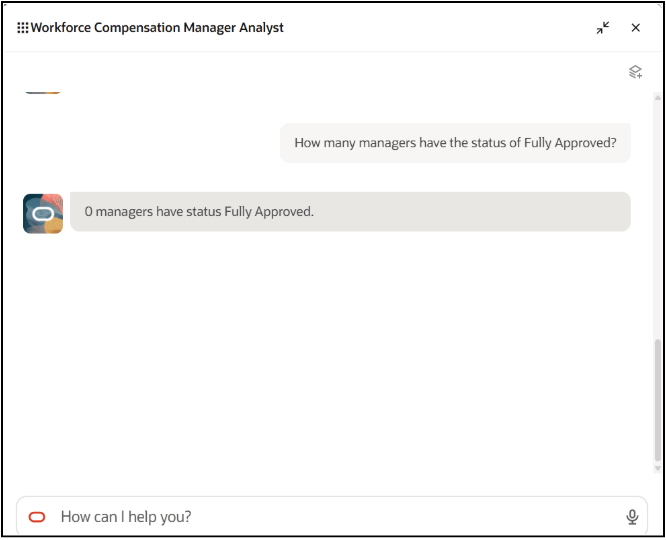
These examples demonstrate how the Workforce Compensation Analyst AI Agent in Oracle Fusion Cloud HCM can help managers retrieve compensation plan information through conversational interactions rather than navigating through multiple worksheets.
Benefits for HR and Compensation Teams
The value here isn’t the novelty of chat-based AI — it’s the time it gives back to the people running the cycle.
A regional manager overseeing a dozen reporting managers no longer has to open a dozen worksheets to find the one that’s over budget or the one sitting untouched three days before the deadline. They can ask, get an answer, and move on.
For HR and compensation administrators, that translates into fewer status-check emails, fewer escalations discovered too late, and a compensation cycle that’s easier to keep on schedule.
The agent can also provide managers with a more immediate view of compensation plan activity. Rather than waiting until a review or escalation point to identify an issue, managers can check the status of their plans as they work through the compensation cycle.
As organizations continue exploring AI in Oracle Cloud HCM, capabilities such as the Workforce Compensation Analyst AI Agent show how conversational AI can be applied to specific HR processes without fundamentally changing the existing compensation workflow.
How to Set Up the Workforce Compensation Analyst AI Agent
The Workforce Compensation Analyst AI Agent ships disabled by default and needs to be opted in under the Compensation Management offering.
Once enabled, it’s configured through Guided Journeys in Visual Builder Studio: open any plan’s landing page, use the profile icon to edit the page, and attach the Workforce Compensation Manager Analyst journey and its task codes before publishing.
It’s a one-time setup per plan landing page, and existing guidance from the Global HR 25A release on AI Agent task types for Guided Journeys applies directly.
For organizations planning to introduce the agent into their Oracle Fusion Cloud HCM Compensation processes, this configuration step is an important part of preparing the feature for worksheet managers.
What Are the Current Limitations of the Compensation AI Agent?
While the Workforce Compensation Analyst AI Agent introduces a more conversational approach to compensation planning, its current capabilities have a defined scope.
The agent currently focuses on manager-level and plan-level information. It does not provide individual employee compensation details. Oracle has identified employee-level detail as a planned enhancement for a future release.
This means organizations should view the current release as a tool for improving visibility into the overall compensation cycle rather than as a replacement for existing compensation worksheets or employee-level compensation analysis.
Understanding this scope can help HR and compensation teams set appropriate expectations when introducing the AI agent to managers.
Key Takeaways from Oracle Fusion Cloud HCM 26C Compensation
The Workforce Compensation Analyst AI Agent is a small feature with an outsized effect on how compensation season actually feels for the people running it. It won’t replace the worksheet — but it does mean fewer reasons to open one.
As Oracle rounds out the agent with employee-level detail in future releases, it’s a good moment for compensation teams to opt in early, get familiar with the Guided Journeys setup, and start collecting the manager feedback that will shape how they roll it out more broadly next cycle.
With Oracle Fusion Cloud HCM 26C, conversational AI is becoming part of the compensation planning experience, giving managers a simpler way to check budgets, worksheet progress, due dates, approvals, and overages.
For organizations already using Oracle Fusion Cloud HCM, the Workforce Compensation Analyst AI Agent provides another way to make compensation management more accessible and efficient while keeping the underlying compensation planning process intact.
Unlock More Value from Oracle Fusion Cloud HCM with Kovaion
Oracle Fusion Cloud HCM 26C introduces new possibilities for simplifying compensation planning with conversational AI. But getting the most value from these capabilities requires more than simply enabling a new feature. The right configuration and alignment with existing compensation processes can help organizations make the most of new Oracle HCM capabilities.
At Kovaion, we help organizations maximize the value of Oracle Fusion Cloud HCM across compensation, core HR, payroll, talent management, and other critical workforce processes. Our Oracle HCM expertise can help you assess new capabilities, configure solutions around your business requirements, and build a practical roadmap for adopting AI-powered HR solutions.
Looking to make your Oracle Cloud HCM environment more efficient and ready for the next generation of AI-powered HR capabilities? Connect with Kovaion to explore how our Oracle HCM expertise can support your transformation journey.
Frequently Asked Questions
The Workforce Compensation Analyst AI Agent is a conversational AI capability introduced in Oracle Fusion Cloud HCM 26C for Workforce Compensation. It allows worksheet managers to ask natural-language questions about compensation plans and access information such as manager worksheet status, overall budgets, due dates, approval progress, and manager-level budget overages.
The AI agent can provide information about the status of reporting managers’ worksheets, overall compensation plan budgets, manager due dates, approval progress, and manager-level budget overages. Its current functionality focuses on manager-level and plan-level compensation information.
No. In its current Oracle Fusion Cloud HCM 26C scope, the Workforce Compensation Analyst AI Agent focuses on manager-level and plan-level information rather than individual employee compensation details. Oracle has identified employee-level detail as a planned enhancement for a future release.
The AI agent allows worksheet managers to use natural-language questions instead of manually navigating multiple worksheets and reports. Managers can quickly check budgets, worksheet progress, approval status, due dates, and budget overages within the context of a compensation plan.
The Workforce Compensation Analyst AI Agent is disabled by default and must be opted in under the Compensation Management offering. After enabling it, administrators configure the agent through Guided Journeys in Visual Builder Studio by editing the plan landing page and attaching the Workforce Compensation Manager Analyst journey and its task codes before publishing.
AI-powered compensation management can help managers access compensation plan information more quickly, reduce routine worksheet navigation, improve visibility into budgets and approvals, and identify issues such as budget overages or pending manager actions earlier in the compensation cycle.
Organizations can start by reviewing the capabilities available in their Oracle Fusion Cloud HCM release, assessing how AI features fit existing compensation processes, configuring the required Guided Journeys and task types, and preparing managers for adoption. Establishing clear usage guidelines and collecting manager feedback can also help organizations plan for future AI capabilities and enhancements.