Oracle Fusion Payroll: What’s New in 26A and 26B and Why It Matters
Oracle Cloud HCM Payroll continues to evolve with every quarterly update. The 25D, 26A, and 26B releases introduced a combination of Redwood user experiences, AI-assisted payroll analysis, payroll process improvements, and country-specific legislative enhancements.
For payroll teams, these updates are about more than a new interface or additional features. They can change how payroll administrators review employee information, identify exceptions, manage payroll processes, and respond to statutory requirements.
This guide breaks down the key Oracle Fusion Payroll updates in 25D, 26A, and 26B and explains what they mean for payroll administrators, HR teams, and payroll operations.
01 – INTERFACE
Redwood UI Expansion: A Real Interface Overhaul
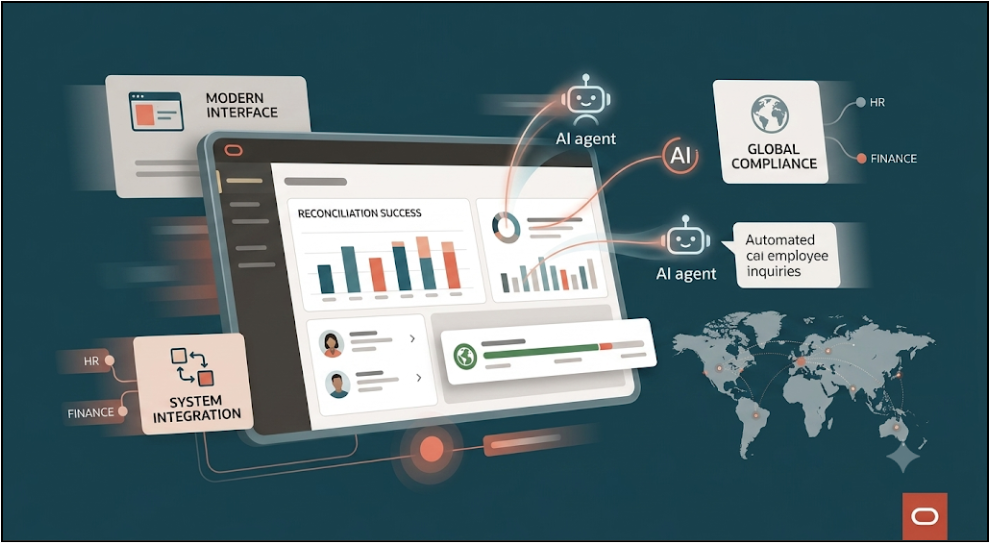
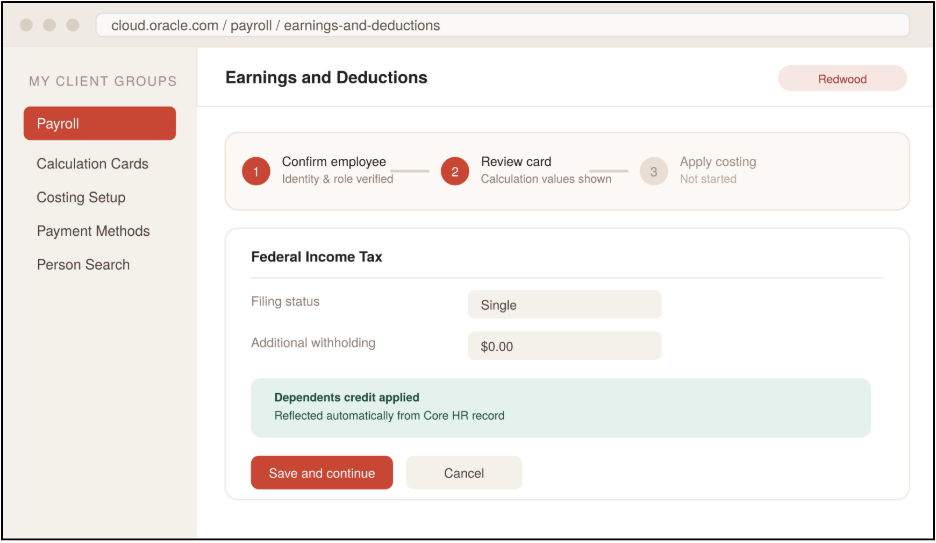
Oracle is continuing the transition of Oracle Fusion Cloud HCM Payroll pages to the Redwood user experience, with several payroll processes receiving redesigned pages and flows across the 26A and 26B updates.
The objective is not simply to change the visual appearance. The Redwood experience brings more contextual information, streamlined navigation, guided interactions, and task-oriented workflows into payroll processes.
What Changed?
Redwood Experience Across Payroll Processes
The Redwood experience has been expanded across several payroll-related areas, including:
- Earnings and Deductions — Review and manage employee earnings and deduction information through a more streamlined experience.
- Person Costing — Manage costing information at different payroll relationship, assignment, and element levels through the Redwood Person Costing page. Oracle delivered the Redwood Person Costing experience as part of 26A.
- Calculation Entries and Calculation Cards — Review payroll calculation information through redesigned Redwood pages.
- Payroll Flow Submission — Redesigned Redwood flow submission pages provide more dynamic parameter selection, showing or hiding related parameters based on the values selected.
- QuickPay and QuickPay Cycle — 26B introduces Redwood QuickPay and QuickPay Cycle flows that allow administrators to review and edit employee earnings and deductions and initiate the appropriate payroll calculation process from the same experience.
- Redwood Payslip — 26A introduced a redesigned Redwood payslip that can be viewed online or downloaded, with accessible PDF/UA templates designed to support legislative reporting requirements.
More Contextual Payroll Navigation
The Redwood approach brings related information closer to the task being performed.
For example, payroll administrators can review employee information, earnings, deductions, costing, and related payroll details without relying as heavily on disconnected legacy navigation paths.
In 26B, Oracle also introduced view-only access to supported calculation cards, allowing appropriately authorized users to review payroll calculation card information without necessarily receiving permission to modify it.
What Does This Mean for Payroll Administrators?
Instead of treating Redwood as simply a UI refresh, payroll teams should consider how the redesigned experience changes everyday payroll activities.
Legacy approach:
Employee → Search → Payroll Relationship → Earnings → Calculation Information → Costing → Review
Redwood-oriented approach:
Employee payroll context → Relevant payroll page → Review related information → Take the required action
This can make frequently performed activities easier to understand, particularly for administrators who are new to Oracle Fusion Cloud Payroll.
Why It Matters
Payroll administrators work with highly sensitive and interconnected information. A more contextual interface can make it easier to find the information required for a specific payroll task while reducing unnecessary navigation.
For organizations preparing for continued Redwood adoption, the key consideration is not simply “What pages have changed?” but “How should our payroll team work differently with the new experience?”
What Payroll Teams Should Review
Before adopting or expanding Redwood pages, organizations should:
- Identify which payroll processes have moved to Redwood.
- Review existing payroll administrator roles and access.
- Update internal process documentation and screenshots.
- Train administrators on the new navigation and guided experiences.
- Test frequently used payroll scenarios before moving operational procedures to the new pages.
- Review any organization-specific extensions or customizations that may be affected by the new experience.
02 – AUTOMATION
AI-Powered Payroll Agents
AI is becoming a more visible part of Oracle Fusion Cloud HCM Payroll, particularly in how administrators review payroll results and identify employee-level changes or exceptions.
Rather than replacing payroll controls, the new AI capabilities are designed to help payroll administrators analyze payroll information more efficiently and focus attention on items that may require review.
Payroll Run Analyst
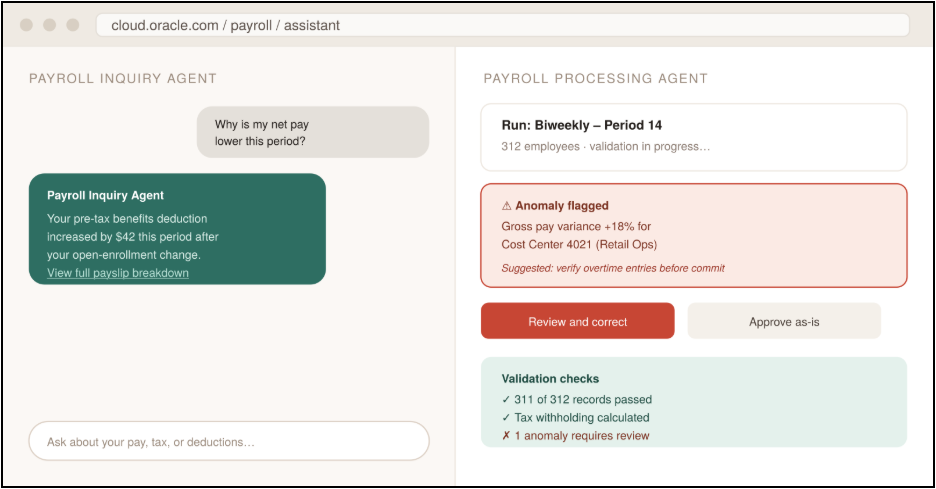
Oracle’s Payroll Run Analyst is an AI-powered assistant available from the Payroll Results page.
It helps payroll administrators validate payroll results for an employee and review information such as the statement of earnings. It can surface relevant employee information and provide links to related HCM pages, helping administrators move from identifying an issue to reviewing the underlying information.
Payroll Summary Analyst
The 26B enhancements extend this capability with the Payroll Summary Analyst.
The assistant can identify and highlight employee changes that may affect payroll results.
The Changes and Exceptions experience can highlight areas such as:
- Calculation entries
- Element entries
- Payroll run costing
- Payroll person result details
- Payslip information
- Worker assignment information
- Salary information
Administrators can also use the interactive chat experience to ask natural-language questions and retrieve relevant employee and payroll information within their authorized access.
How the AI-Assisted Review Works
A typical payroll review can involve several steps:
1. Run payroll: Payroll results are generated for the applicable employees.
2. Review changes and exceptions: The AI-assisted experience highlights notable changes or exceptions that may require attention.
3. Investigate the employee context: The administrator can review relevant salary, employment, absence, payroll, or costing information.
4. Navigate to the source information: Deep links can take the administrator directly to supported HCM pages such as:
- Employment Information
- Payroll Relationships
- Personal Payment Methods
- Team Time Cards
5. Take corrective action: The administrator can investigate the underlying data and follow the organization’s established payroll correction process.
Employee-Facing AI Assistance
AI assistance is also being introduced into employee self-service.
Oracle’s Employee Concierge can provide employees with assistance across areas including payroll, compensation, benefits, and leave. The Payslip Analyst capability can help employees understand payslip documentation, pay components, and deductions.
This changes the traditional model from:
Employee → HR/Payroll ticket → Payroll administrator → Response
toward:
Employee → AI-assisted self-service → Payroll team involvement when required
The objective is not to remove human payroll oversight. Instead, routine questions can be addressed more directly while payroll professionals focus on exceptions and more complex cases.
Why It Matters
Payroll teams spend significant time reviewing large volumes of employee-level information to identify unusual changes.
AI-assisted payroll analysis can help bring potential exceptions to the administrator’s attention earlier and provide contextual information for investigation.
For example, instead of manually comparing multiple employee records to identify what changed, an administrator can use the Changes and Exceptions experience to focus on identified differences and then investigate the relevant payroll information.
This can help payroll teams spend less time searching for information and more time validating the issues that actually require attention.
Important Consideration: AI Does Not Replace Payroll Controls
AI-generated insights should be treated as an additional layer of assistance within the payroll process.
Organizations should continue to maintain:
- Payroll validation procedures
- Approval controls
- Role-based security
- Exception review processes
- Statutory compliance checks
- Payroll reconciliation procedures
Oracle’s AI agent capabilities also operate within configured roles and privileges, so organizations need to review access requirements when enabling these features.
03 – COMPLIANCE
Global Compliance & Automation
Payroll compliance remains one of the most important areas of every Oracle quarterly update.
Because payroll rules vary by country and can change with new tax years, organizations operating across multiple jurisdictions need to continuously review legislative updates and ensure their payroll configuration reflects the latest requirements.
The 25D and 26B updates include a range of country-specific payroll enhancements and legislative changes.
United Kingdom
The 26B update includes enhancements related to Statutory Neonatal Care Leave & Pay.
Oracle also introduced enhancements around UK pension processing and diagnostics, including updates related to the Teachers’ Pension Scheme.
For UK payroll teams, these changes can require a review of existing legislative configuration, payroll calculations, reporting, and testing scenarios.
Mexico
The 26B update includes several Mexico-specific payroll enhancements, including:
- Tax calculation and CFDI reporting support for retirees
- Redwood Employee Tax Card experience for professional users
- SDI Audit Report
- Enhancements related to retroactive overpayment and recovery
These features were delivered through the 26B update and subsequent maintenance updates.
Ireland
The 25D cycle included several Ireland payroll enhancements, including legislative updates for the 2026 tax year and improvements across PAYE, shadow payroll, pensions, reporting, payslips, and other payroll processes.
For example, Oracle introduced enhancements to Irish PAYE Shadow Payroll processing for employees with sourced employment income outside Ireland.
Why Localization Matters
A global payroll implementation cannot rely on a single configuration approach for every country.
Each jurisdiction can have different requirements covering:
- Tax calculations
- Social insurance
- Pension contributions
- Statutory leave
- Benefits taxation
- Payroll reporting
- Payment formats
- Legislative thresholds
- Year-end processing
Why It Matters
For organizations operating payroll across multiple countries, quarterly release reviews should include more than checking whether new features are available.
Payroll teams should ask:
- Does this update affect one of our operating countries?
- Does the feature require configuration?
- Does it change an existing payroll process?
- Does it affect statutory reporting or payroll calculations?
- What testing is required before the change is adopted?
Oracle’s release documentation identifies whether features require setup, are delivered automatically, or may require additional configuration. For example, the 25D feature summary distinguishes between features requiring setup, potential setup, and those requiring no setup.
This makes quarterly release review an important part of maintaining payroll compliance.
04 – INTEGRATION
Integration & Reconciliation Improvements
Payroll sits at the intersection of multiple enterprise processes.
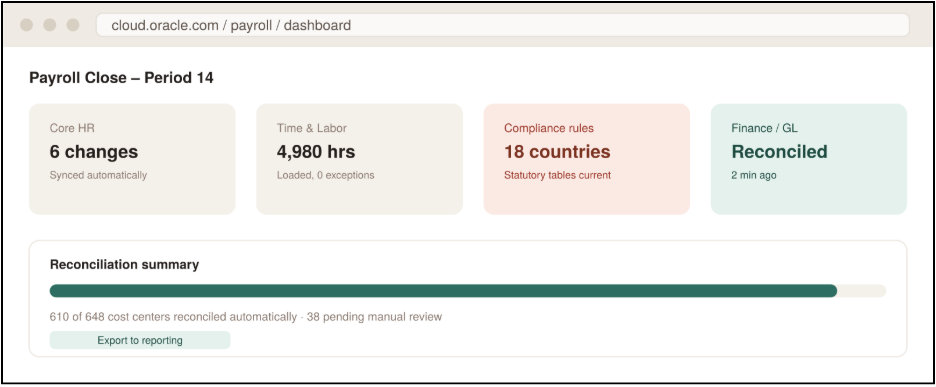
Employee information comes from Core HR. Time and absence information can feed payroll calculations. Payroll results contribute to costing and financial processes. Reporting and analytics then provide visibility into workforce costs.
Because of these dependencies, payroll accuracy depends not only on the payroll calculation itself but also on the quality and consistency of the information flowing into and out of payroll.
Connecting HR and Payroll Data
Payroll processes depend on accurate employee information such as:
- New hires
- Employee transfers
- Salary changes
- Work assignments
- Absence information
- Time entries
- Payroll relationships
- Payment methods
When these changes are not reflected correctly in payroll, administrators may need to investigate differences manually before completing the payroll cycle.
The growing integration between Oracle HCM areas is therefore important for maintaining consistent employee and payroll information.
Payroll and Time Data
Time and Labor information can directly influence payroll calculations.
For organizations using Oracle Time and Labor alongside Payroll, administrators need to ensure that:
- Time entries are submitted correctly.
- Approvals are completed on schedule.
- Absence information is reflected accurately.
- Time-related exceptions are resolved before payroll processing.
- Payroll administrators have visibility into relevant time information.
Oracle’s newer AI-assisted experiences also provide links between payroll and related HCM information, helping administrators move from payroll results to supporting employee information when investigating changes or exceptions.
Payroll and Finance
Payroll costing is another important integration point.
Payroll results eventually feed into financial processes, making accurate costing and reconciliation essential for finance teams.
The move toward more contextual payroll experiences can help administrators review costing information as part of the broader payroll process rather than treating payroll and finance as completely separate activities.
Oracle’s 26A update also introduced the Redwood Person Costing experience, which supports management of costing information across payroll relationship, assignment, and element levels.
Reporting and Analytics
Payroll teams also need reliable reporting to understand:
- Gross-to-net results
- Payroll costs
- Earnings and deductions
- Exceptions
- Employee-level payroll changes
- Costing information
- Statutory reporting requirements
Oracle continues to enhance payroll reporting and analytics capabilities across its quarterly updates, allowing organizations to use more delivered functionality rather than depending entirely on custom reporting.
Why It Matters
- Payroll does not operate in isolation.
- A salary change entered in Core HR can affect payroll.
- An incorrect time entry can affect earnings.
- A payroll costing issue can affect Finance.
- A statutory configuration issue can affect compliance reporting.
That means payroll teams should evaluate each quarterly update from an end-to-end process perspective, rather than reviewing payroll features individually.
A useful release-review model is:
Core HR → Time & Absence → Payroll Calculation → Payroll Results → Costing → Finance → Reporting
Reviewing the entire flow helps organizations identify where a new feature or configuration change could affect downstream processes.
What This Means for Payroll Teams
The latest Oracle Fusion Cloud Payroll updates point toward a broader shift in payroll operations:
More contextual user experiences + AI-assisted analysis + stronger localization + connected payroll processes
For payroll teams, the value of these updates depends on how effectively they are incorporated into existing payroll operations.
1. Prepare for Continued Redwood Adoption
Don’t treat Redwood as only a visual redesign.
Review how payroll administrators currently perform common tasks and identify how the new Redwood pages and flows change those processes.
Update:
- Training materials
- Internal process documentation
- Payroll SOPs
- Screenshots
- Role and access documentation
2. Introduce AI with Appropriate Controls
AI-assisted payroll analysis can help administrators identify changes and exceptions more efficiently.
Before enabling these capabilities broadly:
- Review the required roles and privileges.
- Test the AI-assisted workflows.
- Validate the information surfaced by the agents.
- Define when administrators should manually investigate an exception.
- Keep existing payroll approval and reconciliation controls in place.
3. Review Localization Every Release Cycle
Don’t assume that a quarterly update affects only global payroll functionality.
Review the release documentation for every country in which your organization operates.
For each applicable feature, determine:
Available → Requires Setup → Requires Testing → Ready for Production
This makes quarterly release management more structured and reduces the risk of overlooking country-specific changes.
4. Strengthen Payroll-to-Finance Reconciliation
Payroll results should be reviewed together with costing and financial processes.
Use the available Oracle functionality to improve visibility into:
- Payroll results
- Costing
- Exceptions
- Employee changes
- Financial impact
This can help create a more connected payroll close process.
5. Make Quarterly Updates Part of Payroll Strategy
Oracle Cloud HCM Payroll updates should not be treated as a once-a-year upgrade exercise.
A structured quarterly review can help payroll teams:
Review → Assess → Test → Configure → Validate → Adopt
The organizations that get the most value from Oracle’s continuous innovation are those that connect new features to real payroll processes, controls, employee experiences, and business requirements.
The Bigger Picture
- Oracle Fusion Payroll is moving beyond a traditional payroll processing model toward a more contextual, connected, and AI-assisted payroll experience.
- Redwood is changing how payroll teams interact with the application.
- AI is helping administrators investigate payroll information and exceptions.
- Localization updates continue to support country-specific payroll requirements.
- Integration improvements connect payroll more closely with HR, time, costing, finance, and reporting.
- For payroll leaders, the key question is therefore not simply “What’s new in Oracle Payroll?” It is: “Which of these changes can improve the way our payroll operates?” That is where a structured Oracle Cloud HCM release assessment can make a difference.
How Kovaion Can Help
Keeping up with Oracle’s quarterly updates is only one part of effective Oracle Cloud HCM Payroll management. The bigger challenge is understanding how each release affects your organization’s existing configuration, integrations, business processes, localization requirements, and payroll operations.
Kovaion helps organizations assess and manage Oracle Cloud HCM changes with a focus on business impact, configuration, testing, integration, and adoption.
From Oracle Cloud HCM Payroll implementation and optimization to quarterly release assessment, localization, integrations, reporting, and ongoing support, our team can help you turn Oracle’s continuous updates into practical improvements for your payroll environment.
Looking to assess what the latest Oracle Fusion Payroll updates mean for your organization?
Talk to Kovaion’s Oracle Cloud HCM experts to understand the changes, assess their impact, and plan your next steps.
FAQs
The 25D, 26A, and 26B releases introduced enhancements across Redwood user experiences, AI-assisted payroll analysis, payroll processing, costing, reporting, integrations, and country-specific legislative requirements.
The Redwood expansion includes experiences such as Earnings and Deductions, Person Costing, Calculation Entries and Calculation Cards, Payroll Flow Submission, QuickPay and QuickPay Cycle, and the Redwood Payslip.
Oracle has introduced AI-assisted capabilities such as Payroll Run Analyst and Payroll Summary Analyst. Employee-facing capabilities such as Employee Concierge and Payslip Analyst also support payroll-related self-service and information access.
Payroll Summary Analyst can help administrators identify employee changes and exceptions that may affect payroll results. It can surface information related to calculation entries, element entries, costing, payroll results, payslips, assignments, and salary information.
No. AI-assisted payroll capabilities are designed to support payroll analysis and investigation. Organizations should continue to maintain payroll validation, approval, security, exception review, compliance, and reconciliation controls.
The quarterly updates include country-specific legislative and payroll enhancements. The releases covered in this guide include changes for jurisdictions such as the UK, Mexico, and Ireland, along with other localization updates.
Organizations should review the applicable release documentation, identify impacted features, assess configuration and security requirements, test payroll scenarios, validate integrations, review localization changes, and prepare users for any process or interface changes.