New Redwood Process to Change Worker Type: Oracle Fusion Cloud Human Resources 26B What’s New
Oracle continues to enhance the user experience by introducing Redwood UX across Oracle Fusion Cloud applications. One such enhancement in Update 26B is the new Redwood Change Worker Type process for Oracle Fusion Cloud Human Resources, built using Visual Builder Studio (VBS). This guided flow lets HR specialists convert a worker from one worker type to another — employee, contingent worker, or nonworker — in a single, seamless transaction.
In this blog, we’ll explore why this feature matters, how the new process works, and what administrators need to know to enable and use it effectively.
Key Concept
Previously, converting a worker from one worker type to another required terminating the existing work relationship and creating a brand-new one. This meant duplicate data entry and a risk of losing continuity in the worker’s employment history.
The new Redwood Change Worker Type process eliminates this multi-step approach. HR specialists can now convert a worker’s type in a single guided flow, without terminating and re-hiring the worker, while maintaining continuity of worker information.
For example, a contingent worker who initially joined for a short-term project can be converted into a regular employee based on business needs or performance — all within one streamlined transaction.
Supported Worker Type Conversions
Using the new process, you can change the following worker types:
- Contingent Worker to Employee
- Employee to Contingent Worker
- Nonworker to Employee
- Nonworker to Contingent Worker
- Employee to Nonworker
- Contingent Worker to Nonworker
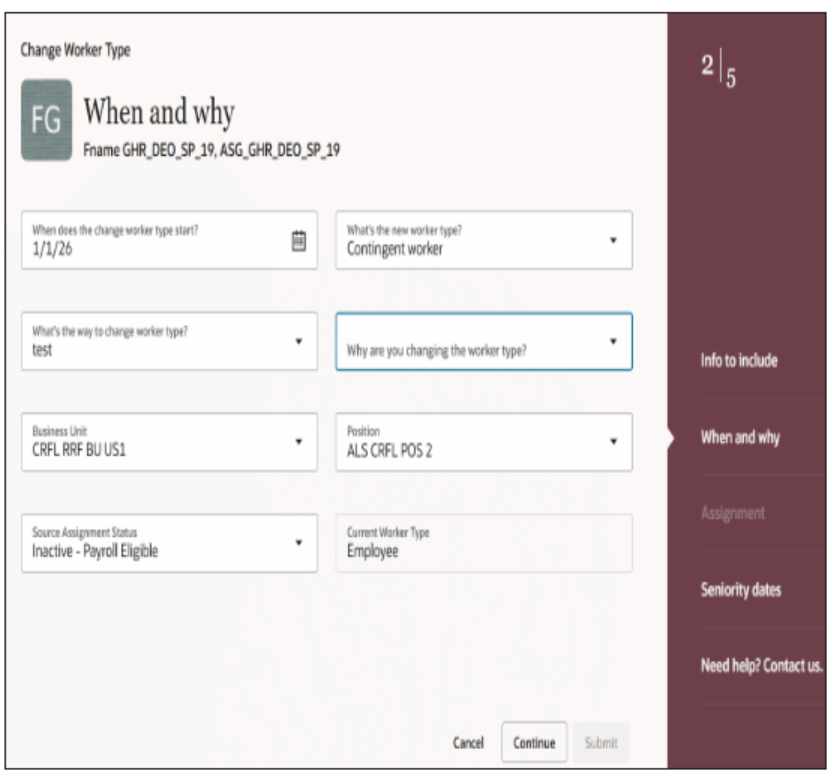
Navigation to Access Change Worker Type in Oracle HCM Cloud:
My Client Groups → Employment → Change Worker Type
Key Features of the Redwood Change Worker Type Process
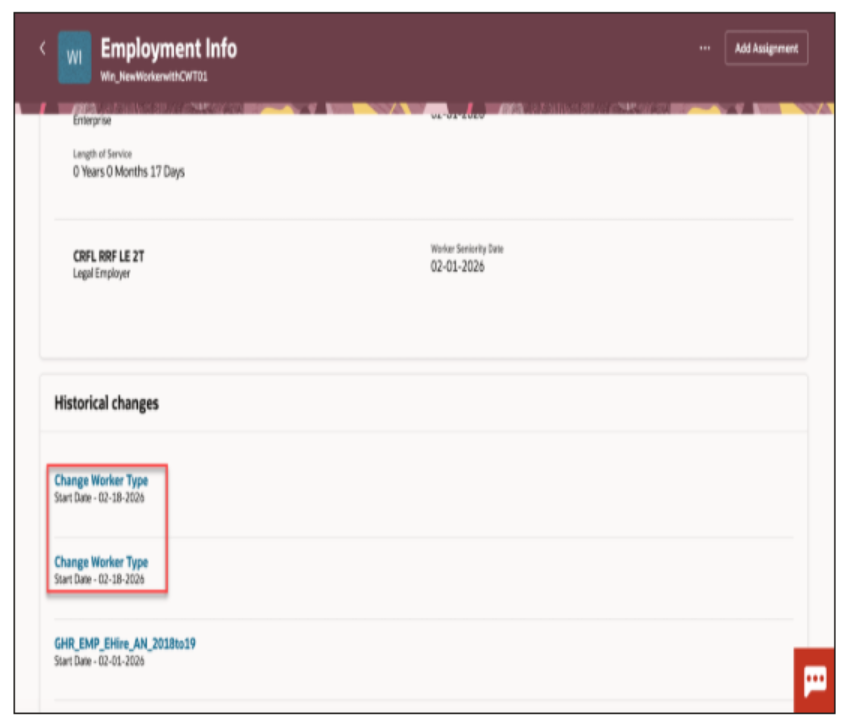
Rollback of Historical Changes
Administrators can roll back the data that was changed while changing a worker’s type, giving HR teams the flexibility to reverse a transaction when needed.
New Attributes for Auditability
The following attributes and values are newly added to support this process, ensuring every Change Worker Type transaction is clearly identifiable and auditable:
- Approval Process: Change Worker Type
- Action: Change Worker Type
- Action Type: Change Worker Type
Automated Payroll Updates
Worker type changes now trigger automated payroll updates, reducing manual intervention and ensuring payroll relationships, calculation cards, and assignments are created or updated correctly.
- The transaction supports direct entry of payroll details for the new assignment.
- The process automatically creates required payroll objects such as assigned payroll, automatic element entries, and statutory calculation cards when applicable.
- Personal payment methods are copied, but balances, costing, and other payroll history aren’t transferred to the new payroll relationship.
Note
The Change Worker Type process doesn’t allow transferring to a new legal employer at the same time. This must be handled as two separate processes — for example, in the US, where an employee becoming a retiree (or vice versa) implies a change of legal employer.
How to Enable and Configure Redwood Change Worker Type in Oracle HCM Cloud
To use the Redwood Change Worker Type process, check that the following profile option is set to the required value:
- ORA_HCM_VBCS_PWA_ENABLED — must be set to Y at the site level.
The profile option ORA_PER_EMPL_CHG_WRK_TYPE_DFLT_FRM_SRC_ENABLED is set to Yes by default. When enabled, it copies assignment attributes, manager relationships (including all reporting relationships), direct reports, and payroll information from the source assignment.
- For the Payroll step, data is copied only when you navigate to the Payroll region, and it’s pre-populated upon visiting that region.
- If the Payroll step isn’t accessed, the data isn’t copied or populated.
- Set the profile option to No if you don’t want these values copied from the source assignment.
Tips for Managing Redwood Change Worker Type Transactions
Reversing a Change Worker Type Transaction or Changing Its Effective Date
- If a Change Worker Type transaction was done incorrectly and needs to be reversed, cancel the newly created work relationship. Once canceled, the application automatically reactivates the original (launching) work relationship.
- To update the effective date: first cancel the work relationship created by the Change Worker Type transaction, then re-initiate the transaction with the desired effective date.
- Within the Payroll section, provide the Tax Reporting Unit to ensure the Tax Reporting Unit and assignment associations on the Statutory Deduction calculation card are created correctly — missing associations may cause the employee to be missed from the payroll run.
Best Practices for Using Redwood Change Worker Type in Oracle HCM Cloud
To get the most value from the Redwood Change Worker Type process:
Confirm the required profile options are enabled before rolling this out to HR specialists.
- Review the default “copy from source assignment” behavior and decide whether it fits your business process.
- Always provide the Tax Reporting Unit in the Payroll step to avoid payroll association issues.
- Use the rollback capability to safely reverse an incorrect transaction instead of manually correcting records.
- Handle legal employer changes as a separate transaction from a worker type change.
- Communicate the new single-flow process to HR teams to replace the older terminate-and-rehire approach.
Common Mistakes to Avoid in Oracle HCM Cloud Worker Type Changes
Avoid these common mistakes while working with the Change Worker Type process:
- Attempting to change worker type and legal employer in the same transaction.
- Forgetting to enter the Tax Reporting Unit in the Payroll step.
- Not reviewing the ORA_PER_EMPL_CHG_WRK_TYPE_DFLT_FRM_SRC_ENABLED setting before go-live, leading to unexpected data being copied (or not copied) from the source assignment.
- Manually terminating and re-hiring a worker instead of using the new guided flow.
- Not verifying that profile option ORA_HCM_VBCS_PWA_ENABLED is set to Y at the site level before testing.
Conclusion
The New Redwood Process to Change Worker Type provides a modern, efficient, single-flow experience for converting workers between employee, contingent worker, and nonworker types. With automated payroll updates, rollback support, and full auditability, administrators can manage worker type changes with greater confidence and less manual effort.
By leveraging this Redwood feature, organizations can reduce duplicate data entry, maintain continuity of worker records, and respond faster to changing workforce needs.
Optimize Your Oracle HCM Cloud Experience with Kovaion
The new Redwood Change Worker Type process in Oracle Fusion Cloud HCM 26B can simplify workforce transitions, but successful adoption depends on the right configuration, profile settings, payroll considerations, and business processes.
Kovaion helps organizations maximize Oracle HCM Cloud capabilities through implementation, configuration, optimization, and ongoing support. Our Oracle HCM expertise can help you adopt new Redwood experiences, streamline HR processes, and align Oracle Cloud HCM with your evolving business requirements.
Looking to simplify your Oracle HCM Cloud processes and make the most of new Redwood capabilities? Connect with Kovaion’s Oracle HCM Cloud experts today.
Redwood Change Worker Type FAQs
Frequently Asked Questions
The Redwood Change Worker Type process in Oracle Fusion Cloud HCM 26B allows HR specialists to change a worker between employee, contingent worker, and nonworker types through a single guided transaction, without manually terminating and rehiring the worker.
The Redwood Change Worker Type process supports conversions between employee, contingent worker, and nonworker types. Supported combinations include Contingent Worker to Employee, Employee to Contingent Worker, Nonworker to Employee, Nonworker to Contingent Worker, Employee to Nonworker, and Contingent Worker to Nonworker.
HR specialists can access the process through My Client Groups → Employment → Change Worker Type. The Redwood guided flow provides the steps required to complete the worker type conversion.
The ORA_HCM_VBCS_PWA_ENABLED profile option must be set to Y at the site level to enable the Redwood Change Worker Type process. The ORA_PER_EMPL_CHG_WRK_TYPE_DFLT_FRM_SRC_ENABLED profile option controls whether assignment, manager, reporting relationship, direct report, and payroll information is copied from the source assignment.
Yes. The Change Worker Type process can automatically create or update required payroll objects, including assigned payroll, automatic element entries, and statutory calculation cards when applicable. Payroll information is populated when the Payroll region is accessed, and personal payment methods can be copied to the new payroll relationship.
No. The Redwood Change Worker Type process doesn’t support changing the worker type and legal employer in the same transaction. A legal employer change must be handled separately from the worker type conversion.
If a Change Worker Type transaction needs to be reversed, cancel the newly created work relationship. The application then reactivates the original work relationship. To change the effective date, cancel the newly created relationship and initiate the Change Worker Type transaction again with the required date.