Oracle Fusion HCM Geofencing for Web Clock: Setup, Benefits & Best Practices

When a client with retail stores, warehouses, hospitals, or field teams starts scoping out Time and Labor, one question comes up almost every time: how do we actually know someone clocked in from where they were supposed to be? A missed punch is annoying. A punch from the wrong place is a different kind of problem – it touches payroll accuracy, labor compliance, and manager trust all at once.
Oracle’s answer to that question, inside Fusion Cloud HCM Time and Labor, is Geofencing for Web Clock. Oracle Fusion HCM Geofencing provides organizations with a way to validate whether employees are clocking in and out from their permitted work locations. It’s a small setup change with a fairly large downstream effect on how much you can trust the time data flowing into payroll and labor costing. Here’s how it actually works, what it takes to set up well, and what I’d tell any organization thinking about turning it on.
What Geofencing Actually Does
At its simplest, geofencing draws an invisible circle around a real-world work location using GPS coordinates. Web Clock — Oracle’s browser and mobile-based time clock – checks a worker’s location against that circle every time they try to clock in or out. Stay inside it, and nothing changes. Step outside it, and Oracle applies whatever rule the organization has configured.
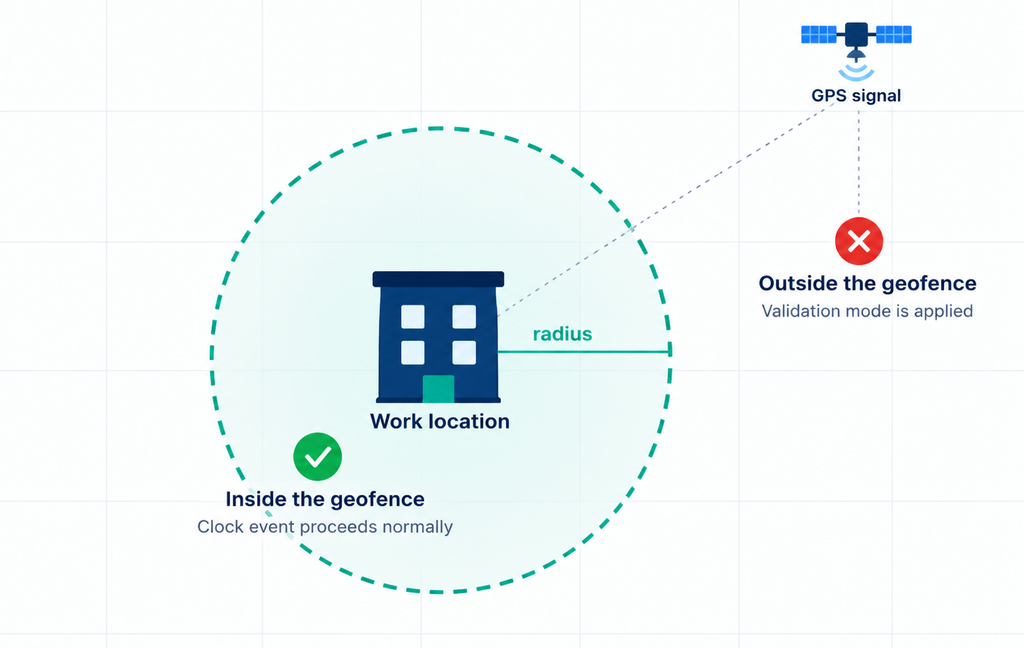
That sounds like a small technical detail, but the impact on the ground is bigger than it looks. Retail chains use it to confirm shift workers are clocking in at the actual store. Field service and facilities teams use it to tell a legitimate off-site visit apart from a punch that shouldn’t have happened at all. Hospitals and shared service centers use it simply to keep attendance data clean enough that payroll isn’t chasing down questionable entries by hand every cycle.
It’s worth being clear about what geofencing isn’t. It doesn’t replace a manager’s judgment, and it isn’t a surveillance tool tracking someone through their day – location is only checked at the moment of a clock event. What it does is give managers and payroll teams better evidence when a time entry needs a second look.
The Mechanics: From Tap to Timestamp
The flow behind a single Web Clock event is straightforward once it’s laid out:
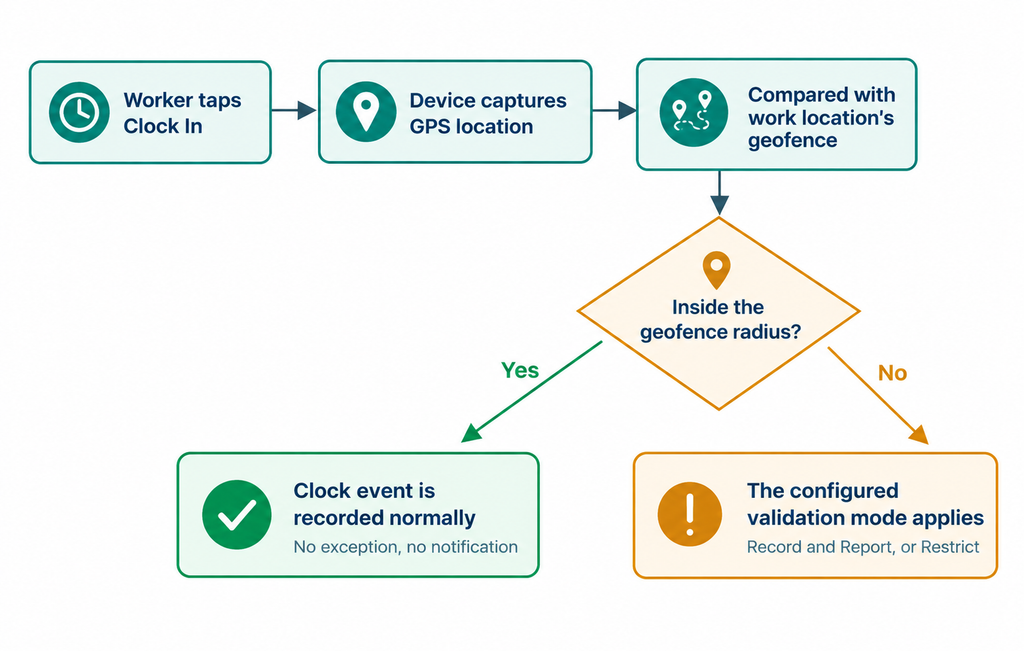
A worker starts a Web Clock event, their device shares its GPS coordinates, and Oracle compares that location against the geofence tied to their primary assignment work location – a circle whose center is derived from the location’s address and whose radius is set by the administrator, commonly somewhere in the 100–200 meter range depending on how large the site is.
Accuracy is where this gets interesting, and it’s worth setting expectations early with any client. Mobile devices carry dedicated GPS sensors and give Oracle a genuinely precise fix. Desktop browsers don’t have that hardware – their location is estimated from the network instead, which is noticeably less reliable, and a desktop on a VPN is the single most common source of a wildly wrong location. That’s exactly why Oracle lets you restrict Web Clock to mobile devices only, and why most rollouts I’d recommend lean on that option rather than trying to make desktop geolocation work well. It’s also worth confirming your Oracle HCM Cloud app version supports geolocation, and that address-to-coordinate accuracy holds up in every country you plan to deploy to — it isn’t uniform globally, so testing regional coverage before go-live is time well spent.
Two Ways to Respond When Someone’s Outside the Line
Once Oracle knows a worker is outside their geofence, it needs to know what to do about it. There are exactly two options, and the choice between them is really a policy decision dressed up as a configuration setting.
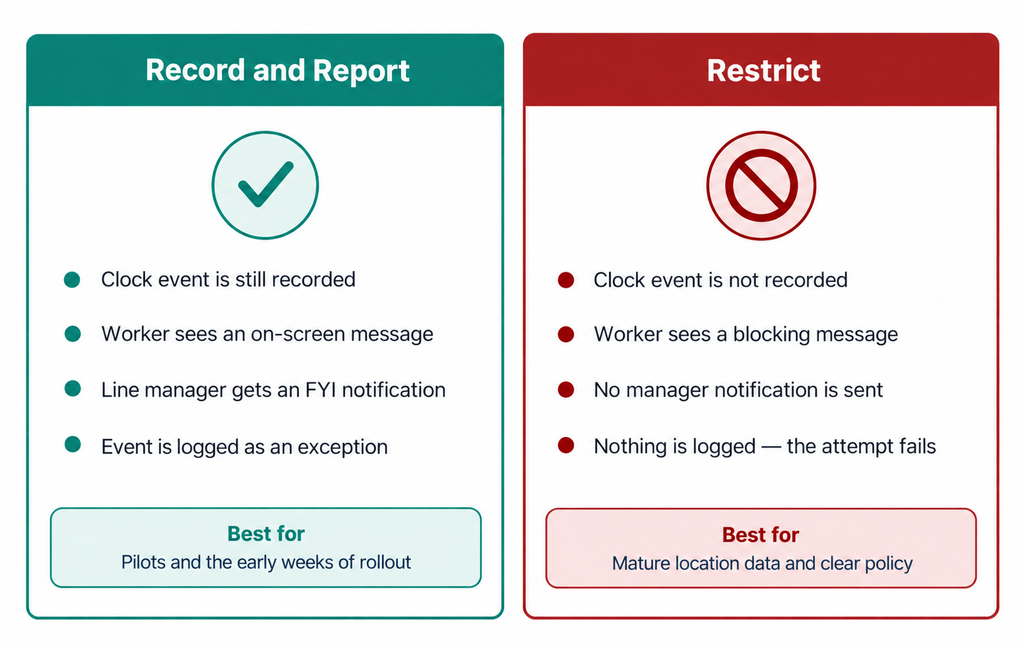
Record and Report is the softer of the two. The clock event still goes through, the worker sees an on-screen message telling them their manager has been notified, and the event is recorded with an exception flag. The line manager gets a notification carrying the worker’s name, the assignment, the timestamp, the captured coordinates, and the derived address – enough context to decide in seconds whether this needs a follow-up conversation or was perfectly legitimate.
Restrict is unambiguous. The transaction simply doesn’t go through. The worker sees a message explaining they’re outside their permitted work area, and because nothing was recorded, there’s no exception for anyone to review afterward – the attempt just fails.
Which one fits depends entirely on how confident you are in your location data and how ready your workforce is for a hard stop. I’d almost never recommend starting a rollout in Restrict mode.
Before You Turn It On
A short readiness check saves a lot of rework later:
- Geolocation has to be enabled before geofencing – it’s a hard prerequisite, not a suggestion.
- Push Web Clock to mobile devices wherever the workforce allows it; GPS accuracy on desktop is a real limitation, not something you can configure your way around.
- Work location addresses in Oracle HCM need to be complete and correct, because that address is literally where the geofence gets centered.
- Test GPS and address coverage in every country you’re rolling out to – it isn’t uniform globally.
- Tell workers, in plain language, what’s being captured and why. A geofence exception notification includes a worker’s coordinates, which is worth a proactive conversation with employee relations and legal before go-live, not an afterthought.
Setting It Up
The configuration itself lives entirely inside the Worker Time Entry Profile, under Setup and Maintenance. Open the relevant profile – a Web Clock payroll profile, typically – switch to Update with an effective date, and a few checkboxes and fields do the rest: enable geolocation, enable geofencing, set the radius in meters, choose the validation mode, and decide whether to restrict Web Clock to mobile devices only. Save it, and the geofence itself is generated automatically from the work location’s address the next time someone on that profile clocks in.
That radius number deserves more thought than it usually gets. Too tight, and ordinary GPS drift near entrances, basements, or dense high-rises starts generating false exceptions that erode trust in the whole feature. Too generous, and you’ve built a control that doesn’t really control much. I’d always pilot the radius at a handful of real locations before locking in a standard value across the organization.
Fine-Tuning the Boundary
Once geofencing is live, the geofences themselves are managed separately, from My Client Groups > Geofences for Web Clock. This is where the address-derived center point sometimes needs a correction – an address can resolve to a road, a campus gate, or a shared postal point rather than the actual building entrance. Administrators can pull the correct latitude and longitude from a map provider and override the generated coordinates directly.
Two details here are genuinely useful in practice. First, a single work location isn’t limited to one geofence – large campuses or multi-building sites can have several, and a worker can clock in from any of the geofences assigned to their location. Second, for organizations managing this at scale, geofences can be created and maintained through HCM Data Loader rather than one at a time through the page.
What’s Changed Recently
Two things are worth knowing if you last looked at this feature around its original release: Oracle has since made geofencing considerably more flexible for hybrid workforces. Web Clock can now let workers report time from any office location rather than only their assigned one, and organizations can skip the geofencing check entirely for hybrid workers clocking in from home – both configured directly in Web Clock rather than needing a workaround. A newer enhancement also lets administrators assign geofences to specific worker groups beyond someone’s usual assignment location, and lets the time card generation process pull the work location automatically from the Web Clock event’s geofence details instead of requiring manual selection. If your organization evaluated geofencing early and shelved it for feeling too rigid for a hybrid workforce, it’s worth another look.
What Employees and Managers Actually See
For the worker, the experience is exactly as blunt or as forgiving as the validation mode chosen: either a message saying the event went through with a flag, or a message saying it didn’t happen at all. For the manager, Record and Report mode means a notification with enough detail – coordinates, derived address, timestamp – to make a quick call on whether an exception needs a conversation or can simply be accepted. That review step is worth building into a manager’s routine deliberately; a notification nobody looks at defeats the purpose of the control.
Lessons for a Smooth Rollout
The technical setup here is genuinely simple – a handful of checkboxes and one radius field. The rollout around it is where most of the real work happens.
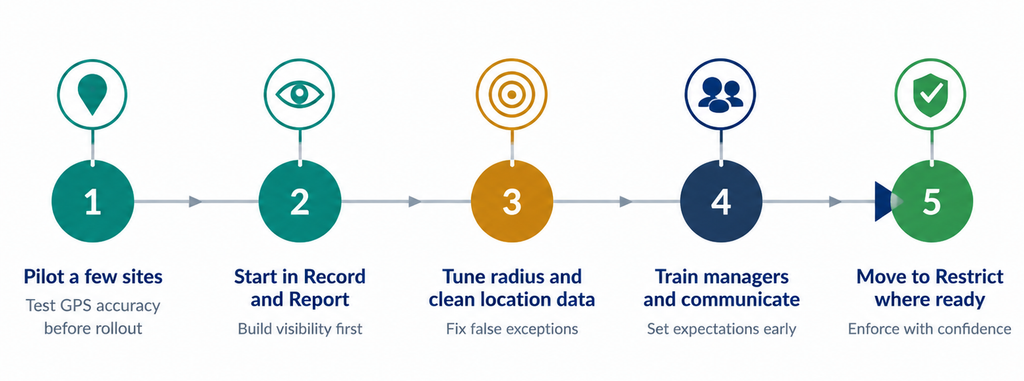
Start with a small set of pilot locations, compare the system-derived coordinates against the actual building, and test clock events from clearly inside and clearly outside the boundary before trusting the numbers. Pay particular attention to GPS behavior near building entrances, in basements, and in dense urban or high-rise settings, since that’s where false exceptions cluster. Lead with Record and Report so the organization can see real-world exception volume before anyone experiences a hard block, and put real effort into training managers on how to read and act on the notifications they’ll start receiving. Workers deserve the same clarity — a short, plain-language explanation of what’s captured and why heads off most of the pushback before it starts. Finally, decide in advance how you’ll support someone who genuinely can’t clock in because of a device, signal, or coverage issue; that support path matters as much as the configuration does.
Where It Falls Short
Geofencing is a genuinely useful control, not a perfect one, and it’s worth being honest about the edges. GPS accuracy still depends on the device, the browser permissions granted, network signal, and the physical building itself – desktop browsers in particular are working with an estimate, not a precise reading. Coverage also isn’t identical everywhere; some countries and regions have weaker map or geolocation accuracy than others. And because validation checks against a worker’s primary assignment work location by default, organizations with people who legitimately rotate across multiple sites need to think through whether their assignment and location model actually supports the policy they’re trying to enforce – which is exactly the kind of gap the newer worker-group and multi-location options above were built to close.
Business Benefits of Oracle Fusion HCM Geofencing
Implementing Oracle Fusion HCM Geofencing for Web Clock can provide measurable operational and business benefits, particularly for organizations with distributed workforces, multiple locations, shift-based employees, and location-specific attendance requirements.
Improved Payroll Accuracy
By validating where clock events take place, organizations can improve the reliability of time data flowing into payroll and reduce the time spent investigating questionable attendance entries.
Better Workforce and Attendance Controls
Oracle Fusion HCM Geofencing helps organizations establish stronger controls around location-based clock-in and clock-out events. This can be particularly valuable for retail stores, warehouses, hospitals, campuses, and field-based teams.
Reduced Manual Exception Management
The Record and Report validation option gives managers the information they need to review potential exceptions quickly. Instead of manually investigating every questionable punch, managers can focus on events that genuinely require attention.
Increased Manager Visibility
Geofencing notifications provide managers with relevant context around time entry exceptions, helping them make faster and more informed decisions.
Support for Compliance and Workforce Policies
For organizations with location-specific attendance policies, geofencing can support stronger adherence to internal workforce policies while providing additional evidence when time entries require review.
Scalable Time and Labor Operations
With support for multiple geofences, worker groups, hybrid work scenarios, and HCM Data Loader, Oracle Fusion HCM Geofencing can support organizations managing complex and geographically distributed workforces.
Conclusion
Oracle Fusion HCM Geofencing helps organizations strengthen location-based attendance controls and improve confidence in Web Clock time entries. With clean location data, a well-tested geofence radius, and the right validation approach, organizations can improve time data accuracy and give HR, payroll, and managers better visibility into attendance exceptions. A phased rollout and proper testing can further help address real-world GPS and location challenges. When implemented effectively, geofencing becomes a practical tool for supporting reliable and efficient Time and Labor operations.
At Kovaion, we provide Oracle Fusion Cloud HCM services to help organizations optimize workforce management processes, including Time and Labor capabilities that support accurate attendance tracking and operational efficiency.
Connect with Kovaion to explore how our Oracle Fusion HCM expertise can help your organization build more reliable and efficient workforce operations.
Frequently asked Questions
-
Oracle Fusion HCM Geofencing is a capability within Oracle Fusion Cloud HCM Time and Labor that helps validate a worker's location when they clock in or out using Web Clock. The system compares the worker's location against a configured geofence associated with their work location.
+ -
When a worker initiates a Web Clock event, their device shares location information. Oracle compares the captured coordinates against the configured geofence and applies the organization's selected validation rule based on whether the worker is inside or outside the permitted boundary.
+ -
Oracle Fusion HCM Geofencing supports two validation approaches: Record and Report, where the event is recorded and flagged for review, and Restrict, where the clock event is prevented from being recorded when the worker is outside the permitted geofence.
+ -
Yes. Geolocation must be enabled before geofencing can be used for Web Clock.
+ -
The appropriate radius depends on the size and characteristics of the work location. Organizations commonly use a range of approximately 100–200 meters, but the radius should be tested at real locations before applying a standard value across the organization.
+ -
Oracle has introduced additional flexibility for hybrid work scenarios, including options that can support reporting time from office locations beyond a worker's assigned location and scenarios where geofencing checks can be skipped for eligible hybrid workers working from home.
+