PeopleSoft HCM PUM 55 Approval Insights for Administrators Guide

As organizations scale, managing enterprise-wide approval of workflows becomes a significant challenge for HR and System Administrators. A single bottlenecked transaction—whether it is an unapproved absence request, a delayed promotion, or an unsubmitted time sheet—can disrupt business operations.
To address this pain point, Oracle introduced a powerful analytical feature: Approval Insights for Administrators.
This blog post covers what this dashboard does, its release timeline, and a verified, step-by-step implementation guide using official Oracle People Book structures.
1. Introduction
Approval Insights for Administrators is an analytical dashboard built on the PeopleSoft Fluid User Interface and powered by PeopleSoft Insights. It provides real-time, visual analysis of transaction approvals across the entire enterprise.
Rather than reviewing individual transactions one by one, administrators can use this dashboard to track incoming approval trends, monitor overall system workloads, pinpoint operational bottlenecks, and take proactive measures to accelerate the approval lifecycle.
1.1 Core Features
- Unified View (All Approvals in One Place)
- Identify Bottlenecks (Pinpoint Delays)
- Workload Tracking (Analyze Manager Workload)
- Accelerate Approvals (Speed Up the Process)
1.1.1 Unified View (All Approvals in One Place)
Previously, track-keeping required navigating multiple sections—one for leave approvals, another for payroll updates, and so on. This new feature consolidates everything into a single screen, allowing administrators to view all approval requests—such as timesheets, leave applications, and organizational changes—in one centralized dashboard.
1.1.2 Identify Bottlenecks (Pinpoint Delays)
The system tracks exactly how long a request has been pending with an approver (using metrics like “Days Since Created”). This gives administrators immediate visibility into where files are getting stuck and which managers are experiencing delays.
1.1.3 Workload Tracking (Analyze Manager Workload)
Through intuitive visual analytics, charts, and graphs, the system highlights which managers are receiving the highest volume of approval requests, making it easy to identify who is facing an excessive workload.
1.1.4 Accelerate Approvals (Speed Up the Process)
If an approval sits with a manager for too long, the system empowers administrators to step in. They can easily reassign the request to someone else or take immediate action to expedite the process.
2. PUM Image Timeline: Clearing Up the Version Confusion.
2.1 Approval Insights for Managers (Introduced in HCM PUM Image 51): This initial release was built strictly for supervisors. It allows managers to view analytics and track pending requests within their direct organizational hierarchy.
2.2 Approval Insights for Administrators (Introduced in HCM PUM Image 55): Delivered in mid-2026, this new dashboard expands capability across the enterprise. It provides cross-functional visibility, allowing HR and System Administrators to analyze approval metrics globally across all departments and modules (such as Core HR, Time and Labor, and Absence Management) from a single interface.
3. Implementation.
3.1 Initialize the Approval Insights Framework Tables.
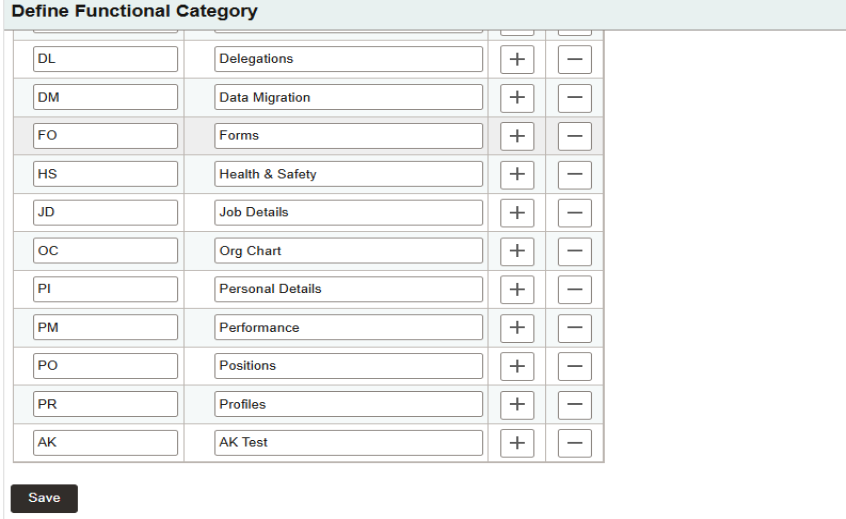
The implementation of Approval Insights begins with defining Functional Categories, which serve as the logical classification for approval transactions. A Functional Category groups related business processes, such as Absence Management, Time and Labor, or Workforce Administration, into a single reporting category. These categories provide the foundation for organizing approval data and enable Approval Insights to present meaningful analytics based on business function.
Navigation – Set Up HCM > Common Definitions > Approvals > Define Functional Category
3.2 Map Functional Category
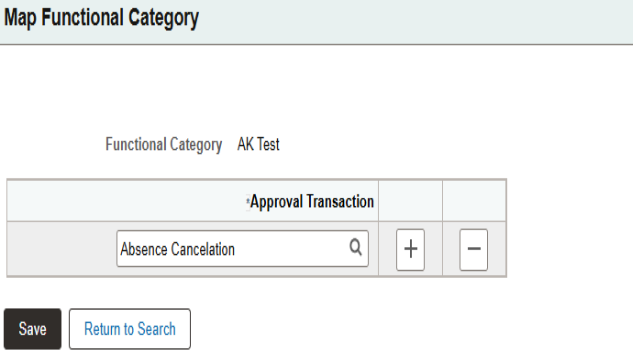
After creating the Functional Categories, they must be associated with the corresponding Approval Workflow Framework (AWE) Transaction Registry IDs. This mapping establishes the relationship between business processes and their approval transactions, allowing Approval Insights to correctly categorize approval requests for reporting and analytics.
Without this mapping, approval transactions cannot be grouped under the appropriate functional category, preventing them from appearing correctly in the analytical dashboards.
3.3 Insight Approval Status
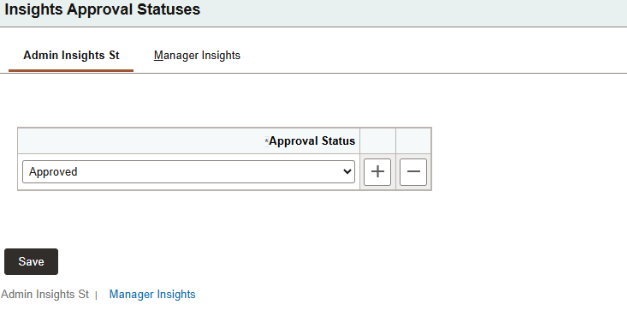
Navigation – Set Up HCM > Common Definitions > Approvals > Insights Approval Statuses (Admin Insights / Manager Insights).
The next step is to configure the approval workflow statuses that should be included in Approval Insights. Since approval processes generate multiple workflow statuses throughout their lifecycle, this component determines which statuses are meaningful for reporting and analysis.
By selecting the appropriate approval statuses, the dashboards provide accurate visibility into pending, approved, denied, or other relevant approval states while excluding unnecessary workflow statuses that do not contribute to business analytics.
3.4 Insights Approval Transactions
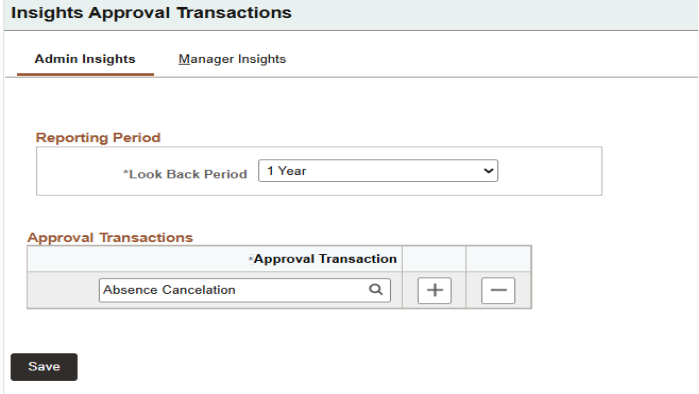
Navigation – Set Up HCM > Common Definitions > Approvals > Insights transactions
Once the approval statuses are configured, the approval transactions must be registered for Approval Insights. This component identifies the approval processes that should participate in analytics and associates them with the appropriate Functional Categories.
It also allows administrators to configure reporting parameters, such as the reporting period and look-back period, which determine the range of approval history considered during analytics and indexing. Only the transactions configured in this component are processed by the Search Framework and made available within the Approval Insights dashboards.
Operations Performed:
- Register approval transactions that will participate in Approval Insights.
- Associate approval transactions with the appropriate Functional Categories.
- Configure reporting periods and look-back periods for approval analytics.
- Identify the approval transactions that will be indexed and displayed within the Approval Insights dashboards.
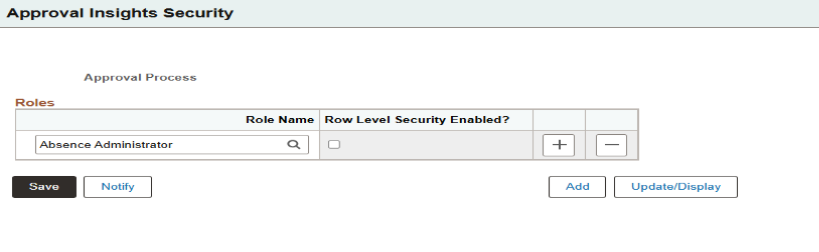
3.5 Approval Insights Security:
Navigation: Set Up HCM > Common Definitions > Approvals > Approval Insights Security
Approval Insights provides different levels of analytical access for Managers and Administrators. This component controls user authorization by assigning the appropriate security roles to access the delivered dashboards.
Managers typically view approval analytics within their reporting hierarchy, whereas Administrators can be granted broader access to monitor approval activities across multiple business processes and organizational units, depending on the configured security.
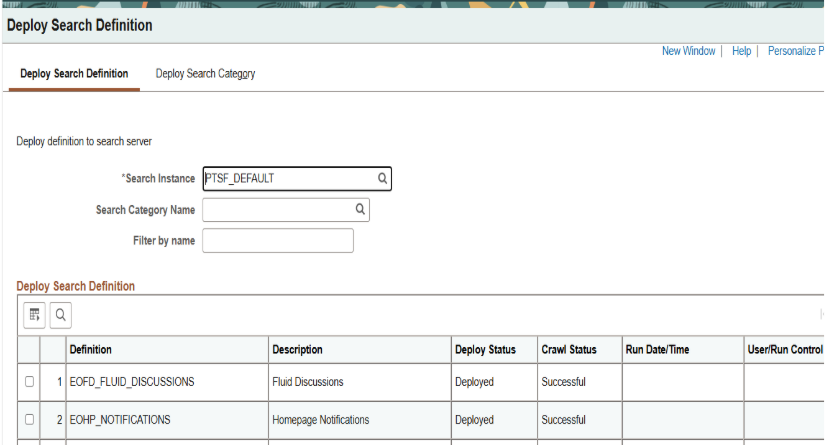
3.6 Deploy the Search Definitions
After completing the functional configuration, the implementation moves to the PeopleSoft Search Framework. The delivered Approval Insights Search Definitions must first be deployed so that they become available for indexing.
Deploying the Search Definitions establishes the connection between the PeopleSoft application data and the configured search engine, preparing the approval data for indexing and analytical processing.
Navigation – People Tools > Search Framework > Administration > Deploy Search Objects.
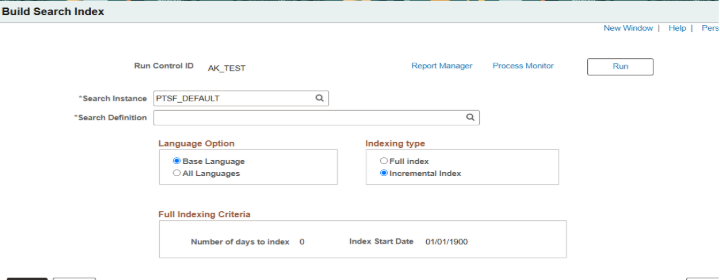
3.7 To Schedule the Index Build:
Navigation – People Tools > Search Framework > Administration > Schedule Search Indexes.
Once the Search Definitions are deployed, the search indexes must be built. During this process, approval transaction data is extracted from the PeopleSoft database and indexed within the configured search engine.
An initial implementation generally requires a Full Index, while subsequent updates can be maintained using Incremental Indexing, ensuring that newly created or updated approval transactions remain synchronized with the analytical dashboards.
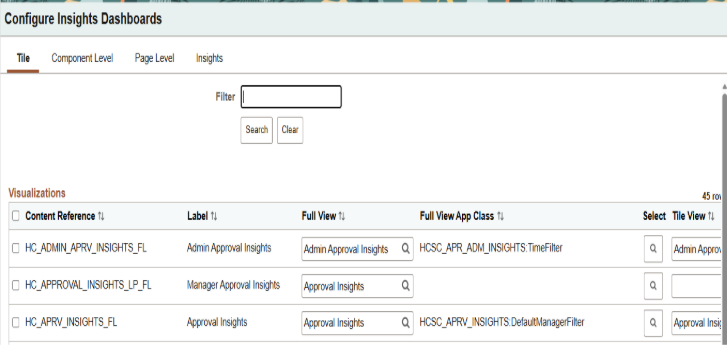
3.8 To Configure the Insight Dashboards:
Navigation- People Tools > Search Framework > Administration > Configure Insights Dashboards
After the search indexes have been successfully created, the delivered Approval Insights dashboards are configured within the Search Framework. This component allows administrators to associate the PeopleSoft application with the corresponding analytical dashboards available in the configured search engine.
For most implementations, Oracle-delivered configurations are sufficient, while organizations implementing customized dashboards can perform additional configuration as required.
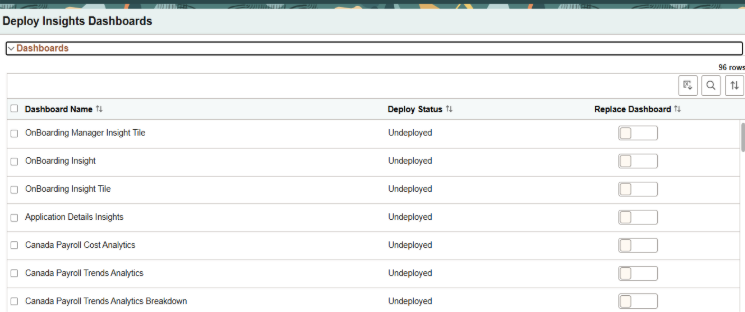
3.9 To Deploy the Insights Dashboards:
Navigation: People Tools > Search Framework > Administration > Deploy Insights Dashboards
The final implementation step is deploying the delivered Approval Insights dashboards. During deployment, the visual dashboards, saved searches, and analytical components are published and made available for use within the PeopleSoft application.
Once deployment is completed successfully, users with the appropriate security privileges can access real-time approval analytics and monitor approval activities through the delivered Approval Insights dashboards
4 . Summary
The implementation of Approval Insights follows a structured sequence that combines functional configuration with Search Framework setup. The process begins by defining Functional Categories, which organize approval transactions into meaningful business groups. These categories are then mapped to the appropriate Approval Workflow Framework (AWE) Transaction Registry IDs, establishing the relationship between business processes and their approval transactions.
Next, the approval workflow statuses relevant for reporting are configured to ensure that only meaningful approval states are included in the dashboards. The required approval transactions are then registered and associated with the corresponding Functional Categories, while reporting parameters such as the reporting period and look-back period are configured to determine the scope of approval analytics.
To ensure secure access, Approval Insights Security is configured by assigning the appropriate roles to Managers and Administrators. This guarantees that users can access approval analytics according to their responsibilities and organizational permissions.
After the functional setup is complete, the implementation proceeds with the PeopleSoft Search Framework. The delivered Search Definitions are deployed, making them available for indexing. A Full Search Index is typically executed during the initial implementation to populate the search repository with existing approval data, while Incremental Indexing is used thereafter to keep the analytics synchronized with ongoing approval transactions.
Finally, the delivered Approval Insights dashboards are configured and deployed. Once deployment is completed successfully, the dashboards become available within the PeopleSoft application, providing real-time visibility into approval workloads, pending requests, approval trends, and process bottlenecks.
5. Conclusion
Approval Insights for Administrators is a powerful analytical solution that enhances visibility into enterprise-wide approval processes. By combining the capabilities of the Approval Workflow Framework with the PeopleSoft Search Framework and OpenSearch, it enables organizations to monitor approval activities through intuitive dashboards and real-time analytics.
The delivered dashboards help administrators identify approval bottlenecks, analyze approval workloads, monitor transaction trends, and make informed decisions that improve operational efficiency. With a straightforward implementation process and minimal customization, Approval Insights provides organizations with a centralized platform for proactively managing approval workflows across multiple HCM business processes.
Optimize PeopleSoft HCM Approval Workflows with Kovaion
Approval bottlenecks can slow HR operations, impact compliance, and reduce workforce productivity. Kovaion’s PeopleSoft consulting services help organizations maximize the value of Oracle PeopleSoft HCM by implementing the latest PUM features, including Approval Insights for Administrators. Our experts provide real-time visibility into approval workflows, identify process bottlenecks, and optimize enterprise-wide approval management to improve operational efficiency.
Whether you’re planning a PeopleSoft HCM upgrade, implementing the latest PeopleSoft PUM Image, modernizing your HR processes, or seeking ongoing managed support, Kovaion delivers end-to-end solutions tailored to your business needs. Our certified PeopleSoft consultants help streamline approval workflows, accelerate digital transformation, strengthen governance, and unlock greater value from your Oracle PeopleSoft investment.