Keeping Hiring Teams Aligned with the Recruiting Activity Center
Introduction
The Recruiting Activity Center ensures that recruiters, hiring managers, and hiring team collaborators stay aligned by tracking and managing assigned activities across requisitions, applications, and offers.
This blog provides a step-by-step guide to enabling and configuring the Recruiting Activity Center in Oracle Fusion HCM, helping organizations improve hiring transparency, accountability, and efficiency.
Prerequisites
Before enabling the Recruiting Activity Center, ensure the following prerequisites are met:
Access Rights: You must have the required setup and security privileges to configure profile options and manage recruiting configurations.
Admin Role: Recruiting Administrator / Application Administrator
Duty Role Required: ORA_IRC_ACCESS_RECRUITING_ACTIVITY_CENTER_DUTY
Step-by-Step Guide
To bring this power to your recruiting team, follow these administrative steps to enable the feature.
1. Enabling the Recruiting Activity Center Using Profile Option
Step 1: Navigate to Profile Options
Go to Setup and Maintenance > click the Tasks icon > Search > Manage Administrator Profile Values.
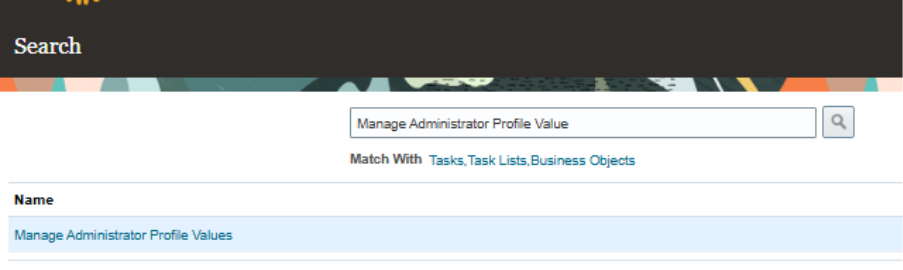
Fig 1: Manage Admin Profile Value
Step 2: Enable the Profile Option
Search for profile option code ORA_IRC_ENABLE_RAC
In the Profile Values section:
- Level: Site
- Profile Value: Y
Click Save and Close
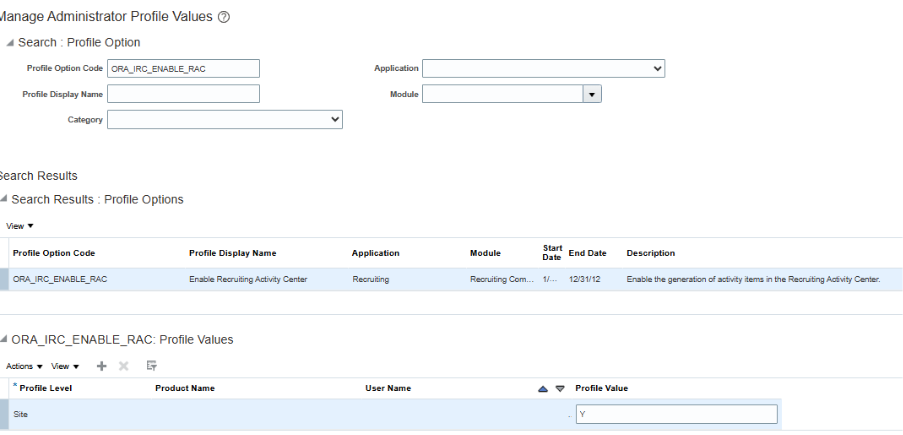
Fig 2: Enable at site Level
Step 3: Configuring Recruiting Activity Center Activities
Oracle Fusion HCM allows recruiting activities to be assigned not only to recruiters and hiring managers, but also to hiring team collaborators.
Navigation
In Setup and Maintenance, navigate to:
• Offering: Recruiting and Candidate Experience
• Functional Area: Recruiting and Candidate Experience Management
• Task: Enterprise Recruiting and Candidate Experience Information
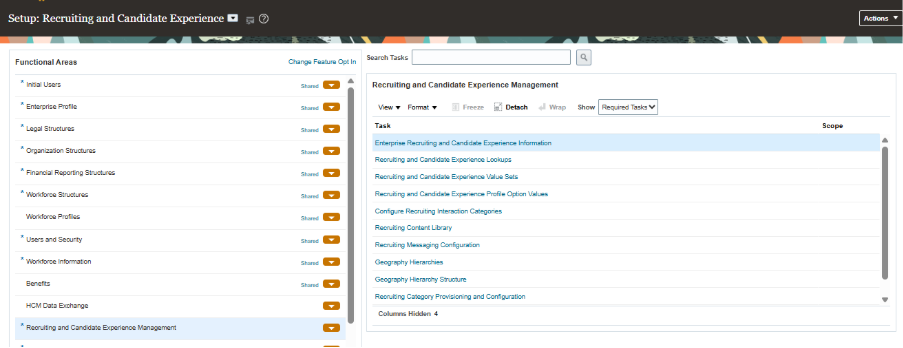
Fig 3: Recruiting and Candidate Experience Information
Step 4: Configure Activity Items
In the Recruiting Management section, click Configure Recruiting Activity Center.
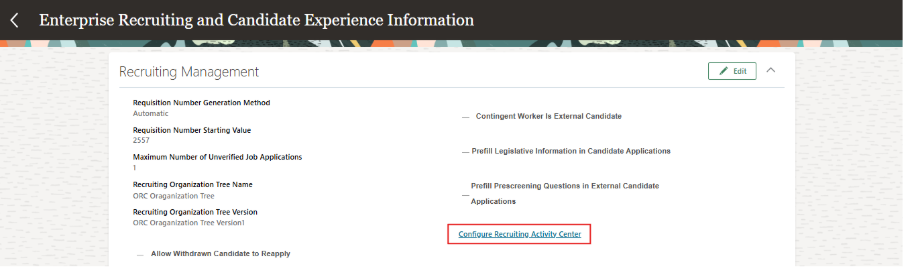
Fig 4: Configure Activity Items
Step 5: Assign Activities to Hiring Team Members
Configure Recruiting Activity Items page displays all activities related to: Applications, Offers, Requisitions.
Click the Edit icon next to the required activity
• Enable the activity if required
• In the Assignees field, select:
– Recruiter
– Hiring Manager
– Collaborator (including custom collaborator types)
• Click Save
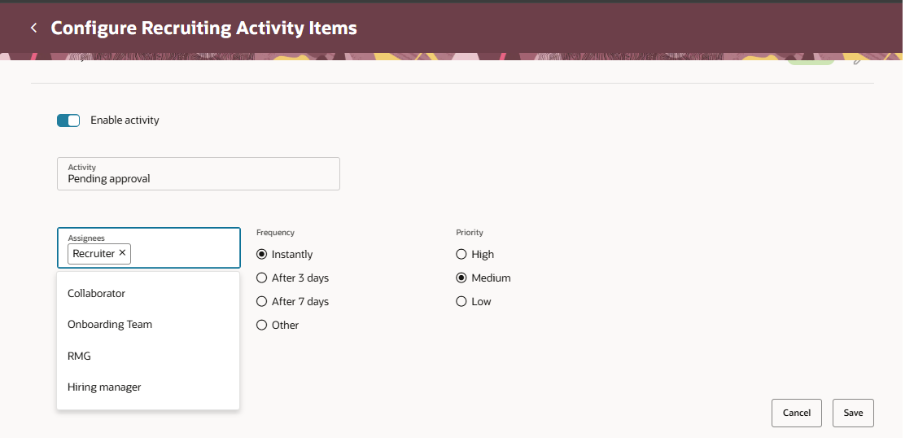
Fig 5: Configure Recruiting Activity
Repeat these steps for all required activity items.
Step 6: Verifying Activity Visibility for Hiring Team Collaborators
After enabling the Recruiting Activity Center, granting access, and configuring activity assignees, the final step is to verify whether collaborators are successfully receiving assigned activities.
Log in using a user account that is assigned as a Collaborator and navigate to the Recruiting Activity Center.
Review the list of activities displayed in the Recruiting Activity Center.
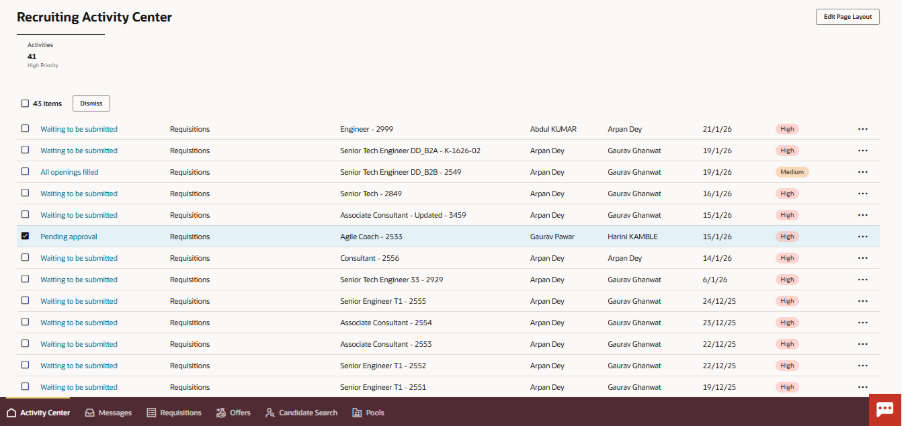
Fig 6: Collaborator Activity Center
Benefits of the Recruiting Activity Center
- Improved Collaboration: Hiring team collaborators stay informed and accountable for assigned activities
- Centralized Visibility: All recruiting activities are tracked in a single workspace
- Role-Based Assignment: Activities can be assigned beyond recruiters and hiring managers.
- Operational Efficiency: Reduces follow-ups and manual tracking of recruitment tasks.
- Enhanced Hiring Experience: Ensures smoother coordination across requisitions, applications, and offers.
Conclusion
The Recruiting Activity Center in Oracle Recruiting helps organizations create a more connected and efficient hiring process by providing recruiters and hiring teams with centralized visibility into recruitment activities. By bringing critical tasks, candidate updates, and hiring actions into a single workspace, organizations can improve collaboration, accelerate decision-making, and reduce delays throughout the recruitment lifecycle. As hiring demands continue to evolve, leveraging tools like the Recruiting Activity Center enables organizations to enhance recruiter productivity, improve candidate experiences, and build a more agile talent acquisition function.
Strengthen Hiring Collaboration with Oracle HCM Solutions
Looking to improve recruiter productivity and keep hiring teams aligned throughout the recruitment process? Oracle Recruiting Activity Center provides a centralized workspace that helps recruiters, hiring managers, and talent acquisition teams stay informed, prioritize tasks, and take action efficiently. By streamlining recruitment activities and enhancing visibility across the hiring lifecycle, organizations can accelerate hiring decisions and deliver a better candidate experience.
At Kovaion, our experienced Oracle HCM consultants help organisations implement and optimise Oracle HCM solutions that modernise talent acquisition and workforce management processes. From Oracle Recruiting enhancements and Redwood experiences to end-to-end HCM transformations, we deliver tailored solutions that help businesses improve collaboration, increase hiring efficiency, and maximise the value of their Oracle HCM investment.