Applying Old TDS Prepayments to New TDS Invoices in Oracle ERP Financials

In Oracle ERP Financials, managing Tax Deducted at Source (TDS) effectively is crucial for maintaining accurate financial records and ensuring compliance. One common business scenario is applying old TDS prepayments to new TDS invoices. This blog explains the concept, prerequisites, and the step-by-step process for achieving this.
Prerequisites
Before applying old TDS prepayments, ensure the following:
- Supplier is enabled for TDS.
- TDS setup (Tax Regime, Tax Rate, and Thresholds) is properly configured.
- Prepayment invoice is created and validated.
- Prepayment is accounted for and available for application.
A new standard invoice is created for the same supplier
Step-by-Step Guide
1. Creating the Tax Setup for the new TDS Section
Step 1: Go to Setup & Maintenance> Global Search > Manage Taxes.

Fig: 1.1 Manage Taxes
Step 2: Select Withholding Tax and click the Add button.
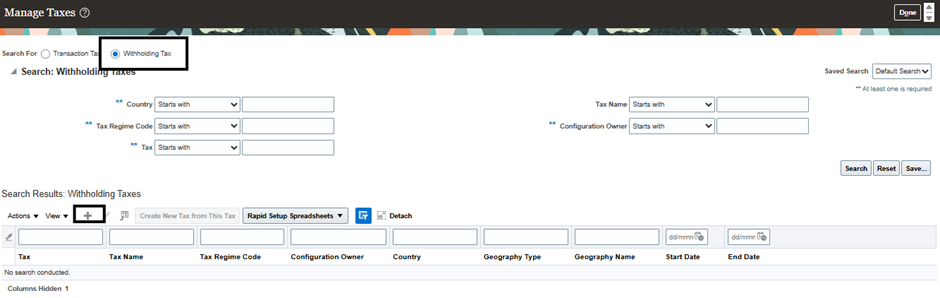
Fig: 1.2 Adding Withholding Taxes
Step 3: Enter Tax, Tax Name, Start Date, and Tax Minimum Accountable Unit, and then click the Save and Close button.
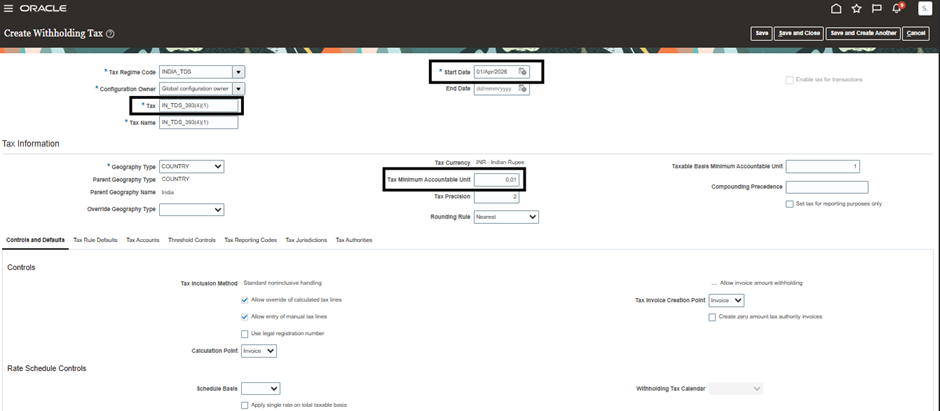
Fig: 1.3 Creating Withholding Tax
2. Creating Tax Jurisdictions
Step 1: Go to Setup & Maintenance > Global Search > Manage Tax Jurisdictions.

Fig: 2.1 Manage Tax Jurisdictions
Step 2: Enter Tax Name and click the Tax Rule Defaults tab, select Tax Jurisdiction, and then click the Create Default button.
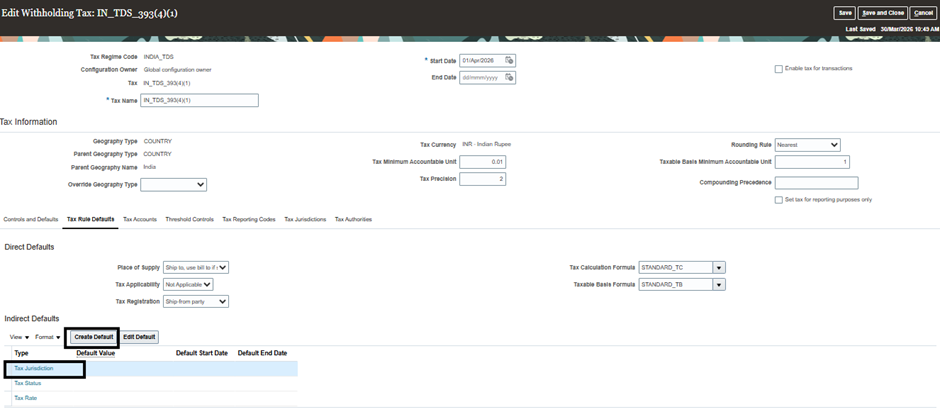
Fig: 2.2 Editing Tax Jurisdiction
Step 3: Enter Tax Jurisdiction Code, Name, Geography Type, Name, and Start Date, and then click Save and Close.
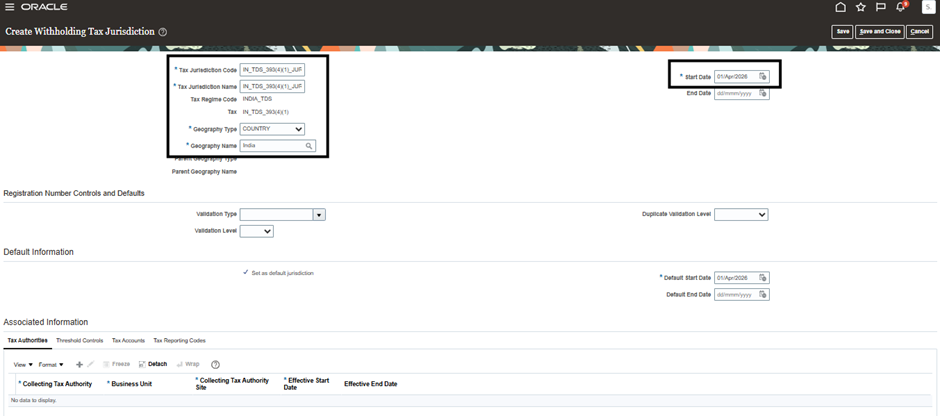
Fig: 2.3 Creating Tax Jurisdiction
3. Creating Tax Statuses
Step 1: Under Manage Taxes, enter Tax Name, Start Date, then select the Tax Rule Defaults Tab, click Tax Status, and then click the Create Default button.
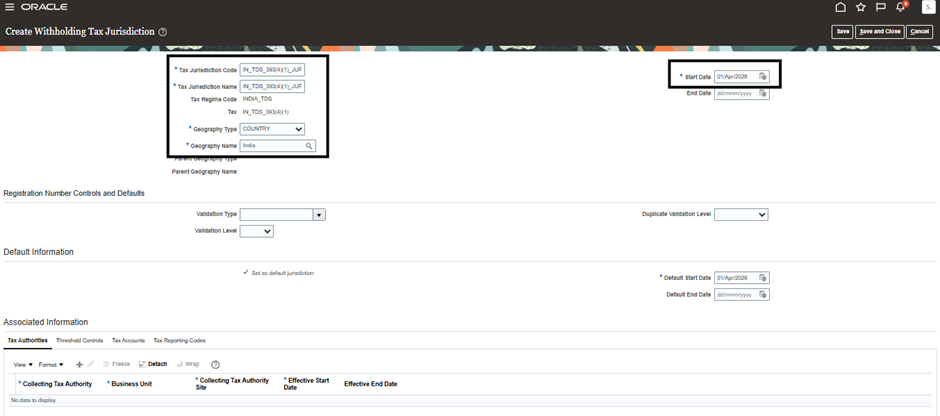
Fig: 3.1 Editing Tax Status
Step 2: Go to Setup & Maintenance > Global Search > Manage Tax Statuses.

Fig: 3.2 Manage Tax Statuses
Step 3: Enter Tax Status Code, Name, and Start Date, and then click Save and Close.
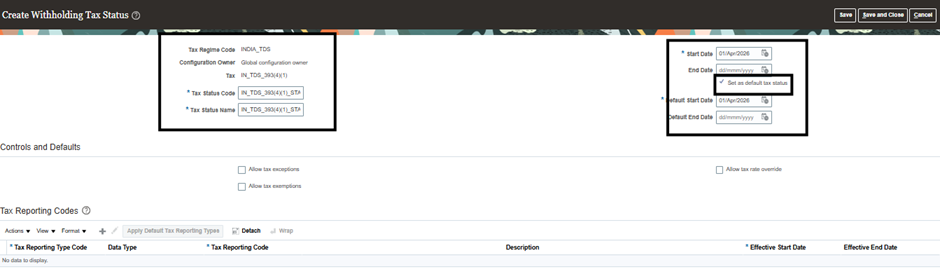
Fig 3.3 Creating Tax Statuses
4. Creating Tax Rate
Step 1: Under Manage Taxes, enter Tax Name, Start Date, then select Tax Rule Defaults Tab. Click Tax Rate and then click the Create Default button.
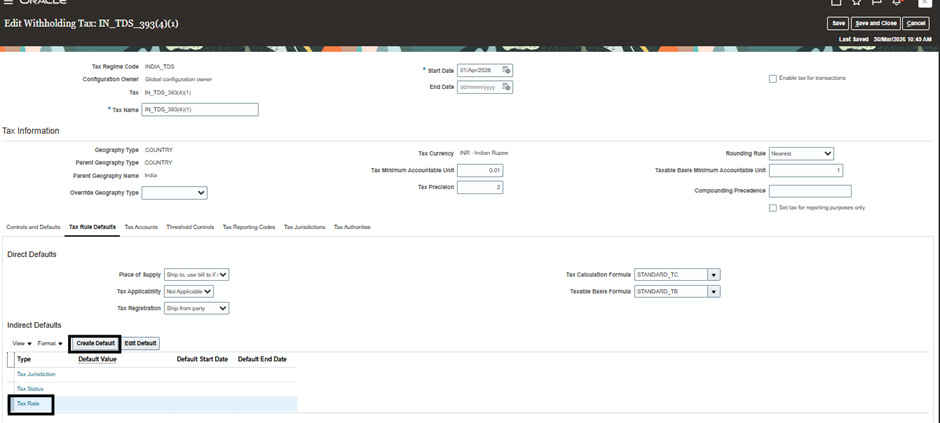
Fig 4.1 Editing Tax Rate
Step 2: Go to Setup & Maintenance > Global Search > Manage Tax Rates and Tax Recovery Rates.
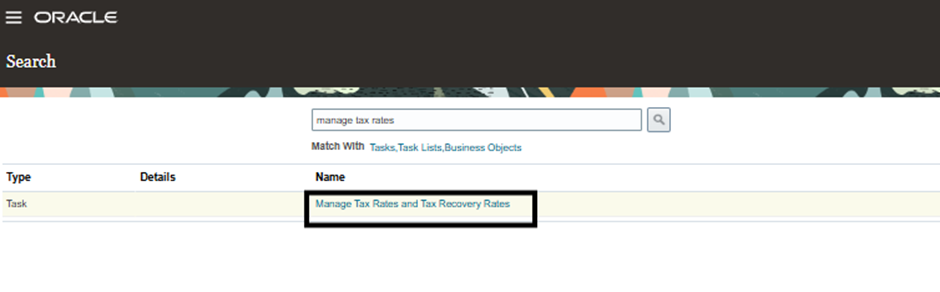
Fig 4.2 Manage Tax Rate
Step 3: Enter Tax Status Code, Tax Rate Code, Tax Rate Type, and then Enter Rate Periods, Rate Percentage, and Effective StartDate, then Under Rate Period Details Select Ledger and Tax Liability Account and then Click Save and Close.
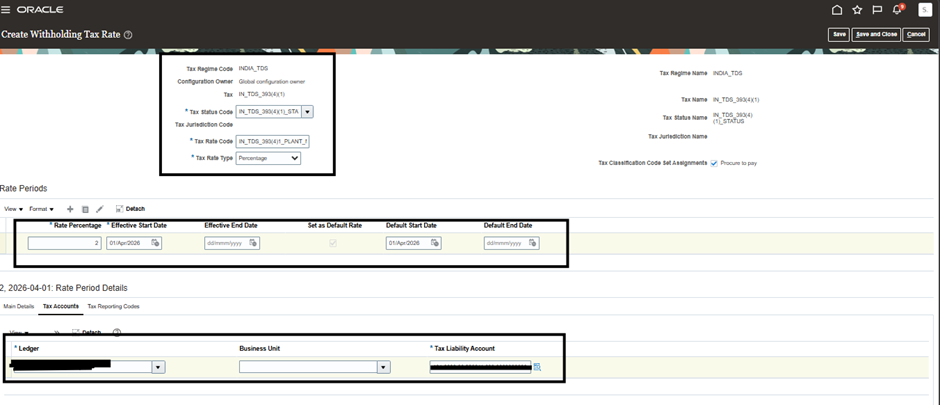
Fig 4.3 Creating Tax Rate
Step 4: Under Manage Taxes, enter Tax Name and StartDate, then click the Tax Accounts Tab. Enter Ledger and Tax Liability Account, and then click Save and Close.
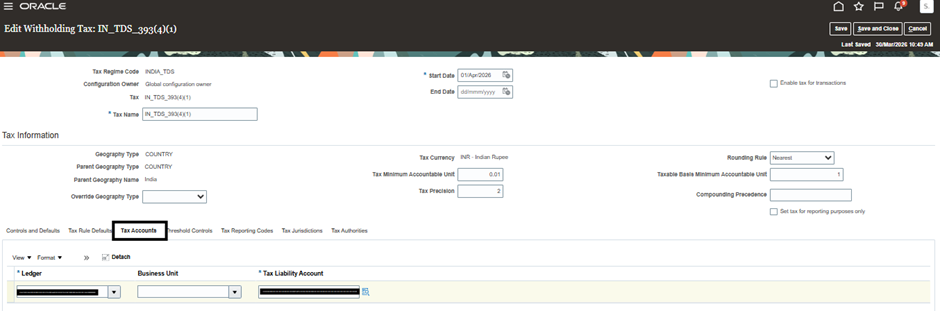
Fig 4.4
Step 5: Click the Tax Authorities Tab. Enter Collecting Tax Authority, Business Unit, Collecting Tax Authority Site, Effective Start Date, and check the Enable tax for Transactions box, and then click the Save and Close button.
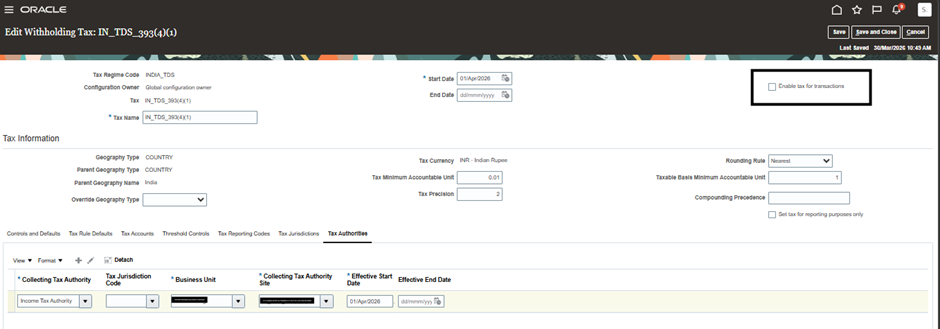
Fig 4.5
5. Manage Tax Rules
Step 1: Go to Setup & Maintenance > Global Search > Manage Tax Rules.

Fig 5.1
Step 2: Click the Withholding Tax Radio button and then click the Add button.
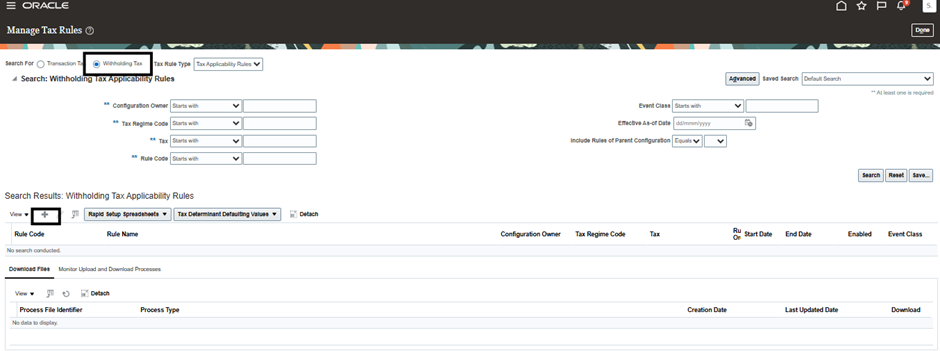
Fig 5.2
Step 3: Enter Rule Details and then under Tax Determining Factor Set, select the Code and then click Next.
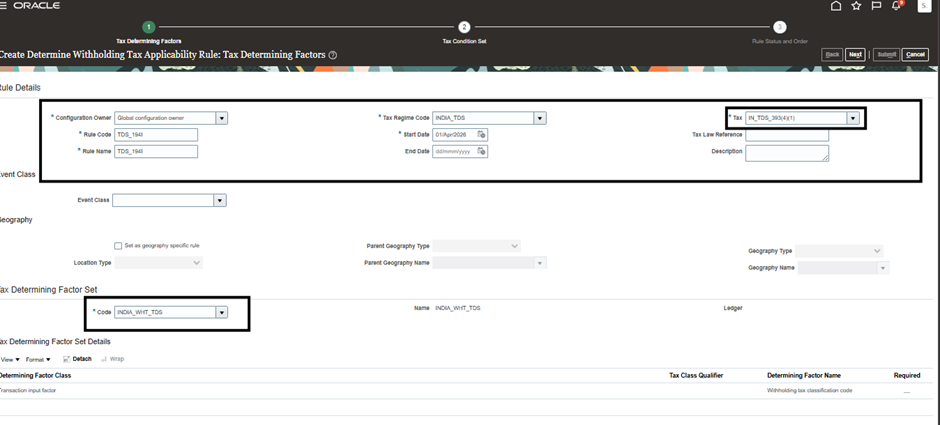
Fig 5.3
6. Manage Tax Condition Sets
Step 1: Go to Setup and Maintenance > Global Search > Manage Tax Condition Set.
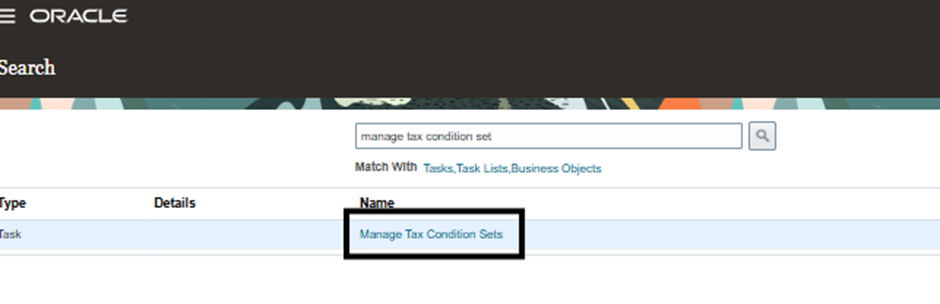
Fig 6.1
Step 2: Click the Withholding Tax Radio button and then click the Add button.
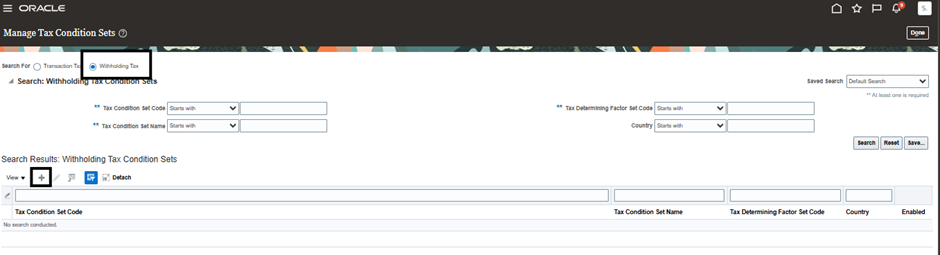
Fig 6.2
Step 3: Enter Tax Condition Set Code, Name, Tax Determining Factor Set Code, and then Choose Value or Start from Range, and then click Save and Close.
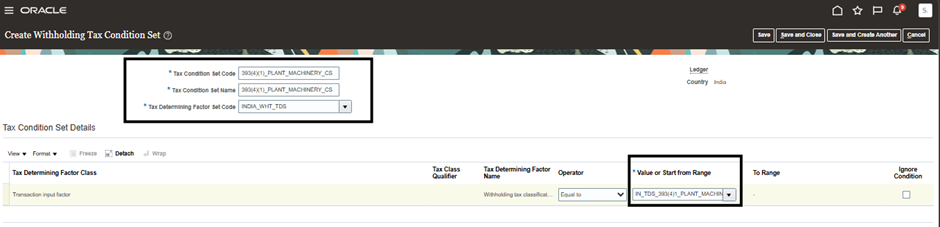
Fig 6.3
Step 4: Select Tax Condition Set Code, New Condition Set Order, Results as Applicable, and check the Enabled button, and click Save and Next button.
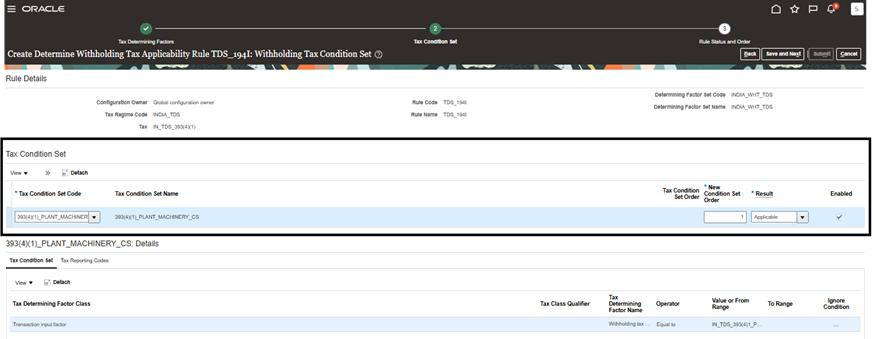
Fig 6.4
Step 5: In the Tax Condition Set tab, select both the New Code and the Old Tax Condition Code to enable applying old prepayments to the new TDS, then click Save and Next.
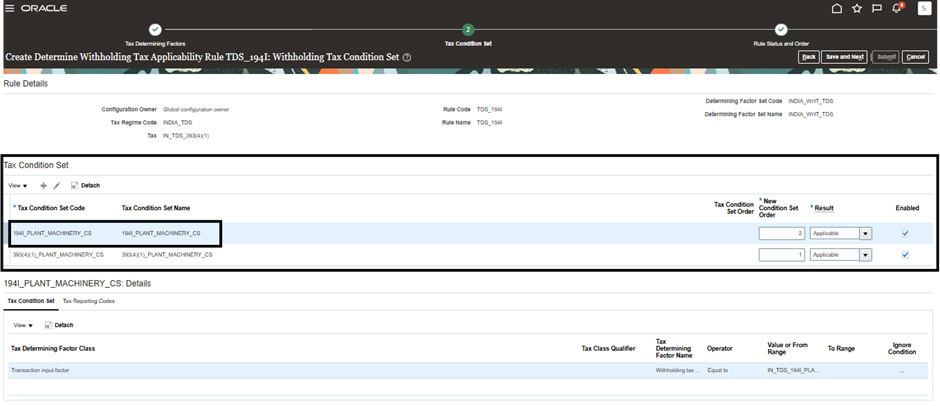
Fig 6.5
Step 6: In the Rule Status and Order tab, select the Global Configuration Owner, check the Enabled button, and click Submit.
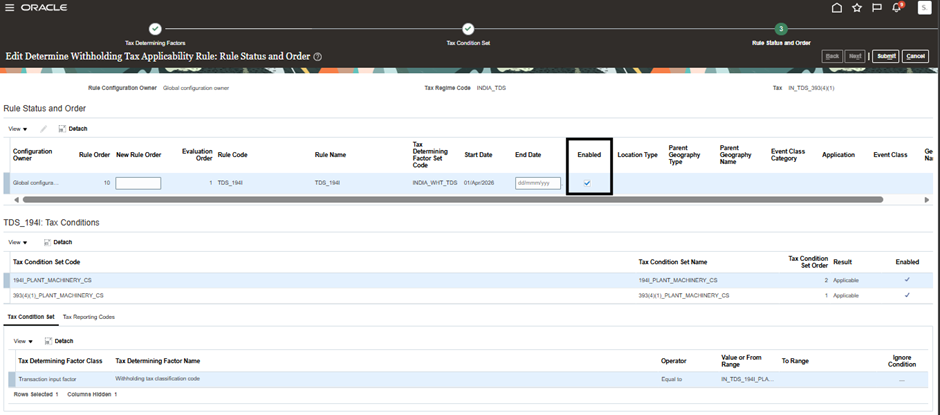
Fig: 6.6
Business Benefits
1. Improved Tax Compliance and Accuracy
Applying old TDS prepayments to new TDS invoices ensures that tax deductions are accurately accounted for and aligned with applicable regulations. This helps organizations maintain compliance while minimizing discrepancies in tax calculations and reporting.
2. Enhanced Financial Control
Proper management of TDS prepayments provides greater visibility into tax-related transactions and outstanding balances. Finance teams can track prepayments more effectively, ensuring accurate application against future invoices and reducing reconciliation challenges.
3. Reduced Manual Adjustments
Automating the application of old TDS prepayments to new invoices minimizes manual intervention and reduces the risk of errors. This streamlines financial processes and improves the overall efficiency of accounts payable and receivable operations.
4. Faster Invoice Processing
By leveraging Oracle ERP Financials capabilities, organizations can process invoices and prepayment adjustments more efficiently. This accelerates transaction processing and helps maintain smooth financial operations.
5. Simplified Reconciliation
Accurate application of TDS prepayments creates a clear audit trail and simplifies reconciliation activities. Finance teams can easily track tax deductions, invoice settlements, and outstanding liabilities, improving financial transparency.
6. Improved Audit Readiness
Maintaining proper records of TDS prepayments and their application to invoices supports compliance audits and statutory reporting requirements. This strengthens governance and reduces the effort required during audit reviews.
7. Scalable Financial Operations
As transaction volumes increase, standardized TDS prepayment processes help organizations manage tax-related transactions efficiently while maintaining accuracy and compliance across business operations.
Conclusion
Applying old TDS prepayments to new invoices in Oracle ERP Financials helps organizations:
- Allows applying old prepayments from the Old TDS to the new TDS.
- Avoid duplicate tax deductions
- Maintain compliance
- Improve financial accuracy
By following the correct process and validations, you can ensure seamless TDS adjustments within the system.
Optimize TDS Processing with Oracle ERP Solutions
Looking to streamline the application of old TDS prepayments against new invoices in Oracle ERP Financials? Efficient TDS management is essential for maintaining compliance, improving financial accuracy, and reducing manual effort. By leveraging Oracle ERP capabilities, organizations can automate tax-related processes, simplify reconciliations, and gain greater visibility into financial transactions.
At Kovaion, our experienced Oracle ERP consultants help organisations implement and optimise Oracle ERP solutions that enhance financial operations, strengthen tax compliance, and improve process efficiency. From Oracle Financials implementations to advanced tax and receivables configurations, we deliver tailored solutions that help businesses maximise the value of their Oracle ERP investment and achieve long-term operational excellence.