Business Intelligence Cloud Connector


As per the Ministry of Current Affairs guidelines, Section 128 of the Companies Act 2013 (‘Act’), Amended Rule 3(1) provides that the books of account and other relevant books and papers maintained in an electronic mode should remain accessible in India at all times to be usable for subsequent reference. ‘At all times’ is the emphasis added to the rule relating to the accessibility of electronic books of accounts.
Amended Rule 3(5) requires companies to maintain the backup of the books of accounts and other relevant books and papers in an electronic mode on servers physically located in India on a daily basis (earlier, periodically), even in cases where such backups are maintained at a place outside India. The amendment draws reference to maintaining backups daily.
Many Oracle Cloud customers have their data centers beyond the borders of India. In response to this challenge and in adherence to MCA guidelines, Oracle has introduced a remarkable solution: the Oracle Business Intelligence Cloud Connector (Oracle BICC). This tool is designed to efficiently extract large volumes of data from Oracle Fusion applications, encompassing areas such as Human Capital Management (HCM), Financials, and Supply Chain Management (SCM).
To facilitate data extraction from different modules, Oracle has implemented data stores tailored for each Fusion application module. These data stores serve as the foundation for creating offerings, enabling users to seamlessly extract and manage data through external object storage. This innovative approach aligns with Oracle’s commitment to providing effective solutions for its diverse user base.
Step-by-Step Guide to Creating Custom Offerings in Oracle BICC and Extracting Data
Let’s go in depth to understand this tool further:
Step 1: Logging into BICC
To open BICC, the URL below should be followed
https://<instancepod>.oraclecloud.com/biacm
After entering the BICC page, navigate to the Task pane area and click on
Manage Offerings and Data Stores
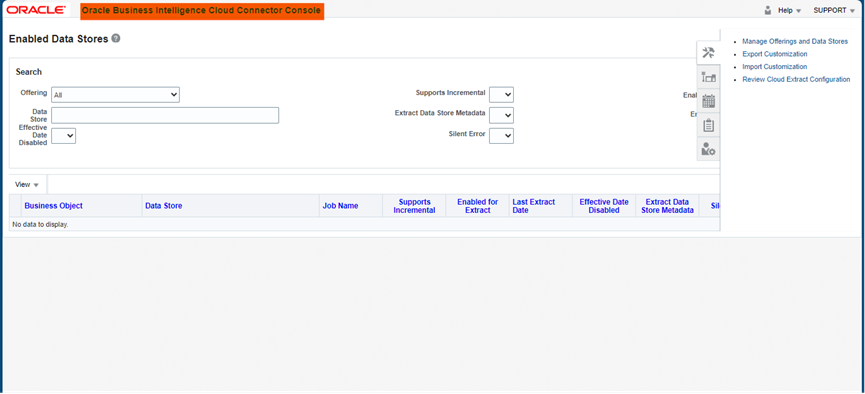
Figure 1.1: Oracle Business Cloud Connector Console
Step 2: Manage Offering And Data Stores:
Manage Offerings and Data stores displays of many offerings that is already defined by Oracle Fusion for various applications. The user can also create custom offerings by defining their own applications according to their modules.
Navigation: Click on Actions > Create Offerings
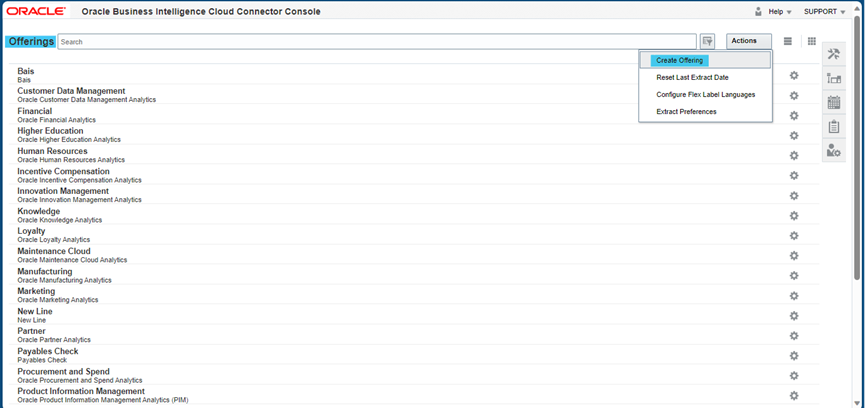
Figure 1.2 Offerings Page
Step 3: Create Offering
- In the Create offering page, the offering code and offering name should be defined.
- In the data stores dialog box, data stores should be selected for the custom offering that needs to be extracted.
- After selecting data stores, click on Save to save the offering.
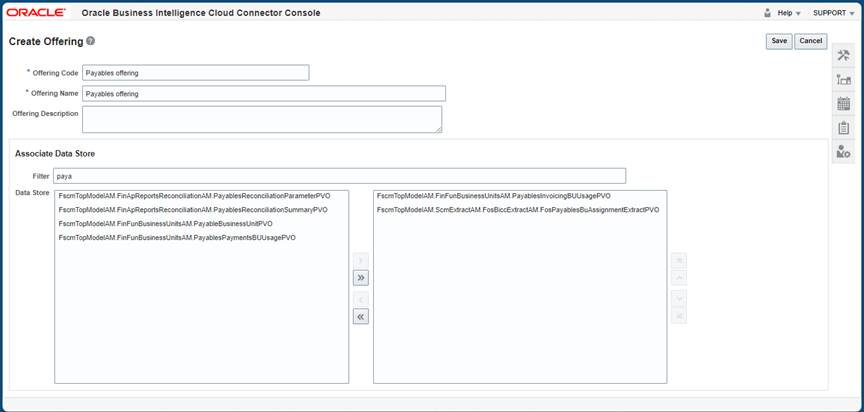
Figure 1.3 Create Offering Page
Step 4: External Storage Configuration
Navigation: Oracle Cloud Connector homepage > Task pane > Configure External Storage
The created offer needs to be configured for external storage for extraction. External Storage has 3 types of storage options
- Storage Service Connection
- OCI Object Storage Connection
- UCM Connection
Storage Service Connection:
The Oracle BICC Storage Service Connection broadens data management functionalities, boosts accessibility to a variety of data sources, and elevates the scalability and flexibility of the platform. This empowers users to seamlessly conduct robust analytics and reporting tasks with enhanced efficiency.
OCI Object Storage Connection:
Within Oracle Business Intelligence Cloud Service (BICC), the Object Storage connection denotes the integration forged between BICC and Oracle Cloud Infrastructure’s Object Storage service.
This integration empowers BICC users to effortlessly access, import, or export data stored in OCI Object Storage directly within their BICC environment. It facilitates a smooth interaction between BICC and the object storage service, streamlining tasks like data uploads, retrieval and utilizing object storage as a data source for analytics and reporting within the BICC platform.
UCM Connection:
When using UCM Connection as external storage, the Test UCM connection should be checked to enable the connection of UCM
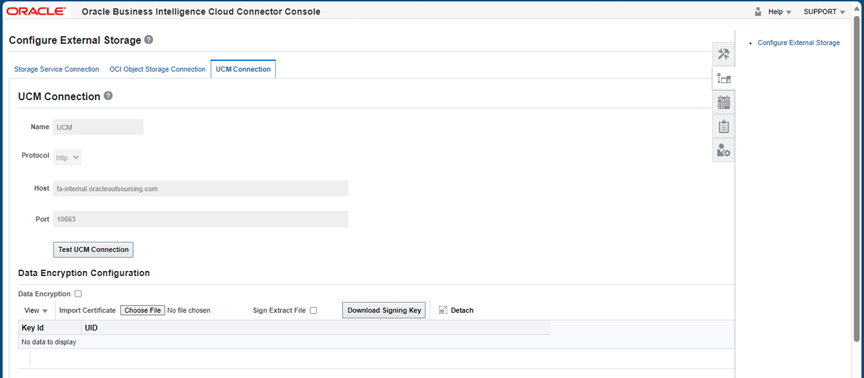
Figure 1.4 Configuration of External Storage
Step 5: Manage Extract Schedules
- In the manage extract schedules, click on the (+) symbol to extract new data, and the schedules page will open.
- Choose the job type as Application Data Extract and provide the name for the data extraction.
- Recurrence displays about schedule periods for extracting the data.
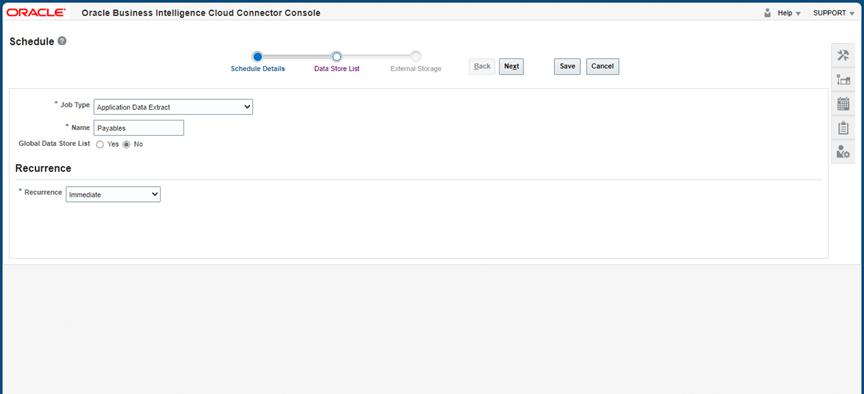
Figure 1.5 Scheduling of Data
- After scheduling, click on Next for the data stores list. In the data stores list, choose the offering that was created.
- Select the data stores inside the offering.
- Click on enabled for extract.
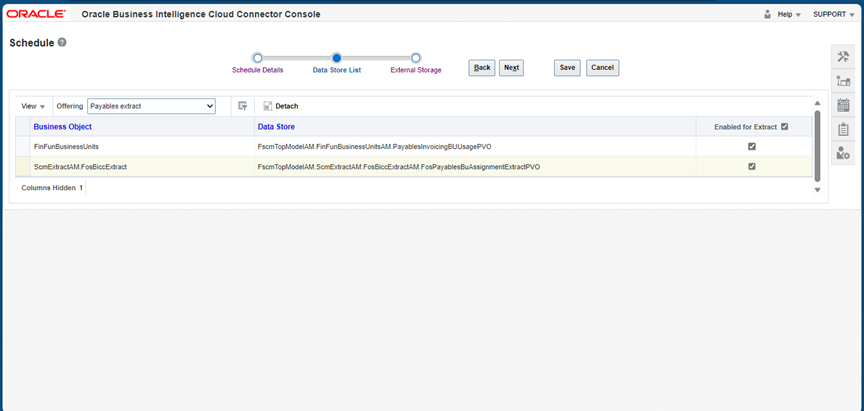
Figure 1.6 Data Stores List
In External Storage, choose the connection as UCM. It also displays the notification to check whether the extraction has started, Success, and failure to the desired mail address.
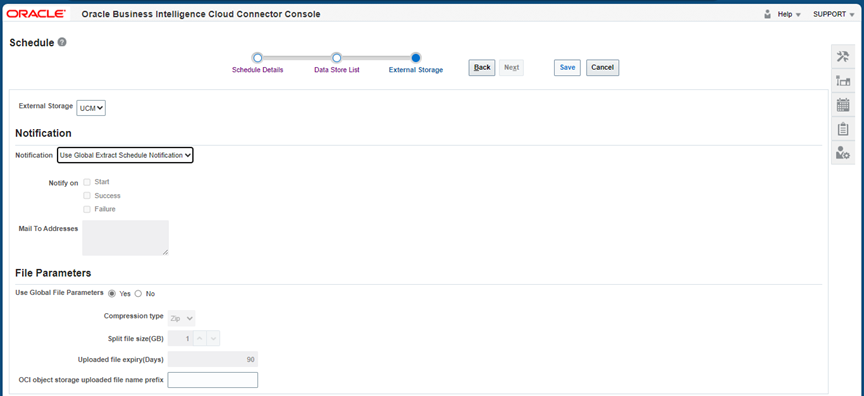
Figure 1.7 External storage for scheduling
The scheduled offering will be displayed on the Manage Extract Schedules home page, where it gives information about the status of the extraction. Once data extraction is successfully completed, open the UCM server.
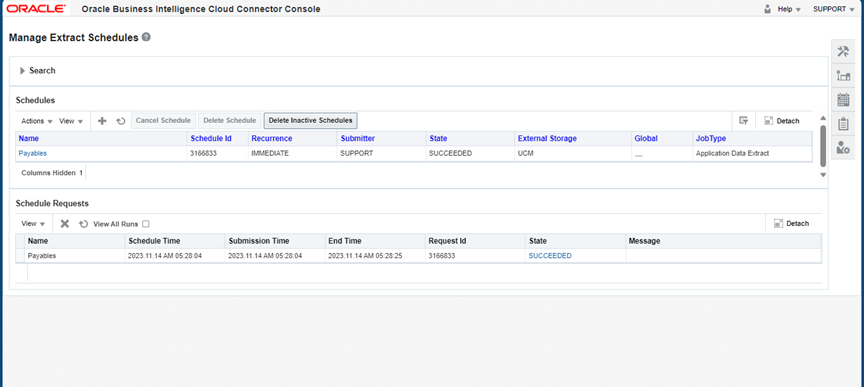
Figure 1.8 Manage Extract Schedules page
Step: 6 UCM Server
To open the UCM server, the URL below should be followed
URL for UCM Connection : https://<instance>.oraclecloud.com/cs
URL displays of the homepage of the UCM server
To extract the data from the UCM server, which was scheduled before, click on search and choose advanced. In the search expanded form under security group, search for OBI*
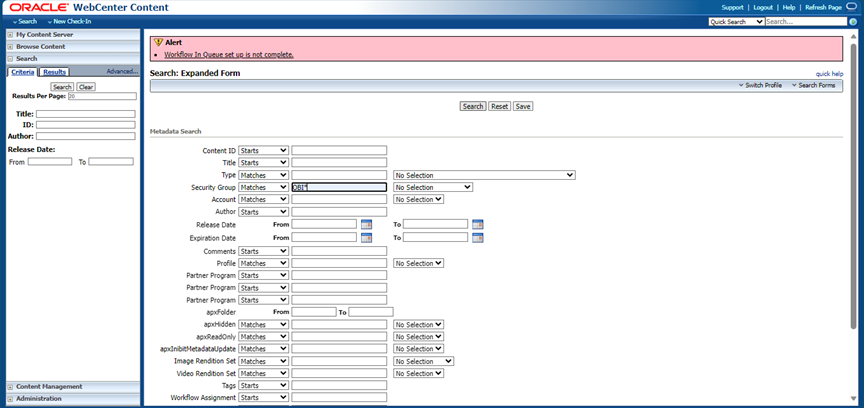
Figure 1.9 Homepage of UCM server
It displays all data extractions that are scheduled through BICC. It shows the data store name with zip by clicking on ID; the extracted data will be downloaded in zip folder format. When the zip folder unzipped extracted data will be in Excel file format.
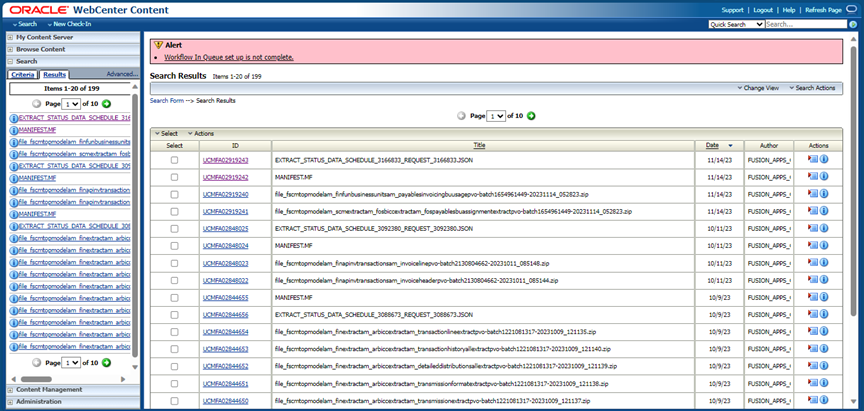
Figure 1.10 Data extraction page in UCM server
Business Benefits:
Enhanced Reliability through Automation:
The automation of data extraction significantly enhances reliability compared to manual backup processes. By automating the extraction, businesses can ensure a consistent and dependable approach to obtaining data, minimizing the likelihood of errors and inaccuracies that may arise during manual procedures.
Daily Extraction Alignment with Business Needs:
With the capability to extract data on a daily basis, organizations can tailor their data management processes to align with specific business requirements. This flexibility allows for the timely retrieval of updated information, supporting informed decision-making and ensuring that the data utilized in analyses and reporting is consistently up-to-date.
Risk Mitigation against Data Attacks:
The automated data extraction process contributes to reducing the risk of data attacks. By consistently and systematically extracting data, organizations can implement security measures and protocols to safeguard sensitive information. This proactive approach helps in mitigating potential vulnerabilities and fortifying the data against unauthorized access or cyber threats.
Prevention of Data Loss:
Automation not only reduces the risk of data attacks but also serves as a preventive measure against data loss. Regular, automated data extraction and backup processes create a safety net, ensuring that even in the event of unexpected incidents, the organization has secure copies of its data. This protective mechanism is crucial for preserving valuable information and maintaining business continuity.
Points to consider:
- Oracle BICC exclusively employs predefined data stores provided by Oracle and does not have the capability to create custom data stores.
- Custom storage options are not supported in Oracle BICC, as the platform is specifically designed to operate with its own designated external storage solutions.
- While Oracle BICC facilitates the extraction of data on a per-record basis, it does not support the joining of multiple records for reporting purposes.
- Oracle BICC does not have the direct functionality to store data in any database. Instead, data can be extracted in CSV format and subsequently uploaded into any desired database.
Conclusion
Business Intelligence Cloud Connector plays a critical role in helping organizations unlock the full value of their Oracle Cloud data. By automating data extraction, simplifying integrations, and enabling advanced reporting capabilities, BICC empowers businesses to make faster, more informed decisions. Whether supporting enterprise analytics initiatives or large-scale data integration projects, BICC provides the flexibility and scalability needed to build a robust, data-driven organization.
Unlock Data-Driven Insights with Oracle ERP Solutions
Looking to streamline data extraction, reporting, and analytics across your Oracle Cloud environment? Business Intelligence Cloud Connector (BICC) helps organizations automate data movement, simplify integrations, and create a strong foundation for enterprise reporting and business intelligence. With seamless access to critical business data, organizations can improve decision-making, enhance operational visibility, and accelerate digital transformation initiatives.
At Kovaion, our experienced Oracle ERP consultants help organisations implement and optimise Oracle ERP solutions that maximise the value of enterprise data. From BICC integrations and data warehouse enablement to reporting automation and analytics modernisation, we deliver scalable solutions that empower businesses to transform data into actionable insights and achieve long-term success.