Implementation Workbook: Redwood “Send Message to Team”
Effective communication between recruiters, hiring managers, interviewers, and collaborators is essential for a successful recruitment process. However, traditional communication methods often rely on emails and external tools, making it difficult to track conversations, maintain visibility, and ensure alignment across the hiring team. Oracle HCM Cloud addresses this challenge with the Redwood “Send Message to Team” feature, a modern communication capability designed to streamline collaboration directly within Oracle Recruiting. Built on the Redwood user experience and powered by Visual Builder Studio (VBS), this feature enables recruiters and recruiting assistants to send templated, trackable, and context-aware messages without leaving the application.
The Redwood “Send Message to Team” functionality enhances recruiting efficiency by centralizing hiring team communication within Oracle HCM Cloud. It reduces dependence on off-system emails, creates a permanent audit trail for requisition and candidate-related discussions, and improves visibility into recruitment activities. With support for predefined communication templates, real-time token previews, and a modern user interface, organizations can standardize communication processes while improving recruiter productivity and hiring team collaboration.
As organizations continue to adopt Redwood experiences across Oracle Fusion HCM, features such as “Send Message to Team” play a key role in delivering a connected, digital-first recruiting experience. By enabling faster communication, improving transparency, and strengthening collaboration among hiring stakeholders, this Redwood enhancement helps organizations optimize recruitment workflows, improve hiring outcomes, and maximize the value of their Oracle Recruiting investment.
Feature Definition & Value Prop
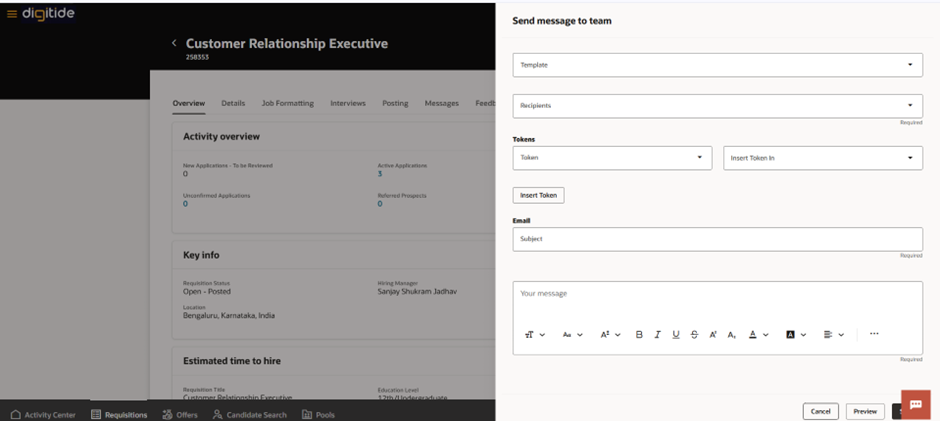
The Send Message to Team action in Redwood replaces the legacy communication process. It allows for high-speed, templated, and trackable communication between Recruiters and the Hiring Team (Hiring Managers, Interviewers, Collaborators).
- Primary Tool: Visual Builder Studio (VBS)
- Target Users: Recruiters and Recruiting Assistants
Business Value: Reduces “off-system” emails; creates a permanent audit trail for requisition and candidate-level decisions.

Configuration & Deployment (Technical)
As a consultant, you will need to verify these Profile Options in the Manage Administrator Profile Values task.
| Step | Profile Option Code | Level | Value | Required for… |
| 1 | ORA_IRC_RECRUITING_REDWOOD_ENABLED | Site | Y | Master Redwood switch |
| 2 | ORA_IRC_REQUISITION_REDWOOD_ENABLED | Site | Y | Requisition-level action |
| 3 | ORA_IRC_JOB_APPLICATION_REDWOOD_ENABLED | Site | Y | Candidate-level action |
NOTE:
After updating these profile values, users may need to sign out and sign back in to see the changes in the UI.
Content Library Setup (Functional)
The system filters which templates are visible based on their Category. If your team says “I can’t see the template I created,” check this setting:
- Navigation: Setup and Maintenance > Recruiting Content Library.
- Action: Edit or create a “Professional Content” template.
- Validation Rule: The Category must be set to “Hiring Team Notification”.
- Tokens: Ensure you include tokens like ${JobRequisition.RequisitionNumber} or ${Candidate.FullName} to reduce manual data entry.
Technical Data Mapping (For BIP/Analytics)
If your manager asks for a report on how often hiring teams are being messaged, use these table relationships:
- Recipient Data: IRC_COMM_RECIPIENTS (Stores the RECIPIENT_ID and RECIPIENT_EMAIL)
- Tracking UI:
- Requisition: Check the Messages tab.
- Application: Check the Activity tab.
Implementation Checklist (UAT Readiness)
Use this list to verify the feature is ready for the “Go-Live”:
- [ ] Profile Options: All three Redwood profile options set to ‘Y’.
- [ ] Security: Ensure the Recruiter role has the Communicate with Hiring Team functional privilege.
- [ ] Templates: At least 2-3 standard templates created in the “Hiring Team Notification” category.
- [ ] Tokens: Tested a sample message to ensure ${Tokens} resolve correctly in the Preview panel.
- [ ] Visibility: Confirmed that the “Send Message to Team” button appears in the Actions menu on both Requisition and Application pages.
Summary Comparison: Classic vs. Redwood
| Feature | Classic Experience | Redwood Experience |
| UI Type | Modal/New Page | Sliding Side Panel |
| Template Filter | All templates visible | Strictly “Hiring Team Notification” category |
| Performance | Slower (ADF) | High Performance (VBS/Microservices) |
| Drafting | Basic Text | Rich Text + Real-time Token Preview |
Business Benefits
The Redwood “Send Message to Team” feature in Oracle HCM Cloud streamlines recruiter and hiring team communication through a modern, centralized interface, improving collaboration and communication efficiency. By reducing reliance on off-system emails and creating a trackable audit trail, organizations can enhance recruiting productivity, workforce alignment, and the overall Oracle HCM user experience.
1. Enhanced Manager-to-Team Communication
The Redwood “Send Message to Team” feature enables managers to communicate with team members directly from Oracle HCM, improving collaboration and ensuring important updates reach employees quickly and efficiently.
2. Improved Employee Engagement
By providing a centralized communication experience within Oracle HCM, organizations can keep employees informed, aligned, and engaged without relying on multiple external communication channels.
3. Increased Manager Productivity
Managers can send messages to individuals or entire teams from a single interface, reducing the time spent switching between applications and improving day-to-day operational efficiency.
4. Consistent Communication Experience
The Redwood user experience delivers a modern and intuitive interface that standardizes communication processes across the organization, helping drive user adoption and satisfaction.
5. Reduced Administrative Effort
Built-in communication capabilities minimize the need for manual coordination and follow-ups, allowing managers and HR teams to focus on strategic workforce initiatives.
6. Stronger Workforce Alignment
Timely communication helps ensure employees remain informed about organizational updates, project priorities, and team objectives, fostering better alignment and collaboration.
7. Enhanced User Experience
With Redwood’s consumer-grade design and intuitive navigation, employees and managers benefit from a seamless digital experience that supports modern workplace expectations.
Conclusion
The Redwood “Send Message to Team” feature enhances workplace communication by providing managers with a simple and effective way to connect with their teams directly within Oracle HCM. By improving communication efficiency, increasing employee engagement, and delivering a modern user experience, organizations can foster stronger collaboration and a more connected workforce. Implementing Redwood capabilities helps businesses create a digital-first employee experience while maximizing the value of their Oracle HCM investment.
Enhance Workforce Communication with Oracle HCM Solutions
Looking to improve team communication and employee engagement within Oracle HCM? The Redwood “Send Message to Team” experience empowers managers to connect with employees more efficiently through a modern, intuitive interface. By streamlining communication workflows and enhancing accessibility, organizations can foster stronger collaboration, improve workforce alignment, and deliver a superior employee experience.
At Kovaion, our Oracle HCM consultants help organisations implement, optimise, and adopt Redwood experiences that transform workforce interactions. Through tailored Oracle HCM solutions, we enable businesses to modernise HR processes, improve user adoption, and create a connected digital workplace that drives productivity and employee satisfaction. Partner with Kovaion to unlock the full potential of Oracle HCM and Redwood innovations.