Time, Labor, and Absence Management Integration in Oracle HCM Cloud

Overview
One of the common requirements during Oracle HCM Cloud implementations is the standard process to integrate the absence entry with the time card page. If an absence is entered, the absence hour should be reflected in the time entry page. This integration was only feasible if the UOM (unit of measurement) during absence configuration is hours. If the absence UOM is days, then the integration field ‘Enable for time card entry’ is not editable.
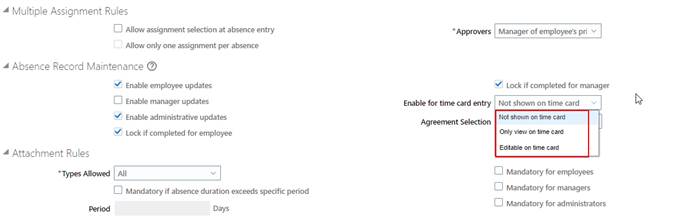
Fig 1: Absence OTL Integration Field
After the 23B update, the integration is now possible even when the UOM is days.
If you are using Time and Labor and Absence Management, then you should enable this feature so that the field ‘Enable for time card entry’ is always editable.
Steps to enable the Integration Field
You can follow the steps mentioned below:
First, select Profile Management, then click on Setup and Maintenance.
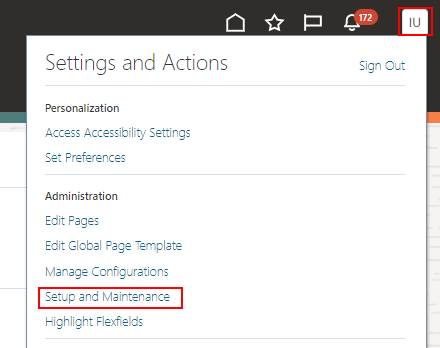
Fig 2: Setup and Maintenance
Select the Task Menu from the right-side panel, and then click the Search option and search for Manage Common Lookup.
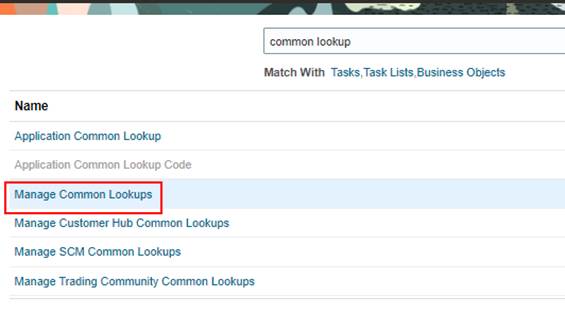
Fig 3: Navigation to Manage Common Lookup
Create a new lookup using the plus (+) icon under the Search Results section.
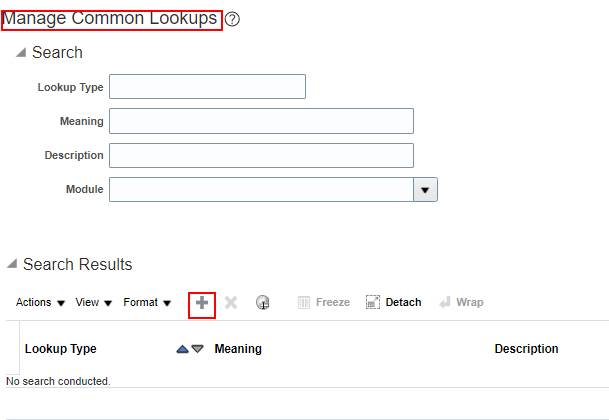
Fig 4: Creating a lookup value
Enter the below values on the respective fields:
- Lookup Type Name: ANC_TM_NEW_INTG_ENABLE
- Lookup Type Meaning: Upgrade Absence Management and Time and Labor Integration
- Lookup Type Description: Upgrade to the new integration architecture for Absence Management and Time and Labor
- Module: Global Absences
- REST Access Secured: Secure
Click Save, then click the plus (+) icon under the Lookup Codes section and continue entering the fields below.
- Lookup Code: ANC_YES
- Enabled: Select the check box
- Meaning: ANC_YES
Once you complete all these, then Save and Close
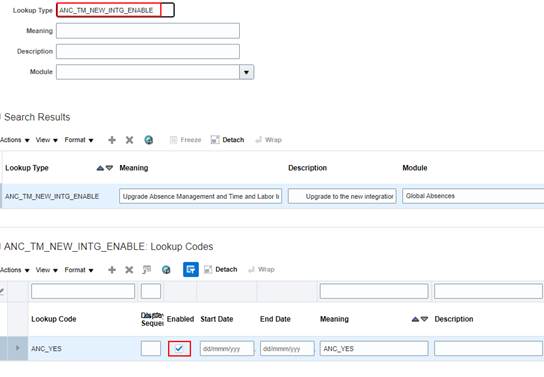
Fig 5: Lookup type ANC_TM_NEW_INTG_ENABLE
Integration during Absence Configuration
After the lookup is created and enabled, the field ‘Enable for time card entry’ will be editable even if it is for an absence type that was already configured or on a new configuration.
For changing the field value of a pre-configured absence type:
Open the absence type configuration page by navigating from the Absence Administration page.
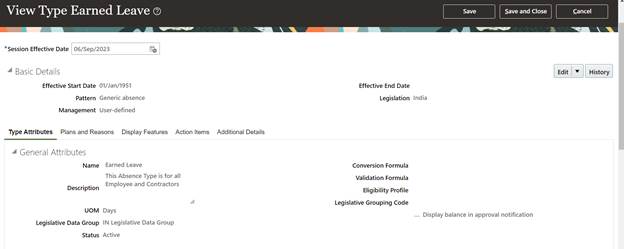
Fig 6: Absence type configuration page
Change the Session Effective Date from the Effective Start Date.
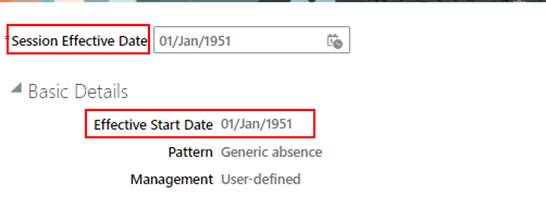
Fig 7: Time Integration
Now click on the Edit drop-down and then select the Correct option.
Scroll down to the right side, Enable for time card entry Field.
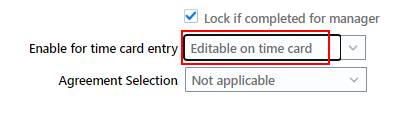
Fig 8: Enable for time card entry
- Not shown on time card: When this option is selected, the absence entered will not reflect on the time card entry page.
- Only view on time card: When this option is selected, the absence hours will reflect on the time card entry page, but they will not be editable from the time card entry page.
Editable on time card: When this option is selected, the absence hours will reflect on the time card page, and a user can change the absence hours from the time card entry page.
- Click Save and Close after choosing the required setup.
- Now, as you can see here, you can see the absence leave details on the time card page.
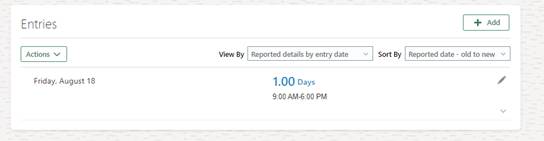
Fig. 9: Time card Page
Conclusion
Oracle HCM Fusion application offers organisations a comprehensive solution to facilitate human capital management needs. Oracle HCM Fusion provides features such as employee management, absence management, employee time entry management, talent management, and much more to streamline HR administration.
If you are looking for Oracle HCM Cloud services, we are happy to assist you. Our team of experts has extensive experience in implementing and managing Oracle HCM Cloud solutions, and we can help you leverage the full potential of this platform to meet your business needs.
Please feel free to contact us to learn more about our Oracle HCM Cloud services and how we can help you transform your HR operations.